
React 入门学习笔记整理(六)—— 组件通信
1、父子组件通信
1)父组件与子组件通信,使用Props
父组件将name传递给子组件
<GreateH name="kitty"/>
子组件通过props接收父组件的值,并显示
class GreateH extends React.Component{

    static defaultProps = {

        name:'CoCo'

    };

    constructor(props){

        super(props);

        this.state ={

            name:props.name

        }

    }

    render(){

        return <div>

            <h2>hello,{this.state.name}</h2>

        </div>

    }

}
2)子组件与父组件通信,执行回调函数
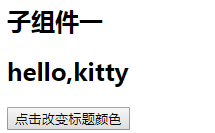
如图所示,点击子组件按钮改变父组件中标题颜色
class GreateH extends React.Component{

    static defaultProps = {

        name:'CoCo'

    };

    constructor(props){

        super(props);

        this.state ={

            name:props.name

        }

    }

    changeBtn(){

        if(typeof this.props.click == 'function' ){

          //触发父组件的事件,改变父组件中标题颜色

            this.props.click();

        }

    };

    render(){

        return <div>

            <h2>hello,{this.state.name}</h2>

            <button onClick={this.changeBtn.bind(this)}>点击改变标题颜色</button>

        </div>

    }

}

export default GreateH;
父组件中通过changeColor事件改变对应标题的颜色
class App extends Component {

   changeColor(obj){

       var oDom = document.getElementsByClassName(obj.class)[0];

       oDom.style.color = obj.color;

   };

  render() {

    return (

      <div className="App">

          <h2 className="title1">子组件一</h2>

          <GreateH name="kitty" click={this.changeColor.bind(this,{color:'red',class:'title1'})}/>

          <hr/>

          <h2 className="title2">子组件二</h2>

          <GreateH  name="lily" click={this.changeColor.bind(this,{color:'blue',class:'title2'})}/>

      </div>

    );

  }

}

export default App;

2、兄弟组件通信
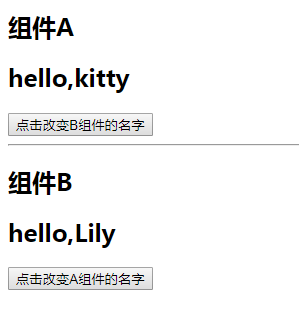
如图所示,要实现点击B组件的按钮改变A的名称,点击A组件的按钮改变B组件的名称
父组件:
class App extends Component {

    constructor(props){

        super(props);

        this.state = {

            nameA:'kitty',

            nameB:'Lily'

        }

    }

    changeBName(params){

        this.setState({

            nameB:params

        })

    }

    changeAName(params){

        this.setState({

            nameA:params

        })

    }

  render() {

    return (

      <div className="App">

          <h2 className="title1">组件A</h2>

          <GreateA name={this.state.nameA} click={this.changeBName.bind(this)}/>

          <hr/>

          <h2 className="title2">组件B</h2>

          <GreateB  name={this.state.nameB} click={this.changeAName.bind(this)}/>

      </div>

    );

  }

}
A组件:
class GreateH extends React.Component{

    static defaultProps = {

        name:''

    };

    changeBtn(){

        if(typeof this.props.click == 'function' ){

            this.props.click('kristy');

        }

    };

    render(){

        return <div>

            <h2>hello,{this.props.name}</h2>

            <button onClick={this.changeBtn.bind(this)}>点击改变B组件的名字</button>

        </div>

    }

}
B组件
class GreateH extends React.Component{

    static defaultProps = {

        name:''

    };

    changeBtn(){

        if(typeof this.props.click == 'function' ){

            this.props.click('CoCo');

        }

    };

    render(){

        return <div>

            <h2>hello,{this.props.name}</h2>

            <button onClick={this.changeBtn.bind(this)}>点击改变A组件的名字</button>

        </div>

    }

}
学到这里有个问题,为什么这样写没有用:
class GreateH extends React.Component{

    static defaultProps = {

        name:''

    };

    constructor(props){

        super(props);

        this.state ={

            name:this.props.name

        }

    }

    changeBtn(){

        if(typeof this.props.click == 'function' ){

            this.props.click('CoCo');

        }

    };

    render(){

        return <div>

            // 改成this.props.name之后才能检测到变化

            <h2>hello,{this.state.name}</h2>

            <button onClick={this.changeBtn.bind(this)}>点击改变A组件的名字</button>

        </div>

    }

}
这个需要加一个钩子函数,在钩子函数中去改变state的值,如下:
  static getDerivedStateFromProps(props,state){

        return {

            name:props.name

        }

    }
React 入门学习笔记整理(六)—— 组件通信的更多相关文章
- React 入门学习笔记整理目录
React 入门学习笔记整理(一)--搭建环境 React 入门学习笔记整理(二)-- JSX简介与语法 React 入门学习笔记整理(三)-- 组件 React 入门学习笔记整理(四)-- 事件 R ...
- React 入门学习笔记整理(三)—— 组件
1.定义组件 1)函数组件 function GreateH(props){ return <div> <h2>hello,{props.name}</h2> &l ...
- React 入门学习笔记整理(四)—— 事件
1.事件定义 React事件绑定属性的命名采用驼峰式写法,而不是小写. 如果采用 JSX 的语法你需要传入一个函数作为事件处理函数,而不是一个字符串(DOM元素的写法) 在类组件中定义函数,通过thi ...
- React 入门学习笔记整理(五)—— state
1.state 1)组件本省也是有状态的,定义在组件内部的state中,state的状态只能由组件自身改变,任何其他组件都不能改变. 当需要改变state时,通过调用setState方法来改变,set ...
- React 入门学习笔记整理(七)—— 生命周期
(1)react 生命周期 只有类组件有生命周期,函数组件没有生命周期 1.挂载阶段:这些方法会在组件实例被创建和插入DOM中时被调用: 1)constructor(props) 初始化组件的状态.绑 ...
- React 入门学习笔记整理(九)——路由
(1)安装路由 React-router React-router提供了一些router的核心api,包括Router, Route, Switch等,但是它没有提供dom操作进行跳转的api. Re ...
- React 入门学习笔记整理(一)——搭建环境
使用create-react-app脚手架搭建环境 1.安装node .软件下载地址:https://nodejs.org/en/,我下的推荐的版本. 安装之后测试是否安装成功.windows系统下, ...
- React 入门学习笔记整理(二)—— JSX简介与语法
先看下这段代码: import React from 'react'; //最终渲染需要调用ReactDOM库,将jsx渲染都页面中 import ReactDOM from 'react-dom'; ...
- React 入门学习笔记整理(八)—— todoList
APP.js import React, { Component,createRef,Fragment} from 'react'; import Todos from './components/t ...
随机推荐
- Android热修复——Tinker的集成
前言 做前端开发的都知道,当我们项目做完了以后,都会把应用上传到应用市场上供用户下载使用,比如上传到应用宝啊,应用汇啊,360啊,小米,华为,魅族啊,等等但是,有时候我们会经常遇到一些很扯淡的事情,刚 ...
- JavaScript中的constructor和继承
概述 这是我在看JavaScript面向对象编程指南的时候,对constructor和继承的总结. 关于它们的详细知识,可以上网查到,所以我只写那些网上没有的. 内容 constructor的理解 c ...
- 处理返回键劫持(结合vue)
在这里记录一下近期解决的一个问题 需求,在某个页面,浏览器返回按钮点击的时候,不能走浏览器的默认返回操作,而是要走自己的逻辑, 比如跳转页面等等. 那么问题来了,如何去不走默认返回呢.经过网上搜罗和同 ...
- Shell-3--变量
用户自定义变量 环境变量 位置参数变量 预定义变量
- 第一篇:服务的注册与发现Eureka(Finchley版本)
一.创建服务注册中心(Eureka) 1. 首先创建一个maven主工程 创建一个主Maven工程,在其pom文件引入依赖,spring Boot版本为2.0.3.RELEASE,Spring Clo ...
- RawConfigParser 与 ConfigParser ——Python的配件文件读取模块
一般情况都是使用ConfigParser这个方法,但是当我们配置中有%(filename)s这种格式的配置的时候,可能会出现以下问题: configparser.InterpolationMissin ...
- vue 组件发布记录
好久没做独立的 vue 组件了,最近突然想把一个常用的 vue 组件打成一个 npm 包,方便使用.好久不用,发现已经忘记环境怎么搭建.翻看以前的组件,才慢慢回想起来,中间还出现些错误.在这记录下开发 ...
- dotnet new 命令使用模板生成Angular应用
dotnet new 命令使用模板快速生成单页应用,本文以Angular应用为例. 最新版.NET Core SDK RC4 最大改动是更新了 dotnet new 命令. dotnet new 默认 ...
- 图文教程 | 开启远程访问mysql数据库权限
!!!考虑到安全性,不建议使用 所以将指定用户的host改为:% 即可 执行:(以root用户为例) use mysql; update user set host = "%" ...
- Eureka编程
在一些场景下,我们需要监听eureka服务中心的一些状态,譬如某个微服务挂掉了,我们希望能监听到,并给管理员发送邮件通知或钉钉告警. 一.Eureka的监听事件,可以用来监控.告警EurekaInst ...