
AlertDialog 对话框 5种
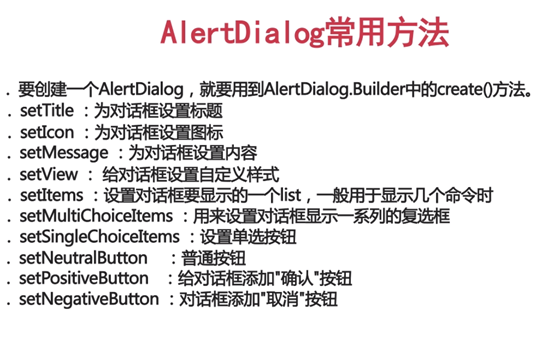
MainActivity.class
public class MainActivity extends AppCompatActivity implements View.OnClickListener{

    private Button bt1;

    private Button bt2;

    private Button bt3;

    private Button bt4;

    private Button bt5;

    @Override

    protected void onCreate(Bundle savedInstanceState) {

        super.onCreate(savedInstanceState);

        setContentView(R.layout.activity_main);

        bt1 = (Button) findViewById(R.id.bt1);

        bt1.setOnClickListener(this);

        bt2 = (Button) findViewById(R.id.bt2);

        bt2.setOnClickListener(this);

        bt3 = (Button) findViewById(R.id.bt3);

        bt3.setOnClickListener(this);

        bt4 = (Button) findViewById(R.id.bt4);

        bt4.setOnClickListener(this);

        bt5 = (Button) findViewById(R.id.bt5);

        bt5.setOnClickListener(this);

    }

    @Override

    public void onClick(View v) {

        switch (v.getId()){

            //确认对话框

            case R.id.bt1:{

                Log.d("xys", "进入了");

                //创建Builder构建器

                AlertDialog.Builder builder = new AlertDialog.Builder(this);

                builder.setTitle("确认对话框!");//设置标题

                builder.setIcon(R.mipmap.ic_launcher);//设置图标

                builder.setMessage("确认对话框内容。");//设置文本内容

                builder.setNegativeButton("取消", new DialogInterface.OnClickListener() {

                    @Override

                    public void onClick(DialogInterface dialog, int which) {

                        Toast.makeText(MainActivity.this, "这里是取消按钮!", Toast.LENGTH_SHORT).show();

                    }

                });

                builder.setPositiveButton("确定", new DialogInterface.OnClickListener() {

                    @Override

                    public void onClick(DialogInterface dialog, int which) {

                        Toast.makeText(MainActivity.this, "这里是确定 按钮!", Toast.LENGTH_SHORT).show();

                    }

                });

                //创建出dialog并show出来

//                AlertDialog dialog = builder.create();

//                dialog.show();

                builder.create().show();

                break;

            }

            //单选按钮对话框

            case R.id.bt2:{

                final String[] list = {"男","女","女博士","程序员"};

                AlertDialog.Builder builder =  new AlertDialog.Builder(this);

                builder.setTitle("选择性别");//设置标题

                builder.setIcon(R.mipmap.ic_launcher);//设置图标

                                            //数据源,默认选中的项目

                builder.setSingleChoiceItems(list, 0, new DialogInterface.OnClickListener() {

                    @Override

                    public void onClick(DialogInterface dialog, int which) {

                        Toast.makeText(MainActivity.this, "你选择的是" + list[which] + "这一项", Toast.LENGTH_SHORT).show();

                    }

                });

                builder.create().show();

                break;

            }

            //多选按钮对话框

            case R.id.bt3:{

                final String[] list = {"口琴","吉他","电脑","跳水"};

                AlertDialog.Builder builder = new AlertDialog.Builder(this);

                builder.setTitle("爱好");

                builder.setIcon(R.mipmap.ic_launcher);

                builder.setMultiChoiceItems(list, null, new DialogInterface.OnMultiChoiceClickListener() {

                    @Override

                    public void onClick(DialogInterface dialog, int which, boolean isChecked) {

                        if (isChecked) {

                            Toast.makeText(MainActivity.this, "我的爱好是" + list[which], Toast.LENGTH_SHORT).show();

                        } else {

                            Toast.makeText(MainActivity.this, "关我屁事", Toast.LENGTH_SHORT).show();

                        }

                    }

                });

                builder.setNegativeButton("取消", new DialogInterface.OnClickListener() {

                    @Override

                    public void onClick(DialogInterface dialog, int which) {

                        dialog.dismiss();

                    }

                });

                builder.create().show();

                break;

            }

            //列表对话框

            case R.id.bt4:{

                final String [] list ={"宣传","策划","打酱油","捣糨糊"};

                AlertDialog.Builder builder = new AlertDialog.Builder(this);

                builder.setTitle("爱好");

                builder.setIcon(R.mipmap.ic_launcher);

                builder.setItems(list, new DialogInterface.OnClickListener() {

                    @Override

                    public void onClick(DialogInterface dialog, int which) {

                        Toast.makeText(MainActivity.this, "你选择的部门是" + list[which], Toast.LENGTH_SHORT).show();

                    }

                });

                builder.create().show();

                break;

            }

            //自定义对话框

            case R.id.bt5:{

                final String [] list ={"宣传","策划","打酱油","捣糨糊"};

                //获取自定义布局

                LayoutInflater inflater = LayoutInflater.from(this);

                View view = inflater.inflate(R.layout.dialog_layout, null);

                final AlertDialog.Builder builder = new AlertDialog.Builder(this);

                builder.setView(view);

                builder.setTitle("自定义对话框");

                //监听自定义按钮

                final EditText text = (EditText) view.findViewById(R.id.layout_text);

                Button bt = (Button) view.findViewById(R.id.layout_bt1);

                bt.setOnClickListener(new View.OnClickListener() {

                    @Override

                    public void onClick(View v) {

                        final String str = text.getText().toString();

                        Toast.makeText(MainActivity.this, "提交的内容是 " + str, Toast.LENGTH_SHORT).show();

                    }

                });

                final AlertDialog dialog = builder.create();

                dialog.show();

//                builder.create().show();

                break;

            }

        }

    }

}
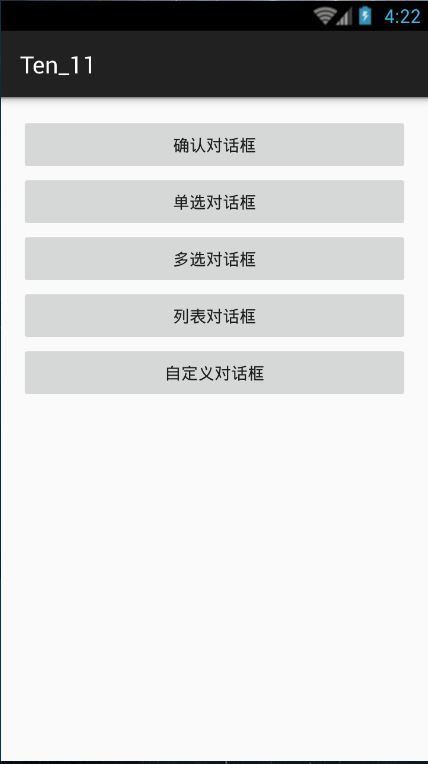
activity_main.xml
<RelativeLayout xmlns:android="http://schemas.android.com/apk/res/android"

    xmlns:tools="http://schemas.android.com/tools" android:layout_width="match_parent"

    android:layout_height="match_parent" android:paddingLeft="@dimen/activity_horizontal_margin"

    android:paddingRight="@dimen/activity_horizontal_margin"

    android:paddingTop="@dimen/activity_vertical_margin"

    android:paddingBottom="@dimen/activity_vertical_margin" tools:context=".MainActivity">

    <Button

        android:id="@+id/bt1"

        android:text="确认对话框"

        android:layout_width="match_parent"

        android:layout_height="wrap_content" />

    <Button

        android:id="@+id/bt2"

        android:layout_below="@id/bt1"

        android:text="单选对话框"

        android:layout_width="match_parent"

        android:layout_height="wrap_content" />

    <Button

        android:id="@+id/bt3"

        android:layout_below="@id/bt2"

        android:text="多选对话框"

        android:layout_width="match_parent"

        android:layout_height="wrap_content" />

    <Button

        android:id="@+id/bt4"

        android:layout_below="@id/bt3"

        android:text="列表对话框"

        android:layout_width="match_parent"

        android:layout_height="wrap_content" />

    <Button

        android:id="@+id/bt5"

        android:layout_below="@id/bt4"

        android:text="自定义对话框"

        android:layout_width="match_parent"

        android:layout_height="wrap_content" />

</RelativeLayout>
dialog_layout.xml(自定义布局)
<?xml version="1.0" encoding="utf-8"?>

<LinearLayout xmlns:android="http://schemas.android.com/apk/res/android"

    android:orientation="vertical"

    android:layout_width="match_parent"

    android:layout_height="match_parent">

<LinearLayout

    android:layout_width="match_parent"

    android:layout_height="wrap_content"

    android:orientation="horizontal">

    <EditText

        android:id="@+id/layout_text"

        android:hint="请输入内容"

        android:layout_weight="5"

        android:layout_width="0dp"

        android:layout_height="wrap_content" />

    <Button

        android:id="@+id/layout_bt1"

        android:layout_weight="1.5"

        android:text="提交"

        android:layout_width="0dp"

        android:layout_height="wrap_content" />

</LinearLayout>

<ImageView

    android:id="@+id/layout_image"

    android:src="@drawable/abc"

    android:layout_width="match_parent"

    android:layout_height="wrap_content" />

</LinearLayout>
AlertDialog 对话框 5种的更多相关文章
- Android应用开发学习之AlertDialog对话框
作者:刘昊昱 博客:http://blog.csdn.net/liuhaoyutz 本文中我们通过一个例子来看AlertDialog对话框的实现,其运行效果如下: 主布局文件main.xml内容如下: ...
- Android中使用AlertDialog实现几种不同的对话框
场景 app中常见的对话框. 简单的带确定取消按钮的对话框 带列表的对话框 带单项选择的对话框 带多项选择的对话框 注: 博客: https://blog.csdn.net/badao_liumang ...
- android 开发 实现一个自定义布局的AlertDialog对话框
对话框有很多实现方法,最常见的是在一个点击事件中代码直接写出对话框.如下: package com.example.lenovo.mydemo2; import android.content.Dia ...
- android 的AlertDialog对话框
private int selectedFruitIndex = 0; private void showMsg2() {// Dialog alertDialog = new AlertDial ...
- 安卓 自定义AlertDialog对话框(加载提示框)
AlertDialog有以下六种使用方法: 一.简单的AlertDialog(只显示一段简单的信息) 二.带按钮的AlertDialog(显示提示信息,让用户操作) 三.类似ListView的Aler ...
- AlertDialog对话框简单案例
什么是Dialog? Dialog类,是一切对话框的基类,需要注意的是,Dialog类虽然可以在界面上显示,但是并非继承于View类,而是直接从java.lang.Object开始构造出的.类似于Ac ...
- 在有EditText控件的AlertDialog对话框中自动弹出输入法
我们先回顾一下创建AlertDialog的一般步骤. 一 inflate AlertDialog的布局文件 例如,其中dlg就是我们的布局文件. View layout = LayoutIn ...
- Android:AlertDialog对话框
1.简单的ALertDialog: Dialog alertDialog = new AlertDialog.Builder(this) .setTitle("标题") .setM ...
- Android4.0的Alertdialog对话框,设置点击其他位置不消失
Android4.0以上AlertDialog,包括其他自定义的dialog,在触摸对话框边缘外部,对话框消失. 可以设置这么一条属性,当然必须先AlertDialog.Builder.create( ...
随机推荐
- 三、使用VSCode配置简单的vue项目
由于最近要使用的项目框架为前后端分离的,采用的是vue.js+webAPI的形式进行开发的.因为之前我没有接触过vue.js,也只是通过视频文档做了一些简单的练习.今天技术主管说让大家熟悉下VSCod ...
- Linux(CentOS)下安装tesseract-ocr以及配置依赖leptonica
下载 wget https://github.com/tesseract-ocr/tesseract/archive/4.1.0.tar.gz wget http://www.leptonica.or ...
- TS问题:属性'filter'在类型'Vue'上不存在
在编译时候报‘Property 'filter' does not exist on type 'Element'.’的错,但是在浏览器中运行正常.如下图: 经过不懈的努力,终于找到了原因.是因为ts ...
- 用Blackbox Exporter to Monitor web和端口
1.按照exporter .wget https://github.com/prometheus/blackbox_exporter/releases/download/v0.12.0/blackbo ...
- 修改umask后apache报错:because search permissions are missing on a component of the path,
0.修改umask后apache报错:because search permissions are missing on a component of the path, 1.ls -lrth ./h ...
- 2019牛客暑期多校训练营(第八场)-A All-one Matrices (单调栈+前缀和)
题目链接:https://ac.nowcoder.com/acm/contest/888/A 题意:给n×m的01矩阵,求出其中全为1的矩阵个数(不被其它全1矩阵包括). 思路:和第二场多校的次大子矩 ...
- mysql CPU太高排查办法
[1]问题描述 首先,查看top,下图来自网络 为什么会有%CPU 375??? 还可以超过100%的? 这是因为,有多核CPU.如图,top后,按数字1,即可出现下图. [2]排查办法(当前CPU爆 ...
- hbase与hdfs的交互
hdfs和hbase的交互,和写MapReduce程序类似,只是需要修改输入输出数据和使用hbase的javaAPI对其进行操作处理即可 public class HBaseToHdfs extend ...
- spring-boot 几个工具类(七)
环境 jdk 6 tomcat 6.0.53 sts 4.4.2 maven 3.2.5 mysql 5.7 SpringContextHolder SpringContextHolder 可以很方便 ...
- php 数组相关方法的一些实际妙用
一.php数组合并两个数组(一个数组做键名,另一个做值) 有两个方法 1.循环 $arry_a = array(0, 1, 2); $arry_b = array('dongsir','董先生','董 ...