
Linux 虚拟机扩容
由于在装软件,原来的20G空间不够使用,需要扩容操作。
1.关闭虚拟机
2.点击编辑虚拟机设置

选中硬盘,添加,硬盘,推荐,确定大小,完成。
2.启动虚拟机
查看磁盘使用情况:
[root@master ~]# df -h

Filesystem      Size  Used Avail Use% Mounted on

/dev/sda2        18G  .0G   14G  % /

tmpfs           931M   80K  931M   % /dev/shm

/dev/sda1       291M   39M  238M  % /boot

/dev/sr0        .6G  .6G      % /media/RHEL_6. x86_64 Disc
查看我们新的磁盘
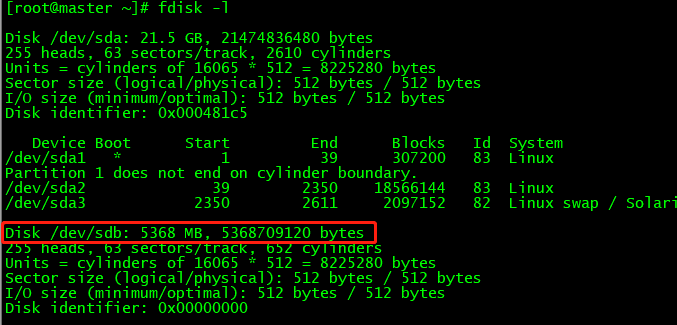
对新加的硬盘进行分区,格式化,因为我的磁盘名称是/dev/sdb,所以输入 fdisk /dev/sdb命令:
[root@master ~]# fdisk /dev/sdb
Device contains neither a valid DOS partition table, nor Sun, SGI or OSF disklabel
Building a new DOS disklabel with disk identifier 0xc2e1095b.
Changes will remain in memory only, until you decide to write them.
After that, of course, the previous content won't be recoverable.
Warning: invalid flag 0x0000 of partition table 4 will be corrected by w(rite)
WARNING: DOS-compatible mode is deprecated. It's strongly recommended to
switch off the mode (command 'c') and change display units to
sectors (command 'u').
Command (m for help): m
Command action
a toggle a bootable flag
b edit bsd disklabel
c toggle the dos compatibility flag
d delete a partition
l list known partition types
m print this menu
n add a new partition
o create a new empty DOS partition table
p print the partition table
q quit without saving changes
s create a new empty Sun disklabel
t change a partition's system id
u change display/entry units
v verify the partition table
w write table to disk and exit
x extra functionality (experts only)
Command (m for help): n
Command action
e extended
p primary partition (1-4)
p
Partition number (1-4): 1
First cylinder (1-652, default 1): 1
Last cylinder, +cylinders or +size{K,M,G} (1-652, default 652):
Using default value 652
Command (m for help): p
Disk /dev/sdb: 5368 MB, 5368709120 bytes
255 heads, 63 sectors/track, 652 cylinders
Units = cylinders of 16065 * 512 = 8225280 bytes
Sector size (logical/physical): 512 bytes / 512 bytes
I/O size (minimum/optimal): 512 bytes / 512 bytes
Disk identifier: 0xc2e1095b
Device Boot Start End Blocks Id System
/dev/sdb1 1 652 5237158+ 83 Linux
Command (m for help): w
The partition table has been altered!
Calling ioctl() to re-read partition table.
Syncing disks.
下一步,查看
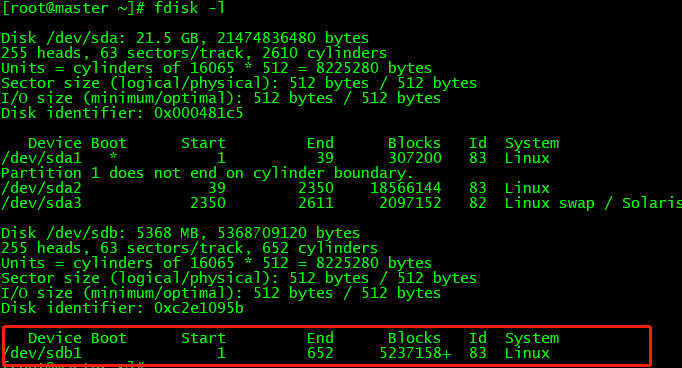
格式化:

另一种格式化:mkfs -t ext3 /dev/sdb1
[root@master ~]# cd /

[root@master /]# ls

bin   dev  home  lib64       media  opt   root  selinux  sys  usr

boot  etc  lib   lost+found  mnt    proc  sbin  srv      tmp  var

[root@master /]# mkdir exapp

[root@master /]# mount /dev/sdb1 /exapp/

[root@master /]# df -h

Filesystem      Size  Used Avail Use% Mounted on

/dev/sda2        18G  .0G   14G  % /

tmpfs           931M   72K  931M   % /dev/shm

/dev/sda1       291M   39M  238M  % /boot

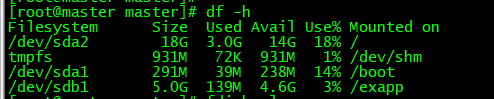
/dev/sdb1       5.0G  139M  4.6G   3% /exapp
这个是挂载上了
开机自动挂载,则修改 /etc/fstab 文件,在这个文件里面添加一行:
/dev/sdb1 /exapp ext3 defaults 0 0
然而:我想扩大 / 下的空间 ,关闭虚拟机,重新给虚拟机分配2G的空间,启动
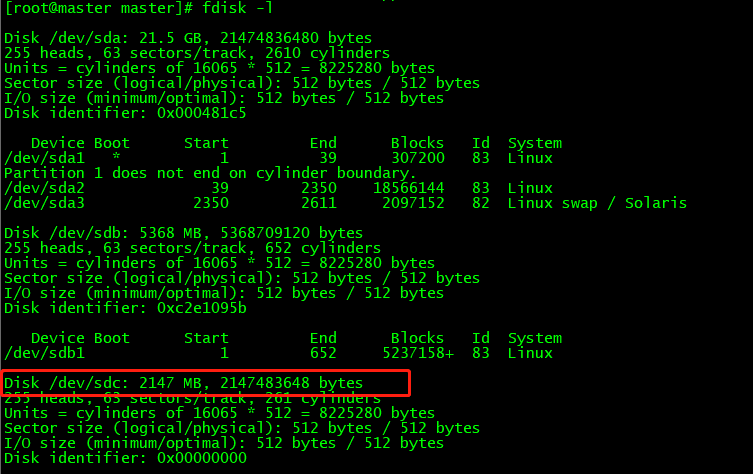
对磁盘进行分区
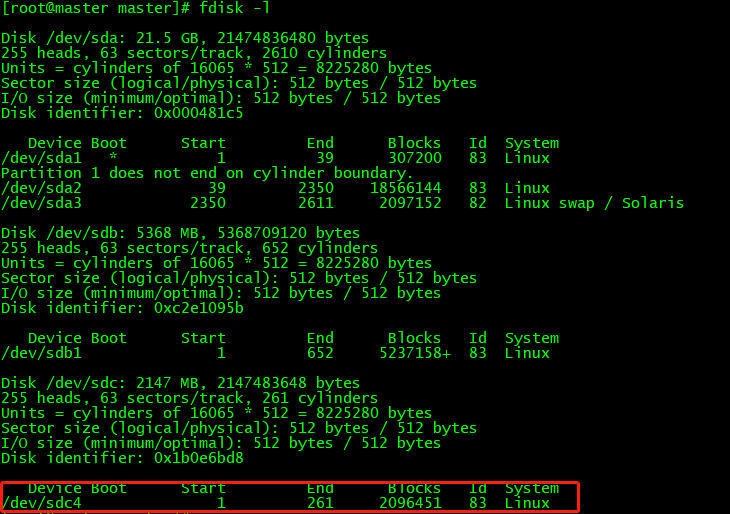
[root@master master]# fdisk /dev/sdc
Device contains neither a valid DOS partition table, nor Sun, SGI or OSF disklabel
Building a new DOS disklabel with disk identifier 0x1b0e6bd8.
Changes will remain in memory only, until you decide to write them.
After that, of course, the previous content won't be recoverable.
Warning: invalid flag 0x0000 of partition table 4 will be corrected by w(rite)
WARNING: DOS-compatible mode is deprecated. It's strongly recommended to
switch off the mode (command 'c') and change display units to
sectors (command 'u').
Command (m for help): m
Command action
a toggle a bootable flag
b edit bsd disklabel
c toggle the dos compatibility flag
d delete a partition
l list known partition types
m print this menu
n add a new partition
o create a new empty DOS partition table
p print the partition table
q quit without saving changes
s create a new empty Sun disklabel
t change a partition's system id
u change display/entry units
v verify the partition table
w write table to disk and exit
x extra functionality (experts only)
Command (m for help): n
Command action
e extended
p primary partition (1-4)
p
Partition number (1-4):
First cylinder (1-261, default 1):
Using default value 1
Last cylinder, +cylinders or +size{K,M,G} (1-261, default 261):
Using default value 261
Command (m for help): p
Disk /dev/sdc: 2147 MB, 2147483648 bytes
255 heads, 63 sectors/track, 261 cylinders
Units = cylinders of 16065 * 512 = 8225280 bytes
Sector size (logical/physical): 512 bytes / 512 bytes
I/O size (minimum/optimal): 512 bytes / 512 bytes
Disk identifier: 0x1b0e6bd8
Device Boot Start End Blocks Id System
/dev/sdc4 1 261 2096451 83 Linux
Command (m for help): w
The partition table has been altered!
Calling ioctl() to re-read partition table.
Syncing disks.
[root@master dev]# df -h
Filesystem Size Used Avail Use% Mounted on
/dev/sda2 18G 3.0G 14G 18% /
tmpfs 931M 72K 931M 1% /dev/shm
/dev/sda1 291M 39M 238M 14% /boot
/dev/sdb1 5.0G 139M 4.6G 3% /exapp
[root@master master]# pvcreate /dev/sdc4 -- //创建物理卷
dev_is_mpath: failed to get device for 8:36
Physical volume "/dev/sdc4" successfully created
查看新建的物理卷和大小,使用pvdisplay命令。
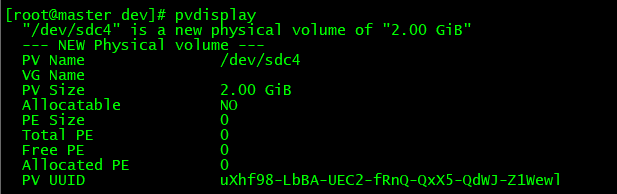
为啥我的根目录下没有卷组?
根目录下有卷组的话,vgextend ubuntu14-vg /dev/sdc4
vgdisplay 会显示一个卷组信息
lvresize -L +120G /dev/mapper/ubuntu14--vg-root
resize2fs /dev/mapper/ubuntu14--vg-root
df -h
应该会添加成功。
Linux 虚拟机扩容的更多相关文章
- [linux]vmware中linux虚拟机扩容 标签: vmware虚拟机linux 2016-09-05 08:03 315人阅读 评
扩容原因 现阶段,虚拟机的标配都是1G内存和20G硬盘,大部分时候是够用的,但是也会出现虚拟机里面东西放多了硬盘不够用的情况,这种情况下,除了清理垃圾,另外就只能给虚拟机扩容了.因为window扩容相 ...
- Linux虚拟机扩容根分区CentOs6.9 VMware14
1.首先关闭虚拟机点击编辑虚拟机设置 2.点击想要扩容的硬盘点击扩容 3.增加容量 输入想增加的容量,因为我本身是30G写到35G是加了5G不是增加30G.(此处为了演示只增加5G) 4.开启虚拟机 ...
- (转)vmware下给linux虚拟机扩容
“Well, here’s another fine mess you’ve gotten me into” Let us pretend that you have an Ubuntu Server ...
- Linux Centos虚拟机扩容
Linux Centos虚拟机扩容(/dev/mapper/centos-root) 1:.首先查看我们的根分区大小是多少 df -h 文件系统 类型 容量 已用 可用 已用% 挂载点``/dev/m ...
- Linux系统盘扩容-物理机非虚拟机
# Linux系统盘扩容 ## 了解磁盘分区情况 - `blkid` 查看分区情况- `fdisk -l` 分区表 ## 系统挂载分区 - `/etc/fstab` 启动挂载分区情况 ## 双系统下分 ...
- VMware虚拟机扩容
作者:金良(golden1314521@gmail.com) csdn博客:http://blog.csdn.net/u012176591 用了一段Linux虚拟机.发现安装虚拟机时分配的空间不够用, ...
- Linux分区扩容
lz在MAC上面使用Linux虚拟机,开始只建了一个分区,挂载在”/”目录下.现在硬盘空间不够了,所以lz就来给这个分区扩容. 首先,当然是要给虚拟机分配更多的硬盘空间喽(lz用的是VMware Fu ...
- 为Xen虚拟机扩容根文件系统(LVM)
===== 为Xen虚拟机扩容根文件系统(LVM) ===== 1. 增加1个4G的映像文件 # dd if=/dev/zero of=data.img bs=4k seek=1024k count= ...
- linux 系统扩容 VMware Centos---VMware ESXi
用到的命令 df fdisk pvcreate pvdisplay vgdisplay vgextend lvdisplay lvextend resize2fs 0 ...
随机推荐
- clientdataset的使用
clientdataset的使用(一) Delphi做为一个快速应用开发工具,深受程序员的喜爱.其强大的组件功能,让程序员能够轻松. 高效地完成常见的界面开发.数据库应用等功能.然而,帮助的相对缺 ...
- iframe高度自适应方法
<iframe width="100%" id="tbbrecommend" name="tbbrecommend" src=&quo ...
- Linux Shell列出网络中所有的活跃主机
因为的的网段是 192.168.1.0/24 , 所以我只需遍历 192.168.1.1 到 192.168.1.255 之间的所有ip然后进行 ping 就可以了: test.sh: #!/bin/ ...
- 神经网络(NN)实现多分类-----Keras实现
IRIS数据集介绍 IRIS数据集(鸢尾花数据集),是一个经典的机器学习数据集,适合作为多分类问题的测试数据,它的下载地址为:http://archive.ics.uci.edu/ml/machi ...
- EasyNetQ使用(五)【基于主题的路由,控制队列名称】
RabbitMQ有一个很酷的功能,基于主题的路由,这个功能允许订阅者基于多个条件去过滤消息.一个主题是由点号分隔的单词列表,随消息一同发布.例如:“stock.usd.nyse” 或 “book.uk ...
- Hadoop 部署之 Hive (五)
目录 一.Hive 简介 1.什么是 Hive 2.为什么使用 Hive 3.Hive 的特点 4.Hive 的架构 二.Hive 安装 1.MySQL 安装(datanode01) 2.MySQL ...
- 02.03 win server r2 搭建FTP站点
============ftp服务器搭建=============== 先要搭建iis信息服务: 1.打开服务器管理器,角色>添加角色 2.选择角色服务:应用程序开发.FTP服务器.安全性 3. ...
- 【DSP开发】帮您快速入门 TI 的 Codec Engine
德州仪器半导体技术(上海)有限公司 通用DSP 技术应用工程师 崔晶 德州仪器(TI)的第一颗达芬奇(DaVinci)芯片(处理器)DM6446已经问世快三年了.继DM644x之后,TI又陆续推出了D ...
- 使用请求包装器RequestWrapper 对博客内容进行编码
1.写一个文章类 代码如下 package model; public class article { private int id; private String title; private St ...
- JDBC:数据库连接技术
JDBC :带它再爱你一次 (一) JDBC 入门 (1) 概述 Java数据库连接,(Java Database Connectivity,简称JDBC)是Java语言中用来规范客户端程序如何来访问 ...