
【全网首发】鸿蒙开源三方组件--跨平台自适应布局yoga组件
目录:
介绍
yoga是facebook打造的一个跨IOS、Android、Window平台在内的布局引擎,兼容Flexbox布局方式,让界面更加简单。
Yoga官网:https://facebook.github.io/yoga/
官网上描述的特性包括:
- 完全兼容Flexbox布局,遵循W3C的规范
- 支持java、C#、Objective-C、C四种语言
- 底层代码使用C语言编写,性能不是问题
- 支持流行框架如React Native
目前在已开源的鸿蒙组件(https://gitee.com/openharmony-tpc/yoga)的功能现状如下:
- native层和接口已经打通
- 支持自定义xml属性来控制布局(通过YogaLayout)
- 设置布局中不支持Image控件(onDrawCanvas暂不支持主动回调,所以yoga没办法扫描到它),请使用Text控件替代
- 不支持VirtualYogaLayout
如何使用
首先我们在MainAbility中定义界面路由
public class MainAbility extends Ability {

    @Override

    public void onStart(Intent intent) {

        super.onStart(intent);

        super.setMainRoute(MainAbilitySlice.class.getName());

        addActionRoute("action.dydrawnode.slice", DynamicsDrawNodeSlice.class.getName());

        addActionRoute("action.showrow.slice", ShowRowAbilitySlice.class.getName());

        addActionRoute("action.inflate.slice", BenchmarkInflateAbilitySlice.class.getName());

    }

}
然后我们来到MainAbilitySlice,其实就是做了一个向其他界面跳转的动作,并提前加载yoga的so库
public class MainAbilitySlice extends AbilitySlice {

    static {

        System.loadLibrary("yoga");

        System.loadLibrary("yogacore");

        System.loadLibrary("fb");

    }

    @Override

    public void onStart(Intent intent) {

        super.onStart(intent);

        setUIContent(ResourceTable.Layout_main_layout);

        Button btn0= (Button) findComponentById(ResourceTable.Id_btn_1);

        btn0.setClickedListener(component -> {

            Intent intent1 = new Intent();

            Operation operation = new Intent.OperationBuilder()

                    .withAction("action.dydrawnode.slice")

                    .build();

            intent1.setOperation(operation);

            startAbilityForResult(intent1, 1);

        });

        Button btn2= (Button) findComponentById(ResourceTable.Id_btn_2);

        btn2.setClickedListener(component -> {

            Intent intent1 = new Intent();

            Operation operation = new Intent.OperationBuilder()

                    .withAction("action.showrow.slice")

                    .build();

            intent1.setOperation(operation);

            startAbilityForResult(intent1, 1);

        });

        Button btn1= (Button) findComponentById(ResourceTable.Id_btn_3);

        btn1.setClickedListener(component -> {

            Intent intent1 = new Intent();

            Operation operation = new Intent.OperationBuilder()

                    .withAction("action.inflate.slice")

                    .build();

            intent1.setOperation(operation);

            startAbilityForResult(intent1, 1);

        });

    }

    @Override

    public void onActive() {

        super.onActive();

    }

    @Override

    public void onForeground(Intent intent) {

        super.onForeground(intent);

    }

}
第一个演示界面
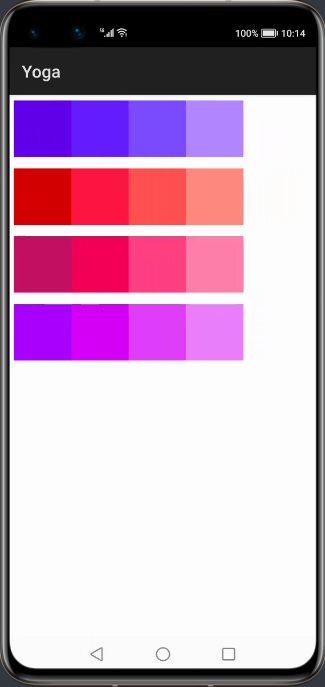
这里yoga向我们展示了动态布局的能力,效果图如下:
实现的代码如下:
public class DynamicsDrawNodeSlice extends AbilitySlice {

    private static final int VIEW_WIDTH = 200;

    private static final int VIEW_HEIGHT = 200;

    private ArrayList<Component> mViewList = new ArrayList<>();

    private ArrayList<YogaNode> mYogaNodeList = new ArrayList<>();

    private int[][] colors = new int[][]{

            new int[]{0xff6200ea, 0xff651fff, 0xff7c4dff, 0xffb388ff},

            new int[]{0xffd50000, 0xffff1744, 0xffff5252, 0xffff8a80},

            new int[]{0xffc51162, 0xfff50057, 0xffff4081, 0xffff80ab},

            new int[]{0xffaa00ff, 0xffd500f9, 0xffe040fb, 0xffea80fc}

    };

    @Override

    protected void onStart(Intent intent) {

        super.onStart(intent);

        PositionLayout container = new PositionLayout(this);

        DisplayAttributes displayAttributes = DisplayManager.getInstance().getDefaultDisplay(this).get().getAttributes();

        float screenWidth = displayAttributes.width;

        float screenHeight = displayAttributes.height;

        YogaNode root = new YogaNodeJNIFinalizer();

        root.setWidth(screenWidth);

        root.setHeight(screenHeight);

        root.setFlexDirection(YogaFlexDirection.COLUMN);

        createRowNodeAndView(root, 0);

        createRowNodeAndView(root, 1);

        createRowNodeAndView(root, 2);

        createRowNodeAndView(root, 3);

        root.calculateLayout(screenWidth, screenHeight);

        for (int i = 0; i < mViewList.size(); i++) {

            Component component = mViewList.get(i);

            YogaNode yogaNode = mYogaNodeList.get(i);

            YogaNode yogaNodeOwner = yogaNode.getOwner();

            component.setTranslationX(yogaNodeOwner.getLayoutX() + yogaNodeOwner.getLayoutX());

            component.setTranslationY(yogaNodeOwner.getLayoutY() + yogaNodeOwner.getLayoutY());

            component.setLeft((int) (yogaNodeOwner.getLayoutX() + yogaNode.getLayoutX()));

            component.setTop((int) (yogaNodeOwner.getLayoutY() + yogaNode.getLayoutY()));

            container.addComponent(component);

        }

        super.setUIContent(container);

    }

    private void createRowNodeAndView(YogaNode root, int index) {

        YogaNode row = new YogaNodeJNIFinalizer();

        row.setHeight(VIEW_HEIGHT);

        row.setWidth(VIEW_WIDTH * 4);

        row.setFlexDirection(YogaFlexDirection.ROW);

        row.setMargin(YogaEdge.ALL, 20);

        for (int i = 0; i < 4; i++) {

            YogaNode yogaNode = new YogaNodeJNIFinalizer();

            yogaNode.setWidth(VIEW_WIDTH);

            yogaNode.setHeight(VIEW_HEIGHT);

            Component component = createView(colors[index][i]);

            row.addChildAt(yogaNode, i);

            mYogaNodeList.add(yogaNode);

            mViewList.add(component);

        }

        root.addChildAt(row, index);

    }

    private Component createView(int color) {

        Component view = new Component(this);

        ShapeElement background = new ShapeElement();

        background.setRgbColor(convertColor(color));

        view.setBackground(background);

        ComponentContainer.LayoutConfig layoutConfig = new AdaptiveBoxLayout.LayoutConfig(VIEW_WIDTH, VIEW_HEIGHT);

        view.setLayoutConfig(layoutConfig);

        return view;

    }

    /**

     *  转换颜色

     * @param color

     * @return RgbColor

     */

    public RgbColor convertColor(int color) {

        int colorInt = color;

        int red = (colorInt & 0xff0000) >> 16;

        int green = (colorInt & 0x00ff00) >> 8;

        int blue = (colorInt & 0x0000ff);

        return new RgbColor(red, green, blue);

    }

}
代码中定义了一个root根布局,宽高为屏幕的宽高,接着定义了四个行布局,并向每个行布局里添加4个子布局,最重要的是在调用root.calculateLayout(screenWidth, screenHeight)后,便将每个子布局的位置给确定了下来,然后根据获取到的每个布局的参数,给每个Component设置位置。该演示只是借助yoga组件来确定每个Component位置,真正使渲染生效的还是基于鸿蒙的原生控件。
第二个演示界面
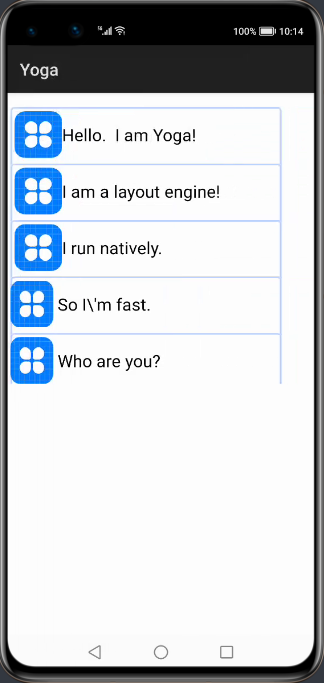
接下来展示如何使用yoga组件在xml里通过填写属性来控制item位置的能力,效果图如下:
代码如下:
<?xml version="1.0" encoding="utf-8" ?>

<com.facebook.yoga.openharmony.YogaLayout

       xmlns:ohos="http://schemas.huawei.com/res/ohos"

       xmlns:yoga="http://schemas.huawei.com/apk/res-auto"

       ohos:height="match_parent"

       ohos:width="match_parent"

>

   <com.facebook.yoga.openharmony.YogaLayout

           ohos:height="60vp"

           ohos:width="match_content"

           yoga:yg_alignItems="center"

           yoga:yg_flexDirection="row"

           yoga:yg_marginHorizontal="15"

           yoga:yg_marginStart="15"

           yoga:yg_marginTop="50"

           ohos:background_element="$graphic:item_element"

   >

       <Text

               ohos:height="50vp"

               ohos:width="50vp"

               ohos:background_element="$media:icon"

               yoga:yg_flex="0"

               yoga:yg_marginStart="15"

       />

       <Text

               ohos:height="50vp"

               ohos:width="220vp"

               ohos:text="Hello.  I am Yoga!"

               ohos:text_color="#000000"

               yoga:yg_flex="1"

               yoga:yg_marginStart="15"

               ohos:text_size="20fp"

       />

   </com.facebook.yoga.openharmony.YogaLayout>

   <com.facebook.yoga.openharmony.YogaLayout

           ohos:background_element="$graphic:item_element"

           ohos:height="60vp"

           ohos:width="match_content"

           yoga:yg_alignItems="center"

           yoga:yg_flexDirection="row"

           yoga:yg_marginHorizontal="15"

           yoga:yg_marginTop="20"

           yoga:yg_marginStart="15"

   >

       <Text

               ohos:height="50vp"

               ohos:width="50vp"

               ohos:background_element="$media:icon"

               yoga:yg_flex="0"

               yoga:yg_marginStart="15"

       />

       <Text

               ohos:height="50vp"

               ohos:width="250vp"

               ohos:text="I am a layout engine!"

               ohos:text_color="#000000"

               yoga:yg_flex="1"

               yoga:yg_marginStart="15"

               ohos:text_size="20fp"

       />

   </com.facebook.yoga.openharmony.YogaLayout>

   <com.facebook.yoga.openharmony.YogaLayout

           ohos:background_element="$graphic:item_element"

           ohos:height="60vp"

           ohos:width="match_content"

           yoga:yg_alignItems="center"

           yoga:yg_flexDirection="row"

           yoga:yg_marginHorizontal="15"

           yoga:yg_marginTop="20"

   >

       <Text

               ohos:height="50vp"

               ohos:width="50vp"

               ohos:background_element="$media:icon"

               yoga:yg_flex="0"

               yoga:yg_marginStart="15"

       />

       <Text

               ohos:height="50vp"

               ohos:width="250vp"

               ohos:text="I run natively."

               ohos:text_color="#000000"

               yoga:yg_flex="1"

               yoga:yg_marginStart="15"

               ohos:text_size="20fp"

       />

   </com.facebook.yoga.openharmony.YogaLayout>

   <com.facebook.yoga.openharmony.YogaLayout

           ohos:background_element="$graphic:item_element"

           ohos:height="60vp"

           ohos:width="match_content"

           yoga:yg_alignItems="center"

           yoga:yg_flexDirection="row"

           yoga:yg_marginHorizontal="15"

           yoga:yg_marginTop="20"

   >

       <Text

               ohos:height="50vp"

               ohos:width="50vp"

               ohos:background_element="$media:icon"

               yoga:yg_flex="0"

       />

       <Text

               ohos:height="50vp"

               ohos:width="200vp"

               ohos:text="So I\'m fast."

               ohos:text_color="#000000"

               yoga:yg_flex="1"

               yoga:yg_marginStart="15"

               ohos:text_size="20fp"

       />

   </com.facebook.yoga.openharmony.YogaLayout>

   <com.facebook.yoga.openharmony.YogaLayout

           ohos:background_element="$graphic:item_element"

           ohos:height="60vp"

           ohos:width="match_content"

           yoga:yg_alignItems="center"

           yoga:yg_flexDirection="row"

           yoga:yg_marginHorizontal="15"

           yoga:yg_marginTop="20"

   >

       <Text

               ohos:height="50vp"

               ohos:width="50vp"

               ohos:background_element="$media:icon"

               yoga:yg_flex="0"

       />

       <Text

               ohos:height="50vp"

               ohos:width="200vp"

               ohos:text="Who are you?"

               ohos:text_color="#000000"

               yoga:yg_flex="1"

               yoga:yg_marginStart="15"

               ohos:text_size="20fp"

       />

   </com.facebook.yoga.openharmony.YogaLayout>

</com.facebook.yoga.openharmony.YogaLayout>
这里YogaLayout其实可以看成FlexBox(详情请参考附录:FlexBox科普),可以通过参数调节子布局位置,我们可以使用YogaLayout上的yoga:yg_alignItems="center"属性使得item居中显示,并通过yoga:yg_flexDirection="row"属性使得之item横向排列。子item也可以通过设置yoga:yg_flex="1"来调整自己的权重。更多属性的使用大家也可以下载项目亲自体验。
集成方式
自行编译工程entity、yoga、yoga_layout、fb生成libyoga.so、libfb.so、libyogacore.so
将其添加到要集成的libs文件夹内,在entity的gradle内添加如下代码。
方式一:
通过library生成har包,添加har包到libs文件夹内。
在entry的gradle内添加如下代码:
implementation fileTree(dir:'libs', include:['*.jar','*.har'])
方式二:
allprojects{

	repositories{

		mavenCentral()

	}

}

implementation 'io.openharmony.tpc.thirdlib:yoga-layout:1.0.0'

implementation 'io.openharmony.tpc.thirdlib:yoga-yoga:1.0.0'

implementation 'io.openharmony.tpc.thirdlib:yoga-fb:1.0.0'
附录1:FlexBox科普
布局的传统解决方案,基于盒状模型,依赖display属性,position属性,float属性。它对于那些特殊布局非常不方便,比如,垂直居中就不容易实现。2009年,W3C提出了一种新的方案:flex。可以简便、完整、响应式地实现各种界面布局。目前,该方案已经得到了所有浏览器的支持。采用Flex布局的元素,称为Flex容器(flex container),简称“容器”。它的所有子元素置动成为容器成员,称为Flex项目(flex item),简称“项目”。
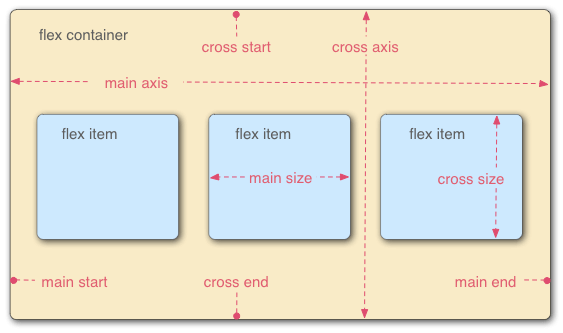
容器默认存在两根轴:水平的主轴(main axis)和垂直的交叉轴(cross axis)。主轴的开始位置(与边框的交叉点)叫main start,结束位置叫main end;交叉轴的开始位置叫cross start,结束位置叫cross end。项目默认沿主轴排列。单个项目占据的主轴空间叫main size,占据的交叉轴空间叫cross size。
附录2:相关资料
- 项目地址:https://gitee.com/openharmony-tpc/yoga
- IDE官方下载地址:https://developer.harmonyos.com/cn/develop/deveco-studio
- 阮一峰的flex布局教程:http://www.ruanyifeng.com/blog/2015/07/flex-grammar.html
想了解更多内容,请访问51CTO和华为合作共建的鸿蒙社区:https://harmonyos.51cto.com
【全网首发】鸿蒙开源三方组件--跨平台自适应布局yoga组件的更多相关文章
- 【全网首发】鸿蒙开源三方组件--强大的弹窗库XPopup组件
目录: 1.介绍 2.效果一览 3.依赖 4.如何使用 5.下载链接 6.<鸿蒙开源三方组件>文章合集 1. 介绍 XPopup是一个弹窗库,可能是Harmony平台最好的弹窗库.它从 ...
- 全球首发—鸿蒙开源平台OpenGL
目录: 前言 背景 鸿蒙OpenGL-ISRC的结构 OpenGL-ISRC和鸿蒙SDK OpenGL的区别 OpenGL-ISRC的使用 前言 基于安卓平台的OpenGL(androidxref.c ...
- react实战 : 用矩阵思想做一个自适应布局容器组件
需求是这样的. 有一个需要显示若干方块型元素的小区域 数量比较少的时候显示一排 数量比较多的时候显示两排 用 grid 不好,因为当数量为奇数的时候需要两排里面的元素都乖乖的居中显示. 用 flex ...
- 鸿蒙开源第三方件组件——轮播组件Banner
目录: 1.功能展示 2.Sample解析 3.Library解析 4.<鸿蒙开源第三方组件>系列文章合集 前言 基于安卓平台的轮播组件Banner(https://github.com/ ...
- 鸿蒙开源第三方组件——SlidingMenu_ohos侧滑菜单组件
目录: 1.前言 2.背景 3.效果展示 4.Sample解析 5.Library解析 6.<鸿蒙开源第三方组件>文章合集 前言 基于安卓平台的SlidingMenu侧滑菜单组件(http ...
- 【开源】C#跨平台物联网通讯框架ServerSuperIO(SSIO)
[连载]<C#通讯(串口和网络)框架的设计与实现>-1.通讯框架介绍 [连载]<C#通讯(串口和网络)框架的设计与实现>-2.框架的总体设计 目 录 C#跨平台物联 ...
- 免费开源的DotNet任务调度组件Quartz.NET(.NET组件介绍之五)
很多的软件项目中都会使用到定时任务.定时轮询数据库同步,定时邮件通知等功能..NET Framework具有“内置”定时器功能,通过System.Timers.Timer类.在使用Timer类需要面对 ...
- 免费开源的DotNet二维码操作组件ThoughtWorks.QRCode(.NET组件介绍之四)
在生活中有一种东西几乎已经快要成为我们的另一个电子”身份证“,那就是二维码.无论是在软件开发的过程中,还是在普通用户的日常中,几乎都离不开二维码.二维码 (dimensional barcode) , ...
- 最好的.NET开源免费ZIP库DotNetZip(.NET组件介绍之三)
在项目开发中,除了对数据的展示更多的就是对文件的相关操作,例如文件的创建和删除,以及文件的压缩和解压.文件压缩的好处有很多,主要就是在文件传输的方面,文件压缩的好处就不需要赘述,因为无论是开发者,还是 ...
随机推荐
- CSS元素层级的概念及性质
元素的层级的介绍 什么是元素的层级 通过z-index可以改变开启定位元素的层级 父元素的层级再高也不会遮盖住子元素 元素的层级的介绍 什么是元素的层级 当元素开启定位后就会是元素提升一个层级,网页是 ...
- DES加密详解
目录 1 根据输入的秘钥得到16个子秘钥 1.1 大致流程 1.2 利用PC-1从K_0中挑出K_1 1.3 利用PC-2从K_1中挑出16个子秘钥 2 利用16个子秘钥对明文进行加密 2.1 大致流 ...
- DatePicker 多时间粒度选择器组件
使用方法: 在.vue文件引入 import ruiDatePicker from '@/components/rattenking-dtpicker/rattenking-dtpicker.vue' ...
- C#开发BIMFACE系列35 服务端API之模型对比6:获取模型构建对比分类树
系列目录 [已更新最新开发文章,点击查看详细] BIMFACE平台提供了服务端"获取模型对比构件分类树"API.目录树返回结果以树状层级关系显示了增删改的构件信息,里面无法 ...
- 在linux系统中登录mysql时出现Enter password: ERROR 1045 (28000): Access denied for user 'debian-sys-maint'@'localhost' (using password: YES)的解决办法
在一次使用mysql数据库是出现了这种错误,于是乎去百度看了很多博文踩了很多坑,最终解决了问题,分享给大家. 转载与:https://blog.csdn.net/css33/article/detai ...
- 输出质数(Java)
输出质数 一.什么是质数 质数又称素数.一个大于1的自然数,除了1和它自身外,不能被其他自然数整除的数叫做质数,否则称为合数(规定1既不是质数也不是合数). 二.代码实现 1.输出100以内的质数 i ...
- P1071 潜伏者(JAVA语言)
//HashMap大法好 题目描述 RR国和SS国正陷入战火之中,双方都互派间谍,潜入对方内部,伺机行动.历尽艰险后,潜伏于SS国的RR 国间谍小CC终于摸清了 SS 国军用密码的编码规则: 1. S ...
- Python3+Pygame实现的射击游戏,很流畅,有音效
之前看到过很多人写的飞机大战,当然了之前我也写过多个版本,总体来说功能是实现了,但总感觉不够"炫" 今天浏览Python资料的时候,意外发现了这个很好的"射击" ...
- PTA 统计二叉树度为1的结点个数
6-3 统计二叉树度为1的结点个数 (10 分) 本题要求实现一个函数,可统计二叉树中度为1的结点个数. 函数接口定义: int NodeCount ( BiTree T); T是二叉树树根指针, ...
- Java系列教程-Spring 教程目录
Spring 教程目录 可参考MyBatis的官方文档也比较清楚 https://mybatis.org/mybatis-3/zh/getting-started.html 代码 目录 https:/ ...