
Taro -- 微信小程序密码弹窗
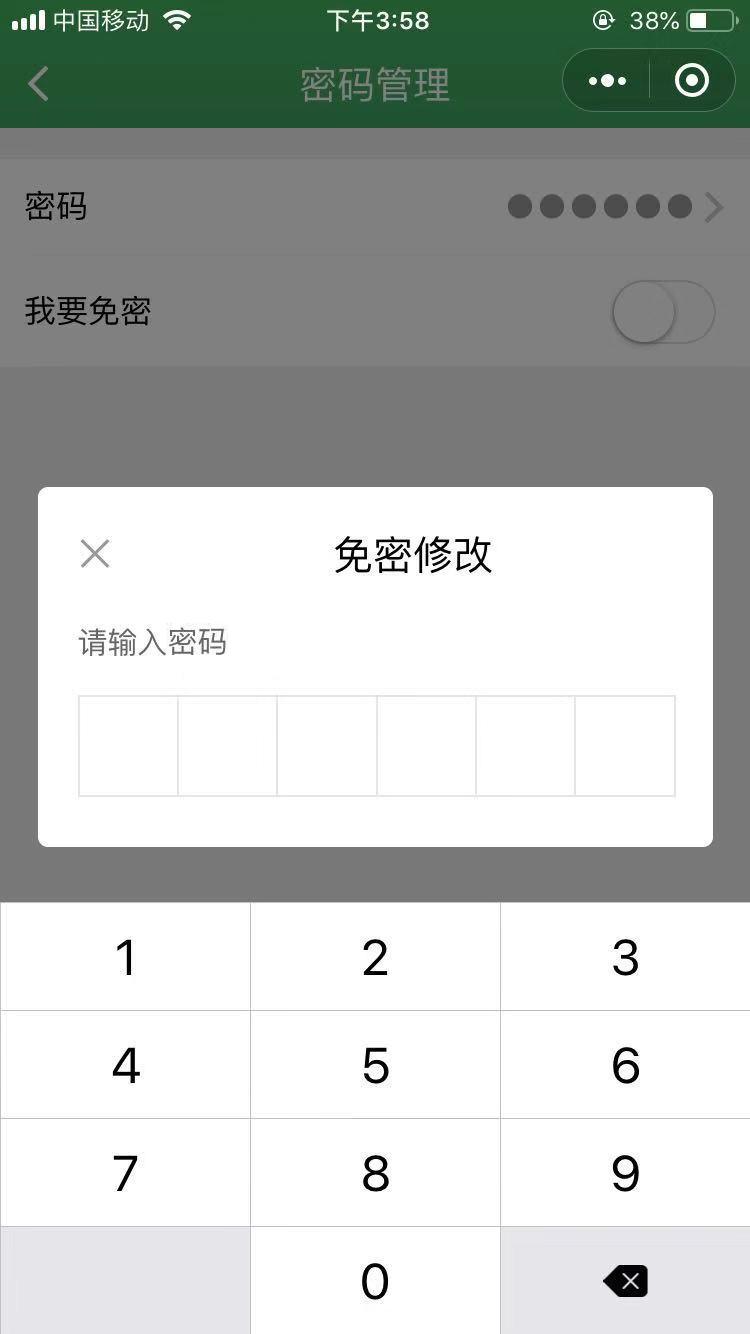
记录一个类似支付密码的弹窗写法,实现是否免密功能。如图:
index.js
class Index extends Component {

  constructor() {

    super(...arguments)

    this.state = ({

      switchIsCheck: false,

      showPayPwdInput: false,

      payFocus: true,

      pwdVal: '',
      toastText: '',
      isOpened: false
    })

  }

// 打开关闭免密  用了在Switch开关上面遮挡一个透明的View,来显示弹窗,控制Switch的开关

  switchIsCheckBtn = () => {

    this.setState({

      showPayPwdInput: true

    })

  }

  closeClick = () => {

    this.setState({

      showPayPwdInput: false

    })

  }

  // 检验密码 输完6位数字密码时候调用

  hidePayLayer = () => {

    let val = this.state.pwdVal
    this.setState({

      showPayPwdInput: false,

      pwdVal: ''

    }, () => {

      Taro.request({

        method: 'post',

        url:

          API.URL,

        header: {

          'Content-Type': 'application/json',

          'Data-Type':'json',

          'weixinauth': this.state.tookenData

        },

        data:JSON.stringify({

          password:val

        }),

        success: res => {

          if (res.data.status == ) {

            this.setState({

              switchIsCheck: !this.state.switchIsCheck

            })

          }else{

            this.setState({

              isOpened: true,

              toastText: '密码错误'

            })

          }

        }

      })

    })

  }

  // 密码输入

  inputPwd = (e) => {

    this.setState({

      pwdVal: e.detail.value

    },() => {

      if (e.detail.value.length >= ) {

        this.hidePayLayer()

      }

    })

  }

  render() {
    const {isOpened, toastText} = this.state

    return (

      <View className='box-passward'>

        <View className="password-top">

          <View className="no-password">

            <AtList>

              <AtListItem title='密码' extraText='●●●●●●' arrow='right' onClick={this.handleClickChange} />

              <AtListItem

                switchColor='#40ac4b'

                title='我要免密'

                isSwitch

                onSwitchChange={this.handleChange}

                switchIsCheck={this.state.switchIsCheck}

              />

              <View className="password-btn" onClick={this.switchIsCheckBtn}></View>

            </AtList>

            <View className='forget-password' onClick={this.forgetPwd}>忘记密码?</View>

          </View>

        </View>

        {

          this.state.showPayPwdInput ?

            <View className="dialog">

              <View className="input_main">

                <View className="input_title">

                  <AtIcon onClick={this.closeClick} value='close' size=''className="input_title-close"></AtIcon>

                  <Text>免密修改</Text>

                </View>

                <View className="write-title">请输入密码</View>

                <View className="input_row">

                  {

                    [,,,,,].map((item,index) => {

                      return (

                        <View key={index} className="pwd_item">

                          {

                            this.state.pwdVal.length>index ? <Text className="pwd_itemtext"></Text> : null

                          }

                        </View>

                      )

                    })

                  }

                </View>

                <Input focus={this.state.payFocus} password type="number" maxLength="" onInput={this.inputPwd} className="input_control"></Input>

              </View>

            </View>

            : null

        }
      </View>

    )

  }

}
index.scss
.box-passward {

  display: flex;

  flex-direction: column;

  height: 100vh;

  background: #f2f2f2;

    .signature-passward-bg {

      background: linear-gradient(#21b459, #24a262);

      position: relative;

    }

    .tabContant-certificate {

        padding-top: %;

        .image-certificate{

            width:360px;

            height: 360px;

            margin: auto;

            image{

               width: %;

               height: %;

            }

        }

        .text-certificate{

            font-size:30px;

            width:508px;

            margin: auto;

        }

    }

    .password-top{

      margin-top:32px;

      .no-password{

        .at-list__item .item-extra__info{

          font-size: 24px;

        }

      }

      .at-list{

         border-top: 1px solid #e5e5e5;

         border-bottom: 1px solid #e5e5e5;

      }

      .password-btn{

         width:105px;

         height: 70px;

         position: absolute;

         right:35px;

         bottom:20px;

      }

      .forget-password{

         padding:20px;

         color:#40ac4b;

         font-size: 28px;

      }

      .my-body {

        .account-tip {

           width: %;

           color: #;

           font-size: 28px;

           line-height: 50px;

           padding:  30px 20px;

           font-family: "PingFang-SC-Medium";

          .active{

             color: #40ac4b;

             font-size: 26px;

          }

        }

        .my-body-content {

           background-color: #fff;

           border-top:1px solid #e5e5e5;

           border-bottom:1px solid #e5e5e5;

        }

        .at-button{

           margin:60px 30px;

        }

      }

    }

  .dialog {

     width: %;

     height: %;

     position: fixed;

     left:;

     top:;

     z-index: ;

     background: rgba(,,,0.5);

    .input_main {

      position: fixed;

      left: %;

      bottom: %;

      margin-bottom:-180px;

      margin-left: -%;

      width: %;

      height: 360px;

      background-color: #fff;

      z-index: ;

      border-radius: 10px;

      .input_title {

        width: %;

        height: 135px;

        line-height: 135px;

        text-align: center;

        font-size: 40px;

        .input_title-close{

          color:rgb(,,);

          float: left;

          margin-top:50px;

          margin-left: 40px;

        }

        .input_back {

          position: absolute;

          left: ;

          top: ;

          width: 80px;

          height: 90px;

          display: flex;

          justify-content: center;

          align-items: center;

          .input_backtext {

            width: 20px;

            height: 20px;

            background-color: white;

            border: 2px solid #aaa;

            border-width: 5px   5px;

            transform: rotate(-45deg);

          }

        }

      }

      .write-title{

        color:rgb(,,);

        font-size: 30px;

        padding-left:40px;

        margin-bottom: 30px;

      }

      .input_row {

        width: %;

        margin:  40px;

        height: 98px;

        position: relative;

        display: flex;

        align-items: center;

        border: 2px solid rgb(,,);

        .pwd_item{

          flex: ;

          display: flex;

          align-items: center;

          justify-content: center;

          height: %;

          border-right: 2px solid rgb(,,);

          position: relative;

          .pwd_itemtext {

            width: 30px;

            height: 30px;

            border-radius: 30px;

            background-color: #;

          }

        }

        .pwd_item:last-child {

          border-right: none;

        }

      }

      .forget_pwd {

        float: right;

        margin: 30px;

        width: 100px;

        text-align: right;

        font-size: 24px;

        color: #ff7800;

      }

      .input_control {

        position: relative;

        left: -300px;

        bottom: ;

        width: 100px;

        height: 100px;

      }

    }

  }

}
Taro -- 微信小程序密码弹窗的更多相关文章
- Taro -- 微信小程序wxParse达到html转换wxml
Taro微信小程序可以用wxParse来达到html转换wxml的效果:https://github.com/NervJS/taro-components-test/blob/master/src/p ...
- Taro -- 微信小程序登录
Taro微信小程序登录 1.调用Taro.login()获取登录凭证code: 2.调用Taro.request()将code传到服务器: 3.服务器端调用微信登录校验接口(appid+appsecr ...
- 微信小程序自定义弹窗wcPop插件|仿微信弹窗样式
微信小程序自定义组件弹窗wcPop|小程序消息提示框|toast自定义模板弹窗 平时在开发小程序的时候,弹窗应用场景还是蛮广泛的,但是微信官方提供的弹窗比较有局限性,不能自定义修改.这个时候首先想到的 ...
- Taro 微信小程序 上传文件到minio
小程序前端上传文件不建议直接引用minio的js npm包,一来是这个包本身较大,会影响小程序的体积,二来是ak sk需要放到前端存储,不够安全,因此建议通过请求后端拿到签名数据后上传. 由于小程序的 ...
- taro 微信小程序原生作用域获取
在 Taro 的页面和组件类中,this 指向的是 Taro页面或组件实例. 但是一般我们需要获取 Taro的页面和组件 所对应的 小程序原生页面和组件实例,这个时候我们可以通过 this.$scop ...
- 微信小程序---密码输入
设计支付密码的输入框 效果如下: 源码:github地址:https://github.com/fiveTree/-_- 干货: <view class="pay"> ...
- 微信小程序底部弹窗动画
第一步,在组件里编写弹窗的代码 <!-- 活动类型弹框 --> <view class='bottomModel' wx:if="{{modelFlag}}" c ...
- 微信小程序 - 自定义弹窗组件
2019-01-06:简化了一些代码,以及增加了可用性. // 弹窗配置 dialogConfig: { // 弹窗 dialogvisible: false, options: { // 显示关闭按 ...
- 微信小程序自定义弹窗(可通用)
效果图 .wxml <cover-view class='mask' wx:if='{{isShow}}'> <cover-view class='modal'> <co ...
随机推荐
- Form 表单用 Ajax 提交数据并用 jQuery Validate 验证
表单填写需要验证可用插件 jQuery Validate 提交数据使用 Ajax 可操控性得到提到 注意:请自行引入 jQuery 和 jQuery Validate HTML 代码 <form ...
- PHP获取数组最大值下标的方法
<?php $hots = array('8213'=> 0,'8212'=> 100,'8172'=> 10008); $key = array_search(max($ho ...
- Sign on Fence(连续的长为W的一段中最小的数字的最大值)
题目链接:http://codeforces.com/problemset/problem/484/E 题意:给你个n,n个木板都有高度,宽度都为1 ,给你两个数[l,r]和一个w,求在[l,r]区间 ...
- CTO爆料:2019程序员最需要了解的行业前沿技术是什么?
安森,个推CTO 毕业于浙江大学,现全面负责个推技术选型.研发创新.运维管理等工作,已带领团队开发出针对移动互联网.金融风控等行业的多项前沿数据智能解决方案. 曾任MSN中国首席架构师,拥有十余年资深 ...
- Mybatis, 实现一对多
我这里是拿商品做为例子 不多说直接上代码 Mapper.xml <?xml version="1.0" encoding="UTF-8"?> < ...
- 获取oracle数据库对象定义
在oracle中,使用DBMS_METADATA包中的GET_DDL函数来获得对应对象的定义语句.GET_DDL函数的定义如下: DBMS_METADATA.GET_DDL ( object_type ...
- Java实体类之间的映射(一对多关系)
通过栗子,一个人可以有多辆汽车 定义人 这个类 人可以有很多辆汽车,类中车属性用数组 class Person{ private String name; private String phone ...
- Understanding ECMAScript 6 阅读问题小记
拖了一年说要看这本书,一直都没坚持下来,开个 bo 记录下觉得疑惑的问题,也算鞭策一下自己. 第一章 块级绑定 1. 第一章“块级绑定”下,说 const 变量如果绑定的是对象 Object,那么修改 ...
- 字符串中的TRIM操作
std::string& ltrim(std::string& str, const std::string& chars = "\t\n\v\f\r ") ...
- Nginx 日志切割(Logrotate)
Logrotate 配置文件 # ls /etc/logrotate.* /etc/logrotate.conf /etc/logrotate.d: cups dracut fmdcn httpd i ...