
微信小程序---密码输入
设计支付密码的输入框
效果如下:
源码:github地址:https://github.com/fiveTree/-_-
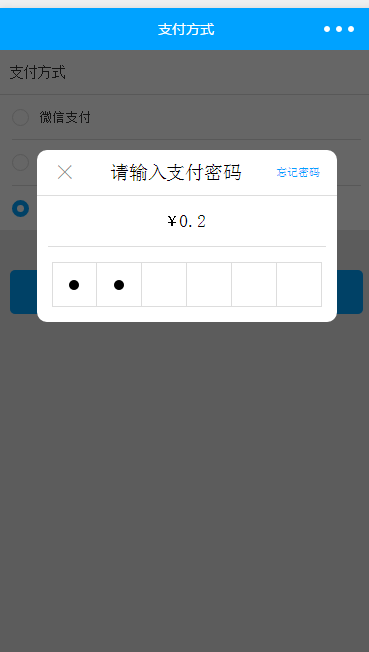
干货:
<view class="pay">
<view class="title">支付方式</view>
<view catchtap="wx_pay" class="wx_pay">
<i class="icon {{payment_mode==1?'active':''}}" type="String"></i>
<text>微信支付</text>
</view>
<view catchtap="offline_pay" class="offline_pay">
<i class="icon {{payment_mode==0?'active':''}}" type="String"></i>
<text>对公打款</text>
</view>
<block wx:if="{{balance!=0}}">
<view catchtap="wallet_pay" class="wallet_pay">
<i class="icon {{payment_mode==2?'active':''}}" type="String"></i>
<text>钱包支付(余额:{{balance/100}}元)</text>
</view>
</block>
<block wx:if="{{balance==0}}">
<view class="wallet_pay">
<i class="icon" type="String" style="background:#e8e8e8;border:none;"></i>
<text style="color:#999">钱包支付(余额不足)</text>
</view>
</block>
</view>
<view catchtap="pay" class="save">确定</view>
<!--输入钱包密码-->
<view wx:if="{{wallets_password_flag}}" class="wallets-password">
<view class="input-content-wrap">
<view class="top">
<view catchtap="close_wallets_password" class="close">×</view>
<view class="txt">请输入支付密码</view>
<view catchtap="modify_password" class="forget">忘记密码</view>
</view>
<view class="actual_fee">
<span>¥</span>
<text>{{actual_fee/100}}</text>
</view>
<view catchtap="set_Focus" class="input-password-wrap">
<view class="password_dot">
<i wx:if="{{wallets_password.length>=1}}"></i>
</view>
<view class="password_dot">
<i wx:if="{{wallets_password.length>=2}}"></i>
</view>
<view class="password_dot">
<i wx:if="{{wallets_password.length>=3}}"></i>
</view>
<view class="password_dot">
<i wx:if="{{wallets_password.length>=4}}"></i>
</view>
<view class="password_dot">
<i wx:if="{{wallets_password.length>=5}}"></i>
</view>
<view class="password_dot">
<i wx:if="{{wallets_password.length>=6}}"></i>
</view>
</view>
</view>
<input bindinput="set_wallets_password" class="input-content" password type="number" focus="{{isFocus}}" maxlength="6" />
</view>
//index.js

Page({

  data: {

    payment_mode: 1,//默认支付方式 微信支付

    isFocus: false,//控制input 聚焦

    balance:100,//余额

    actual_fee:20,//待支付

    wallets_password_flag:false//密码输入遮罩

  },

  //事件处理函数

  onLoad: function () {

  },

  wx_pay() {//转换为微信支付

    this.setData({

      payment_mode: 1

    })

  },

  offline_pay() {//转换为转账支付

    this.setData({

      payment_mode: 0

    })

  },

  wallet_pay() {

    this.setData({//转换为钱包支付

      payment_mode: 2

    })

  },

  set_wallets_password(e) {//获取钱包密码

    this.setData({

      wallets_password: e.detail.value

    });

    if (this.data.wallets_password.length == 6) {//密码长度6位时,自动验证钱包支付结果

      wallet_pay(this)

    }

  },

  set_Focus() {//聚焦input

    console.log('isFocus', this.data.isFocus)

    this.setData({

      isFocus: true

    })

  },

  set_notFocus() {//失去焦点

    this.setData({

      isFocus: false

    })

  },

  close_wallets_password () {//关闭钱包输入密码遮罩

    this.setData({

      isFocus: false,//失去焦点

      wallets_password_flag: false,

    })

  },

  pay() {//去支付

    pay(this)

  }

})

/*-----------------------------------------------*/

/*支付*/

function pay(_this) {

  let apikey = _this.data.apikey;

  let id = _this.data.id;

  let payment_mode = _this.data.payment_mode

  if (payment_mode == 1) {

  //  微信支付

  // 微信自带密码输入框

    console.log('微信支付')

  } else if (payment_mode == 0) {

  //  转账支付 后续跳转至传转账单照片

    console.log('转账支付')

  } else if (payment_mode == 2) {

    // 钱包支付 输入密码

    console.log('钱包支付')

    _this.setData({

      wallets_password_flag: true,

      isFocus: true

    })

  }

}

// 钱包支付

function wallet_pay(_this) {

  console.log('钱包支付请求函数')

  /*

  1.支付成功

  2.支付失败:提示;清空密码;自动聚焦isFocus:true,拉起键盘再次输入

  */

}
index.wxss
page {

  height: 100%;

  width: 100%;

  background: #e8e8e8;

}

page .pay {

  display: flex;

  flex-direction: column;

  background: #fff;

}

page .pay .title {

  height: 90rpx;

  line-height: 90rpx;

  font-size: 28rpx;

  color: #353535;

  padding: 0 23rpx;

  border-bottom: 1rpx solid #ddd;

  box-sizing: border-box;

}

page .pay .wx_pay, page .pay .offline_pay, page .pay .wallet_pay {

  margin: 0 26rpx;

  height: 90rpx;

  line-height: 90rpx;

  border-bottom: 2rpx solid #ddd;

  box-sizing: border-box;

  display: flex;

  align-items: center;

  justify-content: flex-start;

}

page .pay .wx_pay .icon, page .pay .offline_pay .icon,

page .pay .wallet_pay .icon {

  width: 34rpx;

  height: 34rpx;

  border: 2rpx solid #ddd;

  box-sizing: border-box;

  border-radius: 50%;

}

page .pay .wx_pay .icon.active, page .pay .offline_pay .icon.active,

page .pay .wallet_pay .icon.active {

  border: 10rpx solid #00a2ff;

}

page .pay .wx_pay text, page .pay .offline_pay text, page .pay .wallet_pay text {

  margin-left: 20rpx;

  color: #353535;

  font-size: 26rpx;

}

page .pay .wallet_pay {

  border:;

  border-top: 2rpx solid #ddd;

}

page .pay .offline_pay {

  border: 0 none;

}

page .save {

  margin: 80rpx 23rpx;

  color: #fff;

  background: #00a2ff;

  height: 88rpx;

  line-height: 88rpx;

  text-align: center;

  font-size: 30rpx;

  border-radius: 10rpx;

}

page .wallets-password {

  position: absolute;

  left:;

  top:;

  width: 100%;

  height: 100%;

  background: rgba(0, 0, 0, 0.6);

}

page .wallets-password .input-content-wrap {

  position: absolute;

  top: 200rpx;

  left: 50%;

  display: flex;

  flex-direction: column;

  width: 600rpx;

  margin-left: -300rpx;

  background: #fff;

  border-radius: 20rpx;

}

page .wallets-password .input-content-wrap .top {

  display: flex;

  align-items: center;

  height: 90rpx;

  border-bottom: 2rpx solid #ddd;

  justify-content: space-around;

}

page .wallets-password .input-content-wrap .top .close {

  font-size: 44rpx;

  color: #999;

  font-weight:;

}

page .wallets-password .input-content-wrap .top .forget {

  color: #00a2ff;

  font-size: 22rpx;

}

page .wallets-password .input-content-wrap .actual_fee {

  display: flex;

  align-items: center;

  justify-content: center;

  color: #000;

  height: 100rpx;

  margin: 0 23rpx;

  border-bottom: 2rpx solid #ddd;

}

page .wallets-password .input-content-wrap .actual_fee span {

  font-size: 24rpx;

}

page .wallets-password .input-content-wrap .actual_fee text {

  font-size: 36rpx;

}

page .wallets-password .input-content-wrap .input-password-wrap {

  display: flex;

  align-items: center;

  justify-content: center;

  height: 150rpx;

}

page .wallets-password .input-content-wrap .input-password-wrap .password_dot {

  display: flex;

  align-items: center;

  justify-content: center;

  text-align: center;

  color: #000;

  box-sizing: border-box;

  width: 90rpx;

  height: 90rpx;

  border: 2rpx solid #ddd;

  border-left: none 0;

}

page .wallets-password .input-content-wrap .input-password-wrap .password_dot:nth-child(1) {

  border-left: 2rpx solid #ddd;

}

page .wallets-password .input-content-wrap .input-password-wrap .password_dot i {

  background: #000;

  border-radius: 50%;

  width: 20rpx;

  height: 20rpx;

}

page .wallets-password .input-content {

  position: absolute;

  opacity:;

  left: -100%;

  top: 600rpx;

  background: #f56;

  z-index: -999;

}

page .wallets-password .input-content.active {

  z-index: -99;

}
github地址:https://github.com/fiveTree/-_-
微信小程序---密码输入的更多相关文章
- Taro -- 微信小程序密码弹窗
记录一个类似支付密码的弹窗写法,实现是否免密功能.如图: index.js import Taro, { Component } from '@tarojs/taro' import { Vi ...
- 微信小程序-输入框输入文字后,将光标移到文字中间,接着输入文字后光标又自动跳到最后
问题描述: input输入框输入一段文字后,将光标移到文字中间,接着输入文字后光标又自动跳到最后去了. 原因: input事件中,给input框绑定任何事件后,在处理事件时 setData之后就会让光 ...
- WordPress版微信小程序2.1.5版发布
WordPress版微信小程序功能已经基本完善,利用这套程序,搭配WordPress提供的rest api,WordPress网站的站长可以快速搭建属于自己的网站微信小程序 . WordPress版微 ...
- 微信小程序-form表单-获取用户输入文本框的值
微信小程序-form表单-获取用户输入文本框的值 <input name='formnickname' class="textarea" placeholder=" ...
- 微信小程序tips集合:无法输入文字/随时查看页面/元素审查/点击事件/数据绑定
1:编辑文档无法输入文字 出现这种情况一般是因为之前编辑的文档未保存,所有在其他文档输入的时候会自动输入到未保存的文档中,在文档暂时编辑完毕后要ctrl+s随手保存,不然会出现无法打字情况 2: 随时 ...
- 微信小程序 获得用户输入内容
在微信小程序里,如何获得用户输入的内容?? js: document.getElementById("Content").value jq:$("#Content&quo ...
- 微信小程序车牌号码模拟键盘输入
微信小程序车牌号码模拟键盘输入练习, 未经允许,禁止转载,抄袭,如需借鉴参考等,请附上该文章连接. 相关资料参考:https://blog.csdn.net/littlerboss/article/d ...
- 微信小程序怎么获取用户输入
能够获取用户输入的组件,需要使用组件的属性bindchange将用户的输入内容同步到 AppService. <input id="myInput" bindchange=& ...
- 微信小程序开发系列五:微信小程序中如何响应用户输入事件
微信小程序开发系列教程 微信小程序开发系列一:微信小程序的申请和开发环境的搭建 微信小程序开发系列二:微信小程序的视图设计 微信小程序开发系列三:微信小程序的调试方法 微信小程序开发系列四:微信小程序 ...
随机推荐
- 使用 WijmoJS 轻松实现撤消重做(Undo /Redo)
使用 WijmoJS 轻松实现撤消重做(Undo /Redo) 在V2019.0 Update2 的全新版本中,WijmoJS能够轻松实现撤消和重做操作,使Web应用程序的使用更加友好.更加高效. 不 ...
- SQL Server解惑——为什么你的查询结果超出了查询时间范围
原文:SQL Server解惑--为什么你的查询结果超出了查询时间范围 废话少说,直接上SQL代码(有兴趣的测试验证一下),下面这个查询语句为什么将2008-11-27的记录查询出来了呢?这个是同事遇 ...
- C++变量的声明和定义
1.变量的定义:变量的定义用于为变量分配存储控件,还可以为变量指定初始值.在一个程序中,变量有且仅有一个定义. 2.变量的声明:用于向程序表名变量的类型和名字.程序中变量可以声明多次,但只能定义一次. ...
- JavaScript--QuckStudy
Day1: 初识JS: https://www.liaoxuefeng.com/wiki/1022910821149312 >打印: alert('我要学JavaScript!'); >J ...
- SOSdp
layout: post title: SOSdp author: "luowentaoaa" catalog: true tags: mathjax: true - codefo ...
- Boot-crm管理系统开发教程(二)
ps:昨天将管理员登录的功能完成了,并完美的解决跳过登录从而进入管理界面的bug,今天我们将实现"查询用户"功能. ①在po包中创建Customer类,并编写相关变量和添加set/ ...
- 并不对劲的复健训练-CF1187D
题目大意 有两个长度为\(n\)的序列\(a_1,...,a_n\),\(b_1,...,b_n\)(\(a,b\leq n\leq 3\times 10^5\) ).一次操作是选取 \([l,r]\ ...
- 怎样使用 v-html 指令?
v-html 可以在目标节点位置内部插入 html 子节点, 跟节点的 .innerHTML 属性类似, 使用方法如下: <!DOCTYPE html> <html lang=&qu ...
- 搭建自己的框架WedeNet(四)
WedeNet2018.Web-UI层:结构如下: 首先,在Controller中定义BaseController,以便加入统一处理逻辑,如下: using log4net; using System ...
- ZROI2018暑期集训B班训练赛#1解题报告
版权原因不公布题目信息 A 分析 虽然前一天搞到比较晚,考场上还是比较快的想到了正解,可惜姿势水平低被卡到了64(进入高中不知道考过多少次64了...) 这题有个比较明显且\(naive\)的做法是用 ...