
LinearLayout
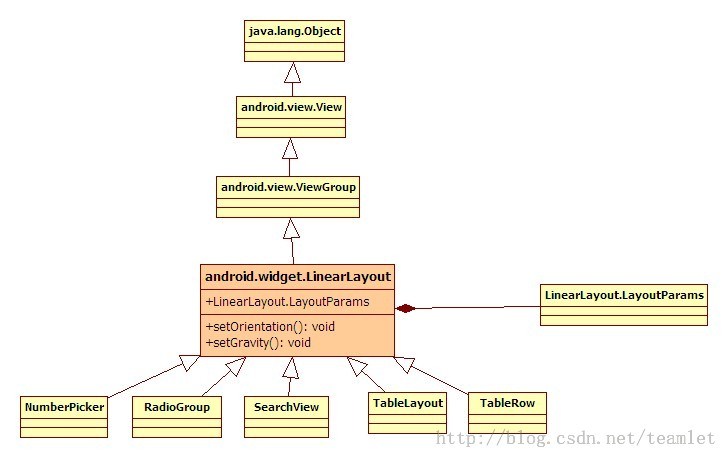
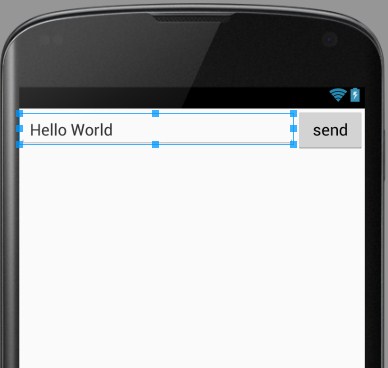
<?xml version="1.0" encoding="utf-8"?>
<LinearLayout xmlns:android="http://schemas.android.com/apk/res/android"
    android:orientation="horizontal"
    android:layout_width="match_parent"
    android:layout_height="match_parent"
    android:layout_alignParentTop="true"
    android:layout_alignParentLeft="true"
    android:layout_alignParentStart="true">

    <EditText
        android:layout_width="0dp"
        android:layout_height="wrap_content"
        android:id="@+id/editText2"
        android:layout_weight="4" />

    <Button
        android:layout_width="0dp"
        android:layout_height="wrap_content"
        android:text="send"
        android:id="@+id/btn_send"
        android:layout_weight="1" />
</LinearLayout>
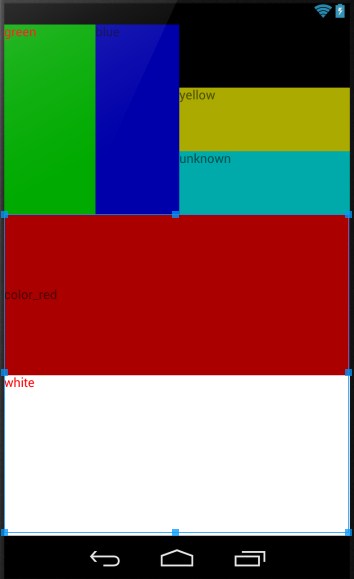
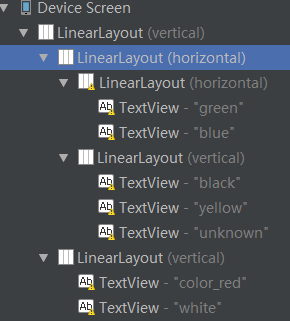
<?xml version="1.0" encoding="utf-8"?>
<LinearLayout xmlns:android="http://schemas.android.com/apk/res/android"
    android:layout_width="fill_parent"
    android:layout_height="fill_parent"
    android:orientation="vertical" >
    <LinearLayout
        android:orientation="horizontal"
        android:layout_width="fill_parent"
        android:layout_height="wrap_content"
        android:baselineAligned="false"
        android:layout_weight="1"  >

        <LinearLayout
            android:orientation="horizontal"
            android:layout_width="wrap_content"
            android:layout_height="fill_parent"
            android:layout_weight="1">
            <TextView
                android:text="green"
                android:textColor="#ff0000"
                android:background="#00aa00"
                android:layout_width="wrap_content"
                android:layout_height="fill_parent"
                android:layout_weight="1"/>
            <TextView
                android:text="blue"
                android:background="#0000aa"
                android:layout_width="wrap_content"
                android:layout_height="fill_parent"
                android:layout_weight="1"/>
        </LinearLayout>
        <LinearLayout
            android:orientation="vertical"
            android:layout_width="wrap_content"
            android:layout_height="fill_parent"
            android:layout_weight="1">
            <TextView
                android:text="black"
                android:background="#000000"
                android:layout_width="fill_parent"
                android:layout_height="wrap_content"
                android:layout_weight="1"/>
            <TextView
                android:text="yellow"
                android:background="#aaaa00"
                android:layout_width="fill_parent"
                android:layout_height="wrap_content"
                android:layout_weight="1"/>
            <TextView
                android:text="unknown"
                android:background="#00aaaa"
                android:layout_width="fill_parent"
                android:layout_height="wrap_content"
                android:layout_weight="1"/>
        </LinearLayout>
    </LinearLayout>
    <LinearLayout
        android:orientation="vertical"
        android:layout_width="fill_parent"
        android:layout_height="wrap_content"
        android:layout_weight="2">
        <TextView
            android:text="color_red"
            android:gravity="fill_vertical"
            android:background="#aa0000"
            android:layout_width="fill_parent"
            android:layout_height="wrap_content"
            android:layout_weight="2"/>
        <TextView
            android:text="white"
            android:textColor="#ff0000"
            android:background="#ffffff"
            android:layout_width="fill_parent"
            android:layout_height="wrap_content"
            android:layout_weight="2"/>
    </LinearLayout>

</LinearLayout>
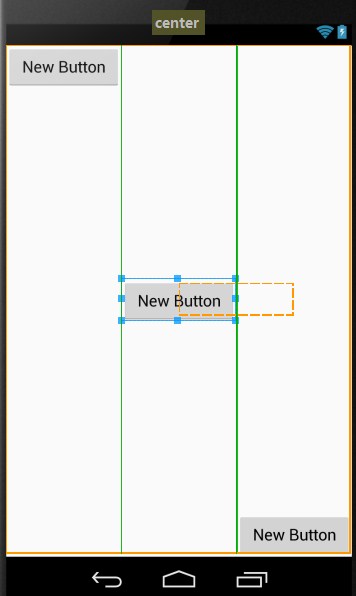
<?xml version="1.0" encoding="utf-8"?>
<LinearLayout xmlns:android="http://schemas.android.com/apk/res/android"
    android:layout_width="match_parent"
    android:layout_height="match_parent">

    <Button
        android:layout_width="wrap_content"
        android:layout_height="wrap_content"
        android:text="New Button"
        android:id="@+id/button3"
        android:layout_gravity="bottom|right|top"
        android:layout_weight="1"/>

    <Button
        android:layout_width="wrap_content"
        android:layout_height="wrap_content"
        android:text="New Button"
        android:id="@+id/button2"
        android:layout_gravity="center_vertical"
        android:layout_weight="1"/>

    <Button
        android:layout_width="wrap_content"
        android:layout_height="wrap_content"
        android:text="New Button"
        android:id="@+id/button"
        android:layout_gravity="bottom"
        android:layout_weight="1" />
</LinearLayout>
LinearLayout的更多相关文章
- Android中的LinearLayout布局
LinearLayout : 线性布局 在一般情况下,当有很多控件需要在一个界面列出来时,我们就可以使用线性布局(LinearLayout)了, 线性布局是按照垂直方向(vertical)或水平方向 ...
- 和我一起看API(一)你所不知道的LinearLayout补充
楼主英语水平差,翻译的不好的话请多多指正,嘿嘿... A Layout that arranges its children in a single column or a single row. T ...
- Android-RelativeLayout(相对布局)、LinearLayout(线性布局)
RelativeLayout(相对布局):按照各子元素之间的位置关系完成布局. 定位:android:layout_above="@id/xxx" --将控件置于给定ID控件之上 ...
- LinearLayout布局问题
LinearLayout是平时开发中很常见的线性布局方式,分为水平和竖直2种,笔者在实际使用中发现了如下问题,希望能帮到别人. 横着的LinearLayout,凡是设置x坐标的属性都不起作用,比如la ...
- 动态添加LinearLayout的高度
WindowManager wm = (WindowManager) getContext() .getSystemService(Context.WINDOW_SERVICE); int width ...
- 动态生成linearLayout
LinearLayout linearLayout=new LinearLayout(this); linearLayout.setOrientation(LinearLayout.VERTICAL) ...
- Android的学习第六章(布局一LinearLayout)
今天我们来说一下Android五大布局-LinearLayout布局(线性布局) 含义:线性布局,顾名思义,指的是整个Android布局中的控件摆放方式是以线性的方式摆放的, 主要作用:主要对整个界面 ...
- This TableLayout layout or its LinearLayout parent is possibly useless
<?xml version="1.0" encoding="utf-8"?> <LinearLayout xmlns:android=&quo ...
- Record:Handle onClick for our custom LinearLayout for Gallery-like HorizontalScrollView
Handle onClick for our custom LinearLayout for Gallery-like HorizontalScrollView The post "Im ...
- Andriod中textview垂直水平居中及LinearLayout内组件的垂直布局
1.textview 垂直水平居中的设置 Android:gravity="center_vertical|center" 2.LinearLayout中设置控件垂直布局,默认的是 ...
随机推荐
- TCP的三次握手与四次分手
TCP的位置 TCP工作在网络OSI的七层模型中的第四层——Transport层,IP在第三层——Network层,ARP在第二层——Data Link层: 在第二层上的数据,我们把它叫Frame,在 ...
- 大学站防SQL注入代码(ASP版)
方法1: Replace过滤字符 解决方法:查找login.asp下的<from找到下边的类似username=request.Form(”name”) pass=request.Form(”p ...
- HBase命令(二) -- 表操作
创建表 hbase shell> create 'mytable','col1','col2' //建表语句 create '表名','列簇名','列簇名','列簇名' hbase shell& ...
- 徐汉彬:Web系统大规模并发——电商秒杀与抢购(转)
[导读]徐汉彬曾在阿里巴巴和腾讯从事4年多的技术研发工作,负责过日请求量过亿的Web系统升级与重构,目前在小满科技创业,从事SaaS服务技术建设. 电商的秒杀和抢购,对我们来说,都不是一个陌生的东西. ...
- Linux 高精確的時序(sleep, usleep,nanosleep) from:http://blog.sina.com.cn/s/blog_533ab41c0100htae.html
Linux 高精確的時序(sleep, usleep,nanosleep) (2010-04-14 17:18:26) 转载▼ 标签: 杂谈 分类: linux 首先, 我会说不保证你在使用者模式 ( ...
- PostgreSQL建立分区表示例
pgsql 分区表: --主表 create table test(id integer, name varchar(32)); create index idx_test_id on test us ...
- Unity3D
一.安装配置 1.下载页面:http://unity3d.com/get-unity 分个人版本和专业版,个人版免费,但少了很多功能(主要是渲染相关,具体请看官方说明), 专业版是每月 75$ 或一次 ...
- 通过google chrome操作JavaScript中Console
紧接着有关上一个文章的!function................. 前端开发人员一定会用到你的开发者工具中的Console控制台.通常Console用于调试程序,日志输出,打断点等功能.比如我 ...
- 【C语言入门教程】2.4 浮点型数据
浮点型数据又称实型数据,是一个以十进制表示的符号实数.符号实数的值包括整数部分.尾数部分和指数部分. 2.4.1 浮点型常量 一些较大的数值,或者有小数位.指数位的数值都需要用浮点型常量表示.浮点型常 ...
- JAVA-多屏幕显示
以下代码适用于:一台主机连接多台显示器,JAVA Swing窗口需要分别显示到对应的显示器上. GraphicsEnvironment env = GraphicsEnvironment.getLoc ...