
android 布局中 layout_gravity、gravity、orientation、layout_weight
线性布局中,有 4 个及其重要的参数,直接决定元素的布局和位置,这四个参数是
android:layout_gravity ( 是本元素相对于父元素的重力方向 )
android:gravity (是本元素所有子元素的重力方向)
android:orientation (线性布局以列或行来显示内部子元素)
android:layout_weight (线性布局内子元素对未占用空间【水平或垂直】分配权重值,其值越小,权重越大。
前提是子元素 设置了 android:layout_width = "fill_parent" 属性(水平方向)
或 android:layout_height = "fill_parent" 属性(垂直方向)
如果某个子元素的 android:layout_width = "wrap_content"
或 android:layout_height =" wrap_content” ,
则 android:layout_weight 的设置值 对该方向上空间的分配刚好相反。
下面以一个简单例子来说明这 4个参数
<? xml version = "1.0" encoding = "utf-8" ?>
< LinearLayout xmlns:android = "http://schemas.android.com/apk/res/android"
android:layout_height = "200dp"
android:layout_width = "200dp"
android:background = "#AABBCC"
android:orientation= "horizontal"
android:layout_gravity= "center" >
< TextView android:text = "ONE"
android:background = "#aa0000"
android:layout_height = "wrap_content"
android:layout_width = "wrap_content"
android:layout_margin = "1dp" />
< TextView android:text = "TWO"
android:background = "#aa0000"
android:layout_height = "wrap_content"
android:layout_width = "wrap_content"
android:layout_margin = "1dp" />
</ LinearLayout >
说明:在上面的例子中,根布局是LinearLayout, 其包含有2 个TextView 视图,为了对参数 android:layout_gravity有直观的了解,对根布局 LinearLayout 特意加了 3 个参数
android:layout_height = "200dp"
android:layout_width = "200dp"
android:background = "#AABBCC"
为布局指定了固定的宽度和高度,以及背景颜色,上面的例子运行后效果如下图:
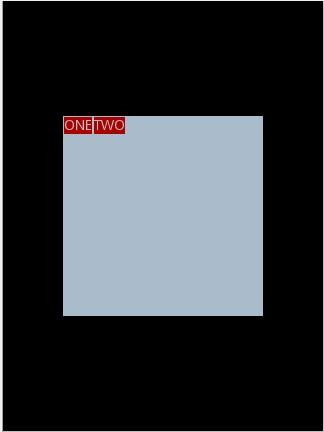
说明:对LinearLayout 中的参数android:layout_gravity 来说,其意义是指定本布局相对于父布局的重力方向,由于该布局的已经是根布局,其父布局是整个屏幕,那么该参数设置的是相对于屏幕的位置,可以换不同的参数top|bottom|left|right 等等参数来试验。
现在增加参数 android:gravity = "bottom|right" 完整 XML 如下,看看效果
<? xml version = "1.0" encoding = "utf-8" ?>
< LinearLayout xmlns:android = "http://schemas.android.com/apk/res/android"
android:layout_height = "200dp"
android:layout_width = "200dp"
android:background = "#AABBCC"
android:orientation="horizontal"
android:layout_gravity= "center"
android:gravity = "bottom|right " >
< TextView android:text = "ONE"
android:background = "#aa0000"
android:layout_height = "wrap_content"
android:layout_width = "wrap_content"
android:layout_margin = "1dp" />
< TextView android:text = "TWO"
android:background = "#aa0000"
android:layout_height = "wrap_content"
android:layout_width = "wrap_content"
android:layout_margin = "1dp" />
</ LinearLayout >
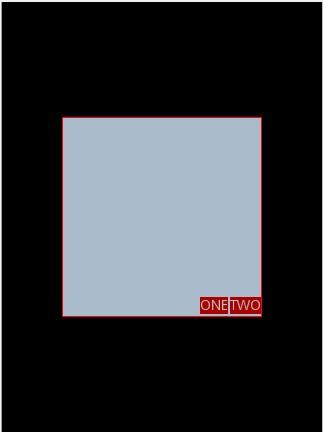
通过改变android:gravity 参数的值可以看到实际效果。
参数 android:orientation= " horizontal " 决定了每个子元素各占一列,如果
参数 android:orientation= " vertical " , 则每个子元素各占一行,也就是从上到下排列了。
对于 LinearLayout 布局的子元素,给每个子元素加上参数 android:layout_weight
看看效果
<? xml version = "1.0" encoding = "utf-8" ?>
< LinearLayout xmlns:android = "http://schemas.android.com/apk/res/android"
android:layout_height = "200dp"
android:layout_width = "200dp"
android:background = "#AABBCC"
android:layout_gravity = "center"
android:gravity = "bottom|right"
android:orientation = "horizontal" >
< TextView android:text = "ONE"
android:background = "#aa0000"
android:layout_height = "wrap_content"
android:layout_width = "wrap_content"
android:layout_margin = "1dp"
android:layout_weight = "1" />
< TextView android:text = "TWO"
android:background = "#aa0000"
android:layout_height = "wrap_content"
android:layout_width = "wrap_content"
android:layout_margin = "1dp"
android:layout_weight = "2" />
</ LinearLayout >
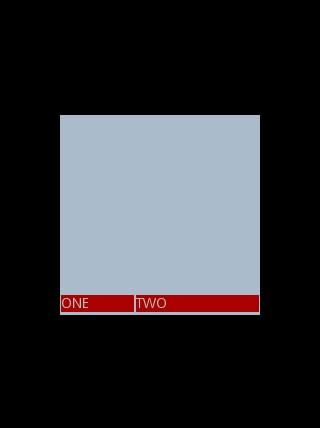
Text 为ONE 的权重为1 ,但明显占的宽度比TWO 的小,百思不得其解,后来得知,如果把TextView 的参数android:layout_width = "wrap_content" 全部修改为 android:layout_width = "fill_parent", 则 ok ,代码如下
<? xml version = "1.0" encoding = "utf-8" ?>
< LinearLayout xmlns:android = "http://schemas.android.com/apk/res/android"
android:layout_height = "200dp"
android:layout_width = "200dp"
android:background = "#AABBCC"
android:layout_gravity = "center"
android:gravity = "bottom|right"
android:orientation = "horizontal" >
< TextView android:text = "ONE"
android:background = "#aa0000"
android:layout_height = "wrap_content"
android:layout_width = " fill_parent "
android:layout_margin = "1dp"
android:layout_weight = "1" />
< TextView android:text = "TWO"
android:background = "#aa0000"
android:layout_height = "wrap_content"
android:layout_width = " fill_parent "
android:layout_margin = "1dp"
android:layout_weight = "2" />
</ LinearLayout >
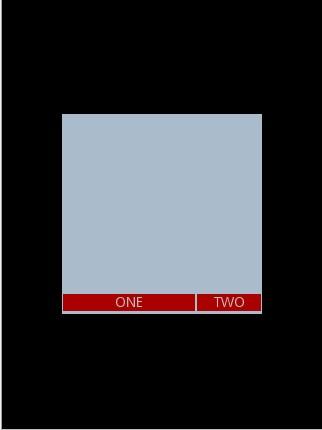
转:http://li-bonan.blog.163.com/blog/static/135564770201172441634145/
android 布局中 layout_gravity、gravity、orientation、layout_weight的更多相关文章
- android 布局中 layout_gravity、gravity、orientation、layout_weight【转】
线性布局中,有 4 个及其重要的参数,直接决定元素的布局和位置,这四个参数是 android:layout_gravity ( 是本元素相对于父元素的重力方向 ) android:gravity (是 ...
- Android布局中的空格以及占一个汉字宽度的空格的实现
在Android布局中进行使用到空格,以便实现文字的对齐.那么在Android中如何表示一个空格呢? 空格: 窄空格: 一个汉字宽度的空格: [用两个空格( )占一个汉字的宽度时,两个空格比 ...
- Android布局中的空格以及占一个汉字宽度的空格,实现不同汉字字数对齐
前言 在Android布局中进行使用到空格,以便实现文字的对齐.那么在Android中如何表示一个空格呢? 空格: (普通的英文半角空格但不换行) 窄空格: (中文全角空格 (一个中文宽度)) ...
- android布局中使用include及需注意点
在android布局中,使用include,将另一个xml文件引入,可作为布局的一部分,但在使用include时,需注意以下问题: 一.使用include引入 如现有标题栏布局block_header ...
- 从零开始学android开发-布局中 layout_gravity、gravity、orientation、layout_weight
线性布局中,有 4 个及其重要的参数,直接决定元素的布局和位置,这四个参数是 android:layout_gravity ( 是本元素相对于父元素的重力方向 ) android:gravity (是 ...
- Android布局中的layout_weight和weightSum属性的详解及使用
由于Android设备的尺寸大小不一,种类繁多,当我们在开发应用的时候就要考虑屏幕的适配型了,尽可能让我们的应用适用于主流机型的尺寸,这样我们的应用不会因为尺寸不同而不美观,解决屏幕适配问题的方法有很 ...
- Android布局中 android:layout_gravity="bottom"为何不起作用?
在android布局时我们有时会需要将位于LinearLayout布局中的控件放在布局底部,或者是同时想将几个控件底部对齐,此时我们自然会想到使用 android:layout_gravity=&qu ...
- Android 布局中 如何使控件居中
首先要分两种不同情况,在两种不同的布局方式下:LinearLayout 和RelativeLayout 1. LinearLayout a). android:layout_gravity=" ...
- 【转】在Android布局中使用include和merge标签
内容转自:http://fengweipeng1208.blog.163.com/blog/static/21277318020138229754135/ 在我们开发android布局时,经常会有很多 ...
随机推荐
- 友推在Android 实现微信等分享代码的常见问题
介绍,最近 做了一个项目,需要集成分享功能.果断选择 友推. 集成过程,参考友推官方提供的集成文档即可 废话不多说,主要说一下自己在集成过程中遇到的一些问题,主要有两个: 问题1. 引入youtui- ...
- 【LeetCode】Search Insert Position(搜索插入位置)
这道题是LeetCode里的第35道题. 题目描述: 给定一个排序数组和一个目标值,在数组中找到目标值,并返回其索引.如果目标值不存在于数组中,返回它将会被按顺序插入的位置. 你可以假设数组中无重复元 ...
- 三种框架对比react vue 和Angular对比
https://blog.csdn.net/runOnWay/article/details/80103880 angular 优点 背靠谷歌 使用typescript 便于后端人员开发上手 完整 不 ...
- js跨域post请求
function funPostBack(srvMethod){ /* var contentNR=$(document.getElementById("reportFrame") ...
- SGX技术初探
一.SGX技术背景 1.1 SGX技术定义 SGX全称Intel Software Guard Extensions,顾名思义,其是对因特尔体系(IA)的一个扩展,用于增强软件的安全性.这种方式并不是 ...
- Zookeeper 增删改查
初始化对象连接到zookeeper服务: public ZooKeeper initZk(){ final CountDownLatch countDownLatch = new CountDownL ...
- 【转】Twitter-Snowflake,64位自增ID算法详解
Twitter-Snowflake算法产生的背景相当简单,为了满足Twitter每秒上万条消息的请求,每条消息都必须分配一条唯一的id,这些id还需要一些大致的顺序(方便客户端排序),并且在分布式系统 ...
- 【bzoj1222】[HNOI2001]产品加工 背包dp
题目描述 某加工厂有A.B两台机器,来加工的产品可以由其中任何一台机器完成,或者两台机器共同完成.由于受到机器性能和产品特性的限制,不同的机器加工同一产品所需的时间会不同,若同时由两台机器共同进行加工 ...
- ZOJ 2676 Network Wars(最优比例最小割)
Network Wars Time Limit: 5 Seconds Memory Limit: 32768 KB Special Judge Network of Bytelan ...
- [usaco jan 09] 气象牛 baric [dp]
题面: 传送门 思路: 题意有点绕,实际上就是给你一个计算规则,让你取最少的元素,通过这个计算方式,得到一个小于指定误差上限的结果 这个规则分为三个部分,这里分别用pre,sum,suf表示 因为给定 ...