
Android布局中的空格以及占一个汉字宽度的空格,实现不同汉字字数对齐
前言
在Android布局中进行使用到空格,以便实现文字的对齐。那么在Android中如何表示一个空格呢?
- 空格: (普通的英文半角空格但不换行)
- 窄空格:
- (中文全角空格 (一个中文宽度))
- (半个中文宽度,但两个空格比一个中文略大)
- (一个中文宽度,但用起来会比中文字宽一点点)
- \u3000\u3000(首行缩进)
- \u3000(全角空格(中文符号))
- \u0020(半角空格(英文符号))
- …(省略号)
所以如果想要实现文字对齐,那么可以考虑下面的方案:
方案一:一个汉字宽度的空格:
方案二:一个汉字宽度的空格: 【用两个空格( )占一个汉字的宽度时,两个空格比一个汉字略窄,三个空格( )比一个汉字略宽】;使用 ‒时候部分机型转译后不是空格,而是“-”;而且在不同机型有不同表现。
方案三:一个汉字宽度的空格: 【比一个中文略大】
方案四:一个汉字宽度的空格: 【比一个中文略大】
注意:以上方案是直接写在布局文件中,如果是写在strings.xml文件中,则需要使用\u3000、\u0020这一类的,比如:
<string name="info_pwd">\u3000\u3000密码:</string>
然后在布局文件中通过下面的方式引用
android:text="@string/info_pwd"
至于,为什么在strings.xml文件中使用\u3000代替 ,则是因为Android Studio3.2 + Gradle Plugn 3.2.0 + Gradle4.6环境下, 、 都不起作用了。
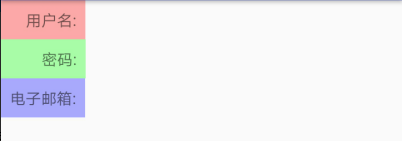
效果图
效果0:未作处理的效果
<?xml version="1.0" encoding="utf-8"?>

<LinearLayout

    xmlns:android="http://schemas.android.com/apk/res/android"

    android:layout_width="match_parent"

    android:layout_height="match_parent"

    android:orientation="vertical">

    <TextView

        android:layout_width="wrap_content"

        android:layout_height="wrap_content"

        android:text="用户名:"

        android:background="#54ff0000"

        android:padding="8dp"/>

    <TextView

        android:layout_width="wrap_content"

        android:layout_height="wrap_content"

        android:text="密码:"

        android:background="#5400ff00"

        android:padding="8dp"/>

    <TextView

        android:layout_width="wrap_content"

        android:layout_height="wrap_content"

        android:text="电子邮箱:"

        android:background="#540000ff"

        android:padding="8dp"/>

</LinearLayout>
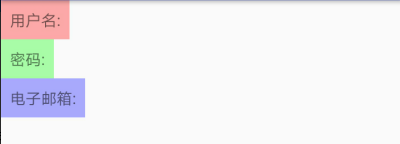
效果一、使用
<?xml version="1.0" encoding="utf-8"?>

<LinearLayout

    xmlns:android="http://schemas.android.com/apk/res/android"

    android:layout_width="match_parent"

    android:layout_height="match_parent"

    android:orientation="vertical">

    <TextView

        android:layout_width="wrap_content"

        android:layout_height="wrap_content"

        android:text=" 用户名:"

        android:background="#54ff0000"

        android:padding="8dp"/>

    <TextView

        android:layout_width="wrap_content"

        android:layout_height="wrap_content"

        android:text="  密码:"

        android:background="#5400ff00"

        android:padding="8dp"/>

    <TextView

        android:layout_width="wrap_content"

        android:layout_height="wrap_content"

        android:text="电子邮箱:"

        android:background="#540000ff"

        android:padding="8dp"/>

</LinearLayout>
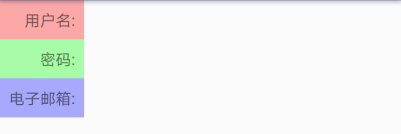
效果二、使用
<?xml version="1.0" encoding="utf-8"?>

<LinearLayout

    xmlns:android="http://schemas.android.com/apk/res/android"

    android:layout_width="match_parent"

    android:layout_height="match_parent"

    android:orientation="vertical">

    <TextView

        android:layout_width="wrap_content"

        android:layout_height="wrap_content"

        android:text="   用户名:"

        android:background="#54ff0000"

        android:padding="8dp"/>

    <TextView

        android:layout_width="wrap_content"

        android:layout_height="wrap_content"

        android:text="      密码:"

        android:background="#5400ff00"

        android:padding="8dp"/>

    <TextView

        android:layout_width="wrap_content"

        android:layout_height="wrap_content"

        android:text="电子邮箱:"

        android:background="#540000ff"

        android:padding="8dp"/>

</LinearLayout>
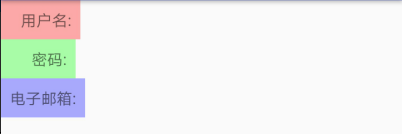
效果三、使用
<?xml version="1.0" encoding="utf-8"?>

<LinearLayout

    xmlns:android="http://schemas.android.com/apk/res/android"

    android:layout_width="match_parent"

    android:layout_height="match_parent"

    android:orientation="vertical">

    <TextView

        android:layout_width="wrap_content"

        android:layout_height="wrap_content"

        android:text="  用户名:"

        android:background="#54ff0000"

        android:padding="8dp"/>

    <TextView

        android:layout_width="wrap_content"

        android:layout_height="wrap_content"

        android:text="    密码:"

        android:background="#5400ff00"

        android:padding="8dp"/>

    <TextView

        android:layout_width="wrap_content"

        android:layout_height="wrap_content"

        android:text="电子邮箱:"

        android:background="#540000ff"

        android:padding="8dp"/>

</LinearLayout>
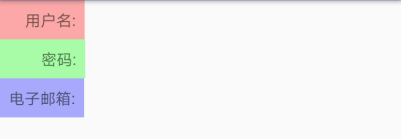
效果四、使用
<?xml version="1.0" encoding="utf-8"?>

<LinearLayout

    xmlns:android="http://schemas.android.com/apk/res/android"

    android:layout_width="match_parent"

    android:layout_height="match_parent"

    android:orientation="vertical">

    <TextView

        android:layout_width="wrap_content"

        android:layout_height="wrap_content"

        android:text=" 用户名:"

        android:background="#54ff0000"

        android:padding="8dp"/>

    <TextView

        android:layout_width="wrap_content"

        android:layout_height="wrap_content"

        android:text="  密码:"

        android:background="#5400ff00"

        android:padding="8dp"/>

    <TextView

        android:layout_width="wrap_content"

        android:layout_height="wrap_content"

        android:text="电子邮箱:"

        android:background="#540000ff"

        android:padding="8dp"/>

</LinearLayout>
参考资料:
Android开发中Html.fromHtml(String source)方法过时的替代方法
三种空格unicode(\u00A0,\u0020,\u3000)表示的区别
Android布局中的空格以及占一个汉字宽度的空格,实现不同汉字字数对齐的更多相关文章
- Android布局中的空格以及占一个汉字宽度的空格的实现
在Android布局中进行使用到空格,以便实现文字的对齐.那么在Android中如何表示一个空格呢? 空格: 窄空格: 一个汉字宽度的空格: [用两个空格( )占一个汉字的宽度时,两个空格比 ...
- android布局中使用include及需注意点
在android布局中,使用include,将另一个xml文件引入,可作为布局的一部分,但在使用include时,需注意以下问题: 一.使用include引入 如现有标题栏布局block_header ...
- android 布局中 layout_gravity、gravity、orientation、layout_weight
线性布局中,有 4 个及其重要的参数,直接决定元素的布局和位置,这四个参数是 android:layout_gravity ( 是本元素相对于父元素的重力方向 ) android:gravity (是 ...
- Android布局中的layout_weight和weightSum属性的详解及使用
由于Android设备的尺寸大小不一,种类繁多,当我们在开发应用的时候就要考虑屏幕的适配型了,尽可能让我们的应用适用于主流机型的尺寸,这样我们的应用不会因为尺寸不同而不美观,解决屏幕适配问题的方法有很 ...
- android: android 布局中的weight 属性
android: weight是线性布局的特有属性,控件的宽度和高度的不同,也会存在差异. 示例1:将宽度设置为包裹类型wrap_content或0dp <?xml version=" ...
- 【转】在Android布局中使用include和merge标签
内容转自:http://fengweipeng1208.blog.163.com/blog/static/21277318020138229754135/ 在我们开发android布局时,经常会有很多 ...
- Android布局中涉及的一些属性
Android:gravity属性 线性布局常见的就是利用LinearLayout进行布局,其中有个比较重要的属性就是android:gravity,在官方文档中是这么描述这个属性的:指定一个元素怎么 ...
- Android布局中match_parent和fill_parent的差别
今天在做项目的一个新功能的时候,从网上查找资源,发现android2.2中出现的MATCH_PARENT感到不明确.过去仅仅有FILL_PARENT和WRAP_CONTENT那么match_paren ...
- android布局中显示隐藏动画
android 在布局中提供属性,能简单的加入动画效果,例如以下: <LinearLayout ... animateLayoutChanges="true" ... /&g ...
随机推荐
- 解决build workspace 缓慢的问题
(1).解决方法 方法1.修改eclipse启动文件 eclipse.ini 中添加启动参数参数: -vmargs -Xmx512m 方法2.关闭自动构建工作区: pr ...
- JSP·随笔
1.简介 > HTML - HTML擅长显示一个静态的网页,但是不能调用Java程序. > Servlet - Servlet擅长调用Java程序和后台进 ...
- dubbo入门学习 一SOA
SOA是什么?SOA全英文是Service-Oriented Architecture,中文意思是中文面向服务编程,是一种思想,一种方法论,一种分布式的服务架构(具体可以百度). 用途:SOA解决多服 ...
- 渗透测试的理论部分4——开放式Web应用程序安全项目
开放式Web应用程序安全项目(Open Web Application Security Project OWASP) 定期退出Top 10 project(排名前十的安全隐患防守规则) 公开了编写安 ...
- CentOS7 + Django2.1 + uwsgi + nginx配置
假设已经可以运行Django项目,可以runserver.也已经安装了uwsgi和nginx 现在需要进行配置. 刚开始进行uwsgi测试就不行,提示bash:'uwsgi' Command not ...
- eclipse 无法记住svn密码
每次要求输入密码,很恼人.经过一番折腾,在stackoverflow上找到了解决方案,上面大神果然多 简单的说,就是通过查看工作空间的日志文件,发现报了个java异常,缺少一个class文件(org. ...
- ArcSDE
ArcSDE,即数据通路,是ArcGIS的空间数据引擎,它是在关系数据库管理系统(RDBMS)中存储和管理多用户空间数据库的通路.从空间数据管理的角度看,ArcSDE是一个连续的空间数据模型,借助这一 ...
- Python基础-数据类型-转摘
1.数字 2 是一个整数的例子.长整数 不过是大一些的整数.3.23和52.3E-4是浮点数的例子.E标记表示10的幂.在这里,52.3E-4表示52.3 * 10-4.(-5+4j)和(2.3-4. ...
- autium designer smart pdf一个小问题
今天在使用ad的smart pdf时遇到一个小问题 就是 使用的是AD17,生成PDF,PDF没有把芯片的引脚标号显示出来(还有其它的芯片也是一样的,但是奇怪的是:只有在原理图元器件右边的没有显示 ...
- Python之路【第三篇】编码
Python代码——>字节码——>机器码——>计算机 Windows: cmd ==> python 文件路径 cmd ==>python >> 输入命令 L ...