
Android布局中的空格以及占一个汉字宽度的空格的实现
前言
在Android布局中进行使用到空格,以便实现文字的对齐。那么在Android中如何表示一个空格呢?
- 空格: (普通的英文半角空格但不换行)
- 窄空格:
- (中文全角空格 (一个中文宽度))
- (半个中文宽度,但两个空格比一个中文略大)
- (一个中文宽度,但用起来会比中文字宽一点点)
- \u3000\u3000(首行缩进)
- \u3000(全角空格(中文符号))
- \u0020(半角空格(英文符号))
- …(省略号)
所以如果想要实现文字对齐,那么可以考虑下面的方案:
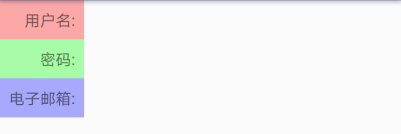
方案一:一个汉字宽度的空格:
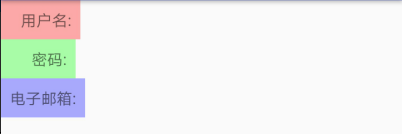
方案二:一个汉字宽度的空格: 【用两个空格( )占一个汉字的宽度时,两个空格比一个汉字略窄,三个空格( )比一个汉字略宽】;使用 ‒时候部分机型转译后不是空格,而是“-”;而且在不同机型有不同表现。
方案三:一个汉字宽度的空格: 【比一个中文略大】
方案四:一个汉字宽度的空格: 【比一个中文略大】
注意:以上方案是直接写在布局文件中,如果是写在strings.xml文件中,则需要使用\u3000、\u0020这一类的,比如:
<string name="info_pwd">\u3000\u3000密码:</string>
然后在布局文件中通过下面的方式引用
android:text="@string/info_pwd"
至于,为什么在strings.xml文件中使用\u3000代替 ,则是因为Android Studio3.2 + Gradle Plugn 3.2.0 + Gradle4.6环境下, 、 都不起作用了。
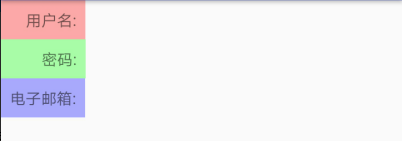
效果图
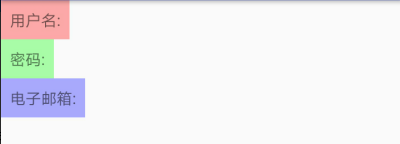
效果0:未作处理的效果
<?xml version="1.0" encoding="utf-8"?>

<LinearLayout

    xmlns:android="http://schemas.android.com/apk/res/android"

    android:layout_width="match_parent"

    android:layout_height="match_parent"

    android:orientation="vertical">

    <TextView

        android:layout_width="wrap_content"

        android:layout_height="wrap_content"

        android:text="用户名:"

        android:background="#54ff0000"

        android:padding="8dp"/>

    <TextView

        android:layout_width="wrap_content"

        android:layout_height="wrap_content"

        android:text="密码:"

        android:background="#5400ff00"

        android:padding="8dp"/>

    <TextView

        android:layout_width="wrap_content"

        android:layout_height="wrap_content"

        android:text="电子邮箱:"

        android:background="#540000ff"

        android:padding="8dp"/>

</LinearLayout>
效果一、使用
<?xml version="1.0" encoding="utf-8"?>

<LinearLayout

    xmlns:android="http://schemas.android.com/apk/res/android"

    android:layout_width="match_parent"

    android:layout_height="match_parent"

    android:orientation="vertical">

    <TextView

        android:layout_width="wrap_content"

        android:layout_height="wrap_content"

        android:text=" 用户名:"

        android:background="#54ff0000"

        android:padding="8dp"/>

    <TextView

        android:layout_width="wrap_content"

        android:layout_height="wrap_content"

        android:text="  密码:"

        android:background="#5400ff00"

        android:padding="8dp"/>

    <TextView

        android:layout_width="wrap_content"

        android:layout_height="wrap_content"

        android:text="电子邮箱:"

        android:background="#540000ff"

        android:padding="8dp"/>

</LinearLayout>
效果二、使用
<?xml version="1.0" encoding="utf-8"?>

<LinearLayout

    xmlns:android="http://schemas.android.com/apk/res/android"

    android:layout_width="match_parent"

    android:layout_height="match_parent"

    android:orientation="vertical">

    <TextView

        android:layout_width="wrap_content"

        android:layout_height="wrap_content"

        android:text="   用户名:"

        android:background="#54ff0000"

        android:padding="8dp"/>

    <TextView

        android:layout_width="wrap_content"

        android:layout_height="wrap_content"

        android:text="      密码:"

        android:background="#5400ff00"

        android:padding="8dp"/>

    <TextView

        android:layout_width="wrap_content"

        android:layout_height="wrap_content"

        android:text="电子邮箱:"

        android:background="#540000ff"

        android:padding="8dp"/>

</LinearLayout>
效果三、使用
<?xml version="1.0" encoding="utf-8"?>

<LinearLayout

    xmlns:android="http://schemas.android.com/apk/res/android"

    android:layout_width="match_parent"

    android:layout_height="match_parent"

    android:orientation="vertical">

    <TextView

        android:layout_width="wrap_content"

        android:layout_height="wrap_content"

        android:text="  用户名:"

        android:background="#54ff0000"

        android:padding="8dp"/>

    <TextView

        android:layout_width="wrap_content"

        android:layout_height="wrap_content"

        android:text="    密码:"

        android:background="#5400ff00"

        android:padding="8dp"/>

    <TextView

        android:layout_width="wrap_content"

        android:layout_height="wrap_content"

        android:text="电子邮箱:"

        android:background="#540000ff"

        android:padding="8dp"/>

</LinearLayout>
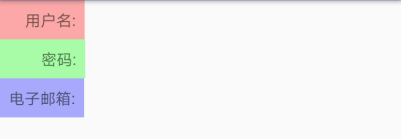
效果四、使用
<?xml version="1.0" encoding="utf-8"?>

<LinearLayout

    xmlns:android="http://schemas.android.com/apk/res/android"

    android:layout_width="match_parent"

    android:layout_height="match_parent"

    android:orientation="vertical">

    <TextView

        android:layout_width="wrap_content"

        android:layout_height="wrap_content"

        android:text=" 用户名:"

        android:background="#54ff0000"

        android:padding="8dp"/>

    <TextView

        android:layout_width="wrap_content"

        android:layout_height="wrap_content"

        android:text="  密码:"

        android:background="#5400ff00"

        android:padding="8dp"/>

    <TextView

        android:layout_width="wrap_content"

        android:layout_height="wrap_content"

        android:text="电子邮箱:"

        android:background="#540000ff"

        android:padding="8dp"/>

</LinearLayout>
参考资料:
Android开发中Html.fromHtml(String source)方法过时的替代方法
三种空格unicode(\u00A0,\u0020,\u3000)表示的区别
Android布局中的空格以及占一个汉字宽度的空格的实现的更多相关文章
- Android布局中的空格以及占一个汉字宽度的空格,实现不同汉字字数对齐
前言 在Android布局中进行使用到空格,以便实现文字的对齐.那么在Android中如何表示一个空格呢? 空格: (普通的英文半角空格但不换行) 窄空格: (中文全角空格 (一个中文宽度)) ...
- android布局中使用include及需注意点
在android布局中,使用include,将另一个xml文件引入,可作为布局的一部分,但在使用include时,需注意以下问题: 一.使用include引入 如现有标题栏布局block_header ...
- android 布局中 layout_gravity、gravity、orientation、layout_weight
线性布局中,有 4 个及其重要的参数,直接决定元素的布局和位置,这四个参数是 android:layout_gravity ( 是本元素相对于父元素的重力方向 ) android:gravity (是 ...
- Android布局中的layout_weight和weightSum属性的详解及使用
由于Android设备的尺寸大小不一,种类繁多,当我们在开发应用的时候就要考虑屏幕的适配型了,尽可能让我们的应用适用于主流机型的尺寸,这样我们的应用不会因为尺寸不同而不美观,解决屏幕适配问题的方法有很 ...
- android: android 布局中的weight 属性
android: weight是线性布局的特有属性,控件的宽度和高度的不同,也会存在差异. 示例1:将宽度设置为包裹类型wrap_content或0dp <?xml version=" ...
- 【转】在Android布局中使用include和merge标签
内容转自:http://fengweipeng1208.blog.163.com/blog/static/21277318020138229754135/ 在我们开发android布局时,经常会有很多 ...
- Android布局中涉及的一些属性
Android:gravity属性 线性布局常见的就是利用LinearLayout进行布局,其中有个比较重要的属性就是android:gravity,在官方文档中是这么描述这个属性的:指定一个元素怎么 ...
- Android布局中match_parent和fill_parent的差别
今天在做项目的一个新功能的时候,从网上查找资源,发现android2.2中出现的MATCH_PARENT感到不明确.过去仅仅有FILL_PARENT和WRAP_CONTENT那么match_paren ...
- android布局中显示隐藏动画
android 在布局中提供属性,能简单的加入动画效果,例如以下: <LinearLayout ... animateLayoutChanges="true" ... /&g ...
随机推荐
- Oracle 表数据去重
Oracle数据库中重复数据怎么去除?使用数据表的时候经常会出现重复的数据,那么要怎么删除呢?下面我们就来说一说去除Oracle数据库重复数据的问题.今天我们要说的有两种方法. 一.根据rowid来去 ...
- ocp 1Z0-047 131-276题解析
131. Which view would you use to display the column names and DEFAULT valuesfor a table?A. DBA_TABLE ...
- HDU 5776 sum (模拟)
sum 题目链接: http://acm.hdu.edu.cn/showproblem.php?pid=5776 Description Given a sequence, you're asked ...
- CodeForces 689C Mike and Chocolate Thieves (二分+数论)
Mike and Chocolate Thieves 题目链接: http://acm.hust.edu.cn/vjudge/contest/121333#problem/G Description ...
- CodeForces 732A Buy a Shovel (水题)
题意:你手中有10元的钱,还有一个r元的零钱,要买一个价格为k的物品,但是你要求不找零钱,求最少要买多少物品. 析:直接暴力,最多买10个物品就够了1-10. 代码如下: #pragma commen ...
- PsLookupProcessByProcessId分析
本文是在讨论枚举进程的时候产生的,枚举进程有很多方法,Ring3就是ZwQuerySystemInformation(),传入SysProcessesAndThreadsInformation这个宏, ...
- 剑指OFFER之数值的整数次方(九度OJ1514)
题目描述: 给定一个double类型的浮点数base和int类型的整数exponent.求base的exponent次方. 输入: 输入可能包含多个测试样例.对于每个输入文件,第一行输入一个整数T,表 ...
- UVa Online Judge 工具網站
UVa Online Judge 工具網站 UVa中译题uHuntAlgorithmist Lucky貓的ACM園地,Lucky貓的 ACM 中譯題目 Mirror UVa Online Judg ...
- password安全之动态盐
首先,我们看看什么是盐:http://zh.wikipedia.org/zh/%E7%9B%90_%28%E5%AF%86%E7%A0%81%E5%AD%A6%29 ,再MD5是d16e970d6e5 ...
- 让java程序在后台一直执行(例如putty关闭后后台程序继续运行)
如果在终端中执行java -jar xxx.jar&命令,当终端关闭时,xxx.jar也会同时结束运行,但是如果执行nohup java -jar xxx.jar&命令,则程序会在后台 ...