
C++(实验三)
Part 1 画布小球试验
程序源码
 #include <iostream>

 #include "canvas.h"

 #include "ball.h"

 int main() {

     Canvas canvas; //创建默认画布,黑底绿色

     Ball ball1(,);

     system("pause");

     ball1.left();

     system("pause");

     ball1.up();

     system("pause");

     canvas.changeCanvasFg("E"); // 更新画布前景色

     system("pause");

     canvas.changeCanvasBg("D"); // 更新画布背景色

     system("pause");

     return ;

 }
main.cpp
 #ifndef CANVAS_H

 #define CANVAS_H

 #include <string>

 using std::string;

 class Canvas {

     public:

         Canvas(string bg0="", string fg0="A");

         void changeCanvasBg(string bg0);

         void changeCanvasFg(string fg0);

         void changeCanvasColor(string bg0, string fg0);

     private:

         string bg;   // background color

         string fg;   // foreground color

 };

 #endif
canvas.h
 #include "canvas.h"

 #include <cstdlib>

 Canvas::Canvas(string bg0, string fg0):bg(bg0), fg(fg0) {

     string color = "color ";

     color += bg0;

     color += fg0;

     system(color.c_str());

 }

 void Canvas::changeCanvasBg(string bg0) {

     bg = bg0; // 更新画布背景色

     string color = "color ";

     color += bg;

     color += fg;

     system(color.c_str());

 }

 void Canvas::changeCanvasFg(string fg0) {

     fg = fg0; // 更新画布前景色

     string color = "color ";

     color += bg;

     color += fg;

     system(color.c_str());

 }

 void Canvas::changeCanvasColor(string bg0, string fg0){

     bg = bg0; // 更新画布背景色

     fg = fg0; // 更新画布前景色

     string color = "color ";

     color += bg;

     color += fg;

     system(color.c_str());

 }
canvas.cpp
 #ifndef BALL_H

 #define BALL_H

 class Ball {

 public:

     Ball(int x0=, int y0=);  // 在坐标(x,y)处构造一个小球(小球用字符O表示)

     void left(int step=);     // 左移step

     void right(int step=);    // 右移step

     void up(int step=);       // 上移step

     void down(int step=);     // 下移step

 private:

     int x;    // x坐标

     int y;    // y坐标

 };

 #endif
ball.h
 #include "ball.h"

 #include <iostream>

 #include <cstdlib> // 因为使用了system("cls"); 所以需要包含这个头文件

 using std::cout;

 using std::endl;

 const int SIZE_X=; // 小球x轴移动范围0~SIZE_X

 const int SIZE_Y=; // 小球y轴移动范围0~SIZE_Y

 Ball::Ball(int x0, int y0):x(x0), y(y0) { // 打印y0-1行空行

     for(int line=; line <= y0-; line++)

         cout << endl;

     // 打印x0-1个空格

     for(int col=; col <= x0-; col++)

         cout << " "; // 打印小球

     cout << "O" << endl;

 }

 void Ball::left(int step) {

     x = x-step;

     if(x <= )

         x=;

     // 清屏 system("cls");

     // 打印y-1行空行

     for(int line=; line <= y-; line++)

         cout << endl;

     // 打印x-1个空格

     for(int col=; col <= x-; col++)

         cout << " "; // 打印小球

     cout << "O" << endl;

 }

 void Ball::right(int step) {

     x = x+step;

     if(x >= SIZE_X)

         x=SIZE_X; // 清屏

     system("cls");

     // 打印y-1行空行

     for(int line=; line <= y-; line++)

         cout << endl;

     // 打印x-1个空格

     for(int col=; col <= x-; col++)

         cout << " "; // 打印小球

     cout << "O" << endl;

 }

 void Ball::up(int step) {

     y = y-step;

     if(y <= )

         y=; // 清屏

     system("cls");

     // 打印y-1行空行

     for(int line=; line <= y-; line++)

         cout << endl;

     // 打印x-1个空格

     for(int col=; col <= x-; col++)

         cout << " "; // 打印小球

     cout << "O" << endl;

 }

 void Ball::down(int step) {

     y = y+step;

     if(y >= SIZE_Y)

         y = SIZE_Y; // 清屏

     system("cls");

     // 打印y-1行空行

     for(int line=; line <= y-; line++)

         cout << endl;

     // 打印x-1个空格

     for(int col=; col <= x-; col++)

         cout << " ";

     // 打印小球

     cout << "O" << endl;

 }
ball.cpp
运行截图
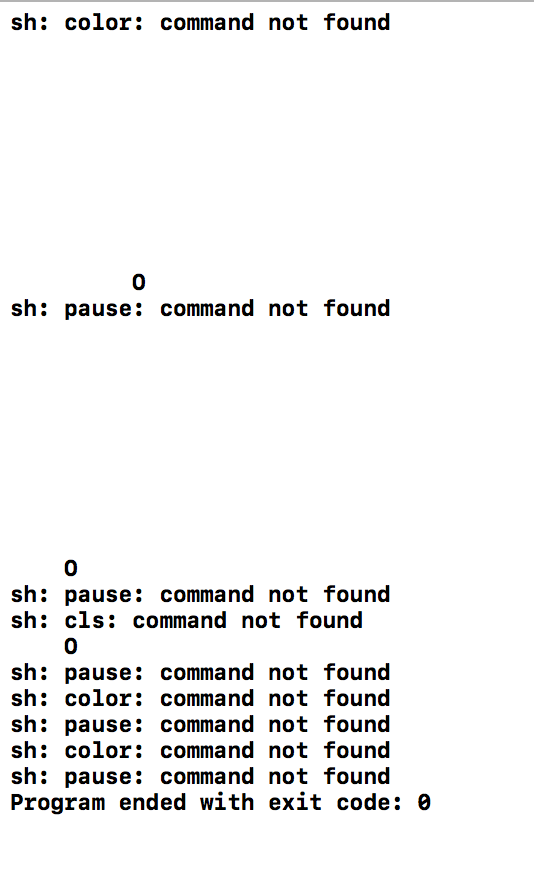
PS:system()在Xcode中运行并不是动画,而且不会改变前景色和背景色,也没有清屏,如图,还在研究中
Part 2 GRAGH
程序源码
 #include <iostream>

 #include "graph.h"

 using namespace std;

 int main() {

     Graph graph1('*',);

     graph1.draw();

     system("pause");

     system("cls");

     Graph graph2('$',);

     graph2.draw();

     return ;

 }
main.cpp
 #ifndef GRAPH_H

 #define GRAPH_H

 class Graph {

     public:

         Graph(char ch, int n);

         void draw();

     private:

         char symbol;

         int size;

 };

 #endif
graph.h
 // 类graph的实现

 #include "graph.h"

 #include <iostream>

 using namespace std;

 // 带参数的构造函数的实现

 Graph::Graph(char ch, int n): symbol(ch), size(n) {

 }

 // 成员函数draw()的实现

 // 功能:绘制size行,显示字符为symbol的指定图形样式

 void Graph::draw() {

     int i,j,k;

     for(i=;i<=size;i++)            //利用行数控制

     {   for(j=size-i;j>=;j--)      //控制空格的输入

             cout<<" ";

         for(k=;k<=*i-;k++)       //控制graph的输入

             cout<<symbol;

         cout<<endl;

     }

 }
graph.cpp
运行截图
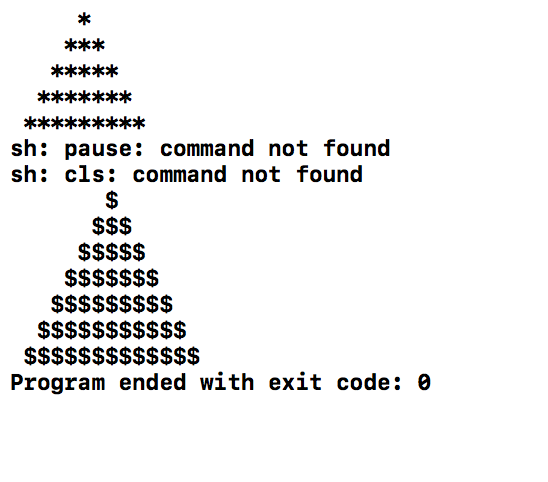
PS:依旧和上个程序一样system()的问题
Part 3 Fraction 类
程序源码
 #include <iostream>

 #include "Fraction.hpp"

 using namespace std;

 int main(){

     Fraction a;

     printf("a:");

     a.printFraction();

     a.compareFraction(, );

     a.addFraction(,);

     a.printFraction();

     cout<<endl<<"b:";

     Fraction b(,);

     b.printFraction();

     b.compareFraction(, );

     b.divideFraction(, );

     b.printFraction();

     cout<<endl<<"c:";

     Fraction c();

     c.printFraction();

     c.compareFraction(, );

     c.minusFraction(,);

     c.printFraction();

     cout<<endl<<"d:";

     Fraction d(,);

     d.printFraction();

     d.compareFraction(, );

     d.timeFraction(, );

     d.printFraction();

     cout<<endl<<"e:";

     Fraction e(,);

     e.printFraction();

     e.compareFraction(, );

     e.addFraction(, );

     e.printFraction();

     return ;

 }
main.cpp
 #ifndef Fraction_hpp

 #define Fraction_hpp

 #include <stdio.h>

 class Fraction{

 public:

     Fraction(int x0=,int y0=);

     void addFraction(int x1,int y1);       //两分数相加

     void minusFraction(int x1,int y1);     //两分数相减

     void timeFraction(int x1,int y1);      //两分数相乘

     void divideFraction(int x1,int y1);    //两分数相除

     void printFraction();                  //输出分数

     void compareFraction(int x1,int y1);   //两分数相比较

 private:

     int top;

     int bottom;

 };

 #endif /* Fraction_hpp */
fraction.h
 #include "Fraction.hpp"

 #include <iostream>

 using namespace std;

 Fraction::Fraction(int x0,int y0):top(x0),bottom(y0){

 }

 void Fraction::addFraction(int x1,int y1){

     int m,n,r,t;

     if(y1==)                          //控制分母为零的情况

         cout<<"error!"<<endl;

     else

     {

       if(bottom==y1)                   //将分数化为最简形式

       {  top=top+x1;

          if(top%bottom==)

          {   top=top/bottom;

              bottom=;}

          else

          {   m=top;

              n=bottom;

              t=;

              r=;

              if(m<n)

              {t=m;m=n;n=t;}

              r=m%n;

              while(r!=)

              {m=n;n=r;r=m%n;}

              top=top/n;

              bottom=bottom/n;

            }

         }

       else

       {   top=top*y1;

           x1=x1*bottom;

           top=top+x1;

           bottom=bottom*y1;

           m=top;

           n=bottom;

           t=;

           r=;

           if(m<n)

           {t=m;m=n;n=t;}

            r=m%n;

            while(r!=)

            {m=n;n=r;r=m%n;}

            top=top/n;

            bottom=bottom/n;

        }

     }

 }

 void Fraction::minusFraction(int x1,int y1){

     int m,n,r,t;

     if(y1==)                      //控制分母为零的情况

         cout<<"error!"<<endl;

     else{

     if(bottom==y1)                 //将分数化为最简形式

     {  top=top-x1;

         if(top%bottom==)

         {   top=top/bottom;

             bottom=;}

         else

         {   m=top;

             n=bottom;

             t=;

             r=;

             if(m<n)

             {t=m;m=n;n=t;}

             r=m%n;

             while(r!=)

             {m=n;n=r;r=m%n;}

             top=top/n;

             bottom=bottom/n;

         }

     }

     else

     {   top=top*y1;

         x1=x1*bottom;

         top=top-x1;

         bottom=bottom*y1;

         m=top;

         n=bottom;

         t=;

         r=;

         if(m<n)

         {t=m;m=n;n=t;}

         r=m%n;

         while(r!=)

         {m=n;n=r;r=m%n;}

         top=top/n;

         bottom=bottom/n;

     }

     }

 }

 void Fraction::timeFraction(int x1,int y1){

     if(y1==)                       //控制分母为零的情况

         cout<<"error!"<<endl;

     else{

     int m,n,r,t;

         top=top*x1;

         bottom=bottom*y1;

     if(top%bottom==)               //将分数化为最简形式

     {   top=top/bottom;

         bottom=;}

     else

     {

         m=top;

         n=bottom;

         t=;

         r=;

         if(m<n)

         {t=m;m=n;n=t;}

         r=m%n;

         while(r!=)

         {m=n;n=r;r=m%n;}

         top=top/n;

         bottom=bottom/n;

     }

     }

 }

 void Fraction::divideFraction(int x1,int y1){

     int m,n,r,t;

     if(y1==)                        //控制分母为零的情况

         cout<<"error!"<<endl;

     else{

     top=top*y1;

     bottom=bottom*x1;

     if(top%bottom==)                //将分数化为最简形式

     {   top=top/bottom;

         bottom=;}

     else

     {

         m=top;

         n=bottom;

         t=;

         r=;

         if(m<n)

         {t=m;m=n;n=t;}

         r=m%n;

         while(r!=)

         {m=n;n=r;r=m%n;}

         top=top/n;

         bottom=bottom/n;

     }

     }

 }

 void Fraction::printFraction(){

     if(bottom==)                        //控制分母为零的情况

         cout<<"error!"<<endl;

     else

     cout<<top<<"/"<<bottom<<endl;

 }

 void Fraction::compareFraction(int x1,int y1){

     double x,y;

     if(y1==)                            //控制分母为零的情况

         cout<<"error!"<<endl;

     else{

     x=top*1.0/bottom;

     y=x1*1.0/y1;

     if(x>y)

         cout<<top<<"/"<<bottom<<" > "<<x1<<"/"<<y1<<endl;

     else if(x<y)

         cout<<top<<"/"<<bottom<<" < "<<x1<<"/"<<y1<<endl;

     else

         cout<<top<<"/"<<bottom<<" = "<<x1<<"/"<<y1<<endl;

     }

 }
fraction.cpp
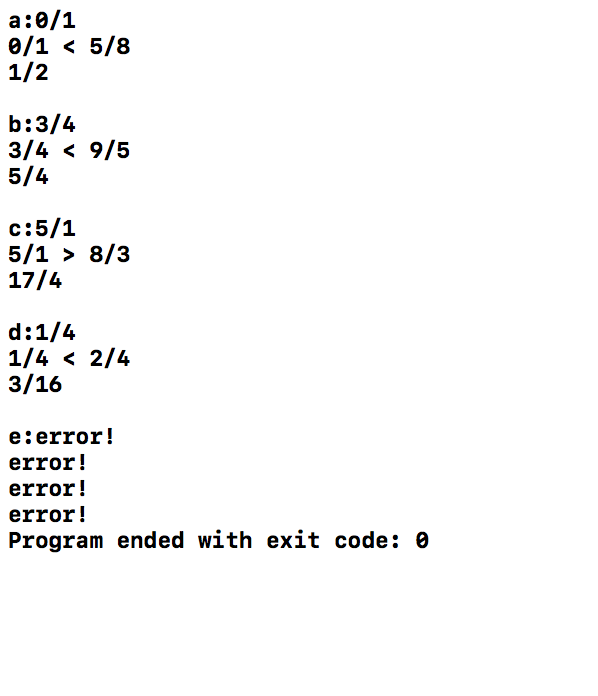
运行截图
实验总结与体会
1.学会运用多文件结构,将类的定义、实现、使用部分分开,便于错误排查,使得程序更加便于管理。
2.了解了system("pause),system("color ××")函数的使用,但在Xcode中貌似有点问题,还在研究中,待完善。
3.C与C++的一些语法规则有些混淆了,说明对C++的基础语法规则掌握的还不熟练,需多敲多练。
实验二评论链接
https://www.cnblogs.com/zuiyankh/p/10587674.html#4219118
https://www.cnblogs.com/qsxsc/p/10583875.html#4219112
https://www.cnblogs.com/yfwg/p/10594280.html#4219099
C++(实验三)的更多相关文章
- FPGA与simulink联合实时环路系列——实验三 按键key
实验三 按键key 实验内容 在FPGA的实验中,经常涉及到按键的使用,按键是必不可少的人机交互的器件之一,在这些实验中,有时将按键的键值读取显示到数码管.LCD或者是通过串口传送到PC的串口助手上进 ...
- Java实验三
20145113 20145102实验三 实验步骤 编码标准 编程标准包含:具有说明性的名字.清晰的表达式.直截了当的控制流.可读的代码和注释,以及在追求这些内容时一致地使用某些规则和惯用法的重要性 ...
- Verilog HDL那些事_建模篇笔记(实验三:按键消抖)
实验三:按键消抖 首先将按键消抖功能分成了两个模块,电平检查模块和10ms延迟模块.电平检测模块用来检测按键信号的变化(是否被按下),10ms延迟模块用来稳定电平检查模块的输入,进而稳定按键信号,防止 ...
- 20145229&20145316 《信息安全系统设计基础》实验三 实时系统的移植
实验封面 实验内容 1.安装ADS(安装文件在00-ads1.2目录下,破解方法00-ads1.2\Crack目录下) 2.安装GIVEIO驱动(安装文件在01-GIVEIO目录下) 3.把整个GIV ...
- 20145301&20145321&20145335实验三
20145301&20145321&20145335实验三 这次实验我的组员为:20145301赵嘉鑫.20145321曾子誉.20145335郝昊 实验内容详见:实验三
- 20145212 实验三《敏捷开发与XP实践》
20145212 实验三<敏捷开发与XP实践> 实验内容 使用git上传代码 与20145223同学一组,使用git相互更改代码 同组实验报告链接:http://www.cnblogs.c ...
- 20145213《Java程序设计》实验三敏捷开发与XP实践
20145213<Java程序设计>实验三敏捷开发与XP实践 实验要求 1.XP基础 2.XP核心实践 3.相关工具 实验内容 1.敏捷开发与XP 软件工程是把系统的.有序的.可量化的方法 ...
- 20145206《Java程序设计》实验三实验报告
20145206<Java程序设计>实验三实验报告 实验内容 XP基础 XP核心实践 相关工具 实验步骤 (一)敏捷开发与XP 软件工程是把系统的.有序的.可量化的方法应用到软件的开发.运 ...
- 20145308刘昊阳 《Java程序设计》实验三 敏捷开发与XP实践 实验报告
20145308刘昊阳 <Java程序设计>实验三 敏捷开发与XP实践 实验报告 实验名称 敏捷开发与XP实践 实验内容 XP基础 XP核心实践 相关工具 统计的PSP(Personal ...
- 20145337实验三实验报告——敏捷开发与XP实践
20145337实验三实验报告--敏捷开发与XP实践 实验名称 敏捷开发与XP实践 实验内容 XP基础 XP核心实践 相关工具 ** 实验步骤**### 敏捷开发与XP 软件工程包括下列领域:软件需求 ...
随机推荐
- [PHP] 编写爬虫获取淘宝网上所有的商品分类以及关键属性 销售属性 非关键属性数据
参考文章地址:https://blog.csdn.net/zhengzizhi/article/details/80716608 http://open.taobao.com/apitools/api ...
- 群晖IP地址更新问题
系统:黑群晖 DS3615 事件:初始安装后 会自动获取一个IP地址,各项功能正常,由于网络调整,更换了路由,群晖宿主机链接到了二级路由(交换机模式) 问题: 1.使用原始的IP无法访问到群晖服务 ...
- ajax请求网络api
不啰嗦,直接上代码: 1.在浏览器输入网址:http://api.asilu.com/weather/?callback=getname&city=深圳 你会看到如下结果:他返回的是json数 ...
- redis 字符串(string)函数
字符串(string)函数 get 命令/方法/函数 Description Get the value related to the specified key 取得与指定的键值相关联的值 Para ...
- v-charts简介
一, v-charts简介 在使用 echarts 生成图表时,经常需要做繁琐的数据类型转化.修改复杂的配置项,v-charts 的出现正是为了解决这个痛点.基于 Vue2.0 和 echarts 封 ...
- SpringBoot Controller接收参数的几种常用方式
第一类:请求路径参数1.@PathVariable获取路径参数.即url/{id}这种形式. 2.@RequestParam获取查询参数.即url?name=这种形式 例子GET http://loc ...
- mysql window系统备份远程数据库到本地
使用方法:创建test.bat文件,保存以下内容,修改配置后双击打开 @echo off REM 声明采用UTF-8编码 chcp echo. echo MySQL数据库备份脚本 echo. echo ...
- 使用nginx代理kibana并配置登录验证
由于kibana不支持登录验证,谁都可以访问,放到公网就不合适了,这里配置用nginx进行代理: 生成密码文件 如果安装了httpd可以用htpasswd,比较方便: htpasswd -c /roo ...
- 结巴库及词频统计bb
下面是利用云图和结巴库完成词频统计.代码如下: # -*- coding:utf- -*- from wordcloud import WordCloud import matplotlib.pypl ...
- bzoj 4767 两双手 - 动态规划 - 容斥原理
题目传送门 传送门I 传送门II 题目大意 一个无限大的棋盘上有一只马,设马在某个时刻的位置为$(x, y)$, 每次移动可以将马移动到$(x + A_x, y + A_y)$或者$(x + B_x, ...