
奖品列表组件【仿swiper】
最近lz在做项目的一些优化,发现我的项目里有个奖品列表的功能;我们之前是引入swiper这个库去做的;swiper库的滑动效果确实比较好看,但是js文件以及css文件相对是比较大的;考虑到这个小小的需求而去引入如此大的库,感觉太不值得了;所以自己去封装了一下;
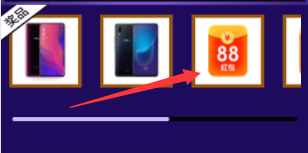
项目原需求如下图:
封装思路:
1.我想的是swiper在布局是不是隐藏掉了滚动条?因为在进行左右滑动时候首先想到的是css属性“overflow-x:scroll或者overflow-x:auto”;但是我审查了下元素发现swiper并没有使用这个css属性;经过查看原来使用了translate3d去让其滑动的;于是解决了滑动问题;
2.思考可视展示问题;我的做法是将整个大的容器除以页面可视容器所要展示的个数得到每个子元素的宽度;然后进行排列;这样布局问题就搞定了;
3.就是滑动问题,监听容器的touchStart、touchMove、touchEnd事件;先要计算出两边的临界值;左边很好理解就是0,右边稍微计算下把整个子容器宽度和-父级容器宽度=最大滑动距离;这样再做下滑动临界值的处理就好了;
4.联动问题,滚动条的滑动跟容器内容滑动原理是一样的,稍微动脑下的是联动的一个逻辑。这里有个等式就是容器滑动距离/容器最大滑动距离 = 滚动条滑动距离/滚动条最大滑动距离;这样就能做好相应的联动效果;对于边界值,我们再稍微的优化下;整个功能就差不多实现了;
封装代码如下:
/**

 * 我们在各个活动工具中要用到swiper去做奖品列表的渲染,由于swiper.js和swiper.css文件较大;所以仿照swiper封装了此组件

 * @param {Object} config

 * @param {String} containerId:选择器

 * @param {Number} slidesPerView:一屏要展示数

 * @param {Number} spaceBetween:奖品间距

 * @param {Boolean} scrollbarHide:是否显示滚动条

 */

import './index.scss';

    class CSlide {

        init(config) {

            let { containerId, slidesPerView, spaceBetween = 20, scrollbarHide } = config;

            this.container = document.querySelector(containerId);

            this.wrapper = this.container.children[0];

            this.store = {

                containerId,

                containerWidth: this.wrapper.offsetWidth,

                children: this.wrapper.children,

                slidesPerView,

                spaceBetween,

                calculateSlideX: 0,

                scrollbarHide

            };

            this.state = {

                startX: 0,

                diffX: 0,

                touchStart: false,

                touchEnd: false,

                touchMove: false,

                translateX: 0,

                transitionDuring: 300,

                ifanimateEnd: false

            };

            this.buildSwiper();

        }

        bind() {

            let events = ['touchstart', 'touchmove', 'touchend'];

            this.addEvent(this.container, events[0], this.touchStart);

            this.addEvent(this.container, events[1], this.touchMove);

            this.addEvent(this.container, events[2], this.touchEnd);

        }

        //初始化内容

        buildSwiper() {

            let {

                containerWidth,

                children,

                slidesPerView,

                spaceBetween

            } = this.store;

            let slideWidth = Math.round(containerWidth / slidesPerView);

            for (let i = 0; i < children.length; i++) {

                children[i].style.width = slideWidth + 'px';

                children[i].style.marginRight = spaceBetween + 'px';

            }

            //是否有滚动条

            if (this.store.scrollbarHide) {

                $(this.store.containerId).append(` <div class="swiper-scrollbar">

                <div class="swiper-scrollbar-drag"></div>

            </div>`);

                this.srollbarContainer = document.querySelector('.swiper-scrollbar-drag');

                this.scrollbar = document.querySelector('.swiper-scrollbar');

                this.store.scrollbarWidth = this.scrollbar.offsetWidth;

                this.store.scrollbarDragWidth = this.srollbarContainer.offsetWidth;

                setTimeout(() => {

                    this.store.ableslideX = Number(this.scrollbar.offsetWidth - this.srollbarContainer.offsetWidth);

                }, 10);

            }

            this.bind();

        }

        //监听touchStart事件

        touchStart(e, that) {

            if (that.state.touchStart) return;

            that.state.startX = e.type === 'touchstart' ? e.targetTouches[0].pageX : e.pageX;

            that.state.touchEnd = that.state.touchMove = false;

            that.state.touchStart = true;

            that.state.diffX = 0;

        }

        //监听touchMove事件

        touchMove(e, that) {

            let { startX } = that.state;

            if (!that.state.touchStart) return;

            that.state.touchMove = true;

            let currentX = e.type === 'touchmove' ? e.targetTouches[0].pageX : e.pageX;

            if (!that.state.ifanimateEnd) {

                that.state.diffX = Math.round(currentX - startX);

                that.targetMaxmove();

                if(that.store.scrollbarHide){

                    that.scrollbarMove();

                }

            }

        }

        //监听touchEnd事件

        touchEnd(e, that) {

            let {

                touchStart,

                touchMove,

                touchEnd,

            } = that.state;

            if (!touchStart || !touchMove || touchEnd) return;

            that.state.touchEnd = true;

            that.state.touchStart = false;

            that.state.ifanimateEnd = false;

            that.ifdeadLine();

            if(that.store.scrollbarHide){

                that.scrollbarInit();

            }

            setTimeout(() => {

                that.transitionDurationEndFn();

            }, that.state.transitionDuring);

        }

        //返回滑动区域的最大值

        calculateSlide() {

            let {

                children,

                spaceBetween,

                containerWidth

            } = this.store;

            let slide_max = 0,

                totalWidth = 0;

            for (let i = 0; i < children.length; i++) {

                totalWidth += children[0].offsetWidth + spaceBetween;

            }

            slide_max = containerWidth + spaceBetween - totalWidth;

            return slide_max;

        }

        //滑动的临界值判断

        targetMaxmove() {

            let {

                diffX

            } = this.state;

            let currentSlide = this.state.diffX + this.getTranslate(this.wrapper).x;

            let rightLine = this.calculateSlide();

            if (diffX > 0 && currentSlide > this.store.containerWidth / 2) {

                this.state.ifanimateEnd = true;

                this.state.translateX = this.store.containerWidth / 2;

            } else if (diffX < 0 && currentSlide <= rightLine - this.store.containerWidth / 2) {

                this.state.ifanimateEnd = true;

                this.state.translateX = rightLine - this.store.containerWidth / 2;

            } else {

                this.state.translateX = currentSlide;

            }

            this.recover(this.wrapper, Number(this.state.translateX), 0, 0);

        }

        //结束时临界值处理

        ifdeadLine() {

            let {

                diffX,

                translateX

            } = this.state;

            let rightLine = this.calculateSlide();

            if (diffX > 0) {

                this.recover(this.wrapper, 0, 0, 0);

            }

            if (diffX < 0 && translateX <= rightLine) {

                this.recover(this.wrapper, rightLine, 0, 0);

            }

        }

        //滚动条滑动处理

        scrollbarMove() {

            let { diffX } = this.state;

            let { ableslideX } = this.store;

            let rightLine = this.calculateSlide();

            let radio = Math.abs(diffX) / Math.abs(rightLine);

            let scrollX = diffX > 0 ? -radio * ableslideX : radio * ableslideX;

            scrollX += this.getTranslate(this.srollbarContainer).x;

            this.recover(this.srollbarContainer, scrollX, 0, 0);

        }

        //结束滚动条处理

        scrollbarInit() {

            let { ableslideX } = this.store;

            let { diffX } = this.state;

            let scrollX = this.getTranslate(this.srollbarContainer).x;

            if (diffX > 0) {

                this.recover(this.srollbarContainer, 0, 0, 0);

            }

            if (diffX < 0 && scrollX > ableslideX) {

                this.recover(this.srollbarContainer, ableslideX, 0, 0);

            }

        }

        recover(container, x, y, z) {

            this.transitionDuration(container, this.state.transitionDuring);

            this.translate(container, x, y, z);

        }

        translate(ele, x, y, z) {

            this.transform(ele, 'translate3d(' + x + 'px, ' + y + 'px, ' + z + 'px)');

        }

        transform(ele, transform) {

            let elStyle = ele.style;

            elStyle.webkitTransform = elStyle.MsTransform = elStyle.msTransform = elStyle.MozTransform = elStyle.OTransform = elStyle.transform = transform;

        }

        transitionDuration(ele, time) {

            let elStyle = ele.style;

            elStyle.webkitTransitionDuration = elStyle.MsTransitionDuration = elStyle.msTransitionDuration = elStyle.MozTransitionDuration = elStyle.OTransitionDuration = elStyle.transitionDuration = time + 'ms';

        }

        transitionDurationEndFn() {

            this.transitionDuration(this.wrapper, 0);

        }

        getTranslate(el) {

            let curStyle = window.getComputedStyle(el);

            let curTransform = curStyle.transform || curStyle.webkitTransform;

            let x, y;

            x = y = 0;

            curTransform = curTransform.split(', ');

            if (curTransform.length === 6) {

                x = parseInt(curTransform[4], 10);

                y = parseInt(curTransform[5], 10);

            }

            return {

                x,

                y

            };

        }

        addEvent(target, type, fn) {

            $(document).on(type, target, event => {

                if (typeof fn !== 'function') return;

                fn(event, this);

            }).bind(this);

        }

    };
css代码如下:
.bxm-container {

    width: 100%;

    height: auto;

    position: relative;

    overflow: hidden;

    list-style: none;

    padding:;

    .bxm-wrapper {

        position: relative;

        width: 100%;

        height: 100%;

        z-index:;

        display: flex;

        transition-property: transform;

        box-sizing: content-box;

        .bxm-slide {

            text-align: center;

            font-size: 18px;

            background: #fff;

            display: flex;

            justify-content: center;

            align-items: center;

            flex-shrink:;

            width: 100%;

            height: 100%;

            box-sizing: border-box;

            transition-property: transform;

            -webkit-flex-shrink:;

            -ms-flex-negative:;

            flex-shrink:;

        }

    }

    .swiper-scrollbar {

        position: relative;

        left: 1%;

        bottom: 0px;

        z-index:;

        height: 5px;

        width: 98%;

        border-radius: 10px;

        -ms-touch-action: none;

        background: rgba(0, 0, 0, .1);

        margin-top: 10px;

        overflow: hidden;

        .swiper-scrollbar-drag {

            height: 100%;

            width: 60%;

            position: relative;

            background: rgba(0, 0, 0, .5);

            border-radius: 10px;

            left:;

            top: 0

        }

    }

}
具体调用该组件类似于
<div class="bxm-container">

    <div class="bxm-wrapper">

        <div class="bxm-slide">

            <div class="awardImg"><img src="https://buyimg.bianxianmao.com/dist/ACTIVITY/certificate/2018/10/24/04c32df6-13f2-464d-b298-b712e14daa2e"

                    alt=""></div>

        </div>

        <div class="bxm-slide">

            <div class="awardImg"><img src="https://buyimg.bianxianmao.com/dist/ACTIVITY/certificate/2018/10/24/04c32df6-13f2-464d-b298-b712e14daa2e"

                    alt=""></div>

        </div>

        <div class="bxm-slide">

            <div class="awardImg"><img src="https://buyimg.bianxianmao.com/dist/ACTIVITY/certificate/2018/10/24/04c32df6-13f2-464d-b298-b712e14daa2e"

                    alt=""></div>

        </div>

        <div class="bxm-slide">

            <div class="awardImg"><img src="https://buyimg.bianxianmao.com/dist/ACTIVITY/certificate/2018/10/24/04c32df6-13f2-464d-b298-b712e14daa2e"

                    alt=""></div>

        </div>

        <div class="bxm-slide">

            <div class="awardImg"><img src="https://buyimg.bianxianmao.com/dist/ACTIVITY/certificate/2018/10/24/04c32df6-13f2-464d-b298-b712e14daa2e"

                    alt=""></div>

        </div>

        <div class="bxm-slide">

            <div class="awardImg"><img src="https://buyimg.bianxianmao.com/dist/ACTIVITY/certificate/2018/10/24/04c32df6-13f2-464d-b298-b712e14daa2e"

                    alt=""></div>

        </div>

    </div>
<script>
var config = {
containerId: '.bxm-container',
slidesPerView: 2.4,
spaceBetween: 20,
scrollbarHide: true,
};
  new CSlide().init(config, temp);
</script>
LZ刚写到快结尾时候被叫到公司去做一个紧急需求,心里一万匹草泥马在奔腾。
如有不妥,请大佬指正;
奖品列表组件【仿swiper】的更多相关文章
- JS列表的下拉菜单组件(仿美化控件select)
JS列表的下拉菜单组件(仿美化控件select) 2014-01-23 23:51 by 龙恩0707, 1101 阅读, 6 评论, 收藏, 编辑 今天是农历23 也是小年,在这祝福大家新年快乐!今 ...
- 列表组件抽象(2)-listViewBase说明
这是我写的关于列表组件的第2篇博客.前面的相关文章有: 1. 列表组件抽象(1)-概述 listViewBase是列表组件所有文件中最核心的一个,它抽象了所有列表的公共逻辑,将来如果有必要添加其它公共 ...
- winform快速开发平台 -> 工作流组件(仿GooFlow)
对于web方向的工作流,一直在用gooflow对于目前我的winform开发平台却没有较好的工作流组件. 针对目前的项目经验告诉我们.一个工作流控件是很必要的. 当然在winform方面的工作流第三 ...
- 可展开的列表组件——ExpandableListView深入解析
可展开的列表组件--ExpandableListView深入解析 一.知识点 1.ExpandableListView常用XML属性 2.ExpandableListView继承BaseExpanda ...
- Bootstrap学习之路(3)---列表组件
列表是几乎所有网站都会用到的一个组件,正好bootstrap也给我们提供了这个组件的样式,下面我给大家简单介绍一下bootstrap中的列表组件的用法! 首先,重提一下引用bootstrap的核心文件 ...
- Android(java)学习笔记186:对ListView等列表组件中数据进行增、删、改操作
1.ListView介绍 解决大量的相似的数据显示问题 采用了MVC模式: M: model (数据模型) V: view (显示的视图) C: controller 控制器 入门案例: acit ...
- bootstrap 之 列表组件使用
列表是几乎所有网站都会用到的一个组件,正好bootstrap也给我们提供了这个组件的样式,下面我给大家简单介绍一下bootstrap中的列表组件的用法! 首先,重提一下引用bootstrap的核心文件 ...
- reactjs-swiper react轮播图组件基于swiper
react轮播图组件基于swiper demo地址:http://reactjs-ui.github.io/reactjs-swiper/simple.html 1. 下载安装 npm install ...
- React-Native新列表组件FlatList和SectionList学习 | | 联动列表实现
React-Native在0.43推出了两款新的列表组件:FlatList(高性能的简单列表组件)和SectionList(高性能的分组列表组件). 从官方上它们都支持常用的以下功能: 完全跨平台. ...
随机推荐
- CMake快速入门
参考: https://www.hahack.com/codes/cmake/ 1. 单目标文件 main.c #include <stdio.h> #include <stdlib ...
- Python——合并指定文件夹下的所有excel文件
前提:该文件夹下所有文件有表头且具有相同的表头. import glob # 同下 from numpy import * #请提前在CMD下安装完毕,pip install numppy impor ...
- [译]ASP.NET Core揭秘 - Razor Pages
原文 什么是Razor Pages? Razor pages是ASP.NET Core 2.0的新特性,它被设计用来更快的开发页面,比传统的MVC模式更便捷. 创建项目 为了使用Razor Pages ...
- CentOS 6.6 系统升级到 CentOS 6.7
1.利用Centos6.7 ISO镜像挂载为本地镜像 创建一个挂载目录 CentOS 6.6 系统升级到 CentOS 6.7 mkdir /mnt/data 2.挂载镜像(远程镜像) mount - ...
- APPLE-SA-2019-3-27-1 watchOS 5.2
APPLE-SA-2019-3-27-1 watchOS 5.2 watchOS 5.2 is now available and addresses the following: CFStringA ...
- Aplcloud中 openFrame 和 openWin 的区别
WIn 占满一屏,但不能设置大小, Frame 可以 一般情况 Frame 依附于win 之上,关了window 通过window打开的frame 也会关闭.
- Stm32之通用定时器复习
因为毕业设计要用到PWM调光很久都没用到Stm32的定时器,有些内容已经遗忘,为了回顾复习相关内容今天开下通用定时器这一章节的数据手册. 1.时钟 通用定时器一般是TIM2~TIM5,TIM1.TIM ...
- JavaScript—对象创建方式
JavaScript 也是面向对象的语言(oop) 之前学JavaScript 没有学对象.现在做下笔记 创建对象的方式: 1. 对象字面量 const hero = { name: '吕布', w ...
- 2018-2019-2 网络对抗技术 20165325 Exp2 后门原理与实践
2018-2019-2 网络对抗技术 20165325 Exp2 后门原理与实践 实验内容(概要): (1)使用netcat获取主机Shell,cron启动 首先两个电脑(虚拟机)都得有netcat, ...
- python制作串口工具
# coding:utf-8import timeimport serialimport stringimport binasciiimport linecache FilePath="G: ...