
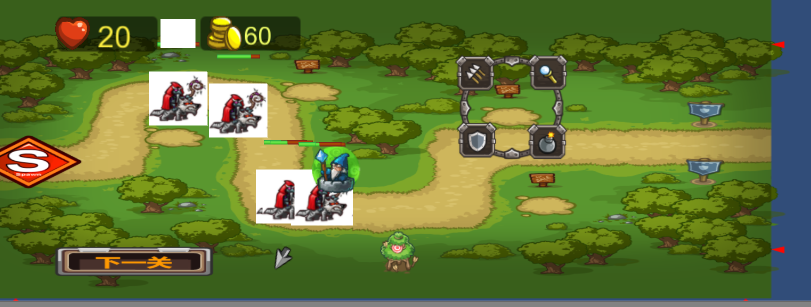
Unity 5.3.5f1 (32-bit) 的简单塔防游戏
我以前使用过unity但是第一次写这么全面的塔防小游戏。我以后会陆续的将我跟过的一些项目的心得经验与体会发表出来希望各位能人能够给出评价,我在此感激各位的批评与赞扬。另外我只是一个学生学艺不精,粗制滥造还请看不过去的大神放过................0.0................................
首先是路径的管理设置
using UnityEngine;

using System.Collections;

namespace RayGame{

    public class PathManager : MonoBehaviour {

        //路点数组

        public GameObject[] Path1;

        public GameObject[] Path2;

        /// <summary>

        /// 返回路点

        /// </summary>

        /// <returns>The node.</returns>

        /// <param name="pathId">路径索引.</param>

        /// <param name="nodeIndex">路点索引</param>

        public GameObject getNode(int pathId,int nodeIndex){

            if(pathId == ){

                //超出路径数组范围,返回 Null

                if (nodeIndex >= Path1.Length) {

                    return null;

                } else {

                    //返回相应路点游戏对象

                    return Path1 [nodeIndex];

                }

            }else{

                if (nodeIndex >= Path2.Length) {

                    return null;

                } else {

                    return Path2 [nodeIndex];

                }

            }

        }

    }

}
然后是游戏玩家管理以及设置
// Authors:Liu Yong

// Email: <raygenes@gmail.com>

// QQ:1931195500

using UnityEngine;

using System.Collections;

using UnityEngine.SceneManagement;

namespace RayGame{

	public class GameManager : MonoBehaviour {

		Animator canvasAnim;

		//最大生命值

		public int totalLife = 20;

		//最大金钱值

		public int totalGold = 200;

		//当前生命值

		int curLife = 0;

		//当前金币

		int curGold = 0;

		UIManager uiMgr;

		public int[] towerPrices;

		void Awake(){

			uiMgr = GameObject.Find ("UIManager").GetComponent<UIManager> ();

			canvasAnim = uiMgr.GetComponent<Animator> ();

		}

		void Start(){

			DataInit ();

			UIInit ();

		}

		//数据初始化

		void DataInit(){

			curLife = totalLife;

			curGold = totalGold;

		}

		//UI界面初始化

		void UIInit(){

			uiMgr.SetHeartValue (curLife);

			uiMgr.SetGoldValue (curGold);

		}

		//添加金钱

		public void addGold(int num){

			curGold += num;

			uiMgr.SetGoldValue (curGold);

		}

		public void useGold(int num){

			curGold -= num;

			uiMgr.SetGoldValue (curGold);

		}

		//增加生命值

		public void addLife(int num){

			curLife += num;

			uiMgr.SetHeartValue (curLife);

		}

		public void useLife(int num){

			curLife -= num;

			uiMgr.SetHeartValue (curLife);

		}

		public bool HasEnoughLife(int num){

			return curLife - num >= 0;

		}

		public bool HasEnoughGold(int num){

			return curGold - num >= 0;

		}

		public void ShowButton(){

			//触发动画切换

			canvasAnim.SetTrigger ("ShowStartButton");

		}

		public void EnterGame(){

			SceneManager.LoadScene ("Game2");

		}

	}

}
怪物的管理及设置
// Authors:Liu Yong

// Email: <raygenes@gmail.com>

// QQ:1931195500

using UnityEngine;

using System.Collections;

using System.Threading;

namespace RayGame{

    public class MonsterManager : MonoBehaviour {

        //怪物资源路径

        string monPath = "Prefabs/Monsters/Mon1";

        //刷怪点

        public Transform spawnPoint;

        //刷新时间

        //public float spawnInterval =3f;

        void Start()

        {

            for (int i=; i<= ; i++)

            {

                Spawn();

            }

            InvokeRepeating ("Start2",,);

        }

        void Start2(){

            for (int i=; i<= ; i++)

            {

                Spawn();

            }

        }

        void Spawn(){

            //随机数生成,半闭半开区间

            //加载ra物资源,并实例化游戏对象

                GameObject mon = (GameObject)Instantiate (Resources.Load (monPath), spawnPoint.position,

                                    Quaternion.identity);

                //关联怪物移动组件

                mon.AddComponent<MonsterMove> ();

                mon.AddComponent<MonsterHealth> ();

                mon.AddComponent<Rigidbody2D> ();

                BoxCollider2D collider = mon.AddComponent<BoxCollider2D> ();

                collider.isTrigger = true;

                   }

    }

}
攻击塔的管理及设置
// Authors:Liu Yong

// Email: <raygenes@gmail.com>

// QQ:1931195500

using UnityEngine;

using System.Collections;

namespace RayGame{

	public class TowerManager : MonoBehaviour {

		//造塔点

		public GameObject[] TowerPoints;

		//建造过程中的图片

		public Sprite[] TowerBuilding;

		//血条资源路径

		string barPath = "Prefabs/UI/ProgressBar";

		//造塔时间

		public float buildingTime = 1f;

		//当前的造塔点

		GameObject curTowerPoint = null;

		//当前塔的类型

		int curTowerId;

		void Awake(){

			//遍历 所有造塔点

			for (int i = 0; i < TowerPoints.Length; i++) {

				GameObject tp = TowerPoints [i];

				//关联碰撞盒

				tp.AddComponent<CircleCollider2D> ();

				//关联脚本

				tp.AddComponent<TowerPoint> ();

			}

		}

		public void ShowBuilding(GameObject _towerPoint,int towerId){

			//记住造塔点

			curTowerPoint = _towerPoint;

			//记住造塔类型

			curTowerId = towerId;

			//获取渲染组件

			SpriteRenderer spRender = _towerPoint.GetComponent<SpriteRenderer> ();

			//更改精灵图片

			spRender.sprite = TowerBuilding [towerId - 1];

			//显示建造过程

			ShowProgress (_towerPoint);

		}

		void ShowProgress(GameObject towerPoint){

			GameObject barObj = (GameObject)Instantiate (Resources.Load (barPath),

				Vector3.zero,Quaternion.identity);

			//ProgressBar组件

			ProgressBar bar = barObj.GetComponent<ProgressBar> ();

			//挂载血条

			bar.SetBarParent (towerPoint.transform);

			//激活进度条

			bar.SetActive (true,buildingTime,gameObject);

		}

		public void ProgressEnd(){

			Debug.Log ("进度条结束");

			BuildTower (curTowerPoint,curTowerId,1);

		}

		/// <summary>

		/// 造塔

		/// </summary>

		/// <param name="towerPoint">造塔点</param>

		/// <param name="type">塔类型</param>

		/// <param name="level">塔的等级</param>

		public void BuildTower(GameObject towerPoint,int type,int level){

			//按照规则拼接路径

			string towerPath = "Prefabs/Towers/Tower"+type+"/Tower"+type+"_"+level;

			Debug.Log ("show path "+towerPath);

			//实例化塔对象

			GameObject tower = (GameObject)Instantiate (Resources.Load (towerPath),

				towerPoint.transform.position, Quaternion.identity);

			Tower tw = tower.AddComponent<Tower> ();

			tw.SetTowerType (type);

			tw.TowerInit ();

			//删除造塔点

			Destroy (towerPoint);

		}

	}

}
UImanger的管理及设置
// Authors:Liu Yong

// Email: <raygenes@gmail.com>

// QQ:1931195500

using UnityEngine;

using System.Collections;

using UnityEngine.UI;

namespace RayGame{

	public class UIManager : MonoBehaviour {

		string panelPath = "Prefabs/UI/TowerPanel";

		//指向当前打开的面板

		GameObject curPanel = null;

		//指向点击的当前的造塔点

		public GameObject curTowerPoint = null;

		public Text heartValue;

		public Text goldValue;

		public Text waveValue;

		/// <summary>

		/// 在指定位置显示面板

		/// </summary>

		/// <param name="pos">指定的位置</param>

		public void ShowTowerPanel(Vector3 pos,GameObject towerPoint){

			if(curPanel != null){

				Destroy (curPanel);

			}

			curPanel = (GameObject)Instantiate (Resources.Load (panelPath),

				pos,Quaternion.identity);

			//记录当前点击的造塔点

			curTowerPoint = towerPoint;

		}

		public void CloseTowerPanel(){

			Destroy (curPanel);

		}

		public void SetHeartValue(int val){

			heartValue.text = val.ToString ();

		}

		public void SetGoldValue(int val){

			goldValue.text = val.ToString ();

		}

		public void SetWaveValue(int val){

			waveValue.text = val.ToString ();

		}

	}

}
另外其实还需要大量的动态图片,路径点设置,路径选择。各种绑定的工作没有办法在这上面演示。想要完整的文件私下qq邮箱我1170826169@qq.com
以上地图所具备的组件已经都完成了。接下来就是塔防,买塔,怪物移动,怪物受到攻击以及打死怪赚钱等等行为的代码
Unity 5.3.5f1 (32-bit) 的简单塔防游戏的更多相关文章
- VS2013配合EgretVS开发简单塔防游戏
VS2013配合EgretVS开发简单塔防游戏(1) - 环境配置 VS2013配合EgretVS开发简单塔防游戏(2) – 原型设计 VS2013配合EgretVS开发简单塔防游戏(3) – 精灵动 ...
- Unity简单塔防游戏的开发——敌人移动路径的创建及移动
软件工程综合实践专题第一次作业 Unity呢是目前一款比较火热的三维.二维动画以及游戏的开发引擎,我也由于一些原因开始接触并喜爱上了这款开发引擎,下面呢是我在学习该引擎开发小项目时编写的一些代码的脚本 ...
- 使用Unity创建塔防游戏(Part2)
How to Create a Tower Defense Game in Unity – Part 2 原文地址:https://www.raywenderlich.com/107529/unity ...
- 使用Unity创建塔防游戏(Part1)
How to Create a Tower Defense Game in Unity - Part1 原文作者:Barbara Reichart 文章原译:http://www.cnblogs.co ...
- 使用unity创建塔防游戏(原译)(part1)
塔防游戏非常地受欢迎,木有什么能比看着自己的防御毁灭邪恶的入侵者更爽的事了. 在这个包含两部分的教程中,你将使用Unity创建一个塔防游戏. 你将会学到如何: 创建一波一波的敌人 使敌人随着路标移动 ...
- 使用Unity创建塔防游戏(Part3)—— 项目总结
之前我们完成了使用Unity创建塔防游戏这个小项目,在这篇文章里,我们对项目中学习到的知识进行一次总结. Part1的地址:http://www.cnblogs.com/lcxBlog/p/60759 ...
- Unity User Group 北京站图文报道:《Unity3D VR游戏与应用开发》
很高兴,能有机会回报Unity技术社区:我和雨松MOMO担任UUG北京站的负责人, 组织Unity技术交流和分享活动. 本次北京UUG活动场地–微软大厦 成功的UUG离不开默默无闻的付出:提前2小时到 ...
- Unity塔防游戏开发
Unity3D塔防开发流程 配置环境及场景搭建编程语言:C#,略懂些许设计模式,如果不了解设计模式,BUG More开发工具:Unity3D编辑器.Visual Studio编译器开发建议:了解Uni ...
- 【Unity】6.4 Transform--移动、旋转和缩放游戏对象
分类:Unity.C#.VS2015 创建日期:2016-04-20 一.简介 Unity引擎提供了丰富的组件和类库,为游戏开发提供了非常大的便利,熟练掌握和使用这些API,对于游戏开发的效率提高很重 ...
随机推荐
- Kafka基础知识
1. kafka是一个分布式的消息发布-订阅队列.2. 其中有一些主要的概念: Topic: 就是对放入队列的消息进行分类,分类消息分开储存,比如现在有订单消息和用户投诉消息,则分成订单topic和投 ...
- centos7架设vsftpd服务
网络控制相关命令: systemctl status network 网络状态 systemctl restart network 网络重启 查看网络状态: nmcli connection show ...
- 多元线性回归模型的特征压缩:岭回归和Lasso回归
多元线性回归模型中,如果所有特征一起上,容易造成过拟合使测试数据误差方差过大:因此减少不必要的特征,简化模型是减小方差的一个重要步骤.除了直接对特征筛选,来也可以进行特征压缩,减少某些不重要的特征系数 ...
- java volatitle介绍与使用
关于关键字volatile可以说是Java虚拟机提供的轻量级的同步机制,但是它并不容易完全被正常.完整地理解,以至于许多程序员都不习惯去使用它,遇到需要处理多线程数据竞争问题的时候一律使用Synchr ...
- org.w3c.dom.Element 缺少 setTextContent 步骤
org.w3c.dom.Element 缺少 setTextContent 方法 今天将项目环境由jdk5改为jdk6,eclipse重新编译工程后,却突然出现org.w3c.dom.Element没 ...
- 学习笔记TF032:实现Google Inception Net
Google Inception Net,ILSVRC 2014比赛第一名.控制计算量.参数量,分类性能非常好.V1,top-5错误率6.67%,22层,15亿次浮点运算,500万参数(AlexNet ...
- Spring 学习笔记(七)—— 切入点表达式
为了能够灵活定义切入点位置,Spring AOP提供了多种切入点指示符. execution———用来匹配执行方法的连接点 语法结构: execution( 方法修饰符 方法返回值 方法所 ...
- 【samba】samba 用户权限配置(转)
首先要保证你的samba安装并配置好,关于安装和配置samba请参考此文章 http://blog.csdn.net/linglongwunv/archive/2010/01/19/5212875.a ...
- scanf返回值问题
在家养病,闲着没事看C primer plus,看到书中对于scanf输入的判断,常用如下方法: 此时它将返回1视为我输入成功,如果不为1则视为输入失败.那到底scanf的返回值具体指的是什么呢? 例 ...
- oracle 查看表空间,及大小,利用率
selectb.file_name 物理文件名,b.tablespace_name 表空间,b.bytes/1024/1024 大小M,(b.bytes-sum(nvl(a.bytes,0)))/10 ...