
Coursera machine learning 第二周 编程作业 Linear Regression
必做:
[*] warmUpExercise.m - Simple example function in Octave/MATLAB
[*] plotData.m - Function to display the dataset
[*] computeCost.m - Function to compute the cost of linear regression
[*] gradientDescent.m - Function to run gradient descent
1.warmUpExercise.m
A = eye();
2.plotData.m
plot(x, y, 'rx', 'MarkerSize', ); % Plot the data

ylabel('Profit in $10,000s'); % Set the y-axis label

xlabel('Population of City in 10,000s'); % Set the x-axis label
3.computeCost.m
function J = computeCost(X, y, theta)

%COMPUTECOST Compute cost for linear regression

%   J = COMPUTECOST(X, y, theta) computes the cost of using theta as the

%   parameter for linear regression to fit the data points in X and y

% Initialize some useful values

m = length(y); % number of training examples

% You need to return the following variables correctly

J = ;

% ====================== YOUR CODE HERE ======================

% Instructions: Compute the cost of a particular choice of theta

%               You should set J to the cost.

H = X*theta-y;

J = (1/(2*m))*sum(H.*H);

% =========================================================================

end
公式: 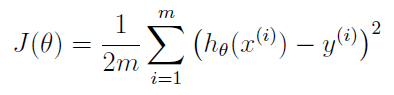
注意matlab中 .* 的用法。
4.gradientDescent.m
function [theta, J_history] = gradientDescent(X, y, theta, alpha, num_iters)

%GRADIENTDESCENT Performs gradient descent to learn theta

%   theta = GRADIENTDESCENT(X, y, theta, alpha, num_iters) updates theta by

%   taking num_iters gradient steps with learning rate alpha

% Initialize some useful values

m = length(y); % number of training examples

J_history = zeros(num_iters, );

for iter = :num_iters

    % ====================== YOUR CODE HERE ======================

    % Instructions: Perform a single gradient step on the parameter vector

    %               theta.

    %

    % Hint: While debugging, it can be useful to print out the values

    %       of the cost function (computeCost) and gradient here.

     H = X*theta-y;
    theta(1)=theta(1)-alpha*(1/m)*sum(H.*X(:,1));
    theta(2)=theta(2)-alpha*(1/m)*sum(H.*X(:,2));

    % ============================================================

    % Save the cost J in every iteration

    J_history(iter) = computeCost(X, y, theta);

end

end
单变量梯度下降
对函数J(θ)求偏导

即 H.*X(:,1)
θi向着梯度最小的方向减少,alpha为步长。

theta(i)=theta(i)-alpha*(1/m)*sum(H.*X(:,i));
Coursera machine learning 第二周 编程作业 Linear Regression的更多相关文章
- Coursera machine learning 第二周 quiz 答案 Linear Regression with Multiple Variables
https://www.coursera.org/learn/machine-learning/exam/7pytE/linear-regression-with-multiple-variables ...
- Coursera machine learning 第二周 quiz 答案 Octave/Matlab Tutorial
https://www.coursera.org/learn/machine-learning/exam/dbM1J/octave-matlab-tutorial Octave Tutorial 5 ...
- Coursera-AndrewNg(吴恩达)机器学习笔记——第二周编程作业
一.准备工作 从网站上将编程作业要求下载解压后,在Octave中使用cd命令将搜索目录移动到编程作业所在目录,然后使用ls命令检查是否移动正确.如: 提交作业:提交时候需要使用自己的登录邮箱和提交令牌 ...
- Coursera-AndrewNg(吴恩达)机器学习笔记——第二周编程作业(线性回归)
一.准备工作 从网站上将编程作业要求下载解压后,在Octave中使用cd命令将搜索目录移动到编程作业所在目录,然后使用ls命令检查是否移动正确.如: 提交作业:提交时候需要使用自己的登录邮箱和提交令牌 ...
- 【Machine Learning】单参数线性回归 Linear Regression with one variable
最近开始看斯坦福的公开课<Machine Learning>,对其中单参数的Linear Regression(未涉及Gradient Descent)做个总结吧. [设想] ...
- Andrew Ng机器学习编程作业: Linear Regression
编程作业有两个文件 1.machine-learning-live-scripts(此为脚本文件方便作业) 2.machine-learning-ex1(此为作业文件) 将这两个文件解压拖入matla ...
- [Machine Learning (Andrew NG courses)]II. Linear Regression with One Variable
- [Machine Learning (Andrew NG courses)]IV.Linear Regression with Multiple Variables
watermark/2/text/aHR0cDovL2Jsb2cuY3Nkbi5uZXQvenFoXzE5OTE=/font/5a6L5L2T/fontsize/400/fill/I0JBQkFCMA ...
- Coursera公开课-Machine_learing:编程作业
第二周编程作业:Linear Regression 分为单一变量和多变量,假想函数为:hθ(x)=θ0+θ1x1+θ2x2+θ3x3+⋯+θnxn.明显已经包含单一变量的情况,所以完成多变量可以一并解 ...
随机推荐
- linux mysql cluser集群
管理节点的安装与启动 config.init内容如下 [NDBD DEFAULT] NoOfReplicas=1 #定义在Cluster环境中相同数据的份数,最大为4 [NDB_MGMD] #设置管理 ...
- 【java】Stream的使用
首先,给大家推荐一个好的地方:http://ifeve.com/stream/ 可以好好学一下 接下来,今天要删除数组中的某些元素,想到了之前用过的这个JDK8的Stream 1.Array转化为St ...
- CSS3:2D转换方法
利用transform 可以实现旋转.缩放.倾斜.移动 属性有:translate.scale 移动: translateX(10px); //水平方向移动10px translateY(50px); ...
- 理解ASP.NET 5 Web Apps
来源https://docs.asp.net/en/latest/conceptual-overview/understanding-aspnet5-apps.html ASP.NET 5引入了几个新 ...
- ASIHttpRequest请求时的默认编码
在ASIHttpRequest.m文件 中的 - (id)initWithURL:(NSURL *)newURL方法中找到 [self setDefaultResponseEncoding:NSISO ...
- 倍福TwinCAT(贝福Beckhoff)基础教程5.1 TwinCAT-1 获取和设置系统时间
使用功能块NT_GetTime,NETID填写两个单引号表示本机,START就是一个触发信号,一般的功能块都需要一个上升沿触发执行,最后的输出类型都是让系统自己决定,然后统一把这些变量放到全局变量中( ...
- 系统封装 如何加载PE到Easyboot进行合盘
1 直接使用别人的PE. 如何加载PE到Easyboot首先需要知道验证你下载的PE的ISO镜像能否启动 如果答案是可以的,以自由天空的MINIPE为例,虽然可以启动,但是完全没有菜单提示,我们想要作 ...
- ACdreamoj 1011(树状数组维护字符串hash前缀和)
题目链接:http://acdream.info/problem? pid=1019 题意:两种操作,第一种将字符串某个位置的字符换为还有一个字符.另外一种查询某个连续子序列是否是回文串: 解法:有两 ...
- mysql 修复
/home/wkubuntu/mysql/data/iZ25sgya7raZbak.pid pid 文件notfond 错误解决 一.截图 snipingtool skip-locking 修改成 ...
- bootstrap之PressKeyCode&&LongPressKeyCode
PressKeyCode package io.appium.android.bootstrap.handler; import com.android.uiautomator.core.UiDevi ...