
Dtree 添加 checkbox 复选框 可以默认选中
一:目标
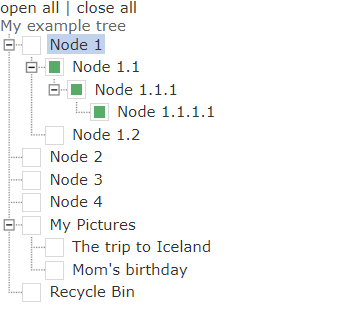
要实现用一个树形结构的展示数据,每个节点(除了根节点)前有一个checkbox,同时,点击父节点,则子节点全选或者全不选,当选中了全部子节点,父节点选中;如下图所示:
同时可以在创建的时候,让某些节点默认选中或不选中;
注:本人把显示图标改成了false(个人觉得不好看),想用图标的话可以不用修改源文件,
useIcons : false// 想用图标,值为true
二:准备工作
1. dtree 的 js css等文件可以去官网上下载:http://destroydrop.com/javascripts/tree/
2.由于本人对js文件做出了修改,其中用到了jquery的选择器,所以引入一个jquery的js文件
三:详细步骤
1.如果要想将dtree引入到java的web项目中,请首先将js文件中的 function dTree(objName) 下的this.icon 下所有的图片路径修改成自己项目可以访问到的图片路径
 this.icon = {

         root                : '/dtree/img/base.gif',

         folder            : '/dtree/img/folder.gif',

         folderOpen    : '/dtree/img/folderopen.gif',

         node                : '/dtree/img/page.gif',

         empty                : '/dtree/img/empty.gif',

         line                : '/dtree/img/line.gif',

         join                : '/dtree/img/join.gif',

         joinBottom    : '/dtree/img/joinbottom.gif',

         plus                : '/dtree/img/plus.gif',

         plusBottom    : '/dtree/img/plusbottom.gif',

         minus                : '/dtree/img/minus.gif',

         minusBottom    : '/dtree/img/minusbottom.gif',

         nlPlus            : '/dtree/img/nolines_plus.gif',

         nlMinus            : '/dtree/img/nolines_minus.gif'

     };
2.在 function dTree(objName) 下this.config最后加入一个属性 userCheckbox,默认值为 true
 this.config = {

         target                    : null,

         folderLinks            : true,

         useSelection        : true,

         useCookies            : true,

         useLines                : true,

         useIcons                : false,//我给改了,不想让显示图标,太丑了 0.0 想要的话,改成true

         useStatusText        : false,

         closeSameLevel    : false,

         inOrder                    : false,

         useCheckbox                      : true   //新加的

     }
并在 function Node(id, pid, name, url,checked ,title, target, icon, iconOpen, open) 中加入一行代码:
this.checkedStatus = checked || false;// 选中状态,默认false,不选中
 function Node(id, pid, name, url,checked ,title, target, icon, iconOpen, open) {

     this.id = id;

     this.pid = pid;

     this.name = name;

     this.url = url;

     this.checkedStatus = checked || false;// 选中状态,默认false,不选中

     this.title = title;

     this.target = target;

     this.icon = icon;

     this.iconOpen = iconOpen;

     this._io = open || false;

     this._is = false;

     this._ls = false;

     this._hc = false;

     this._ai = 0;

     this._p;

 };
修改 dTree.prototype.add = function(id, pid, name, url, checked, title, target, icon, iconOpen, open) , 添加了一个参数 checked:是否选中
 dTree.prototype.add = function(id, pid, name, url, checked, title, target, icon, iconOpen, open) {

     this.aNodes[this.aNodes.length] = new Node(id, pid, name, url,checked ,title, target, icon, iconOpen, open);

 };
3.在 dTree.prototype.node = function(node, nodeId)下 if (this.config.useIcons) {} 结束之后加入以下代码,把checkbox加入进去,(checkbox做了美化,最后修改css文件),并判断是否默认选中:
 if(this.config.useCheckbox == true && node.id != 0){

         str += '<label class="demo--label">'

             + '<input type="checkbox"  class="demo--radio" id="' + node.pid+ '_' + node.id

             + '" onclick="javascript:' + this.obj + '.cc(' + node.id

             + ',' + node.pid + ')"';

             if (node.checkedStatus){

                 str += 'checked="checked"';

             }

             str += ' />'

             + '<span class="demo--checkbox demo--radioInput"></span>'

             + '</label>';

     }
4. 在js文件的任意位置加入以下几个函数,为了实现父级子级 checkbox选中事件,代码中有详细注释,这里不做过多说明
 //复选框onclick事件

 dTree.prototype.cc=function(nodeId, nodePid){

     //说明:checkbox的id由 nodePid + _ + nodeId  三部分组成

     //获取当前节点的选中状态

     var boo = $("#"+nodePid+"_"+nodeId).attr("checked");

     //1. 判断有无子节点,如果有,则全部选中,并且递归判断子节点是否还有子节点

     childsSelected(nodeId, boo);

     //2. 获取所有同级节点,判断是否都选中,如果都选中,则父节点也要选中

     parentsSelected(nodePid);

 }

 //递归选中父节点,参数1:父节点,参数2:选中状态

 function parentsSelected(pid) {

     //1. 获取所有同级checkbox的id集合

     var siblings = getChilds(pid);

     //由于至少还会有调用方法的那个节点本身,所以siblings里至少有一个值

     var flag = $("#"+siblings[0]).attr("checked");

     //如果flag为false,则不用看其他同级节点了,父节点的checkbox必然为false,为true的话,则继续看同级节点里有没有false

     //只要有一个false,父节点都为false

     if (flag){

         for (var i = 1; i < siblings.length; i++){

             if ($("#"+siblings[i]).attr("checked") != flag){

                 flag = false;

                 break;

             }

         }

     }

     // 获取父节点的选中状态 (父节点的id,_的后面部分是子节点_的前面部分)

     var originalCheck = $("input[id$='_"+siblings[0].split("_")[0]+"']").attr("checked");

     //如果父节点原本的选中状态和应该的选中状态不一致,则改变父节点选中状态,并递归调用本方法

     if (originalCheck != flag){

         $("input[id$='_"+siblings[0].split("_")[0]+"']").attr("checked", flag);

         var parentCheckBoxId =  $("input[id$='_"+siblings[0].split("_")[0]+"']").attr("id");

         if (parentCheckBoxId != null){

             parentsSelected(parentCheckBoxId.split("_")[0]);

         }

     }

 }

 //递归选中子节点,参数1:父节点id, 参数2:选中状态

 function childsSelected(pid, boo) {

     //获取所有下一级节点的checkbox的id

     var childs = getChilds(pid);

     if (childs.length == 0){

         return;

     }

     //让所有子节点选中,并递归判断每一个子节点是否还有子节点,让每一层每一个都选中

     for (var i = 0; i < childs.length; i++){

         $("#"+childs[i]).attr("checked",boo);

         childsSelected(childs[i].split("_")[1], boo);

     }

 }

 //获取下一级子节点的id

 function getChilds(pid){

     var arr = new Array();

     $("input[id^='"+pid+"_']").each(function (i,chkbox) {

         arr.push(chkbox.id);

     })

     return arr;

 }
 .demo--label{display:inline-block}

 .demo--radio{display:none}

 .demo--radioInput{background-color:#fff;border:1px solid rgba(0,0,0,0.15);border-radius:100%;display:inline-block;height:13px;margin-right:5px;margin-top:-1px;vertical-align:middle;width:13px;line-height:}

 .demo--radio:checked + .demo--radioInput:after{background-color:#57ad68;border-radius:100%;content:"";display:inline-block;height:9px;margin:2px;width:9px}

 .demo--checkbox.demo--radioInput,.demo--radio:checked + .demo--checkbox.demo--radioInput:after{border-radius:}
四:说明
至此应该是结束了,如果按照步骤不能实现,请留言评论,咱们可以互相探讨,本人亲测好使,最后附上全部的js代码和css代码把,
(如果想让某一个节点默认选中,则设置url后面的一个参数为 true ,
d.add(1,0,'Node 1','searchTest.page',true);
这样只会影响单节点,对父节点和子节点都没有影响)
dtree.js:
 // Node object

 function Node(id, pid, name, url,checked ,title, target, icon, iconOpen, open) {

     this.id = id;

     this.pid = pid;

     this.name = name;

     this.url = url;

     this.checkedStatus = checked || false;// 选中状态,默认false,不选中

     this.title = title;

     this.target = target;

     this.icon = icon;

     this.iconOpen = iconOpen;

     this._io = open || false;

     this._is = false;

     this._ls = false;

     this._hc = false;

     this._ai = 0;

     this._p;

 };

 // Tree object

 function dTree(objName) {

     this.config = {

         target                    : null,

         folderLinks            : true,

         useSelection        : true,

         useCookies            : true,

         useLines                : true,

         useIcons                : false,//我给改了,不想让显示图标,太丑了 0.0 想要的话,改成true

         useStatusText        : false,

         closeSameLevel    : false,

         inOrder                    : false,

         useCheckbox                      : true   //新加的

     }

     this.icon = {

         root                : '/dtree/img/base.gif',

         folder            : '/dtree/img/folder.gif',

         folderOpen    : '/dtree/img/folderopen.gif',

         node                : '/dtree/img/page.gif',

         empty                : '/dtree/img/empty.gif',

         line                : '/dtree/img/line.gif',

         join                : '/dtree/img/join.gif',

         joinBottom    : '/dtree/img/joinbottom.gif',

         plus                : '/dtree/img/plus.gif',

         plusBottom    : '/dtree/img/plusbottom.gif',

         minus                : '/dtree/img/minus.gif',

         minusBottom    : '/dtree/img/minusbottom.gif',

         nlPlus            : '/dtree/img/nolines_plus.gif',

         nlMinus            : '/dtree/img/nolines_minus.gif'

     };

     this.obj = objName;

     this.aNodes = [];

     this.aIndent = [];

     this.root = new Node(-1);

     this.selectedNode = null;

     this.selectedFound = false;

     this.completed = false;

 };

 // Adds a new node to the node array

 dTree.prototype.add = function(id, pid, name, url, checked, title, target, icon, iconOpen, open) {

     this.aNodes[this.aNodes.length] = new Node(id, pid, name, url,checked ,title, target, icon, iconOpen, open);

 };

 // Open/close all nodes

 dTree.prototype.openAll = function() {

     this.oAll(true);

 };

 dTree.prototype.closeAll = function() {

     this.oAll(false);

 };

 // Outputs the tree to the page

 dTree.prototype.toString = function() {

     var str = '<div class="dtree">\n';

     if (document.getElementById) {

         if (this.config.useCookies) this.selectedNode = this.getSelected();

         str += this.addNode(this.root);

     } else str += 'Browser not supported.';

     str += '</div>';

     if (!this.selectedFound) this.selectedNode = null;

     this.completed = true;

     return str;

 };

 // Creates the tree structure

 dTree.prototype.addNode = function(pNode) {

     var str = '';

     var n=0;

     if (this.config.inOrder) n = pNode._ai;

     for (n; n<this.aNodes.length; n++) {

         if (this.aNodes[n].pid == pNode.id) {

             var cn = this.aNodes[n];

             cn._p = pNode;

             cn._ai = n;

             this.setCS(cn);

             if (!cn.target && this.config.target) cn.target = this.config.target;

             if (cn._hc && !cn._io && this.config.useCookies) cn._io = this.isOpen(cn.id);

             if (!this.config.folderLinks && cn._hc) cn.url = null;

             if (this.config.useSelection && cn.id == this.selectedNode && !this.selectedFound) {

                     cn._is = true;

                     this.selectedNode = n;

                     this.selectedFound = true;

             }

             str += this.node(cn, n);

             if (cn._ls) break;

         }

     }

     return str;

 };

 // Creates the node icon, url and text

 dTree.prototype.node = function(node, nodeId) {

     var str = '<div class="dTreeNode">' + this.indent(node, nodeId);

     if (this.config.useIcons) {

         if (!node.icon) node.icon = (this.root.id == node.pid) ? this.icon.root : ((node._hc) ? this.icon.folder : this.icon.node);

         if (!node.iconOpen) node.iconOpen = (node._hc) ? this.icon.folderOpen : this.icon.node;

         if (this.root.id == node.pid) {

             node.icon = this.icon.root;

             node.iconOpen = this.icon.root;

         }

         str += '<img id="i' + this.obj + nodeId + '" src="' + ((node._io) ? node.iconOpen : node.icon) + '" alt="" />';

     }

     if(this.config.useCheckbox == true && node.id != 0){

         str += '<label class="demo--label">'

             + '<input type="checkbox"  class="demo--radio" id="' + node.pid+ '_' + node.id

             + '" onclick="javascript:' + this.obj + '.cc(' + node.id

             + ',' + node.pid + ')"';

             if (node.checkedStatus){

                 str += 'checked="checked"';

             }

             str += ' />'

             + '<span class="demo--checkbox demo--radioInput"></span>'

             + '</label>';

     }

     // if(this.config.useCheckbox == true && node.id != 0){

     //     str += '<input type="checkbox" id="' + node.pid+ '_' + node.id

     //         + '" onclick="javascript:' + this.obj + '.cc(' + node.id

     //         + ',' + node.pid + ')"/>';

     // }

     if (node.url) {

         str += '<a id="s' + this.obj + nodeId + '" class="' + ((this.config.useSelection) ? ((node._is ? 'nodeSel' : 'node')) : 'node') + '" href="' + node.url + '"';

         if (node.title) str += ' title="' + node.title + '"';

         if (node.target) str += ' target="' + node.target + '"';

         if (this.config.useStatusText) str += ' onmouseover="window.status=\'' + node.name + '\';return true;" onmouseout="window.status=\'\';return true;" ';

         if (this.config.useSelection && ((node._hc && this.config.folderLinks) || !node._hc))

             str += ' onclick="javascript: ' + this.obj + '.s(' + nodeId + ');"';

         str += '>';

     }

     else if ((!this.config.folderLinks || !node.url) && node._hc && node.pid != this.root.id)

         str += '<a href="javascript: ' + this.obj + '.o(' + nodeId + ');" class="node">';

     str += node.name;

     if (node.url || ((!this.config.folderLinks || !node.url) && node._hc)) str += '</a>';

     str += '</div>';

     if (node._hc) {

         str += '<div id="d' + this.obj + nodeId + '" class="clip" style="display:' + ((this.root.id == node.pid || node._io) ? 'block' : 'none') + ';">';

         str += this.addNode(node);

         str += '</div>';

     }

     this.aIndent.pop();

     return str;

 };

 //复选框onclick事件

 dTree.prototype.cc=function(nodeId, nodePid){

     //说明:checkbox的id由 nodePid + _ + nodeId  三部分组成

     //获取当前节点的选中状态

     var boo = $("#"+nodePid+"_"+nodeId).attr("checked");

     //1. 判断有无子节点,如果有,则全部选中,并且递归判断子节点是否还有子节点

     childsSelected(nodeId, boo);

     //2. 获取所有同级节点,判断是否都选中,如果都选中,则父节点也要选中

     parentsSelected(nodePid);

 }

 //递归选中父节点,参数1:父节点,参数2:选中状态

 function parentsSelected(pid) {

     //1. 获取所有同级checkbox的id集合

     var siblings = getChilds(pid);

     //由于至少还会有调用方法的那个节点本身,所以siblings里至少有一个值

     var flag = $("#"+siblings[0]).attr("checked");

     //如果flag为false,则不用看其他同级节点了,父节点的checkbox必然为false,为true的话,则继续看同级节点里有没有false

     //只要有一个false,父节点都为false

     if (flag){

         for (var i = 1; i < siblings.length; i++){

             if ($("#"+siblings[i]).attr("checked") != flag){

                 flag = false;

                 break;

             }

         }

     }

     // 获取父节点的选中状态 (父节点的id,_的后面部分是子节点_的前面部分)

     var originalCheck = $("input[id$='_"+siblings[0].split("_")[0]+"']").attr("checked");

     //如果父节点原本的选中状态和应该的选中状态不一致,则改变父节点选中状态,并递归调用本方法

     if (originalCheck != flag){

         $("input[id$='_"+siblings[0].split("_")[0]+"']").attr("checked", flag);

         var parentCheckBoxId =  $("input[id$='_"+siblings[0].split("_")[0]+"']").attr("id");

         if (parentCheckBoxId != null){

             parentsSelected(parentCheckBoxId.split("_")[0]);

         }

     }

 }

 //递归选中子节点,参数1:父节点id, 参数2:选中状态

 function childsSelected(pid, boo) {

     //获取所有下一级节点的checkbox的id

     var childs = getChilds(pid);

     if (childs.length == 0){

         return;

     }

     //让所有子节点选中,并递归判断每一个子节点是否还有子节点,让每一层每一个都选中

     for (var i = 0; i < childs.length; i++){

         $("#"+childs[i]).attr("checked",boo);

         childsSelected(childs[i].split("_")[1], boo);

     }

 }

 //获取下一级子节点的id

 function getChilds(pid){

     var arr = new Array();

     $("input[id^='"+pid+"_']").each(function (i,chkbox) {

         arr.push(chkbox.id);

     })

     return arr;

 }

 // Adds the empty and line icons

 dTree.prototype.indent = function(node, nodeId) {

     var str = '';

     if (this.root.id != node.pid) {

         for (var n=0; n<this.aIndent.length; n++)

             str += '<img src="' + ( (this.aIndent[n] == 1 && this.config.useLines) ? this.icon.line : this.icon.empty ) + '" alt="" />';

         (node._ls) ? this.aIndent.push(0) : this.aIndent.push(1);

         if (node._hc) {

             str += '<a href="javascript: ' + this.obj + '.o(' + nodeId + ');"><img id="j' + this.obj + nodeId + '" src="';

             if (!this.config.useLines) str += (node._io) ? this.icon.nlMinus : this.icon.nlPlus;

             else str += ( (node._io) ? ((node._ls && this.config.useLines) ? this.icon.minusBottom : this.icon.minus) : ((node._ls && this.config.useLines) ? this.icon.plusBottom : this.icon.plus ) );

             str += '" alt="" /></a>';

         } else str += '<img src="' + ( (this.config.useLines) ? ((node._ls) ? this.icon.joinBottom : this.icon.join ) : this.icon.empty) + '" alt="" />';

     }

     return str;

 };

 // Checks if a node has any children and if it is the last sibling

 dTree.prototype.setCS = function(node) {

     var lastId;

     for (var n=0; n<this.aNodes.length; n++) {

         if (this.aNodes[n].pid == node.id) node._hc = true;

         if (this.aNodes[n].pid == node.pid) lastId = this.aNodes[n].id;

     }

     if (lastId==node.id) node._ls = true;

 };

 // Returns the selected node

 dTree.prototype.getSelected = function() {

     var sn = this.getCookie('cs' + this.obj);

     return (sn) ? sn : null;

 };

 // Highlights the selected node

 dTree.prototype.s = function(id) {

     if (!this.config.useSelection) return;

     var cn = this.aNodes[id];

     if (cn._hc && !this.config.folderLinks) return;

     if (this.selectedNode != id) {

         if (this.selectedNode || this.selectedNode==0) {

             eOld = document.getElementById("s" + this.obj + this.selectedNode);

             eOld.className = "node";

         }

         eNew = document.getElementById("s" + this.obj + id);

         eNew.className = "nodeSel";

         this.selectedNode = id;

         if (this.config.useCookies) this.setCookie('cs' + this.obj, cn.id);

     }

 };

 // Toggle Open or close

 dTree.prototype.o = function(id) {

     var cn = this.aNodes[id];

     this.nodeStatus(!cn._io, id, cn._ls);

     cn._io = !cn._io;

     if (this.config.closeSameLevel) this.closeLevel(cn);

     if (this.config.useCookies) this.updateCookie();

 };

 // Open or close all nodes

 dTree.prototype.oAll = function(status) {

     for (var n=0; n<this.aNodes.length; n++) {

         if (this.aNodes[n]._hc && this.aNodes[n].pid != this.root.id) {

             this.nodeStatus(status, n, this.aNodes[n]._ls)

             this.aNodes[n]._io = status;

         }

     }

     if (this.config.useCookies) this.updateCookie();

 };

 // Opens the tree to a specific node

 dTree.prototype.openTo = function(nId, bSelect, bFirst) {

     if (!bFirst) {

         for (var n=0; n<this.aNodes.length; n++) {

             if (this.aNodes[n].id == nId) {

                 nId=n;

                 break;

             }

         }

     }

     var cn=this.aNodes[nId];

     if (cn.pid==this.root.id || !cn._p) return;

     cn._io = true;

     cn._is = bSelect;

     if (this.completed && cn._hc) this.nodeStatus(true, cn._ai, cn._ls);

     if (this.completed && bSelect) this.s(cn._ai);

     else if (bSelect) this._sn=cn._ai;

     this.openTo(cn._p._ai, false, true);

 };

 // Closes all nodes on the same level as certain node

 dTree.prototype.closeLevel = function(node) {

     for (var n=0; n<this.aNodes.length; n++) {

         if (this.aNodes[n].pid == node.pid && this.aNodes[n].id != node.id && this.aNodes[n]._hc) {

             this.nodeStatus(false, n, this.aNodes[n]._ls);

             this.aNodes[n]._io = false;

             this.closeAllChildren(this.aNodes[n]);

         }

     }

 }

 // Closes all children of a node

 dTree.prototype.closeAllChildren = function(node) {

     for (var n=0; n<this.aNodes.length; n++) {

         if (this.aNodes[n].pid == node.id && this.aNodes[n]._hc) {

             if (this.aNodes[n]._io) this.nodeStatus(false, n, this.aNodes[n]._ls);

             this.aNodes[n]._io = false;

             this.closeAllChildren(this.aNodes[n]);

         }

     }

 }

 // Change the status of a node(open or closed)

 dTree.prototype.nodeStatus = function(status, id, bottom) {

     eDiv    = document.getElementById('d' + this.obj + id);

     eJoin    = document.getElementById('j' + this.obj + id);

     if (this.config.useIcons) {

         eIcon    = document.getElementById('i' + this.obj + id);

         eIcon.src = (status) ? this.aNodes[id].iconOpen : this.aNodes[id].icon;

     }

     eJoin.src = (this.config.useLines)?

     ((status)?((bottom)?this.icon.minusBottom:this.icon.minus):((bottom)?this.icon.plusBottom:this.icon.plus)):

     ((status)?this.icon.nlMinus:this.icon.nlPlus);

     eDiv.style.display = (status) ? 'block': 'none';

 };

 // [Cookie] Clears a cookie

 dTree.prototype.clearCookie = function() {

     var now = new Date();

     var yesterday = new Date(now.getTime() - 1000 * 60 * 60 * 24);

     this.setCookie('co'+this.obj, 'cookieValue', yesterday);

     this.setCookie('cs'+this.obj, 'cookieValue', yesterday);

 };

 // [Cookie] Sets value in a cookie

 dTree.prototype.setCookie = function(cookieName, cookieValue, expires, path, domain, secure) {

     document.cookie =

         escape(cookieName) + '=' + escape(cookieValue)

         + (expires ? '; expires=' + expires.toGMTString() : '')

         + (path ? '; path=' + path : '')

         + (domain ? '; domain=' + domain : '')

         + (secure ? '; secure' : '');

 };

 // [Cookie] Gets a value from a cookie

 dTree.prototype.getCookie = function(cookieName) {

     var cookieValue = '';

     var posName = document.cookie.indexOf(escape(cookieName) + '=');

     if (posName != -1) {

         var posValue = posName + (escape(cookieName) + '=').length;

         var endPos = document.cookie.indexOf(';', posValue);

         if (endPos != -1) cookieValue = unescape(document.cookie.substring(posValue, endPos));

         else cookieValue = unescape(document.cookie.substring(posValue));

     }

     return (cookieValue);

 };

 // [Cookie] Returns ids of open nodes as a string

 dTree.prototype.updateCookie = function() {

     var str = '';

     for (var n=0; n<this.aNodes.length; n++) {

         if (this.aNodes[n]._io && this.aNodes[n].pid != this.root.id) {

             if (str) str += '.';

             str += this.aNodes[n].id;

         }

     }

     this.setCookie('co' + this.obj, str);

 };

 // [Cookie] Checks if a node id is in a cookie

 dTree.prototype.isOpen = function(id) {

     var aOpen = this.getCookie('co' + this.obj).split('.');

     for (var n=0; n<aOpen.length; n++)

         if (aOpen[n] == id) return true;

     return false;

 };

 // If Push and pop is not implemented by the browser

 if (!Array.prototype.push) {

     Array.prototype.push = function array_push() {

         for(var i=0;i<arguments.length;i++)

             this[this.length]=arguments[i];

         return this.length;

     }

 };

 if (!Array.prototype.pop) {

     Array.prototype.pop = function array_pop() {

         lastElement = this[this.length-1];

         this.length = Math.max(this.length-1,0);

         return lastElement;

     }

 };
dtree.css:
 .dtree {

     font-family: Verdana, Geneva, Arial, Helvetica, sans-serif;

     font-size: 11px;

     color: #;

     white-space: nowrap;

 }

 .dtree img {

     border: 0px;

     vertical-align: middle;

 }

 .dtree a {

     color: #;

     text-decoration: none;

 }

 .dtree a.node, .dtree a.nodeSel {

     white-space: nowrap;

     padding: 1px 2px 1px 2px;

 }

 .dtree a.node:hover, .dtree a.nodeSel:hover {

     color: #;

     text-decoration: underline;

 }

 .dtree a.nodeSel {

     background-color: #c0d2ec;

 }

 .dtree .clip {

     overflow: hidden;

 }

 .demo--label{display:inline-block}

 .demo--radio{display:none}

 .demo--radioInput{background-color:#fff;border:1px solid rgba(,,,0.15);border-radius:%;display:inline-block;height:13px;margin-right:5px;margin-top:-1px;vertical-align:middle;width:13px;line-height:}

 .demo--radio:checked + .demo--radioInput:after{background-color:#57ad68;border-radius:%;content:"";display:inline-block;height:9px;margin:2px;width:9px}

 .demo--checkbox.demo--radioInput,.demo--radio:checked + .demo--checkbox.demo--radioInput:after{border-radius:}
Dtree 添加 checkbox 复选框 可以默认选中的更多相关文章
- 通过编写串口助手工具学习MFC过程——(五)添加CheckBox复选框
通过编写串口助手工具学习MFC过程 因为以前也做过几次MFC的编程,每次都是项目完成时,MFC基本操作清楚了,但是过好长时间不再接触MFC的项目,再次做MFC的项目时,又要从头开始熟悉.这次通过做一个 ...
- jquery关于checkbox复选框是否被选中的问题
本人在项目中需要用到,判断哪些复选框被用户选中.自然而然想到用 if($('').attr('checked') == true) 但是不管有没有选,$('').attr('checked')返回的都 ...
- DevExpress GridControl使用教程:之 添加 checkbox 复选框
添加一列,FieldName为"FLAG",将ColumnEdit设置为复选框样式. gridview1 =>optionsbehavior => editabl ...
- C# dev gridcontrol中添加checkbox复选框
文章来源 csdn weinierbian http://blog.csdn.net/weinierbian/article/details/6255402 添加一列,FieldName为 " ...
- checkBox复选框,获得选中那一行所有列的数据
function showCol(){ var check=$("input[name='one']:checked");//选中的复选框 check.each(function( ...
- 转 纯CSS设置Checkbox复选框控件的样式
Checkbox复选框是一个可能每一个网站都在使用的HTML元素,但大多数人并不给它们设置样式,所以在绝大多数网站它们看起来是一样的.为什么不把你的网站中的Checkbox设置一个与众不同的样式,甚至 ...
- 【转】纯CSS设置Checkbox复选框控件的样式
Checkbox复选框是一个可能每一个网站都在使用的HTML元素,但大多数人并不给它们设置样式,所以在绝大多数网站它们看起来是一样的.为什么不把你的网站中的Checkbox设置一个与众不同的样式,甚至 ...
- checkbox复选框样式
随着现代浏览器的流行,纯CSS设置checkbox也变的很是实用,下面会讲到5种与众不同的checkbox复选框. 首先,需要添加一段CSS隐藏所有的Checkbox复选框,下面我们会改变它的外观.要 ...
- 纯CSS设置Checkbox复选框控件的样式
Checkbox复选框是一个可能每一个网站都在使用的HTML元素,但大多数人并不给它们设置样式,所以在绝大多数网站它们看起来是一样的.为什么不把你的网站中的Checkbox设置一个与众不同的样式,甚至 ...
随机推荐
- 如何在html文件中导入header、footer等
1.include是php函数,所以确实需要转化成.php文件--(其实除了用php,html都有自带的引入方法)2.html转化为php文件很简单,直接改一下后缀名就可以了--(如:index.ht ...
- 配置了SSH后还是每次都要求输入密码
保存凭证可以解决问题 git config --global credential.helper store
- 3305: Hero In Maze II (优先队列+bfs)
Description 500年前,Jesse是我国最卓越的剑客.他英俊潇洒,而且机智过人^_^.突然有一天,Jesse心爱的公主被魔王困在了一个巨大的迷宫中.Jesse听说这个消息已经是两天以后了, ...
- Spark编程模型(下)
创建Pair RDD 什么是Pair RDD 包含键值对类型的RDD类型被称作Pair RDD: Pair RDD通常用来进行聚合计算: Pair RDD通常由普通RDD做ETL转化而来. Pytho ...
- asp.net web 开发中配置web.config
一.配置数据库连接字符串 <connectionStrings> <add name="CaoLPractise" connectionString=" ...
- SpringBoot | 第十七章:web应用开发之文件上传
前言 上一章节,我们讲解了利用模版引擎实现前端页面渲染,从而实现动态网页的功能,同时也提出了兼容jsp项目的解决方案.既然开始讲解web开发了,我们就接着继续往web这个方向继续吧.通常,我们在做we ...
- <邮件的反垃圾反病毒>
本章——发送接收邮件的工具为雷鸟 安装 # yum install dovecot-mysql.x86_64 dovecot.x86_64 -y 编辑文件 vim 10-mail.conf mail_ ...
- .net core mvc全局设置跨域访问
public void Configure(IApplicationBuilder app, IHostingEnvironment env, ILoggerFactory loggerFactory ...
- JS语法字典---网友总结
1.document.write(""); 输出语句2.JS中的注释为//3.传统的HTML文档顺序是:document->html->(head,body)4.一个浏 ...
- 在Magento中用MySQL模拟队列发送电子邮件
1. 需求 顾客在网站上购买特定商品并且这些商品的总金额超过特定金额后,使用email给顾客发送一个优惠券:假如某件商品已经降价了,则此商品的金额不计算在目标总金额内: 2. 需求分析 ①发送优惠券的 ...