
Pester: Unit Testing for PowerShell
Pester is a BDD inspired testing framework for PowerShell just like Jasmine is on the JavaScript side and RSpec is on the Ruby side for example (I do believe that JavaScript is one of the best comparisons for PowerShell though, it being a scripting language and all).
This blog post is meant as a quick introduction to what I think are the key take-aways of Pester and how I use it.

So why on earth should you test your PowerShell scripts, are they not meant to be ad-hoc?
I do believe, much like in any other language, that sometimes you don’t have the need to test your code (say what!?). Sometimes it definitely a place for ad-hoc code that just just executes once or twice just to accomplish something for the time being.
However when you’re constructing something that will survive over time and that others may use and improve, testing is extremely useful. Don’t let the word “script” or “shell” fool you, it’s still code.
PowerShell is often used in some sort of configuration scenario, may it be in a build/setup scenario for SharePoint or a deployment framework for your web application etc. It often deals a lot with external dependencies such as services and IO which are often hard to get under test. Or is it?
Disclaimer: I’m a BDD enthusiast and specifically I ‘m very fond of Specification by Example and the Gherkin syntax. This may (ok, it will) influence how I use the Pester framework which is really more leaning towards RSpec than Cucumber or SpecFlow (both being Gherkin family frameworks).
Note: All the code for this post can be found here.
1. Hello World
Let’s begin with a very quick example shall we. (btw this is the start of Roy Osherov´s StringCalculator Kata if you’re wondering):
StringCalculator.Tests.ps1
|
01
02
03
04
05
06
07
08
09
10
11
12
13
14
15
16
17
|
$here = Split-Path -Parent $MyInvocation.MyCommand.Path$sut = (Split-Path -Leaf $MyInvocation.MyCommand.Path).Replace(".Tests.", "."). "$here\$sut"Describe "Add" { Context "when the input is an empty string" { $input = " " $expected = 0 $actual = Add $input It "should return zero" { $actual | Should Be $expected } }} |
please note: StringCalculator.ps1, which has the Add function, reside in the same directory as the tests. (Line 1-3 dot sources that file into the test).
We’ll go trough all the different parts of a pester test shortly but for now you should know that Describe-Context-It-Should-Be are Pesterkeywords/concepts. (in PowerShell terms, they are functions).
Executing the tests (from a PowerShell prompt)
|
1
2
3
4
|
Set-Location [PATH_TO_FOLDER_WITH_TESTS]Import-Module "[PATH_TO_PESTER_MODULE]\Pester.psm1" # may be optionalInvoke-Pester |
Pester will, out of the box, locate files named *.tests.ps1 in the current directory and downwards. (Therefore I’m setting the current location to where my tests reside with Set-Location).
Next, we’ll need to import the pester module (that may be optional if it has been added globally already as we’ll see examples of shortly).
Finally, kick it off with a call to Invoke-Pester.
Result
Execute…watch it fail

…fix code…watch it succeed

…and now refactor.
2. Installation
So now that we’ve seen a simple example on how to use Pester we now need to find out how to get it onto our machine.
A few different options exist depending on the context one might say.
Manually
You always have the option to go to github and grab the bits and copy them (or fork/clone) to your machine.
Pros:
Easy, fast.
Cons:
The problem here is versioning. I mean…it’s not something compiled we’re getting it’s just a text file.
NuGet
If you’re working as a developer and want to use Pester for your library/scripts this is in my opinion the best choice. NuGet has the concept of versions at least. (Pester is 2.0.3 at the time of this post)
After you’ve installed the Pester NuGet package (Install-Package Pester) you’ll get a ‘packages’ folder that contains the Pester files.
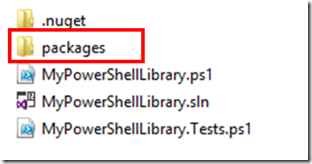
Given that you now execute your tests from within that folder you’d call Pester like this:

Pros:
Known technology to many .NET developers and has a versioning story. You get the Pester code close to your own code and you know the version it has.
Cons:
You may need a solution file or something that NuGet can understand (packages.config) just for the sake of using NuGet.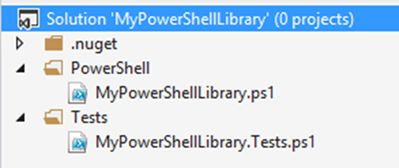
I’ll try to come back to the Pester/NuGet story in a future post perhaps when I aim to speak about TeamCity and Pester.
A word of caution using NuGet
If your scripts reside in the same folder as the ‘packages’ folder (as the image above shows) here’s what can happen when you execute Pester.
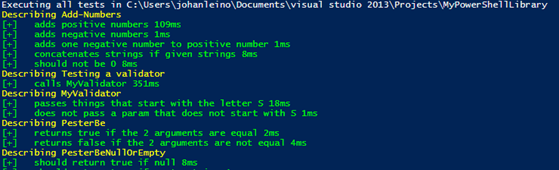
See…it starts running the Pester test. That’s because Pester runs files names *.tests.ps1 in the current folder and all child folder. Pester itself is a child folder (the NuGet package includes all the tests as well).
So…you’ll need to do this:
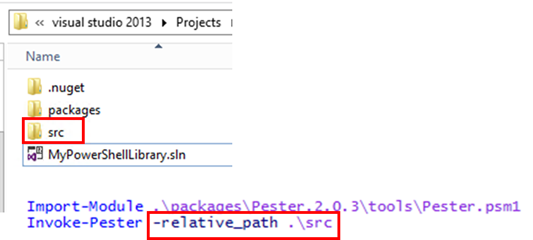
I’ve moved my scripts (and tests) into a subfolder (‘src’) and when I call Pester I make use of the relative path parameter to point it to start in that folder.
Chocolatey or PsGet
Another alternative is to get the Pester bits onto your machine once, a.k.a. global install.
Here you can use Chocolatey or PsGet. I’m showing you the PsGet approach simply because I didn’t get it working with Chocolatey actually.
I’ll start by installing PsGet on my machine (I’m using Chocolatey for that):

And then it’s actually pretty easy:

Done!
Pros:
Install once (handle updates once).
Cons:
Hard to handle versions on the entire system like this perhaps.
3. Pester Specifics
OK, now let’s go into more details on some Pester things that might be good to know about.
We’ll start by looking at that beginning test for the Add function again:
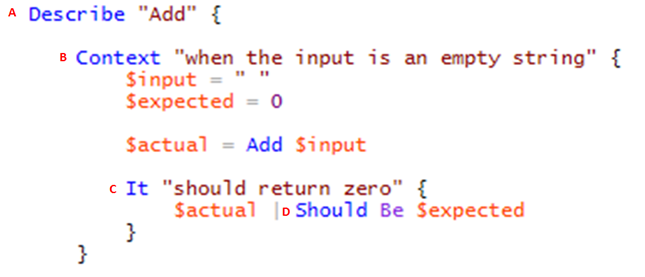
A. Describe
Instead of a test case class, Pester (BDD) uses a “describe” block for one test case.
Describe is a function that takes two parameters: a string and a script block.
The string is a name or title for a spec suite – usually what is under test.
The script block is the code that implements the spec suite – { …some code…}
Personal comment:
My style of writing tests in PowerShell is more towards function per function so describe for me is the name of the function that I’m putting under test.
In a regular unit test this would probably have been my test class (fixture).
B. Context
Context is just an alias for describe. It is used to organize test code into different contexts.
Personal comment:
I like to think of this as my ‘Given’-clause where I’d like to setup my preconditions. Or in AAA terms this is the ‘Arrange’ part .
Therefore I’m often writing it like “given [some condition]” (or “when [some condition]” but not in terms of the Gherkin-style when which describes the action)
Remember, this is your DSL so it’s very important that you feel comfortable with it and it makes sense to you.
C. It
Each test method is an “it” block. This would be the ‘act’ part.
Personal comment:
I often place my ‘act’ in the context part of the code as apart from the It-block.
This is just because of how Pester treats expectations and I might want to do multiple expectations on the same context.
D. Should
BDD style assertions are called expectations. Should is just a syntactic sugar that makes it more readable. Pester has a lot of very useful (readable) should expectations.
Personal comment:
I like to think of this as my ‘Then-clause where I check my post conditions.
Or in AAA terms this is the Assert part . Therefore I’m often writing it like “then [some condition]”.
Again, the DSL is important.
It’s Just Functions!
Since describe, context and it blocks are functions, they can contain any executable code necessary to implement the test. PowerShell scoping rules apply, so variables declared in a describe are available to any descendant block inside the suite.
4. Is that it?
This section will focus more on some personal “best practices” that I have found useful when working with Pester.
Using the file system and some useful tricks
A pretty common scenario for scripts might be to interact with the file system which is traditionally quite hard to handle with a test. Consider this:
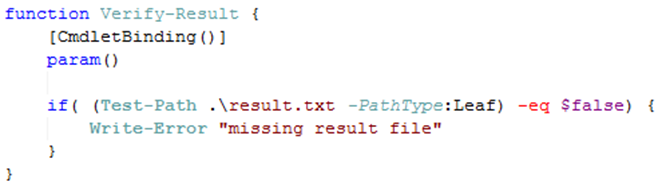
If we want to put that function under test to verify that it indeed writes an error when the result.txt file is missing, how do we do that?
No worries, Pester has the answer:
First, we’ll need to make sure we can add and remove the file as we please. Pester has something called a TestDrive which is a temporary folder that the test has access to.
Let’s see it in action. Start with a failing test… (the TDD purist would probably scream now and say that you can’t write code before you have a failing test…well I just did so).
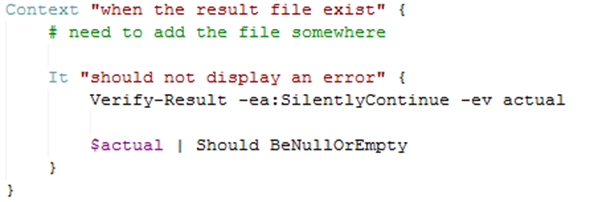

Indeed it fails and it fails because I couldn’t seem to figure out how to add the file (or setup my precondition so to say).
Let’s fix that.
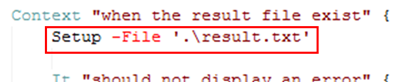
Setup let’s us add file or folder to a temporary location that only exist throughout our test…then it is deleted.
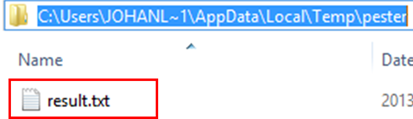
Indeed the file is added but the test still fails. That’s because we’re not executing the that location, pretty common scenario…the working directory issue.
We’ll use another Pester thing…the In-construct to help us solve that issue.
Let’s see it in action.
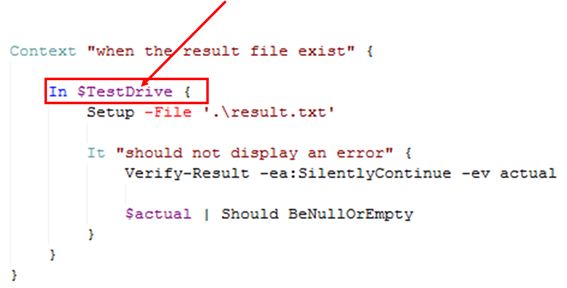
I’ve wrapped the whole ‘interacting with file system’ part in a call to the In function that takes a path and a script block. The path is taken from the pester global variable $TestDrive. The code is now executed with that temp folder and happy day!
And now it’s green.
Now we can refactor, right?
Here we have the opportunity for some refactoring. As I see it the test code is now a bit ‘cluttered’ with that call to in.
What if I should make something that can combine a call to context and combine it with the in call.
Coding by wishful thinking…
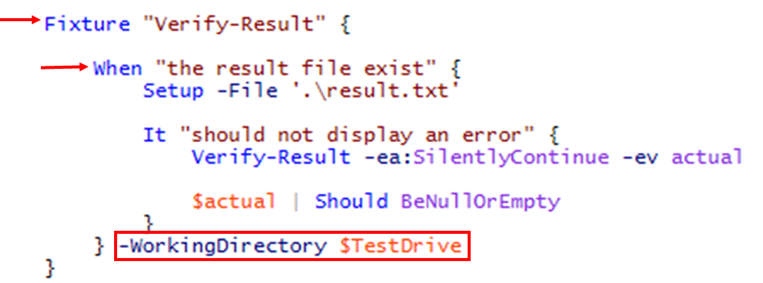
What if our code could look like that instead. In my world that would be better.
What we wish to accomplish is:
- Change ‘describe’ to ‘fixture’ instead.
- Change ‘context’ to ‘when’ and add a parameter to it, WorkingDirectory, that allow us to set the working folder for the entire when function.
The first thing I’m going need is a common place to implement those ‘wrapper functions’. In an object oriented world we would probably call this abase class. In PowerShell it’s simply just a file that I’m importing into the test files. Like this (with a bit of refactoring on the importing parts as well):
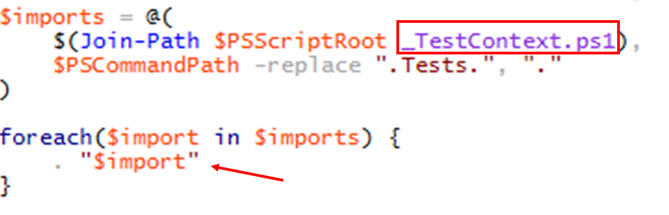
OK and here are those functions that are now in the _TestContext.ps1 file:
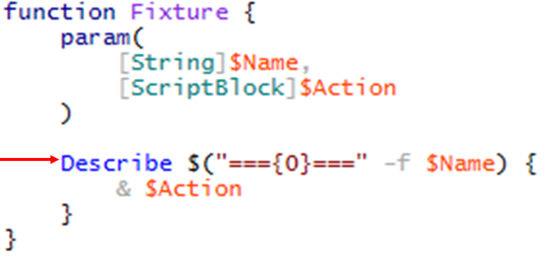
Fixture just wraps the call to describe and adds some text around the call.
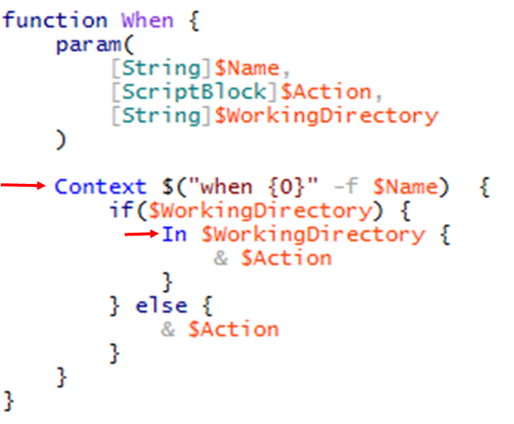
When wraps the call to context, with a prepended ‘when’, and optionally executes the code in the in-clause if you provide a working directory.
..and

Mocking
Yes it can be done. Great examples already exist at the Pester wiki.
Pester: Unit Testing for PowerShell的更多相关文章
- Unit Testing PowerShell Code with Pester
Summary: Guest blogger, Dave Wyatt, discusses using Pester to analyze small pieces of Windows PowerS ...
- Unit Testing with NSubstitute
These are the contents of my training session about unit testing, and also have some introductions a ...
- [Java Basics3] XML, Unit testing
What's the difference between DOM and SAX? DOM creates tree-like representation of the XML document ...
- Javascript单元测试Unit Testing之QUnit
body{ font: 16px/1.5em 微软雅黑,arial,verdana,helvetica,sans-serif; } QUnit是一个基于JQuery的单元测试Uni ...
- [Unit Testing] AngularJS Unit Testing - Karma
Install Karam: npm install -g karma npm install -g karma-cli Init Karam: karma init First test: 1. A ...
- C/C++ unit testing tools (39 found)---reference
http://www.opensourcetesting.org/unit_c.php API Sanity AutoTest Description: An automatic generator ...
- Unit testing Cmockery 简单使用
/********************************************************************** * Unit testing Cmockery 简单使用 ...
- Unit Testing a zend-mvc application
Unit Testing a zend-mvc application A solid unit test suite is essential for ongoing development in ...
- MVC Unit Testing学习笔记
MVC Unit Testing 参考文档: 1.http://www.asp.net/mvc/overview/testing 2.http://www.asp.net/mvc/tutorials/ ...
随机推荐
- 50道经典的JAVA编程题(目录)
这份题从2013做到2014啊...哈哈,整理个目录吧.为了好查阅,也为了监督自己好好的去做完这50道题.当然,有些题实在做得没意思就跳过了,或者自己改题了.题目来源于:http://blog.sin ...
- 50道经典的JAVA编程题 (1-5)
后天java考试,现在闲着也是闲着,来做做java题吧. 前不久在网上看见了50道java算法编程题,感觉还不错,记得大一学C语言的时候做过一些,现在用java来回顾下吧,也算应付考试吧. 代码要是有 ...
- 【转】Linux 技巧: Bash 参数和参数扩展
重点看下清单7 现在,很多 Linux® 和 UNIX® 系统上都有 bash shell,它是 Linux 上常见的默认 shell.通过本文,您将了解到如何在 bash 脚本中处理参数和选项,以及 ...
- HDU-4704 Sum 大数幂取模
题目链接:http://acm.hdu.edu.cn/showproblem.php?pid=4704 题意:求a^n%m的结果,其中n为大数. S(1)+S(2)+...+S(N)等于2^(n-1) ...
- POJ 3764 (异或+字典树)
早就听过用字典树求异或最大值,然而没做过.发现一碰到异或的题就GG,而且因为以前做过的一道类似的题(事实上并不类似)限制了思路,蠢啊= =. 题意:一棵带权的树,求任意两点间路径异或的最大值. 题解: ...
- Altium Designer PCB 常用功能键
altium designer 5种走线模式的切换 : shift+space 方格与格点的切换:View-Grids-ToggleVisible Grid Kind源点:Edit-Origin-Se ...
- UVA 10779 Collectors Problem(最大流)
这个题是很难往网络流上面构思的... 从s向每个物品增加容量为Bob拥有数的弧,然后从每个物品向t增加容量为1的弧(代表种类个数).这时候跑最大流的话,得到的肯定是Bob拥有的初始种类数.那么交换后的 ...
- Cocos2d-x 3.x学习笔记(一):开始Cocos2d之旅
首先,进入官网下载cocos2d-x:http://www.cocos.com/download/,当然你需要注册一个账号才可以下载. 接下来需要跟着官网的配置文档配置一下开发环境,不得不说,Coco ...
- iphone 3G\3GS 超详细拆机教程
更为直观的iphone视频拆机教程: http://bbs.app111.com/thread-243147-1-1.html 第一步: 准备好所需工具 iphone一台....吸盘一个..屏幕布一块 ...
- innobackupex 单脚本循环7天一全备6增备脚本更新
#!/bin/bash #日期转为天数 function date2days { echo "$*" | awk '{ z=-$)/); y=$+-z; m=$+*z-; j=*m ...