
cocos2dx注册场景 使用CCEditBox实现输入框
我们在开始玩一个游戏时,通常要做的第一件事就是注册账号,下面就让我们来制作一个简单的注册场景,我所使用的cocos2dx版本为2.2.2
在这个场景中最主要的元素就是输入框和按钮,我从网上找了一些素材(也有自己P的),样子不太好看,但是最终的效果都是一样的。

在这个场景中,元素的摆放和按钮的功能都比较简单,唯一有些困难的就是输入框。在cocos2dx2.2.2中输入框可以使用CCTextFieldTTF和CCEditBox来实现,我们这里使用的是CCEditBox。
下面我们先来看看这个注册场景操作层的头文件
 #ifndef __MyGame__RegisterHandleLayer__

 #define __MyGame__RegisterHandleLayer__

 #include <iostream>

 #include "cocos2d.h"

 #include "cocos-ext.h"

 using namespace cocos2d;

 USING_NS_CC_EXT;

 class RegisterHandleLayer:public CCLayer,public CCEditBoxDelegate{

 private:

     CCEditBox * editBoxUsername;//用户名

     CCEditBox * editBoxPassword;//密码

     CCEditBox * editBoxRePassword;//重复密码

     void addEditBox(CCEditBox * editBox,CCPoint editPoint, char * defaultValue,bool isPassword);//添加输入框

     bool checkInput();//输入验证

     void toGameScene();//跳转到游戏场景

     void toLoginScene();//跳转到登录场景

 public:

     virtual bool init();

     CREATE_FUNC(RegisterHandleLayer);

     virtual void editBoxEditingDidBegin(extension::CCEditBox* editBox);

     virtual void editBoxEditingDidEnd(extension::CCEditBox* editBox);

     virtual void editBoxTextChanged(extension::CCEditBox* editBox, const std::string& text);

     virtual void editBoxReturn(extension::CCEditBox* editBox);

 };

 #endif /* defined(__MyGame__RegisterHandleLayer__) */
使用CCEditBox需要引入扩展库extension,我们引入头文件 "cocos-ext.h",再引入命名空间,可以使用“using namespace extension”或宏定义“USING_NS_CC_EXT”,同时,还需要继承CCEditBoxDelegate。在该类中,我们定义了3个输入框,用户名、密码和重复密码,及设置输入框的方法。最后的4个虚函数是CCEditBoxDelegate中定义的,我们对输入框的不同操作会触发相应的方法,我们这里不会用到,但是可以通过日志查看各方法的触发时机,各方法的触发时机如下:
 //键盘弹出后输入框获得焦点时触发

 void RegisterHandleLayer::editBoxEditingDidBegin(extension::CCEditBox *editBox)

 {

     CCLog("begin");

 }

 //键盘隐藏后输入框失去焦点时触发

 void RegisterHandleLayer::editBoxEditingDidEnd(extension::CCEditBox *editBox)

 {

     CCLog("end");

 }

 //输入框内文本变化时触发

 void RegisterHandleLayer::editBoxTextChanged(extension::CCEditBox *editBox, const std::string &text)

 {

     CCLog("change");

 }

 //按下返回键或点击键盘外的位置时触发(点击当前输入框时不触发)

 void RegisterHandleLayer::editBoxReturn(extension::CCEditBox *editBox)

 {

     CCLog("return");

 }
下面我们来看看最关键的addEditBox方法,我们可以使用该方法设置输入框的不同属性
 /*

  * 功能 : 向场景中添加输入框并设置相应属性

  *

  *      editBox : 输入框

  *    editPoint : 位置

  * defaultValue : 缺省文本

  *   isPassword : true-密码,false-非密码

 */

 void RegisterHandleLayer::addEditBox(CCEditBox * editBox,CCPoint editPoint, char * defaultValue,bool isPassword)

 {

     editBox->CCNode::setPosition(editPoint.x,editPoint.y); //位置

     editBox->setFontColor(ccWHITE); //文字颜色

     editBox->setPlaceHolder(defaultValue); //输入框缺省文字

     editBox->setPlaceholderFontColor(ccWHITE); //缺省文字颜色

     editBox->setMaxLength(); //最大长度

     editBox->setReturnType(kKeyboardReturnTypeDone); //默认使用键盘return类型为Done

     editBox->setInputMode(kEditBoxInputModeEmailAddr); //输入键盘模式

     if (isPassword) {

         editBox->setInputFlag(kEditBoxInputFlagPassword); //输入密码时的替代符

     }

     editBox->setDelegate(this); //设置委托代理对象为当前类

     this->addChild(editBox);

 }
相关属性还是比较好理解的,大家可以改变属性查看不同的效果。其中setReturnType、setInputMode、setInputFlag这3个方法的参数可能会有些疑问,但是我们可以在“CCEditBox.h”头文件中查看各参数的含义,也可以改变各参数,分别查看不同的效果。例如,我们这里对密码类型输入框的设置“editBox->setInputFlag(kEditBoxInputFlagPassword);”会得到如下效果:
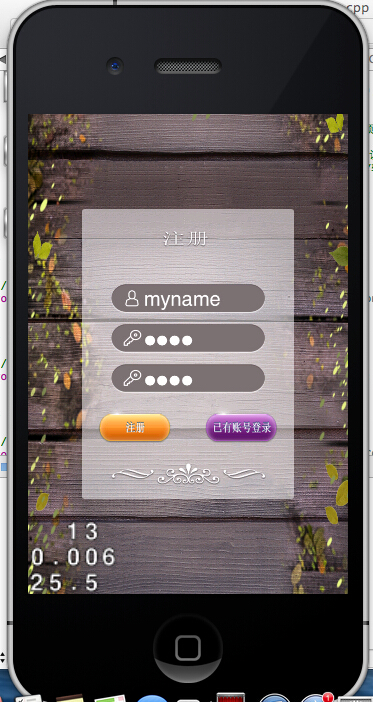
各参数的原始定义如下:
 enum KeyboardReturnType {

     kKeyboardReturnTypeDefault = ,

     kKeyboardReturnTypeDone,

     kKeyboardReturnTypeSend,

     kKeyboardReturnTypeSearch,

     kKeyboardReturnTypeGo

 };

 /**

  * \brief The EditBoxInputMode defines the type of text that the user is allowed

  * to enter.

  */

 enum EditBoxInputMode

 {

     /**

      * The user is allowed to enter any text, including line breaks.

      */

     kEditBoxInputModeAny = ,

     /**

      * The user is allowed to enter an e-mail address.

      */

     kEditBoxInputModeEmailAddr,

     /**

      * The user is allowed to enter an integer value.

      */

     kEditBoxInputModeNumeric,

     /**

      * The user is allowed to enter a phone number.

      */

     kEditBoxInputModePhoneNumber,

     /**

      * The user is allowed to enter a URL.

      */

     kEditBoxInputModeUrl,

     /**

      * The user is allowed to enter a real number value.

      * This extends kEditBoxInputModeNumeric by allowing a decimal point.

      */

     kEditBoxInputModeDecimal,

     /**

      * The user is allowed to enter any text, except for line breaks.

      */

     kEditBoxInputModeSingleLine

 };

 /**

  * \brief The EditBoxInputFlag defines how the input text is displayed/formatted.

  */

 enum EditBoxInputFlag

 {

     /**

      * Indicates that the text entered is confidential data that should be

      * obscured whenever possible. This implies EDIT_BOX_INPUT_FLAG_SENSITIVE.

      */

     kEditBoxInputFlagPassword = ,

     /**

      * Indicates that the text entered is sensitive data that the

      * implementation must never store into a dictionary or table for use

      * in predictive, auto-completing, or other accelerated input schemes.

      * A credit card number is an example of sensitive data.

      */

     kEditBoxInputFlagSensitive,

     /**

      * This flag is a hint to the implementation that during text editing,

      * the initial letter of each word should be capitalized.

      */

     kEditBoxInputFlagInitialCapsWord,

     /**

      * This flag is a hint to the implementation that during text editing,

      * the initial letter of each sentence should be capitalized.

      */

     kEditBoxInputFlagInitialCapsSentence,

     /**

      * Capitalize all characters automatically.

      */

     kEditBoxInputFlagInitialCapsAllCharacters

 };
在我们了解了CCEditBox的相关属性和用法后,就可以完成我们的注册场景了,注册场景操作层的init方法代码如下:
 bool RegisterHandleLayer::init()

 {

     if (!CCLayer::init()) {

         return false;

     }

     //精灵帧缓存

     CCSpriteFrameCache * sfCache = CCSpriteFrameCache::sharedSpriteFrameCache();

     sfCache->addSpriteFramesWithFile("p_register.plist");

     //屏幕尺寸

     CCSize size = CCDirector::sharedDirector()->getWinSize();

     //注册框

     CCSpriteFrame * f_register_box = sfCache->spriteFrameByName("register.png");

     CCSprite * spriteBox = CCSprite::createWithSpriteFrame(f_register_box);

     spriteBox->setPosition(CCPointMake(size.width/, size.height/));

     this->addChild(spriteBox);

     //注册框尺寸

     CCSize boxSize = spriteBox->getContentSize();

     //用户名

     CCSpriteFrame * f_register_username = sfCache->spriteFrameByName("username.png");

     CCSprite * spriteUsername = CCSprite::createWithSpriteFrame(f_register_username);

     CCSize spriteUsernameSize = spriteUsername->getContentSize();

     CCSize editSize = CCSizeMake(spriteUsernameSize.width*/, spriteUsernameSize.height);

     CCPoint spriteUsernamePoint = CCPointMake(size.width/, size.height/+spriteUsernameSize.height*/);

     spriteUsername->setPosition(spriteUsernamePoint);

     this->addChild(spriteUsername);

     //密码

     CCSpriteFrame * f_register_password = sfCache->spriteFrameByName("password.png");

     CCSprite * spritePassword = CCSprite::createWithSpriteFrame(f_register_password);

     CCPoint spritePasswordPoint = CCPointMake(size.width/, size.height/+spriteUsernameSize.height/);

     spritePassword->setPosition(spritePasswordPoint);

     this->addChild(spritePassword);

     //重复密码

     CCSpriteFrame * f_register_repassword = sfCache->spriteFrameByName("password.png");

     CCSprite * spriteRePassword = CCSprite::createWithSpriteFrame(f_register_repassword);

     CCPoint spriteRePasswordPoint = CCPointMake(size.width/, size.height/-spriteUsernameSize.height*/);

     spriteRePassword->setPosition(spriteRePasswordPoint);

     this->addChild(spriteRePassword);

     //添加输入框

     editBoxUsername = CCEditBox::create(editSize, CCScale9Sprite::create());

     addEditBox(editBoxUsername, spriteUsernamePoint, "输入账号",false);

     editBoxPassword = CCEditBox::create(editSize, CCScale9Sprite::create());

     addEditBox(editBoxPassword, spritePasswordPoint, "创建密码",true);

     editBoxRePassword = CCEditBox::create(editSize, CCScale9Sprite::create());

     addEditBox(editBoxRePassword, spriteRePasswordPoint, "重复密码",true);

     //注册按钮

     CCSpriteFrame * f_register_btn_register = sfCache->spriteFrameByName("btn_register_normal.png");

     CCSprite * sprite_register_btn_register = CCSprite::createWithSpriteFrame(f_register_btn_register);

     CCSpriteFrame * f_register_btn_register_select = sfCache->spriteFrameByName("btn_register_select.png");

     CCSprite * sprite_register_btn_register_select = CCSprite::createWithSpriteFrame(f_register_btn_register_select);

     CCMenuItemSprite * itemRegister = CCMenuItemSprite::create(
                                         sprite_register_btn_register,
                                         sprite_register_btn_register_select,
                                         this,
                                         menu_selector(RegisterHandleLayer::toGameScene));

     CCSize registerBthSize = itemRegister->getContentSize();

     itemRegister->setPosition(CCPointMake(size.width/-boxSize.width/,
                                             size.height/ - boxSize.height/ + registerBthSize.height*));

     //已有账号登录按钮

     CCSpriteFrame * f_register_btn_login = sfCache->spriteFrameByName("btn_register_login_normal.png");

     CCSprite * sprite_register_btn_login = CCSprite::createWithSpriteFrame(f_register_btn_login);

     CCSpriteFrame * f_register_btn_login_select = sfCache->spriteFrameByName("btn_register_login_select.png");

     CCSprite * sprite_register_btn_login_select = CCSprite::createWithSpriteFrame(f_register_btn_login_select);

     CCMenuItemSprite * itemLogin = CCMenuItemSprite::create(
                                      sprite_register_btn_login,
                                      sprite_register_btn_login_select,
                                      this,
                                      menu_selector(RegisterHandleLayer::toLoginScene));

     CCSize loginBthSize = itemLogin->getContentSize();

     itemLogin->setPosition(CCPointMake(size.width/+boxSize.width/,
                                          size.height/ - boxSize.height/ + loginBthSize.height*));

     //按钮菜单

     CCMenu * menu = CCMenu::create(itemRegister,itemLogin,NULL);

     menu->setPosition(CCPointZero);

     this->addChild(menu);

     return true;

 }
代码比较简单,我们的注册场景现在基本完成了,参数验证等其他功能我们会在后续文章中再做补充。
cocos2dx注册场景 使用CCEditBox实现输入框的更多相关文章
- cocos2d-x开发: 场景实体(entity)管理
公司现在开新项目,主题的框架部分都是我自己在做,不用受到别人的牵制,所以还算是比较的自由,很好发挥. 游戏并不大,所以需要用到的地方并不多.今天花了一些时间写了场景entity管理的部分代码,还没有完 ...
- Cocos2d-x多场景切换生命周期
在多个场景切换时候,场景的生命周期会更加复杂.这一节我们介绍一下场景切换生命周期. 多个场景切换时候分为几种情况: 情况1,使用pushScene函数从实现HelloWorld场景进入Setting场 ...
- cocos2d-x创建场景
今天开始学习Cocos2d-x,使用的版本是2.1.4,这个版本比较老,对应的参考资料也比较齐全. 在mac/xcode环境下,代码是写在Classes文件夹下的,和iOS应用类似,程序从AppDel ...
- cocos2d-x之场景转换特效
bool HelloWorld::init() { if ( !Layer::init() ) { return false; } Size visibleSize = Director::getIn ...
- cocos进阶教程(3)Cocos2d-x多场景切换生命周期
在多个场景切换时候,场景的生命周期会更加复杂.这一节我们介绍一下场景切换生命周期. 多个场景切换时候分为几种情况: 情况1,使用pushScene函数从实现HelloWorld场景进入Setting场 ...
- cocos2dx一个场景添加多个层
首先创建两个layer,以下是头文件 #pragma once#include "cocos2d.h"USING_NS_CC;class BackgroundLayer : pub ...
- 8 cocos2dx加入场景切换效果,控制场景切换彻底完毕之后再运行动画
1 加入场景切换效果 供场景切换的类: CCTransitionJumpZoom CCTransitionProgressRadialCCW CCTransitionProgressRadial ...
- cocos2dx切换场景
第一屏必须: auto scene = GameMenu::createScene(); director->runWithScene(scene); 然后是主场景: auto scene = ...
- cocos2dx常见场景切换动画(转)
本文转载自:http://www.cnblogs.com/linux-ios/archive/2013/04/09/3010779.html bool HelloWorld::init() { /// ...
随机推荐
- [Angular2 Router] Build Angular 2 Navigation with routerLink
Angular 2 navigation is configured using the routerLink directive. The routerLink directive behaves ...
- GridView编辑删除操作
第一种:使用DataSource数据源中自带的编辑删除方法,这样的不经常使用,在这里就不加说明了. 另外一种:使用GridView的三种事件:GridView1_RowEditing(编辑).Grid ...
- 深入了解android平台的jni---图像灰度化处理
一.涉及到的jni编程知识 Java基本类型的数组,在JNI中都是jArray的类型格式.具体类型如下: typedef jarray jbooleanArray; typedef jarray jb ...
- 清除SQL Server 2008中登陆时的历史记录
win7 在地址栏直接输入下面路径,删除SqlStudio.bin文件%AppData%\Microsoft\Microsoft SQL Server\100\Tools\Shell
- MySQL · 特性分析 · 内部临时表
http://mysql.taobao.org/monthly/2016/06/07/#rd MySQL中的两种临时表 外部临时表 通过CREATE TEMPORARY TABLE 创建的临时表,这种 ...
- Spring SqlRowSet example--转载
原文地址:http://www.roseindia.net/tutorial/spring/spring3/jdbc/sqlrowset.html The 'SqlRowSet' is used to ...
- dpkg的用法
转载:http://blog.csdn.net/sunjiajiang/article/details/7252593 dpkg是一个Debian的一个命令行工具,它可以用来安装.删除.构建和管理De ...
- 看完《Don't make me think》的总结
寒假在公司实习,然后公司人数比较少,作为一个前端实习生,分工下,就去负责了项目的业务逻辑的梳理以及页面的设计,为了让页面设计的好看,交互性好,便于用户使用,我就快速看了这本薄薄的却很有用的书.书的整体 ...
- 1.4.2 solr字段类型--(1.4.2.5)使用枚举字段
1.4.2 solr字段类型 (1.4.2.1) 字段类型定义和字段类型属性. (1.4.2.2) solr附带的字段类型 (1.4.2.3) 使用货币和汇率 (1.4.2.4) 使用Dates(日期 ...
- cocos2d-x lua 使用ListView
cocos2d-x lua 使用ListView version: cocos2d-x 3.6 本文主要讲述:使用Cocos Studio创建ListView,和列表项的模板,代码中通过模板创建列表的 ...