
控制台程序(C#)不弹出登录窗口连接到Dynamics CRM Online的Web API
微软动态CRM专家罗勇 ,回复331或者20190505可方便获取本文,同时可以在第一间得到我发布的最新博文信息,follow me!
我之前的文章 控制台程序(C#)不弹出认证窗口连接到Dynamics CRM Online的Web API 发现不好用了,我在stackoverflow上找到了类似的答案,由 IntegerWolf 提供的问题 Using ADAL C# as Confidential User /Daemon Server /Server-to-Server - 401 Unauthorized 的答案。
首先登录 https://portal.azure.com 注册一个app,如下图所示新建:

Name取得有意义即可,Redirect URI得值暂时用不上,然后点击 Register 按钮。
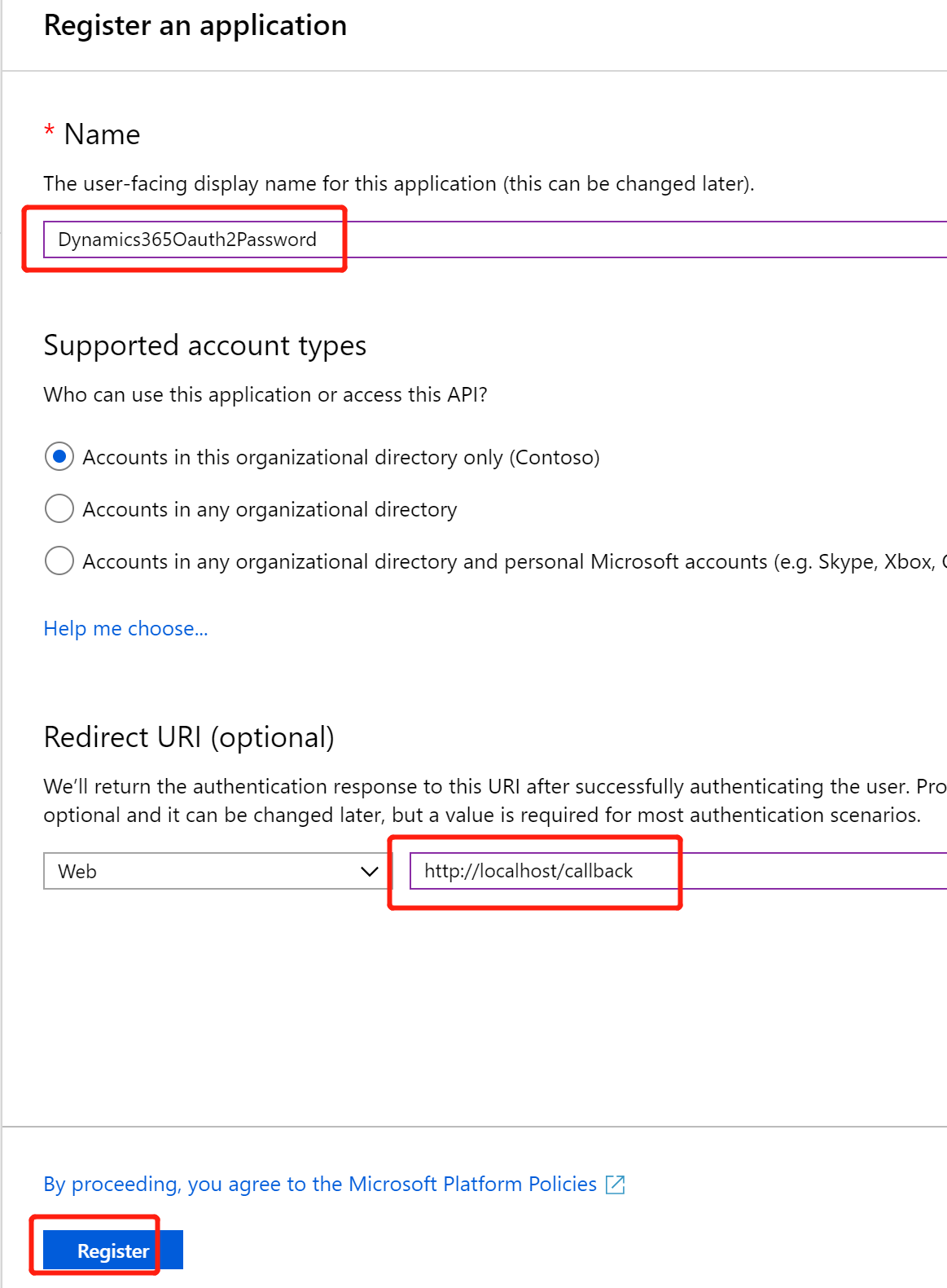
创建成功后将Application (client) ID 和Directory (tenant) ID 复制出来备用。

然后点击左边的 Certificates & secrets ,再点击右边的 New client secret按钮。
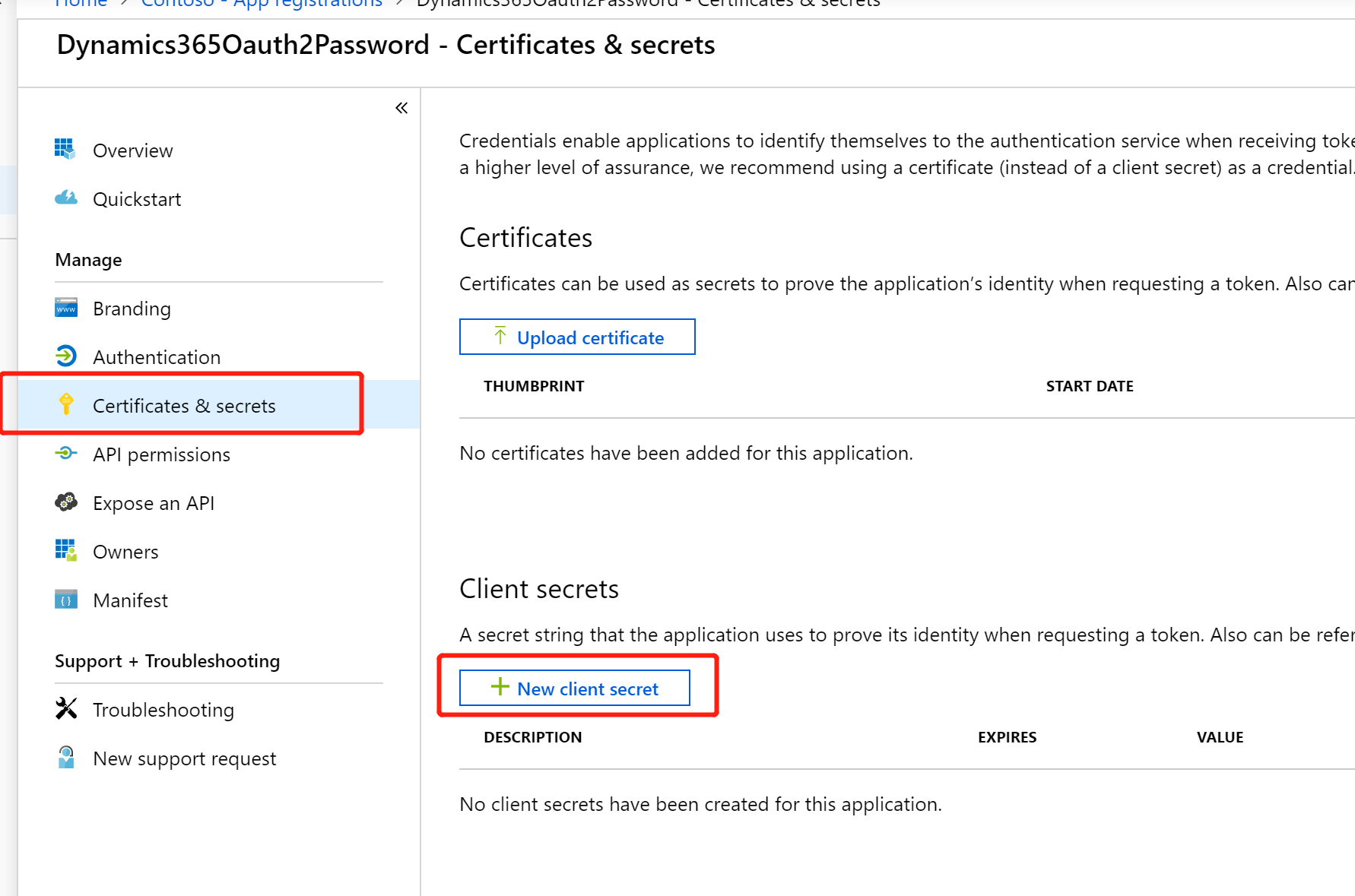
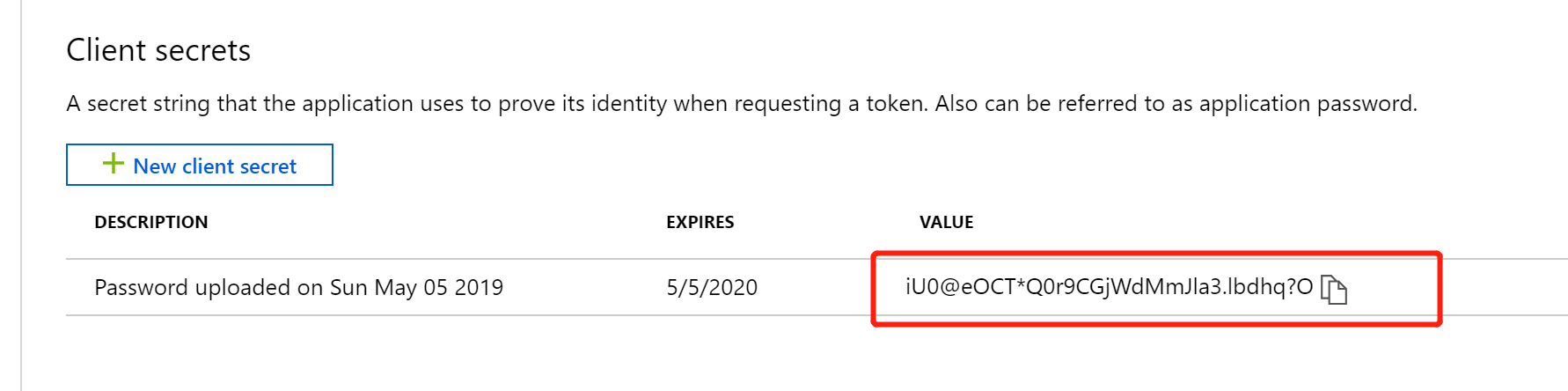
直接点击 Add 按钮。

将自动产生的 client secret 复制出来备用。
然后再点击左边的 API permissions ,点击右边的 Add a permission。
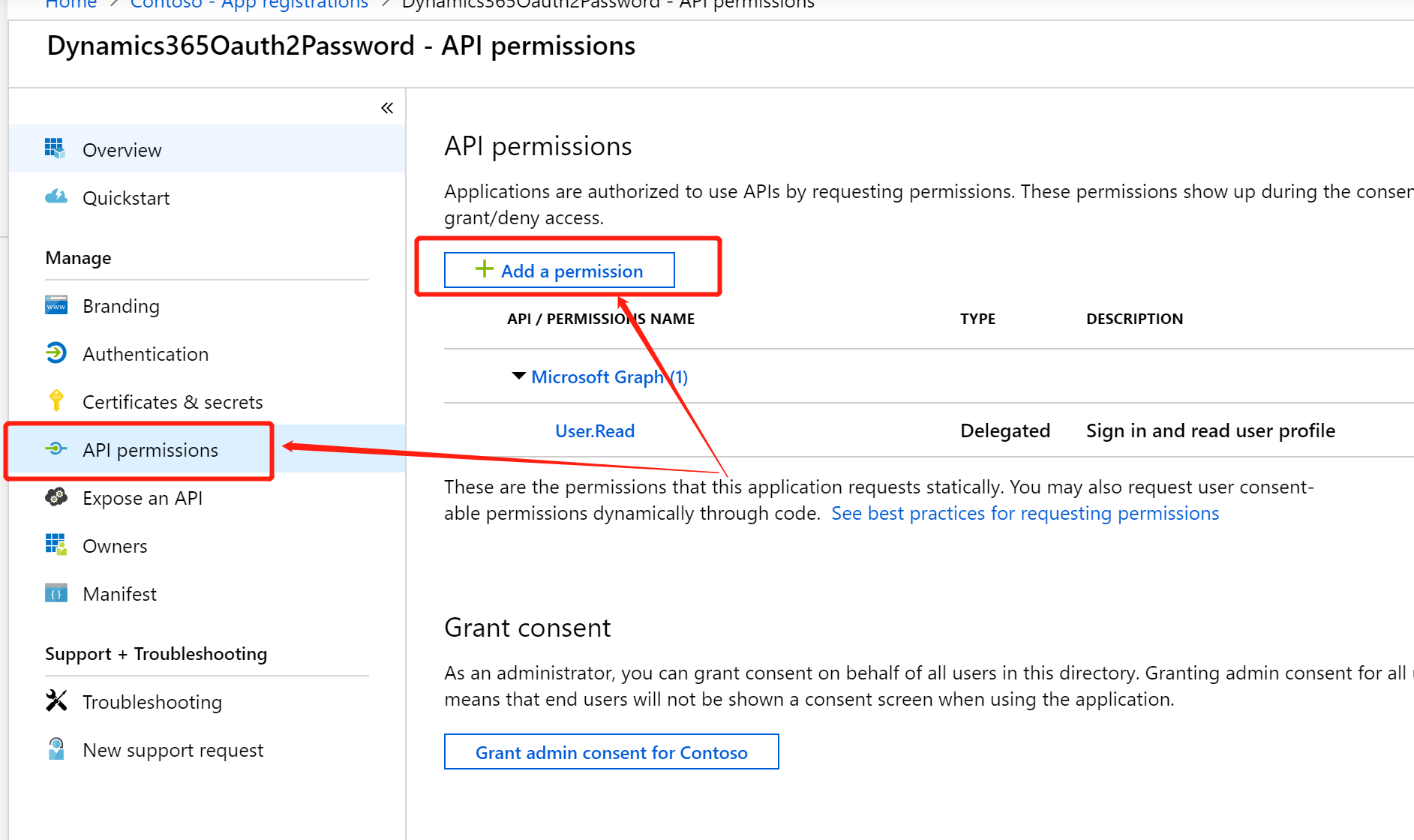
将Dynamics CRM Online的如下权限添加上:
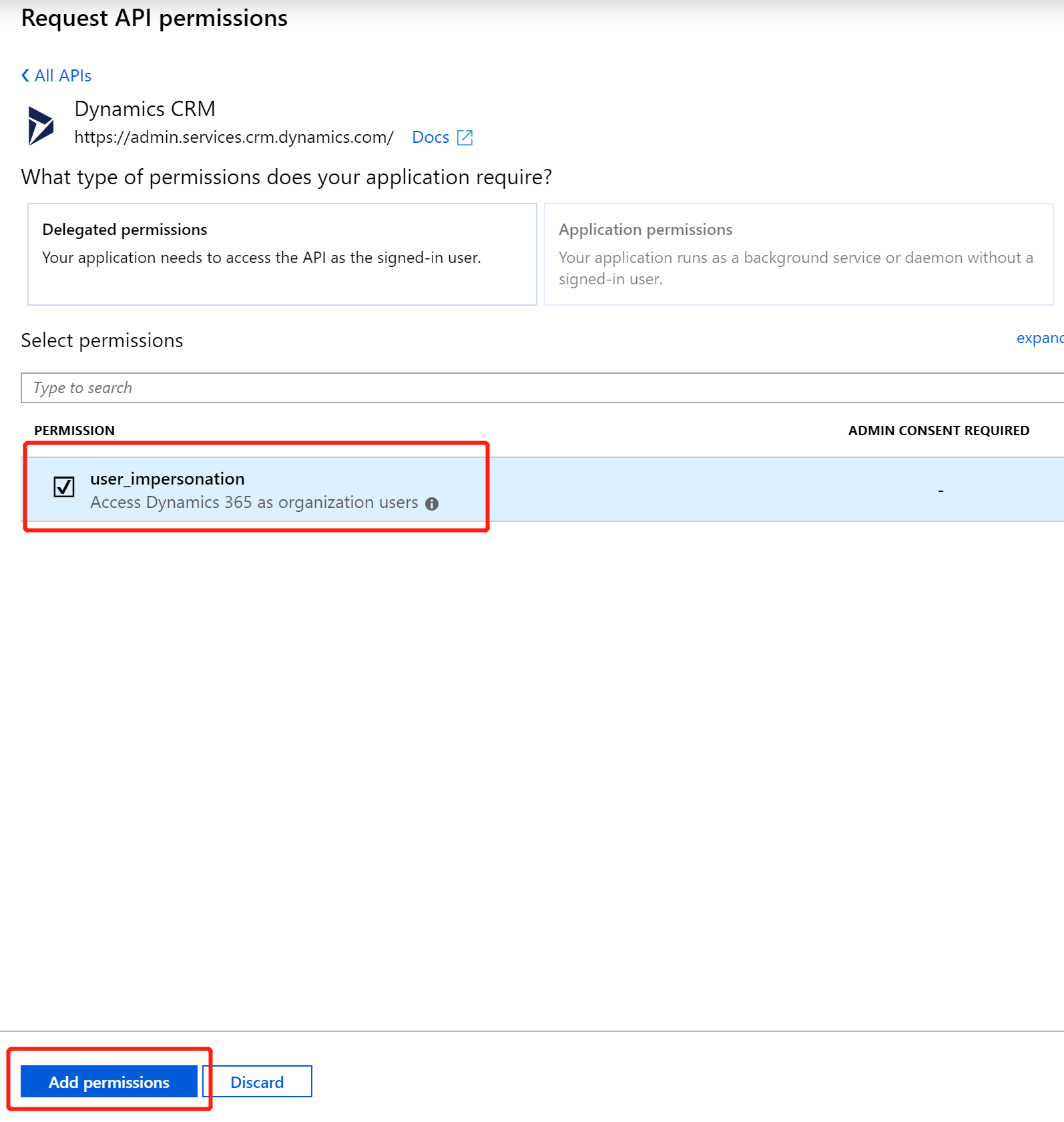
再点击下 Grant admin consent for Consoto 按钮,在提示中点击Yes,等待操作完成。

下面就是代码部分了:
using Newtonsoft.Json;

using System;

using System.Collections.Generic;

using System.IO;

using System.Net.Http;

using System.Net.Http.Headers;

using System.Runtime.Serialization.Json;

using System.Threading.Tasks;

namespace UsingWebAPI

{

    public class AuthenticationResponse

    {

        public string token_type { get; set; }

        public string scope { get; set; }

        public int expires_in { get; set; }

        public int expires_on { get; set; }

        public int not_before { get; set; }

        public string resource { get; set; }

        public string access_token { get; set; }

        public string refresh_token { get; set; }

        public string id_token { get; set; }

    }

    public class Account

    {

        public string name { get; set; }

        public string telephone1 { get; set; }

    }

    class Program

    {

        static string resourceUrl = "https://crm773088.api.crm.dynamics.com/";

        static string clientId = "87ca6bd8-3e66-49bd-a756-9c4d86a9ff1a";

        static string clientSecret = "iU0@eOCT*Q0r9CGjWdMmJla";

        static string tenantId = "79f34dea-50b2-4acf-80e9-700391c4cf83";

        static string userName = "admin@CRM773088.onmicrosoft.com";

        static string password = "Pas91";

        static void Main(string[] args)

        {

            GetAuthenticationResponse();

            Console.ReadKey();

        }

        private static async void GetAuthenticationResponse()

        {

            List<KeyValuePair<string, string>> vals = new List<KeyValuePair<string, string>>();

            vals.Add(new KeyValuePair<string, string>("client_id", clientId));

            vals.Add(new KeyValuePair<string, string>("resource", resourceUrl));

            vals.Add(new KeyValuePair<string, string>("username", userName));

            vals.Add(new KeyValuePair<string, string>("password", password));

            vals.Add(new KeyValuePair<string, string>("grant_type", "password"));

            vals.Add(new KeyValuePair<string, string>("client_secret", clientSecret));

            string url = string.Format("https://login.windows.net/{0}/oauth2/token", tenantId);

            using (HttpClient httpClient = new HttpClient())

            {

                httpClient.DefaultRequestHeaders.Add("Cache-Control", "no-cache");

                HttpContent content = new FormUrlEncodedContent(vals);

                HttpResponseMessage hrm = httpClient.PostAsync(url, content).Result;

                AuthenticationResponse authenticationResponse = null;

                if (hrm.IsSuccessStatusCode)

                {

                    Stream data = await hrm.Content.ReadAsStreamAsync();

                    DataContractJsonSerializer serializer = new DataContractJsonSerializer(typeof(AuthenticationResponse));

                    authenticationResponse = (AuthenticationResponse)serializer.ReadObject(data);

                    DataOperations(authenticationResponse);

                }

                else

                {

                    Console.WriteLine("Error." + hrm.ReasonPhrase);

                }

            }

        }

        private static async Task DataOperations(AuthenticationResponse authResult)

        {

            using (HttpClient httpClient = new HttpClient())

            {

                httpClient.BaseAddress = new Uri("https://crm773088.api.crm.dynamics.com/");

                httpClient.Timeout = new TimeSpan(, , ); //2 minutes

                httpClient.DefaultRequestHeaders.Add("OData-MaxVersion", "4.0");

                httpClient.DefaultRequestHeaders.Add("OData-Version", "4.0");

                httpClient.DefaultRequestHeaders.Add("Cache-Control", "no-cache");

                httpClient.DefaultRequestHeaders.Accept.Add(new MediaTypeWithQualityHeaderValue("application/json"));

                httpClient.DefaultRequestHeaders.Authorization = new AuthenticationHeaderValue("Bearer", authResult.access_token);

                Account account = new Account();

                account.name = "Test Account";

                account.telephone1 = "555-555";

                string content = String.Empty;

                content = JsonConvert.SerializeObject(account, new JsonSerializerSettings() { DefaultValueHandling = DefaultValueHandling.Ignore });

                HttpRequestMessage request = new HttpRequestMessage(HttpMethod.Post, "api/data/v9.1/accounts");

                request.Content = new StringContent(content);

                request.Content.Headers.ContentType = MediaTypeHeaderValue.Parse("application/json");

                HttpResponseMessage response = await httpClient.SendAsync(request);

                if (response.IsSuccessStatusCode)

                {

                    Console.WriteLine("Account '{0}' created.", account.name);

                }

                else

                {

                    throw new Exception(String.Format("Failed to create account '{0}', reason is '{1}'."

                      , account.name

                      , response.ReasonPhrase));

                }

            }

        }

    }

}
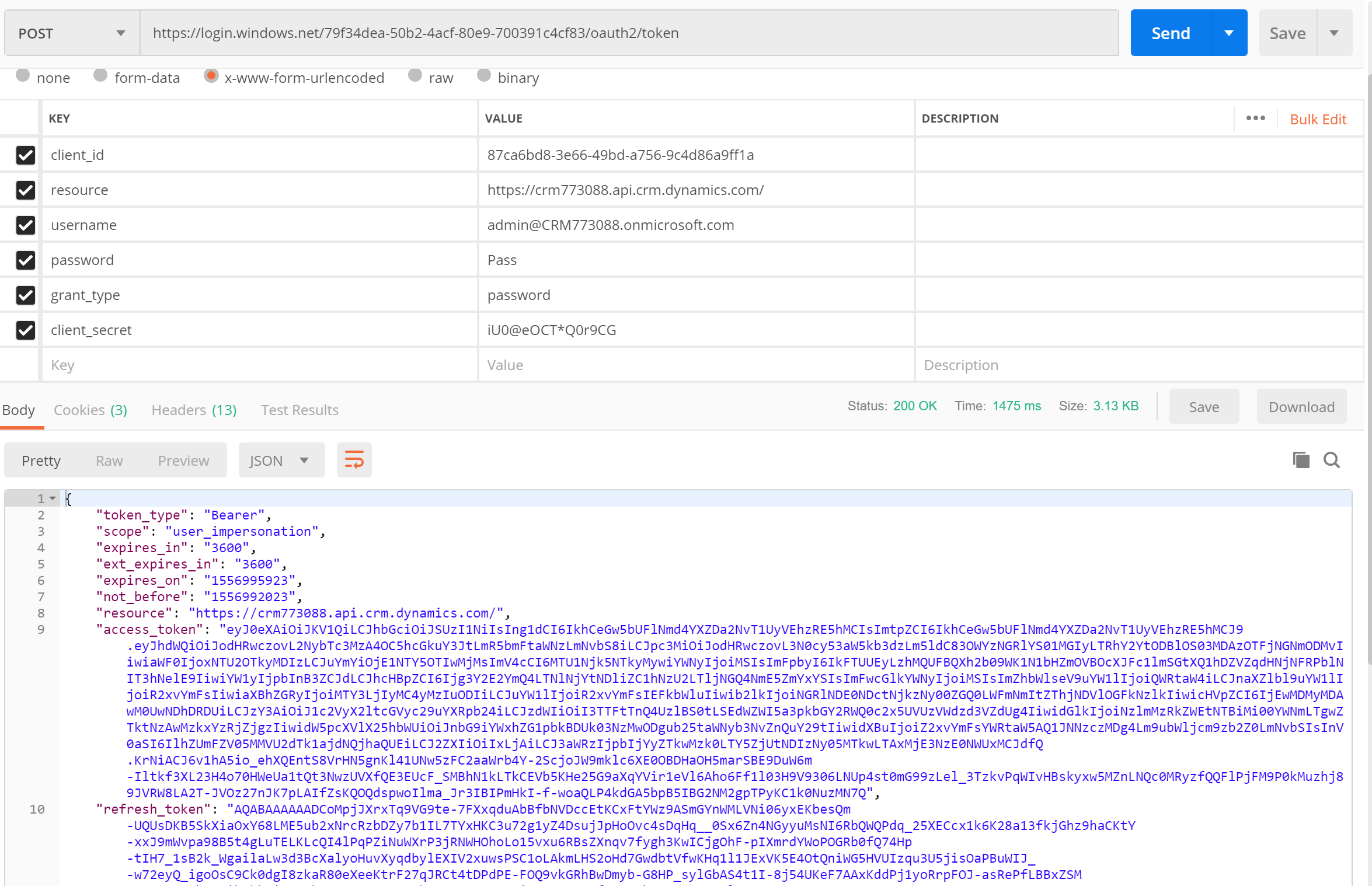
获取access token的方法用如下的Postman请求模拟也可以获取到。
控制台程序(C#)不弹出登录窗口连接到Dynamics CRM Online的Web API的更多相关文章
- 控制台程序(C#)不弹出认证窗口连接到Dynamics CRM Online的Web API
摘要: 本人微信和易信公众号: 微软动态CRM专家罗勇 ,回复271或者20180602可方便获取本文,同时可以在第一间得到我发布的最新的博文信息,follow me!我的网站是 www.luoyon ...
- QUI操作超时弹出登录窗口登录的处理方式
在使用QUI开发的业务系统中,如果长时间没操作,session过期后,再次操作系统超时会自动跳转到登陆页面,如果当前有一些操作没有保存,需要重新登录后再次填写信息,用户体验很不好! 为了避免超时后页面 ...
- CRM 总是弹出登录窗口
最近测试机总是会出现登录窗口,也能正常进入系统,但是会反复出现. 环境:CRM2016 问题:总是弹出登录窗口 解决方法:
- div弹出登录窗口
<meta charset="utf-8"/> <script type="text/javascript"> //弹出式登录 func ...
- SSO-Javascript模拟IE登录,不让IIS弹出登录窗口
解决方案: 用JS模拟IE用户登录,再跳转到对应的系统. <!DOCTYPE html PUBLIC "-//W3C//DTD XHTML 1.0 Transiti ...
- 【原创】SSO-Javascript模拟IE登录,不让IIS弹出登录窗口
解决方案: 用JS模拟IE用户登录,再跳转到对应的系统. <!DOCTYPE html PUBLIC "-//W3C//DTD XHTML 1.0 Transitional//EN&q ...
- ***小程序wx.getUserInfo不能弹出授权窗口后的解决方案
微信更新api后,wx.getUserInfo在开发和体验版本都不能弹出授权窗口.微信文档说明: 注意:此接口有调整,使用该接口将不再出现授权弹窗,请使用 <button open-type=& ...
- c#自动关闭 MessageBox 弹出的窗口
我们都知道,MessageBox弹出的窗口是模式窗口,模式窗口会自动阻塞父线程的.所以如果有以下代码: MessageBox.Show("内容',"标题"); 则只有关闭 ...
- 第一百三十三节,JavaScript,封装库--弹出登录框
JavaScript,封装库--弹出登录框 封装库,增加了两个方法 yuan_su_ju_zhong()方法,将获取到的区块元素居中到页面,chuang_kou_shi_jian()方法,浏览器窗口事 ...
随机推荐
- c++ LeetCode (网易面试题和链表以及树篇) 五道算法例题代码详解(三)
原文作者:aircraft 原文链接:https://www.cnblogs.com/DOMLX/p/11209807.html 一.1道网易c++的面试题 我当时第一时间的解答方案 #include ...
- 设计院老师良心汇总:值得牢记的15个CAD基础技巧,能帮大忙
哈喽!你们的CAD魔鬼(老师)来喽! 良心CAD技巧汇总,设计院师傅精心汇总,值得你牢记的15个CAD基础技巧,满满的都是干货,日常最常见的问题以及解决方法这里都汇总给你,给你高效的绘图体验,关键时刻 ...
- Linux 资源监控整体分析-TOP
一.top 第一行,任务队列信息,同 uptime 命令的执行结果 系统时间:15:23:10 运行时间:up 236 day,4min, 当前登录用户: 2个 user 负载均衡(uptime) ...
- Python遍历字典
1.遍历key值 1 >>> d = {'Python':'astonishing', 'C++':'complicated', 'Java':'versatile'} 2 > ...
- Android6.0 源码修改之Setting列表配置项动态添加和静态添加
写在前面 最近客户有个需求,要求增加操作Setting列表配置项的功能,是不是一脸懵,没关系,一图胜千言,接下来就上图.诺,就是这么个意思. 原来的列表配置项 增加了单个配置项 增 ...
- Django2.1 更新说明!
Django2.1版本发布时间:2018-8-1 一.Python兼容性 Django2.1只支持Python 3.5. 3.6和3.7以上版本.Django2.0是最后一个支持Python3.4及一 ...
- 缺少控制文件备份时如何还原数据库 (Doc ID 1438776.1)
How to restore database when controlfile backup missing (Doc ID 1438776.1) APPLIES TO: Oracle Databa ...
- 2-3 远程管理命令-SSH工作方式简介
03.远程登录和复制文件 序号 命令 对应英文 作用 01 ssh 用户名@ip secure shell 关机/重启 02 scp 用户名@ip:用户名或路径 用户名@ip:文件名或路径 secur ...
- Python入门基础学习(时间模块,随机模块)
Python基础学习笔记(六) time模块: 时间的三种表示方法: 1.格式化字符串 2.时间戳 用来表示和1970年的时间间隔,单位为s 3.元组 struct_time 9个元素 time的st ...
- 【翻译】spring-data 之JdbcTemplate 使用
文档 Jdbc的使用 基础的代码结构: 一个Application作为入口.IUserRepository和UserRepository作为具体的实现.applicationContext.xml定义 ...