
EntityFramework 学习 一 Multiple Diagrams in Entity Framework 5.0
Visual Studio 2012 provides a facility to split the design time visual representation of the Entity Data Model. This means that you can have multiple diagrams for one Entity Data Model.
You can create a new diagram in multiple ways:
- Add a new diagram and drag and drop entities from Model Browser
- Move entities from an existing diagram to a new diagram
1. Add a new diagram and drag and drop entities from Model Browser:
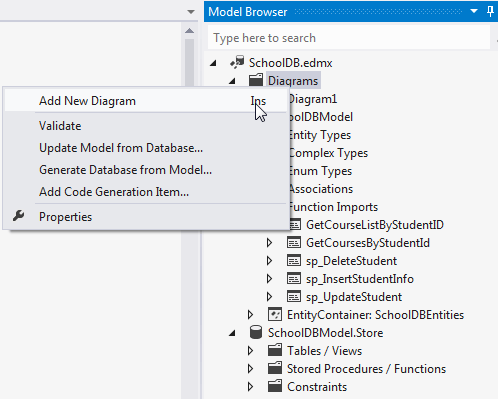
You can add a new diagram by right clicking on the Diagrams node of the model browser and selecting 'Add New Diagram':
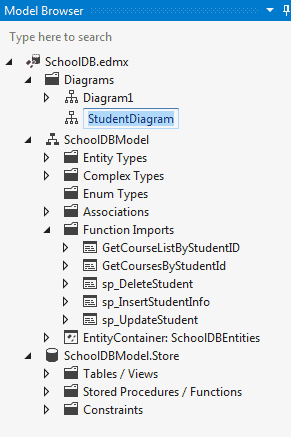
You can rename the diagram, for example: StudentDiagram to include all student related entities:
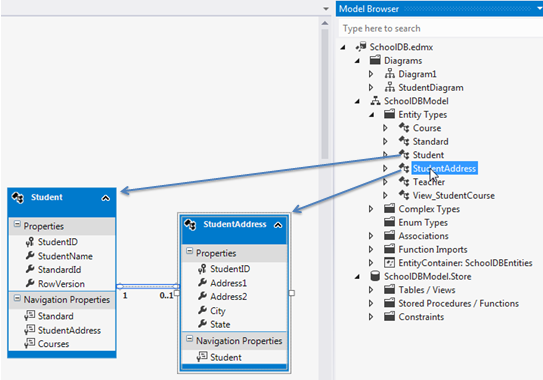
Now, you can drag and drop Student and StudentAddress entities to this new diagram:
2. Move entities from existing diagram to new diagram:
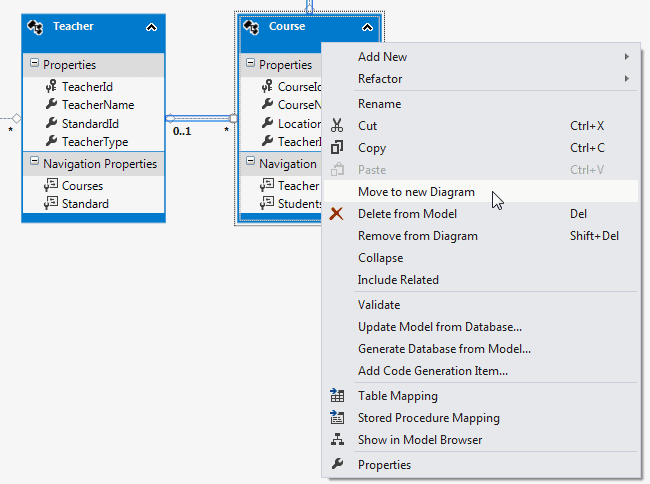
You can also move entities from an existing diagram to a new diagram. For example, if you want to move Teacher and Course entities to a new diagram, then select those entities in an existing diagram and right click and select 'Move to New Diagram' from the context menu:
It will create a new diagram and move Teacher and Course entities to a new diagram as shown below:
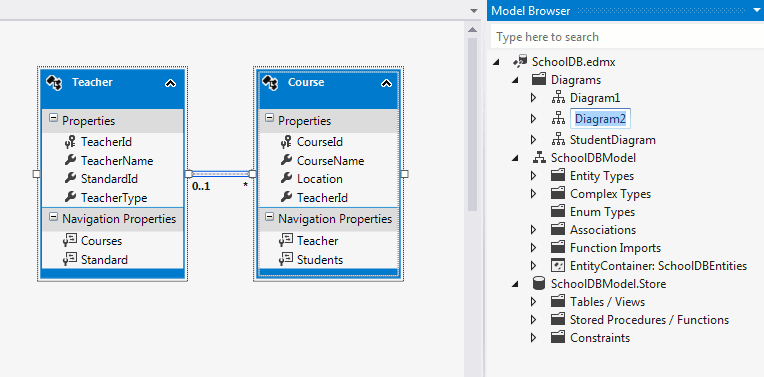
So, in this way you can create a new diagram from an existing diagram.
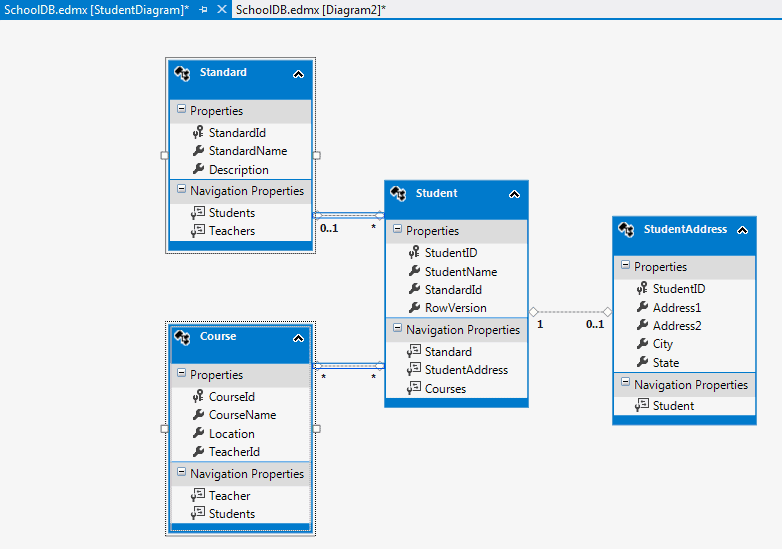
You can also include the related entities of a particular entity. For example, right click on Student entity → select 'Include Related'. Standard and Course entities will also be included, because Student has their reference property:
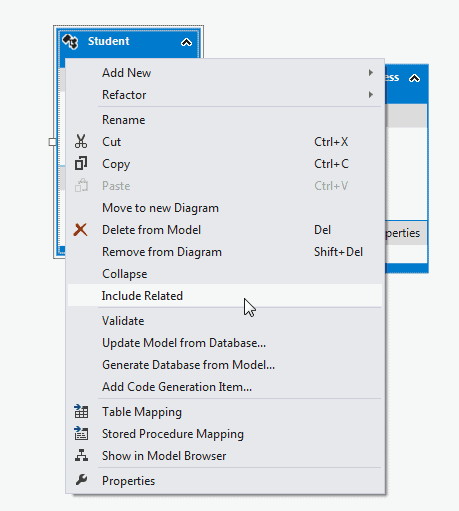
This will include Standard and Course entity as shown below.
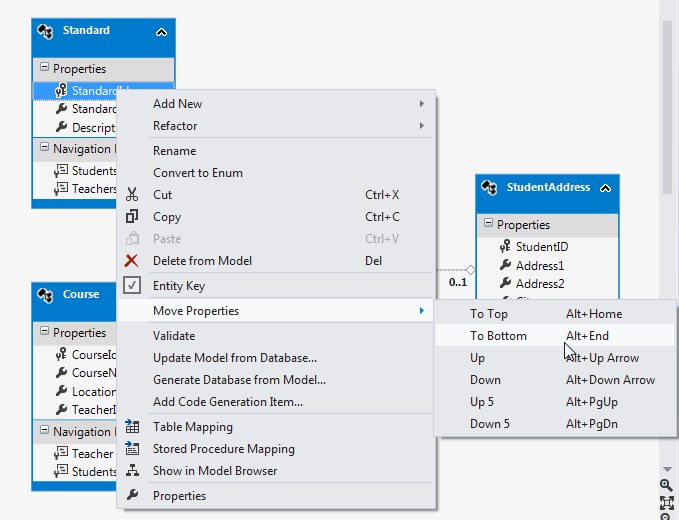
Additionally, you can also move properties up or down by right clicking on the property → select Move Property → select UP/Down etc. as shown below:
Difference between delete and remove entity:
You can remove the entity from the diagram by right clicking on entity and selecting 'Remove from diagram'.
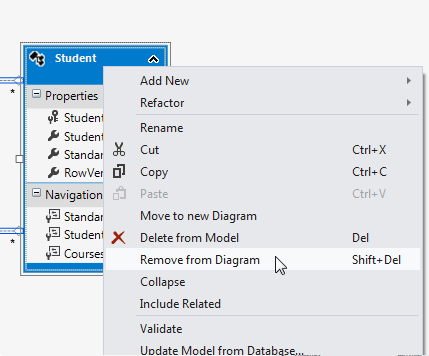
Remove from Diagram will only remove the entity from the diagram whereas 'Delete from Model' will delete the entity from the EDM. So you won't be able to use that entity at all.
EntityFramework 学习 一 Multiple Diagrams in Entity Framework 5.0的更多相关文章
- EntityFramework 学习 一 Table-Valued Function in Entity Framework 5.0
USE [SchoolDB] GO /****** Object: UserDefinedFunction [dbo].[GetCourseListByStudentID] */ SET ANSI_N ...
- EntityFramework 学习 一 Change Tracking in Entity Framework
EntityFramework自动跟踪上下文中已经加载的实体,DbChangeTracker类给你关于当前实体的所有跟踪信息 注意,每个实体都要有EntityKey(主键)的属性,EntityFram ...
- EntityFramework 学习 一 Migration from Entity Framework 4.1/4.3 to Entity Framework 5.0/6.0
To migrate your existing Entity Framework 4.x project to Entity Framework 5.0 using VS2012, first ta ...
- .NET 5学习笔记(10)——Entity Framework Core之切换SQLServer和SQLite
上一篇我们梳理了CodeFist的一般流程,本篇我们讨论如何在一套代码中,支持SQL Server和SQLite的切换.同时从本篇开始,我们从.NET Core 3.1 迁移到.NET 5.相信.NE ...
- Entity Framework 5.0系列之Code First数据库迁移
我们知道无论是"Database First"还是"Model First"当模型发生改变了都可以通过Visual Studio设计视图进行更新,那么对于Cod ...
- 浅析Entity Framework Core2.0的日志记录与动态查询条件
前言 Entity Framework Core 2.0更新也已经有一段时间了,园子里也有不少的文章.. 本文主要是浅析一下Entity Framework Core2.0的日志记录与动态查询条件 去 ...
- Entity Framework 6.0 对枚举的支持/实体添加后会有主键反回
实验 直接上代码,看结果 实体类 [Flags] public enum FlagsEnum { Day = , Night = } public class EntityWithEnum { pub ...
- Entity Framework 6.0 Tutorials(1):Introduction
以下系统文章为EF6.0知识的介绍,本章是第一篇 原文地址:http://www.entityframeworktutorial.net/entityframework6/introduction.a ...
- Entity Framework 6.0 入门系列 第一篇
Entity Framework 6.0 入门系列 第一篇 好几年前接触过一些ef感觉不是很好用,废弃.但是 Entity Framework 6.0是经过几个版本优化过的产物,性能和功能不断完善,开 ...
随机推荐
- 项目中lua(基础)
关于项目中lua任务(某些没弄懂,但lua上耗费时间有点长了不看了) 这段时间看了lua语法和项目中lua应用 .在lua中注册c库,在lua5.2中好像都是注册c库,相当于在lua中定义一个tabl ...
- 《从零开始学Swift》学习笔记(Day 37)——默认构造函数
原创文章,欢迎转载.转载请注明:关东升的博客 结构体和类的实例在构造过程中会调用一种特殊的init方法,称为构造函数.构造函数没有返回值,可以重载.在多个构造函数重载的情况下,运行环境可以根据它的外部 ...
- 深入C#学习系列一:序列化(Serialize)、反序列化(Deserialize)(转)
序列化又称串行化,是.NET运行时环境用来支持用户定义类型的流化的机制.其目的是以某种存储形成使自定义对象持久化,或者将这种对象从一个地方传输到另一个地方. .NET框架提供了两种串行化的方式: ...
- Guava Joiner 拼接字符串
Joiner Guava 是Google 对Java的内置类型进行增强和扩展的工具. Joiner.on(", ").join(Iterator<> iter) Joi ...
- GDI+的应用
在VS中创建窗体 (1)CDI+清除绘画面 在窗体中写入代码: protected override void OnPaint(PaintEventArgs e){ Graphics g=e.Grap ...
- 洛谷 P4071 [SDOI2016]排列计数
洛谷 这是一道组合数学题. 对于一个长为n的序列,首先我们要选m个使之稳定\(C^{m}_{n}\). 且要保证剩下的序列不稳定,即错排\(D_{n-m}\). 所以答案就是:\[ANS=C^{m}_ ...
- MySQL中InnoDB存储引擎中的哈希算法
InnoDB存储引擎使用哈希算法来对字典进行查找,其冲突机制采用链表方式,哈希函数采用除法散列方式.对于缓冲池页的哈希表来说,在缓冲池中的Page页都有一个chain指针.它指向相同哈希函数值的页的. ...
- grep和正则表达式参数
一:grep参数 1,-n :显示行号 2,-o :只显示匹配的内容 3,-q :静默模式,没有任何输出,得用$?来判断执行成功没有,即有没有过滤到想要的内容 4,-l :如果匹配成功,则只将 ...
- STL学习笔记— —容器map和multimap
简单介绍 在头文件<map> 中定义 namespace std { template <typename Key, typename T, typename Compare = l ...
- 017-Spring Boot AOP
一.概述 面向切面编程,将业务代码与处理琐碎相关度少的代码隔离开.以便达到重用,解耦. 用途:日志记录.权限处理.性能统计.监控.事务处理.异常处理等 通知类型有:前置通知.后置最终通知.后置返回通知 ...