
ok6410 android driver(7)
This article talk about how to test device driver on JNI.
There are two ways to test the device driver :
(1) Create methods to control devices in .c/.cpp file, the .java call the methods in .c/.cpp :
This way is call JNI (Java Native Interface), means java works via native interface in C/C++.
(2) .java control devices via the class in FileInputStream and FileOutputStream.
TIPS :
I test these two methods in eclipse ADT.

If you don't know how to write android application program, I think you'd better take some reading in books about android app design and do some practice firstly.
Error TIPS:
If there "R cannot be resolved to a variable" error in your project when created, try "Project -> clean"
1、JNI
(1) Create android project
File -> New -> Android Application Project
(2) Create jni native support
You must get the ndk work tools already and prefix the ndk path :
Windows -> Preferences -> Android -> NDK
Right click the project name :
Android Tools -> Add Native Support
There will be a new directory in project :
jni ——- Andoid.mk

       |—-  wordcntjni.cpp
(3) string.xml
<?xml version="1.0" encoding="utf-8"?>

<resources>

    <string name="app_name">wordcntjni</string>

    <string name="action_settings">Settings</string>

    <string name="wcstring">JNI test app.</string>

    <string name="wcwrite">Write</string>

    <string name="wcread">Read</string>

</resources>
(4) activity_main.xml
Graphical Layout :
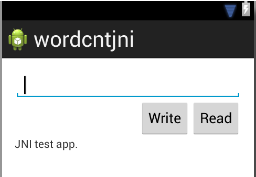
xml :
<RelativeLayout xmlns:android="http://schemas.android.com/apk/res/android"

    xmlns:tools="http://schemas.android.com/tools"

    android:layout_width="match_parent"

    android:layout_height="match_parent"

    android:paddingBottom="@dimen/activity_vertical_margin"

    android:paddingLeft="@dimen/activity_horizontal_margin"

    android:paddingRight="@dimen/activity_horizontal_margin"

    android:paddingTop="@dimen/activity_vertical_margin"

    tools:context=".MainActivity" >

    <EditText

        android:id="@+id/editText_wc"

        android:layout_width="wrap_content"

        android:layout_height="wrap_content"

        android:inputType="text"

        android:layout_alignParentLeft="true"

        android:layout_alignParentRight="true"

        android:layout_alignParentTop="true"

        android:ems="10" >

        <requestFocus />

    </EditText>

    <Button

        android:id="@+id/onClick_wcRead"

        android:layout_width="wrap_content"

        android:layout_height="wrap_content"

        android:layout_alignRight="@+id/editText_wc"

        android:layout_below="@+id/editText_wc"

        android:onClick="onClick_wcRead"

        android:text="@string/wcread" />

    <Button

        android:id="@+id/onClick_wcWrite"

        android:layout_width="wrap_content"

        android:layout_height="wrap_content"

        android:layout_below="@+id/editText_wc"

        android:layout_toLeftOf="@+id/onClick_wcRead"

        android:onClick="onClick_wcWrite"

        android:text="@string/wcwrite" />

    <TextView

        android:id="@+id/textView_wc"

        android:layout_width="wrap_content"

        android:layout_height="wrap_content"

        android:layout_alignLeft="@+id/editText_wc"

        android:layout_below="@+id/onClick_wcWrite"

        android:text="@string/wcstring" />

</RelativeLayout>
(5) MainActivity.java
package com.example.wordcntjni;

import android.os.Bundle;

import android.app.Activity;

import android.view.Menu;

import android.view.View;

import android.widget.EditText;

import android.widget.TextView;

public class MainActivity extends Activity {

    private TextView tv_wc;

    private EditText et_wc;

    @Override

    protected void onCreate(Bundle savedInstanceState) {

        super.onCreate(savedInstanceState);

        setContentView(R.layout.activity_main);

        tv_wc = (TextView) findViewById(R.id.textView_wc);

        et_wc = (EditText) findViewById(R.id.editText_wc);

    }

    public void onClick_wcRead (View view) {

        tv_wc.setText("Read words :" + String.valueOf(readWordCnt()));

    }

    public void onClick_wcWrite (View view) {

        tv_wc.setText("Words write success.");

        writeWordCnt(et_wc.getText().toString());

    }

    public native int readWordCnt();

    public native void writeWordCnt(String str);

    static {

        System.loadLibrary("wordcntjni");

    }

    @Override

    public boolean onCreateOptionsMenu(Menu menu) {

        // Inflate the menu; this adds items to the action bar if it is present.

        getMenuInflater().inflate(R.menu.main, menu);

        return true;

    }

}
(6) wordcntjni.cpp wordcntjni.h
Before we edit wordcntjni.cpp, we should create wordcntjni.h first :
$ pwd

~/Software/ADT/project/wordcntjni/jni

$ javah -classpath ../bin/classes/ -jni -o wordcntjni.h com.example.wordcntjni.MainActivity
Project clean the eclipse and we would find a new file wordcntjni.h in dir jni.
Finaly, we can edit the wordcntjni.cpp :
#include <jni.h>

#include <string.h>

#include <fcntl.h>

#include <stdio.h>

#include <sys/stat.h>

#include <sys/types.h>

#include <unistd.h>

#include <stdlib.h>

#include "wordcntjni.h"

JNIEXPORT jint JNICALL Java_com_example_wordcntjni_MainActivity_readWordCnt

  (JNIEnv *env, jobject thiz)

{

    int fd_dev;

    int num = ;

    jint wordcnt = ;

    unsigned char buf[];

    //fd_dev = open("/dev/wordcount2", O_RDONLY);

    fd_dev = open("/data/local/jnitest.txt", O_RDONLY);

    read(fd_dev, buf, );

    num =     ((int) buf[]) <<  |

            ((int) buf[]) <<  |

            ((int) buf[]) <<   |

            ((int) buf[]) ;

    wordcnt = (jint) num;

    close(fd_dev);

    return wordcnt;

}

char* jstring_to_pchar(JNIEnv* env, jstring str)

{

    char* pstr = NULL;

    jclass clsstring = env->FindClass("java/lang/String");

    jstring strencode = env->NewStringUTF("utf-8");

    jmethodID mid = env->GetMethodID(clsstring, "getBytes", "(Ljava/lang/String;)[B");

    jbyteArray byteArray = (jbyteArray) (env->CallObjectMethod(str, mid, strencode));

    jsize size = env->GetArrayLength(byteArray);

    jbyte* pbyte = env->GetByteArrayElements(byteArray, JNI_FALSE);

    if (size > ) {

        pstr = (char*) malloc(size);

        memcpy(pstr, pbyte, size);

    }

    return pstr;

}

JNIEXPORT void JNICALL Java_com_example_wordcntjni_MainActivity_writeWordCnt

  (JNIEnv *env, jobject thiz, jstring str)

{

    int fd_dev;

    //fd_dev = open("/dev/wordcount2", O_WRONLY);

    fd_dev = open("/data/local/jnitest.txt", O_WRONLY);

    char* pstr = jstring_to_pchar(env, str);

    if (pstr != NULL) {

        write(fd_dev, pstr, strlen(pstr));

    }

    close(fd_dev);

}
When compilier the application, the following errors may occur :
[ error1 ]
Android NDK: WARNING: APP_PLATFORM android- is larger than android:minSdkVersion
[ Fix ]
$ vim /home/linx/Software/Android/ndk/build/core/add-$ application.mk

// add the android-8 following android-14

APP_PLATFORM := android-

APP_PLATFORM := android-
[ error2 ]
There still the read error couldn't fix yet.

The file writing is ok.

If you have any idea about this error.

I am very please to receive your reply.
2、Java FileStream
We don't need to create the jni files anymore by this way, just test the device in android application.
(1) string.xml
<?xml version="1.0" encoding="utf-8"?>

<resources>

    <string name="app_name">file_test</string>

    <string name="action_settings">Settings</string>

    <string name="hello_world">Hello, Press button to write file.</string>

    <string name="wstring">Write</string>

    <string name="rstring">Read</string>

</resources>
(2) activity_main.xml
<RelativeLayout xmlns:android="http://schemas.android.com/apk/res/android"

    xmlns:tools="http://schemas.android.com/tools"

    android:layout_width="match_parent"

    android:layout_height="match_parent"

    android:paddingBottom="@dimen/activity_vertical_margin"

    android:paddingLeft="@dimen/activity_horizontal_margin"

    android:paddingRight="@dimen/activity_horizontal_margin"

    android:paddingTop="@dimen/activity_vertical_margin"

    tools:context=".MainActivity" >

    <TextView

        android:id="@+id/textView1"

        android:layout_width="wrap_content"

        android:layout_height="wrap_content"

        android:text="@string/hello_world" />

    <Button

        android:id="@+id/button2"

        android:layout_width="wrap_content"

        android:layout_height="wrap_content"

        android:layout_alignParentRight="true"

        android:layout_below="@+id/textView1"

        android:layout_marginRight="14dp"

        android:onClick="onClick_button2"

        android:text="@string/rstring" />

    <Button

        android:id="@+id/button1"

        android:layout_width="wrap_content"

        android:layout_height="wrap_content"

        android:layout_alignBaseline="@+id/button2"

        android:layout_alignBottom="@+id/button2"

        android:layout_toLeftOf="@+id/button2"

        android:onClick="onClick_button1"

        android:text="@string/wstring" />

</RelativeLayout>
(3) MainActivity.java
package com.example.file_test;

import java.io.FileInputStream;

import java.io.FileOutputStream;

import java.nio.ByteBuffer;

import android.os.Bundle;

import android.app.Activity;

import android.view.Menu;

import android.view.View;

import android.widget.TextView;

public class MainActivity extends Activity {

    public TextView fstream;

    @Override

    protected void onCreate(Bundle savedInstanceState) {

        super.onCreate(savedInstanceState);

        setContentView(R.layout.activity_main);

        fstream = (TextView) findViewById(R.id.textView1);

    }

    public void onClick_button1 (View view) {

        writeFile("File text strings.");

        fstream.setText("File write success.");

    }

    public void onClick_button2 (View view) {

        fstream.setText("File read :" + String.valueOf(readFile()));

    }

    private int readFile () {

        byte[] buffer = new byte[4];

        int num = 0;

        try {

            FileInputStream fis = new FileInputStream("/data/local/jnitest.txt");

            //FileInputStream fis = new FileInputStream("/dev/wordcount2");

            fis.read(buffer);

            ByteBuffer bbuf = ByteBuffer.wrap(buffer);

            num = bbuf.getInt();

//            num =    (int)((buffer[0]) & 0xff)     << 24     |

//                    (int)((buffer[1]) & 0xff)     << 16     |

//                    (int)((buffer[2]) & 0xff)     << 8       |

//                    (int)((buffer[3]) & 0xff)    ;

            fis.close();

        } catch (Exception e) {

        }

        return num;

    }

    private void writeFile (String str) {

        try {

            FileOutputStream fos = new FileOutputStream("/data/local/jnitest.txt");

            //FileOutputStream fos = new FileOutputStream("/dev/wordcount2");

            fos.write(str.getBytes("iso-8859-1"));

            fos.close();

        } catch (Exception e) {

        }

    }

    @Override

    public boolean onCreateOptionsMenu(Menu menu) {

        // Inflate the menu; this adds items to the action bar if it is present.

        getMenuInflater().inflate(R.menu.main, menu);

        return true;

    }

}
[error]
This file does't fix the read error too, and the write is also ok.

If you have any idea about this error.

I am very please to receive your reply.
ok6410 android driver(7)的更多相关文章
- ok6410 android driver(5)
Test the android driver by JNI (Java Native Interface), In the third article, we know how to compile ...
- ok6410 android driver(11)
This essay, I go to a deeply studying to android HAL device driver program. According to the android ...
- ok6410 android driver(9)
In this essay, I will write the JNI to test our leds device. If you don't know how to create a jni p ...
- ok6410 android driver(8)
In the past, we know how to create and run a simple character device driver on pc, goldfish and ok64 ...
- ok6410 android driver(3)
This article discusses the Makefile and how to port the module to different platform (localhost and ...
- ok6410 android driver(12)
In this essay, I will talk about how to write the service libraries. TIPS : I won't discuss the name ...
- ok6410 android driver(10)
From this essay, we go to a new discussion "Android Hardware Abstraction Layer". In this e ...
- ok6410 android driver(6)
This is a short essay about the mistakes in compiling ok6410 android-2.3 source codes. If there is n ...
- ok6410 android driver(1)
target system : Android (OK6410) host system : Debian Wheezy AMD64 1.Set up android system in ok6410 ...
随机推荐
- Remove WebCakeDesktop
WebCakeDesktop.Updater.exe 是广告程序,卸载步骤参考 http://malwaretips.com/blogs/webcake-desktop-updater-exe-rem ...
- Android gradle问题解决: This app has been built with an incorrect configuration. Please configure your build for VectorDrawableCompat
1. 问题描述: Android Studio在运行模拟器某些机型或者真机某些机型的时候发生闪退. 错误如下: Java.lang.RuntimeException: Unable to start ...
- Codeforces Round #381 (Div. 1) A. Alyona and mex 构造
A. Alyona and mex 题目连接: http://codeforces.com/contest/739/problem/A Description Alyona's mother want ...
- javamail邮件发送例子
public class EmailTask{ // Session used by the javamail classes private Session session; ...
- 【转帖】Moodle平台的5个新玩法
[玩坏Moodle平台]Moodle平台的5个新玩法 1.RSS订阅 Moodle平台可以导入外部博客(或其他提供RSS的服务),并显示在Moodle内置的博客系统中.无论是自己的个人网站还是他人的博 ...
- 连接的世界 - LTE时代产业趋势和战略分析
连接的世界 - LTE时代产业趋势和战略分析 作者:华为有线技术公司李常伟 2014-09-22 信息产业发展解放的核心是这个世界连接的方式.由语音到数据.由通信到情感.由人的连接到物的连接.由“哑” ...
- CSS - Select 标签在不同浏览器中的高度设置
当使用Select标签时,在不同浏览器中显示的高度不同,如何解决此问题: 解决方法链接:http://stackoverflow.com/questions/20477823/select-html- ...
- 关于 Visual Studio 调试 Global 的一点总结
在开发 MVC 的项目中遇到了些问题,想通过调戏查看找问题的原因,发现无法调试 Global 中的 Application_Start 方法,在网上找遍了也没有相应的解决办法,在经过了很多次尝试之后仍 ...
- The file 'MemoryStream' is corrupted! 的解决办法
The file 'MemoryStream' is corrupted! Remove it and launch unity again! [Position > ] 有时候我们会遇到这个报 ...
- ux.form.field.Verify 验证码控件
//验证码控件 Ext.define('ux.form.field.Verify', { extend: 'Ext.container.Container', alias: ['widget.fiel ...