
ok6410 android driver(11)
This essay, I go to a deeply studying to android HAL device driver program.
According to the android architecture we disscus in last essay, when we are designing a android device driver, we should follow the steps below :
(1) linux device driver
In this driver, we should try our best to cut down the mechanism and change them to be more concise.
(2) HAL libraries
The HAL serves as a standard interface that allows the Android system to call into the device driver layer while being agnostic about the lower-level implementations of your drivers and hardware.
(3)Service libraries
System service access the hardware in HAL libraries and provide the APIs for android framework. Service libraries usually are JNI libraries or Linux libraries.
1、linux device driver
//s3c6410_leds_hal.c

#include <linux/fs.h>

#include <linux/cdev.h>

#include <linux/pci.h>

#include <asm/uaccess.h>

#include <mach/map.h>

#include <mach/regs-gpio.h>

#include <mach/gpio-bank-m.h>

#define DEVICE_NAME "s3c6410_leds_hal"

#define DEVICE_COUNT 1

#define S3C6410_LEDS_MAJOR 0

#define S3C6410_LEDS_MINOR 234

static unsigned char mem[];

static int major = S3C6410_LEDS_MAJOR;

static int minor = S3C6410_LEDS_MINOR;

static dev_t leds_number;

static struct class *leds_class = NULL;

static void write_io(unsigned char buf[])

{

    int i;

    unsigned int tmp;

    tmp = ioread32(S3C64XX_GPMDAT);

    for (i = ; i < ; i++) {

        if (buf[i] == '') {

            tmp &= (~( << i));

        } else {

            tmp |= ( << i);

        }

    }

    iowrite32(tmp, S3C64XX_GPMDAT);

}

static ssize_t s3c6410_leds_hal_write(struct file *filp,

    const char __user *buf,    size_t count, loff_t *ppos)

{

    unsigned int tmp = count;

    if (count > ) {

        tmp = ;

    }

    if (copy_from_user(mem, buf, tmp)) {

        return -EFAULT;

    } else {

        write_io(mem);

    }

    return count;

}

static struct file_operations leds_fops = {

    .owner = THIS_MODULE,

    .write = s3c6410_leds_hal_write,

};

static struct cdev leds_cdev;

static int leds_create_device(void)

{

    int ret = ;

    int err = ;

    cdev_init(&leds_cdev, &leds_fops);

    leds_cdev.owner = THIS_MODULE;

    if (major > ) {

        leds_number = MKDEV(major, minor);

        err = register_chrdev_region(leds_number, DEVICE_COUNT, DEVICE_NAME);

        if (err < ) {

            printk(KERN_WARNING "register_chardev_region() failed.\n");

            return err;

        }

    } else {

        err = alloc_chrdev_region(&leds_cdev.dev, ,

                DEVICE_COUNT, DEVICE_NAME);

        if (err < ) {

            printk(KERN_WARNING "register_chardev_region() failed.\n");

            return err;

        }

        major = MAJOR(leds_cdev.dev);

        minor = MINOR(leds_cdev.dev);

        leds_number = leds_cdev.dev;

    }

    ret = cdev_add(&leds_cdev, leds_number, DEVICE_COUNT);

    leds_class = class_create(THIS_MODULE, DEVICE_NAME);

    device_create(leds_class, NULL, leds_number, NULL, DEVICE_NAME);

    return ret;

}

static int leds_init(void)

{

    int ret;

    ret = leds_create_device();

    printk(DEVICE_NAME "\tinitialized.\n");

    return ret;

}

static void leds_exit(void) {

    device_destroy(leds_class, leds_number);

    if (leds_class) {

        unregister_chrdev_region(leds_number, DEVICE_COUNT);

        return;

    }

    printk(DEVICE_NAME"\texit.\n");

}

module_init(leds_init);

module_exit(leds_exit);

MODULE_LICENSE("GPL");
Yes, this file is the same as the previous driver file, because there aren't any business-related codes in this simple led driver.
Then we focus more in the HAL libraries and Service libraries coding.
2、HAL libraries
HAL modules would be compile to a Linux shared library (*.so), and these *.so files could be automaticlly loaded by android system.
Each HAL module should provide a variable for android system loading : HAL_MODULE_INFO_SYM (never change it.)
//Android.mk

LOCAL_PATH := $(call my-dir)

include $(CLEAR_VARS)

LOCAL_PRELINK_MODULE := false

LOCAL_MODULE_PATH := $(TARGET_OUT_SHARED_LIBRARIES)/hw

LOCAL_SHARED_LIBRARIES := liblog

LOCAL_SRC_FILES := leds_hal.c

LOCAL_MODULE := leds_hal.default

LOCAL_MODULE_TAGS := eng

include $(BUILD_SHARED_LIBRARY)

//leds_hal.h

#include <hardware/hardware.h>

#include <fcntl.h>

#include <cutils/log.h>

struct leds_module_t {

        struct hw_module_t hw_module;

};

struct leds_device_t {

        struct hw_device_t hw_device;

        int (*set_on)(struct leds_device_t *dev, int32_t led);

        int (*set_off)(struct leds_device_t *dev, int32_t led);

};

#define LED_HARDWARE_MODULE_ID "leds_hal"

//leds_hal.c

#include "leds_hal.h"

int fd_leds = ;

int leds_switch(struct leds_device_t *dev, int32_t led, int32_t on_off)

{

    unsigned char buf[];

    if (led <  && led > ) {

        LOGI("Led Stub : no this led.\n");

        return -;

    }

    if (on_off == ) {

        LOGI("Led Stub : set %d led on", led);

        buf[led] = '';

    } else {

        LOGI("Led Stub : set %d led off", led);

        buf[led] = '';

    }

    write(fd_leds, buf, );

    return ;

}

int leds_on(struct leds_device_t *dev, int32_t led)

{

    return leds_switch(dev, led, );

}

int leds_off(struct leds_device_t *dev, int32_t led)

{

    return leds_switch(dev, led, );

}

int leds_device_close(struct hw_device_t *device)

{

    struct leds_device_t *ldt = (struct leds_device_t *) device;

    if (ldt)

        free(ldt);

    close(fd_leds);

    return ;

}

static int leds_device_open(const struct hw_module_t *module, const char *name,

        struct hw_device_t **device)

{

    struct leds_device_t *leds_dev;

    leds_dev = (struct leds_device_t *) malloc(sizeof(*leds_dev));

    memset(leds_dev, , sizeof(*leds_dev));

    leds_dev->hw_device.tag = HARDWARE_DEVICE_TAG;

    leds_dev->hw_device.version = ;

    leds_dev->hw_device.module = (struct hw_module_t *) module;

    leds_dev->hw_device.close = leds_device_close;

    leds_dev->set_on = leds_on;

    leds_dev->set_off = leds_off;

    *device = (hw_device_t *) leds_dev;

    fd_leds = open("/dev/s3c6410_leds_hal", O_RDWR);

    if (fd_leds < ) {

        LOGI("Led Stub : open /dev/s3c6410_leds_hal fail.\n");

    } else {

        LOGI("Led Stub : open /dev/s3c6410_leds_hal success.\n");

    }

    return ;

}

static struct hw_module_methods_t leds_module_methods = {

    .open = leds_device_open

};

struct leds_module_t HAL_MODULE_INFO_SYM = {

    hw_module : {

        tag: HARDWARE_MODULE_TAG,

        version_major: ,

        version_minor: ,

        id: LED_HARDWARE_MODULE_ID,

        name: "Led HAL Stub",

        methods: &leds_module_methods,

    }

};
Acturely, in this simple leds HAL module, we didn't get much messages about "business-related", but we can treat the leds switch functions as.
And the more important messages we need to know are listing follow :
HAL_MODULE_INFO_SYM

hw_module_t

hw_device_t

hw_module_methods_t
Ok, let's stop here. I wanna to talk some more about the module both in linux and android.
In my opnions, there are a lot of design logic share with this two system.
(1) linux
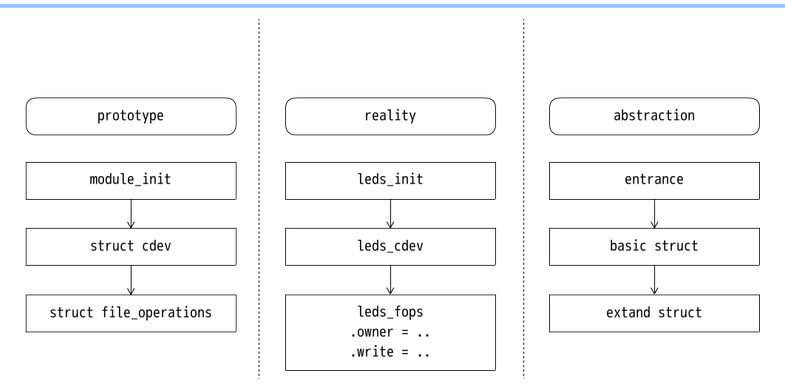
In the picture, we can see what we should do to design a device driver :
Create a entrance function;
Declare a basic struct;
Extand the struct with special operations.
(2) android
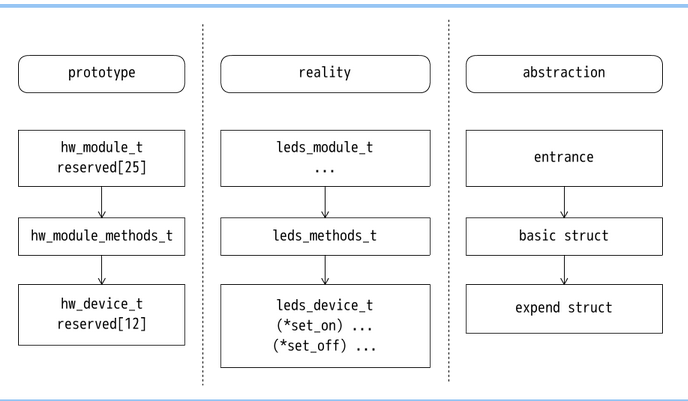
In the picture, we can see the android HAL is the same as linux device driver in the three absractions :
Entrance, basic struct, expend struct.
Then I will discuss the different between the two system ;
[ Entrance ]
// We use functions to build the device driver in linux

module_init(leds_init);

// The entrance is a variable HAL_MODULE_INFO_SYM automaticlly loaded by the system

struct leds_module_t HAL_MODULE_INFO_SYM = {

        hw_module : {

                tag: HARDWARE_MODULE_TAG,

                version_major: ,

                version_minor: ,

                id: LED_HARDWARE_MODULE_ID,

                name: "Led HAL Stub",

                methods: &leds_module_methods,

        }

};
[ Basic Struct ]
// Basic struct in linux is a structure, we use the "struct" to create our device

static struct cdev leds_cdev;

// Basic struct in android is a structure with function open, we use the "function" to create our device

static int leds_device_open(const struct hw_module_t *module, const char *name,

                struct hw_device_t **device)

{

        struct leds_device_t *leds_dev;

        leds_dev = (struct leds_device_t *) malloc(sizeof(*leds_dev));

        memset(leds_dev, , sizeof(*leds_dev));

        leds_dev->hw_device.tag = HARDWARE_DEVICE_TAG;

        leds_dev->hw_device.version = ;

        leds_dev->hw_device.module = (struct hw_module_t *) module;

        leds_dev->hw_device.close = leds_device_close;

        leds_dev->set_on = leds_on;

        leds_dev->set_off = leds_off;

        *device = (hw_device_t *) leds_dev;

        fd_leds = open("/dev/s3c6410_leds_hal", O_RDWR);

        if (fd_leds < ) {

                LOGI("Led Stub : open /dev/s3c6410_leds_hal fail.\n");

        } else {

                LOGI("Led Stub : open /dev/s3c6410_leds_hal success.\n");

        }

        return ;

}
[ Extend Struct ]
// The extend struct means the functions include in file_operations, we have to build the callback functions in linux.

static struct file_operations leds_fops = {

        .owner = THIS_MODULE,

        .write = s3c6410_leds_hal_write,

};

// Instead of using the prototype, the HAL specification suggest us to create two new struct with the first element hw_module_t/hw_device_t in android.

// We can see that it is useless to create a struct in a prototype to hw_device_t, because there is no callback functions in this struct.

// If we want to extend the hw_device_t, we should create the new struct as the substruct of hw_device_t

struct leds_device_t {

        struct hw_device_t hw_device;

        int (*set_on)(struct leds_device_t *dev, int32_t led);

        int (*set_off)(struct leds_device_t *dev, int32_t led);

};
After compiling, we should push the leds_hal.default.so to dir /system/lib/hw in ok6410.
I will discuss the "Service libraries" in next essay.
ok6410 android driver(11)的更多相关文章
- ok6410 android driver(5)
Test the android driver by JNI (Java Native Interface), In the third article, we know how to compile ...
- ok6410 android driver(9)
In this essay, I will write the JNI to test our leds device. If you don't know how to create a jni p ...
- ok6410 android driver(8)
In the past, we know how to create and run a simple character device driver on pc, goldfish and ok64 ...
- ok6410 android driver(3)
This article discusses the Makefile and how to port the module to different platform (localhost and ...
- ok6410 android driver(12)
In this essay, I will talk about how to write the service libraries. TIPS : I won't discuss the name ...
- ok6410 android driver(10)
From this essay, we go to a new discussion "Android Hardware Abstraction Layer". In this e ...
- ok6410 android driver(7)
This article talk about how to test device driver on JNI. There are two ways to test the device driv ...
- ok6410 android driver(6)
This is a short essay about the mistakes in compiling ok6410 android-2.3 source codes. If there is n ...
- ok6410 android driver(1)
target system : Android (OK6410) host system : Debian Wheezy AMD64 1.Set up android system in ok6410 ...
随机推荐
- HDU 4759 Poker Shuffle
Poker Shuffle Time Limit: 2000/1000 MS (Java/Others) Memory Limit: 32768/32768 K (Java/Others)Tot ...
- dubbo通信协议之对比
对dubbo的协议的学习,可以知道目前主流RPC通信大概是什么情况,本文参考dubbo官方文档 http://dubbo.io/User+Guide-zh.htm dubbo共支持如下几种通信协议: ...
- php安装phalcon扩展
一.关于phalcon: 简介: Phalcon 是开源.全功能栈.使用 C /zephir 编写.针对高性能优化的 PHP 5 框架. 开发者不需要学习和使用 C 语言的功能, 因为所有的功能都以 ...
- PL/SQL Developer去掉启动时自动弹出的Logon弹出框方法
以前用PL/SQL Developer 7.0版本,最近升级到PL/SQL Developer 11.0版本,但每次启动PL/SQL Developer都会自动弹出Logon窗口,并且选中其中的登录历 ...
- [转]Python零碎知识(2):强大的zip
一.代码引导 首先看这一段代码: 1 >>> name=('jack','beginman','sony','pcky') 2 >>> age=(2001,2003 ...
- Oracle数据库入门——高水位线详解
一.什么是水线(High Water Mark)? 所有的oracle段(segments,在此,为了理解方便,建议把segment作为表的一个同义词) 都有一个在段内容纳数据的上限,我们把这个上限称 ...
- Android odex文件反编译
odex 是经过优化的dex文件,且独立存在于apk文件.odex 多用于系统预制应用或服务.通过将apk中的dex文件进行 odex,可以加载 apk 的启动速度,同时减小空间的占用.请参考ODEX ...
- Fast 迅捷网络 无线路由器FW323的功能设置
一.问题的提出 1.有一个无线路由器,型号:Fast 迅捷网络 无线路由器FW323 2.有三个网络层级,第一级,用一个路由器A负责对接互联网,内网IP段为192.168.1.*,网关设置192.16 ...
- 十八、【开源】EnterpriseFrameWork框架核心类库之Winform控制器
回<[开源]EnterpriseFrameWork框架系列文章索引> EFW框架源代码下载:http://pan.baidu.com/s/1qWJjo3U EFW框架中的WinContro ...
- android判断EditText输入的数字、中文还是字母方法
String txt = edInput.getText().toString(); Pattern p = Pattern.compile("[0-9]*"); Mat ...