
spring day02-go3
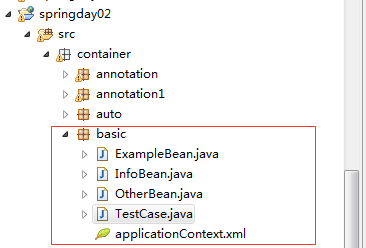
1.复制xml到container/basic包下
2.ExampleBean中设置属性,包括基本类型(String和age)和集合类型(List,Set,Map),Properties类型
3.添加无参构造器,toString方法,get/set方法
4.使用value进行基本值注入,主要基本类型和集合类型的区别
5.test1测试:对ExampleBean进行测试
ExampleBean.java:
package container.basic;
import java.util.List;
import java.util.Map;
import java.util.Properties;
import java.util.Set;
//演示注入基本类型的值和集合类型的值
public class ExampleBean {
private String name;
private int age;
private List<String> interest;
private Set<String> cities;
private Map<String,Double> scores;
private Properties db;
@Override
public String toString() {
return "ExampleBean [age="+age+",interest="+interest+
",cities="+cities+",scores="+scores+",Properties="+db+
",name="+name+"]";
}
public ExampleBean(){
System.out.println("ExampleBean的无参构造器");
}
public String getName() {
return name;
}
public void setName(String name) {
this.name = name;
}
public int getAge() {
return age;
}
public void setAge(int age) {
this.age = age;
}
public List<String> getInterest() {
return interest;
}
public void setInterest(List<String> interest) {
this.interest = interest;
}
public Set<String> getCities() {
return cities;
}
public void setCities(Set<String> cities) {
this.cities = cities;
}
public Map<String, Double> getScores() {
return scores;
}
public void setScores(Map<String, Double> scores) {
this.scores = scores;
}
public Properties getDb() {
return db;
}
public void setDb(Properties db) {
this.db = db;
}
}
xml:
<bean id="eb1" class="container.basic.ExampleBean">
<property name="name" value="黛玉"></property>
<property name="age" value="16"></property>
<property name="interest">
<list>
<value>snooker</value>
<value>football</value>
<value>fishing</value>
</list>
</property>
<property name="cities">
<set>
<value>北京</value>
<value>上海</value>
<value>岳阳</value>
</set>
</property>
<property name="scores">
<map>
<entry key="english" value="100"/>
<entry key="math" value="90"/>
<entry key="music" value="100"/>
</map>
</property>
<property name="db" >
<props>
<prop key="username">Tom</prop>
<prop key="password">1234</prop>
</props>
</property>
</bean>
TestCase:
@Test
public void test1(){
String cfg = "container/basic/applicationContext.xml";
ApplicationContext ac =
new ClassPathXmlApplicationContext(cfg);
ExampleBean eb1 = ac.getBean("eb1",ExampleBean.class);
System.out.println(eb1.getAge());
System.out.println(eb1.getName());
System.out.println(eb1);
}
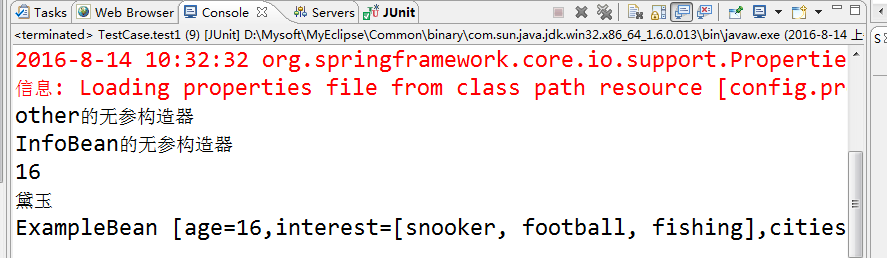
运行结果如下:
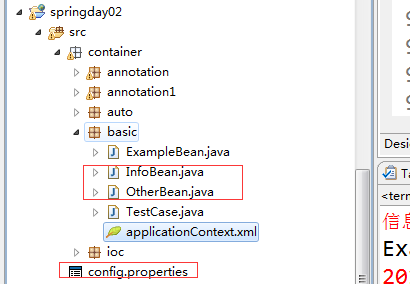
6.同理,添加一个OtherBean类,
7.在src下面新建一个config.properties文件,当然,也可以存在别的地方
8.再修改xml文件,此时不采用上述方法配置xml,而是采用将集合当作一个bean来配置
9.test2测试OtherBean这个类,test3测试读取配置文件dbInfo
10.新建InfoBean类,实现无参构造器,toString方法,get/set方法
11.使用spring表达式来读取其他bean属性的值。即将当前infoBean属性的值设置为别的bean属性的值。
12.test4测试:对infoBean进行测试
OtherBean.java:
package container.basic;
import java.util.List;
import java.util.Map;
import java.util.Properties;
import java.util.Set;
public class OtherBean {
private List<String> interest;
private Set<String> cities;
private Map<String,Double> scores;
private Properties db;
private String pageSize;
@Override
public String toString() {
return "OtherBean [interest=" + interest + ", cities=" + cities
+ ", scores=" + scores + ", db=" + db + ", pageSize="
+ pageSize + "]";
}
public OtherBean() {
System.out.println("other的无参构造器");
}
public List<String> getInterest() {
return interest;
}
public void setInterest(List<String> interest) {
this.interest = interest;
}
public Set<String> getCities() {
return cities;
}
public void setCities(Set<String> cities) {
this.cities = cities;
}
public Map<String, Double> getScores() {
return scores;
}
public void setScores(Map<String, Double> scores) {
this.scores = scores;
}
public Properties getDb() {
return db;
}
public void setDb(Properties db) {
this.db = db;
}
public String getPageSize() {
return pageSize;
}
public void setPageSize(String pageSize) {
this.pageSize = pageSize;
}
}
config.properties:
pageSize=10
InfoBean.java:
package container.basic;
//使用spring表达式来读取bean属性值
public class InfoBean {
private String name;
private String interest;
private double score;
private String pageSize;
public InfoBean() {
System.out.println("InfoBean的无参构造器");
}
@Override
public String toString() {
return "InfoBean [name=" + name + ", interest=" + interest + ", score="
+ score + ", pageSize=" + pageSize + "]";
}
public String getName() {
return name;
}
public void setName(String name) {
this.name = name;
}
public String getInterest() {
return interest;
}
public void setInterest(String interest) {
this.interest = interest;
}
public double getScore() {
return score;
}
public void setScore(double score) {
this.score = score;
}
public String getPageSize() {
return pageSize;
}
public void setPageSize(String pageSize) {
this.pageSize = pageSize;
}
}
修改xml,添加代码如下:
<!-- 将集合当做一个bean来配置
命名空间:为了区分同名的元素而在元素之前添加一个前缀
<%@taglib uri="" prefix=""%>
<c:if></c:if>
-->
<util:list id="interestBean">
<value>snooker</value>
<value>football</value>
<value>fishing</value>
</util:list>
<util:set id="citiesBean">
<value>北京</value>
<value>上海</value>
<value>岳阳</value>
</util:set>
<util:map id="scoresBean">
<entry key="english" value="100"/>
<entry key="math" value="90"/>
<entry key="music" value="100"/>
</util:map>
<util:properties id="dbBean">
<prop key="username">Tom</prop>
<prop key="password">1234</prop>
</util:properties>
<!-- 将指定位置的properties文件的内容读入到id为dbInfo的bean对象 -->
<util:properties id="dbInfo"
location="classpath:config.properties">
<!-- 注意,以上的Properties一种是直接设定值,一种是通过读取文件读取内容 -->
</util:properties>
<bean id="otherBean" class="container.basic.OtherBean">
<property name="interest" ref="interestBean"/>
<property name="cities" ref="citiesBean"/>
<property name="scores" ref="scoresBean"/>
<property name="db" ref="dbBean"/>
<property name="pageSize" value="#{dbInfo.pageSize}"/>
</bean>
<!-- 注意ref和value区别,若为对象,则ref,若为基本类型值,则为value -->
<!-- 使用spring表达式来读取其他bean的属性值 -->
<bean id="infoBean" class="container.basic.InfoBean">
<property name="name" value="#{eb1.name}"/>
<property name="interest" value="#{eb1.interest[1]}"/>
<property name="score" value="#{eb1.scores.english}"/>
<property name="pageSize" value="#{dbInfo.pageSize}"/>
</bean>
测试代码:
@Test
public void test1(){
String cfg = "container/basic/applicationContext.xml";
ApplicationContext ac =
new ClassPathXmlApplicationContext(cfg);
ExampleBean eb1 = ac.getBean("eb1",ExampleBean.class);
System.out.println(eb1.getAge());
System.out.println(eb1.getName());
System.out.println(eb1);
}
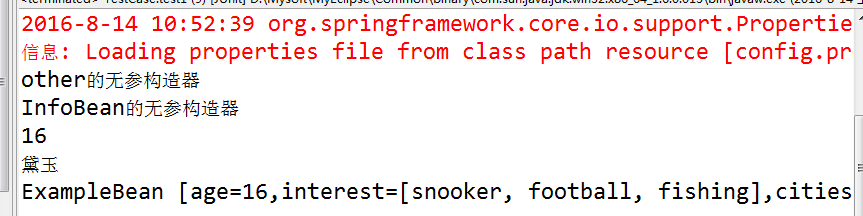
运行结果:
@Test
public void test2(){
String cfg = "container/basic/applicationContext.xml";
ApplicationContext ac =
new ClassPathXmlApplicationContext(cfg);
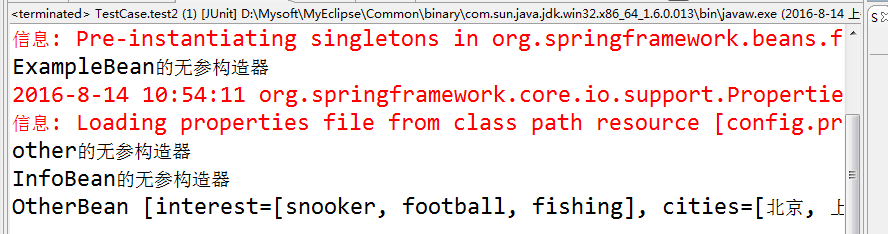
OtherBean ob = ac.getBean("otherBean",OtherBean.class);
System.out.println(ob);
}
运行结果如下:
@Test
public void test3(){
String cfg = "container/basic/applicationContext.xml";
ApplicationContext ac =
new ClassPathXmlApplicationContext(cfg);
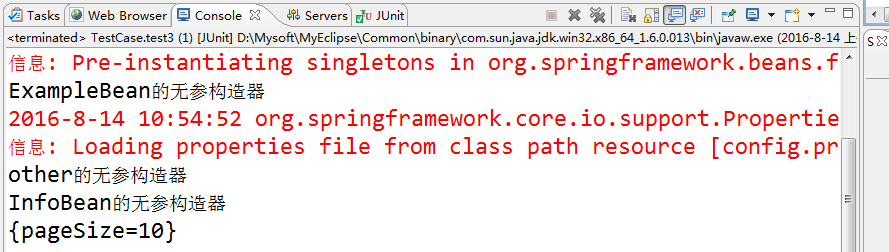
System.out.println(ac.getBean("dbInfo"));
}
运行结果如下:
@Test
public void test4(){
String cfg = "container/basic/applicationContext.xml";
ApplicationContext ac =
new ClassPathXmlApplicationContext(cfg);
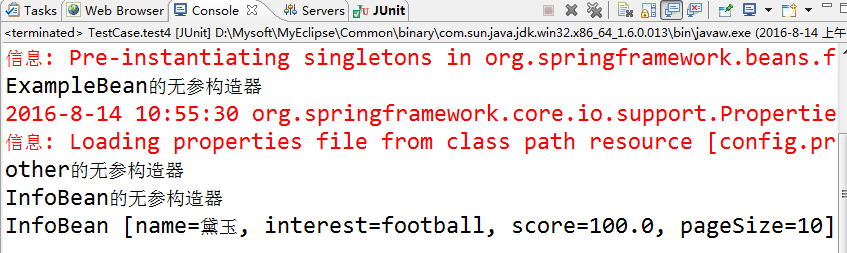
InfoBean ib = ac.getBean("infoBean",InfoBean.class);
System.out.println(ib);
}
运行结果如下:
spring day02-go3的更多相关文章
- Spring day02笔记
spring day01回顾 编写流程(基于xml) 1.导入jar包:4+1 --> beans/core/context/expression | commons-logging 2.编写目 ...
- 开放源代码的设计层面框架Spring——day02
spring第二天 一.基于注解的IOC配置 1.1写在最前 学习基于注解的IOC配置,大家脑海里首先得有一个认知,即注解配置和xml配置要实现的功能是 ...
- Spring day03笔记
spring day02回顾 AOP :切面编程 切面:切入点 和 通知 结合 spring aop 编程 <aop:config> 方法1: <aop:pointcut expre ...
- Spring day01笔记
struts:web层,比较简单(ValueStack值栈,拦截器) hibernate:dao层,知识点杂 spring:service层,重要,讲多少用多少 --> [了解] sprin ...
- spring框架入门day01
struts:web层,比较简单(ValueStack值栈,拦截器) hibernate:dao层,知识点杂 spring:service层,重要,讲多少用多少 --> [了解] spring ...
- Spring-Day02-依赖注入-作业
配置beans约束自动提示 spring-framework-4.2.4.RELEASE\docs\spring-framework-reference\html中打开xsd-configuratio ...
- [刘阳Java]_Spring常用注解介绍_第6讲
Spring的注解是在Spring2.5的版本中引入的,目的简化XML配置.在企业开发过程中使用注解的频率非常高,但是学习注解的前提是大家一定要对Spring基于XML配置要熟悉,这是我个人建议,因为 ...
- [刘阳Java]_Spring相关配置介绍_第5讲
这一节我们介绍一下Spring框架的相关常用配置 Spring依赖注入的两种方式(构造方法注入和setter方式注入) p-namespace方式配置 properties属性文件配置方式 集合对象配 ...
- Spring Boot 配置_yaml语法介绍 day02
一.Spring Boot 的全局配置文件(application.properties.application.yml) 1.这两种配置文件是SpringBoot 支持的对默认配置修改的格式.命名和 ...
- Spring Boot 基于Spring Initializer 的快速构建 day02
一.基于Spring Initializr 快速构建Spring Boot项目(快速) 备注:需要联网 这是使用Intellij Idea快速构建可以为我们省去大量的pom.xml配置时间,简单操作, ...
随机推荐
- 答CsdnBlogger问-关于VR取代安卓的问题
本文来自http://blog.csdn.net/liuxian13183/ ,引用必须注明出处! 安卓未来的发展和命运几何? 现在VR和AR各种火爆,是否安卓能够在洪流中屹立不倒呢? 你好,其实这个 ...
- 【C】用我所学去讲C语言指针
很多人不敢讲C的指针,有些人讲不清,有些人怕讲错.初生牛犊不怕虎,就让我讲讲. 下面开始. 一.指针的定义 指针是内存单元的编号.内存单元是以字节为单位的.所以指针就是字节的编号. 比如我们的个人电 ...
- php--无限极分类
效果图:
- AutoHotKey使用:空格键坏了怎么办?
;RCtrl:: RAlt:: Send, {space} Return http://ahkscript.org/ https://autohotkey.com/download/
- 50道JavaScript经典题和解法(JS新手进...持续更新...)
最近在学习<数据结构与算法JavaScript描述>这本书,对JavaScript的特性和数据结构都有了进一步的了解和体会. 学习之余,也进行了相应的练习,题目难度不大,但是对所学知识的巩 ...
- appium关于定位元素
Windows上定位元素我用的是uiautomatorviewer 这个工具在你的SDK-tools目录下,点击uiautomatorviewer.bat启动,注意appium在跑的时候是取不到的 工 ...
- Java学习-031-JSON 之五 -- 特定数据获取(JSONObject满足特定键值)
前面几篇博文分别讲述了 JSON 的 概要知识.简单数据获取.封装cssSelector数据获取方法.JSONObject 是否包含 key_value,请自行阅读相关博文. 在日常的接口测试脚本编写 ...
- Appium-001-测试开发环境搭建(Android - Win7)
随着移动端 App 测试自动化的兴起,为更好的控制产品质量,越来越多的中大型公司开始了移动端的自动化测试.Appium 自动化测试技术也是我很早之前就想学习的一门技术,却一直没有比较空余的时间来学习( ...
- Notepad++ install vi plugin
下载Notepad++,想安装vi插件. 使用Notepad++自带的插件管理器下载visimulator失败. 所以直接下载插件visimulator.dll,再导入. 下载地址: https:// ...
- 利用utl_file来读取文件.
以前写过用external table来加载trace文件,详情参考下面链接. http://www.cnblogs.com/princessd8251/p/3779145.html 今天要做到是用U ...