
iOS菜单滚动联动内容区域功能实现
平时开发APP中关于此功能还是比较经常碰到,本实例借用三个开源的插件,并对其中一个进行修改调整实现出想要的效果;本文重点介绍修改的内容跟三个插件的运用,这三个插件还可以各自扩展到其它项目的运用;
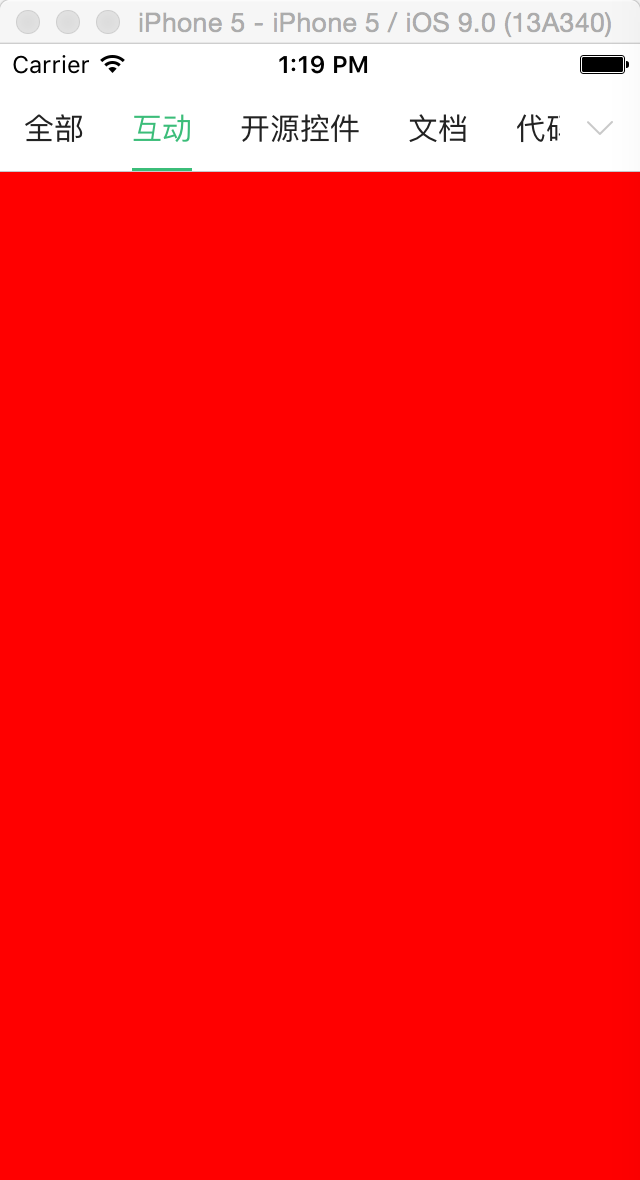
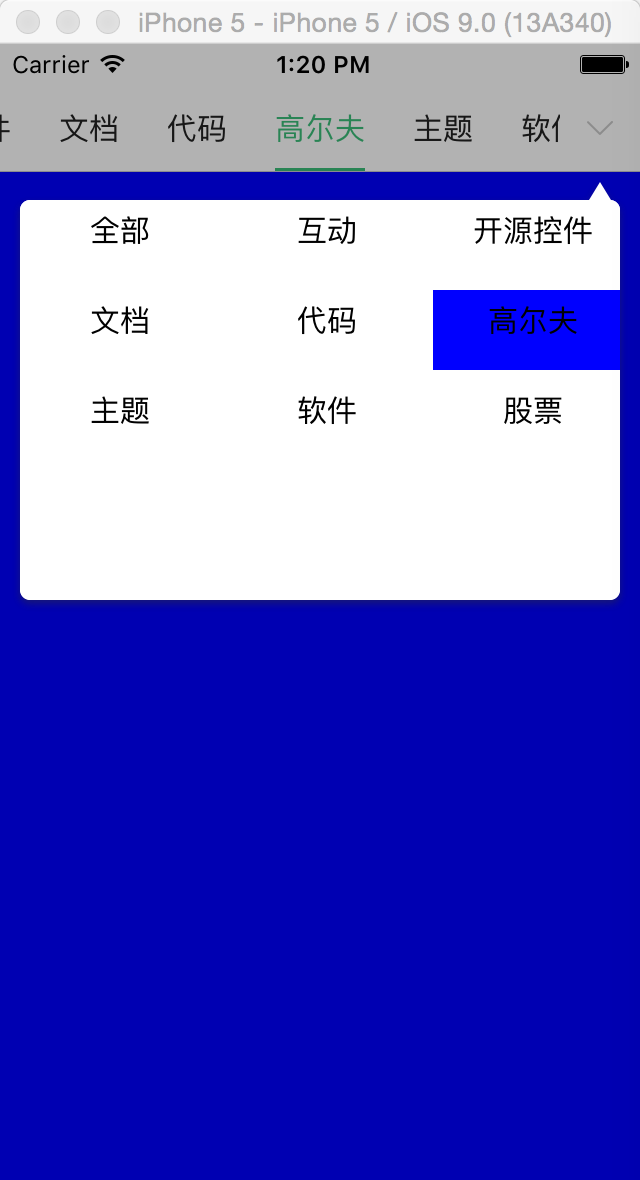
效果图:
 |
 |
 |
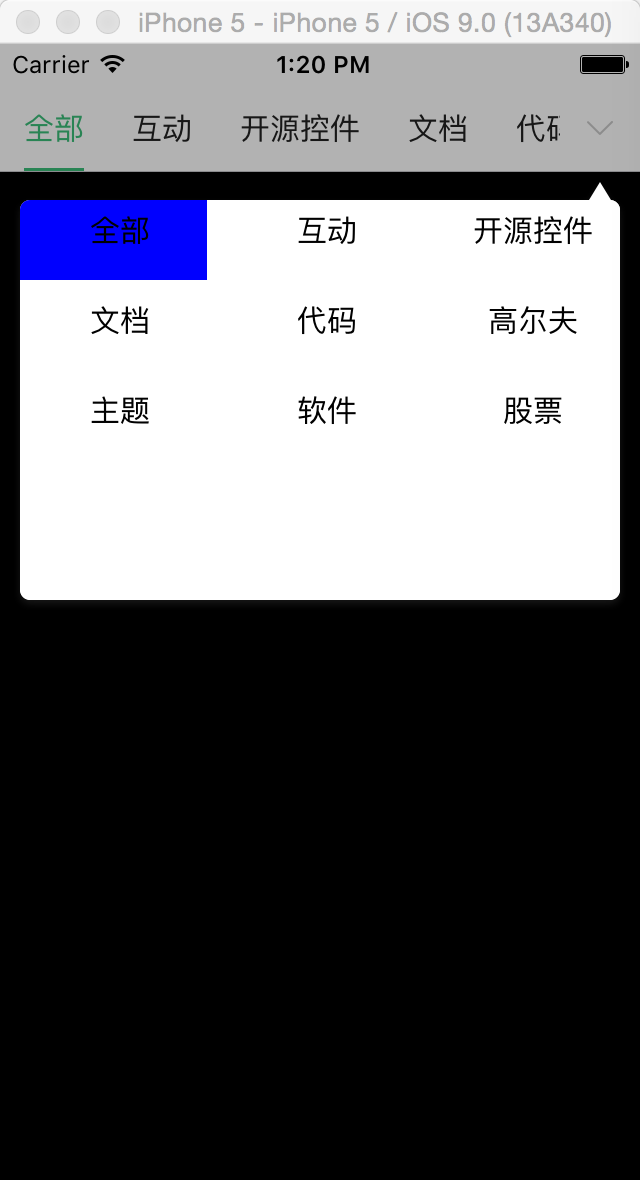 |
本实例实现的效果:顶部的滚动菜单显示出所有的类型,每个类型都对应一种展示,可以在顶部的菜单进行滚动,内容区域也会跟着改变,或者是内容区域左右滑动,则顶部的滚动菜单也会跟着更改,顶部菜单的最右边有一个展示更多菜单的效果,用于弹出一个带箭头的窗;(源代码下载)
带箭头的弹出视图插件 :https://github.com/xiekw2010/DXPopover
内容区域滑动插件:https://github.com/nicklockwood/iCarousel
及Codint.Net开源项目中的XTSegmentControl菜单滚动效果,此实例对它进行的修改
1:插件及页面的初始化
#import "ViewController.h"

#import "oldChildVewController.h"

#import "ChildViewController.h"

#import "newChildVewController.h"

#import "XTSegmentControl.h"

#import "iCarousel.h"

#import "Masonry.h"

#import "menuCollectionViewCell.h"

#import "DXPopover.h"

#define kScreen_Height [UIScreen mainScreen].bounds.size.height

#define kScreen_Width [UIScreen mainScreen].bounds.size.width

#define kMySegmentControl_Height 44.0

@interface ViewController ()<UICollectionViewDataSource, UICollectionViewDelegate,iCarouselDataSource, iCarouselDelegate>

@property (strong, nonatomic) XTSegmentControl *mySegmentControl;

@property (strong, nonatomic) NSArray *titlesArray;

@property (strong, nonatomic) iCarousel *myCarousel;

@property(assign,nonatomic)NSInteger curSelectIndex;

@property (nonatomic, strong) DXPopover *popover;

@property(assign,nonatomic)CGFloat popoverWidth;

@property (strong, nonatomic) UICollectionView *myCollectionView;

@end

@implementation ViewController

- (void)viewDidLoad {

    [super viewDidLoad];

    self.view.backgroundColor=[UIColor whiteColor];

    //初始化一个popover 用于弹窗效果的展示

    self.popover = [DXPopover new];

    _popoverWidth = kScreen_Width-;

    __weak typeof(self) weakSelf = self;

    CGRect frame=self.view.bounds;

    //内容区滚动效果插件

    self.myCarousel = ({

        iCarousel *icarousel = [[iCarousel alloc] initWithFrame:frame];

        icarousel.dataSource = self;

        icarousel.delegate = self;

        icarousel.decelerationRate = 1.0;

        icarousel.scrollSpeed = 1.0;

        icarousel.type = iCarouselTypeLinear;

        icarousel.pagingEnabled = YES;

        icarousel.clipsToBounds = YES;

        icarousel.bounceDistance = 0.2;

        [self.view addSubview:icarousel];

        [icarousel mas_makeConstraints:^(MASConstraintMaker *make) {

            make.edges.equalTo(self.view).insets(UIEdgeInsetsMake(, , , ));

        }];

        icarousel;

    });

    //添加滑块

    __weak typeof(_myCarousel) weakCarousel = _myCarousel;

    self.mySegmentControl = [[XTSegmentControl alloc] initWithFrame:CGRectMake(, , kScreen_Width, ) Items:self.titlesArray showRightButton:YES selectedBlock:^(NSInteger index) {

        weakSelf.curSelectIndex=index;

        weakCarousel.currentItemIndex=index;

        [weakSelf.myCollectionView reloadData];

    }];

    //当有右边键时 其响应的事件

    self.mySegmentControl.rightButtonBlock= ^(CGRect rightButtomRect)

    {

        //弹出插件的运用

        [weakSelf updateMyViewFrame];

        CGPoint startPoint =

        CGPointMake(CGRectGetMidX(rightButtomRect), CGRectGetMaxY(rightButtomRect) + );

        [weakSelf.popover showAtPoint:startPoint

                   popoverPostion:DXPopoverPositionDown

                  withContentView:weakSelf.myCollectionView

                           inView:weakSelf.view];

    };

    [self.view addSubview:self.mySegmentControl];

    //用于展示弹出效果里面的列表

    if (!_myCollectionView) {

        UICollectionViewFlowLayout *layout = [[UICollectionViewFlowLayout alloc] init];

        self.myCollectionView = [[UICollectionView alloc] initWithFrame:CGRectMake(,,kScreen_Width-, ) collectionViewLayout:layout];

        self.myCollectionView.backgroundColor=[UIColor whiteColor];

        self.myCollectionView.showsHorizontalScrollIndicator=NO;

        self.myCollectionView.showsVerticalScrollIndicator=NO;

        [self.myCollectionView registerClass:[menuCollectionViewCell class] forCellWithReuseIdentifier:NSStringFromClass([menuCollectionViewCell class])];

        self.myCollectionView.dataSource = self;

        self.myCollectionView.delegate = self;

    }

}
其中XTSegmentControl为顶部菜单的创建,其中showRightButton是为了扩展是否显示右边更多菜单的事件,并把事件的响应Block到页面进行实现,此事例就是响应弹出窗的效果展现,iCarousel为内容区域的滑动效果,DXPopover弹出窗的效果,UICollectionView则用于弹出窗里面的菜单列表
//popver一些属性的设置

-(void)updateMyViewFrame

{

    CGRect tableViewFrame = self.myCollectionView.frame;

    tableViewFrame.size.width = _popoverWidth;

    self.myCollectionView.frame = tableViewFrame;

    self.popover.contentInset = UIEdgeInsetsZero;

    self.popover.backgroundColor = [UIColor whiteColor];

}

#pragma mark - Getter/Setter

- (NSArray*)titlesArray

{

    if (nil == _titlesArray) {

            _titlesArray = @[@"全部", @"互动", @"开源控件", @"文档", @"代码", @"高尔夫",@"主题",@"软件",@"股票"];

    }

    return _titlesArray;

}
2插件iCarouselDataSource, iCarouselDelegate代码实现
#pragma mark iCarousel M

- (NSUInteger)numberOfItemsInCarousel:(iCarousel *)carousel{

    return [self.titlesArray count];

}

//滚动时内容视图的加载

- (UIView *)carousel:(iCarousel *)carousel viewForItemAtIndex:(NSUInteger)index reusingView:(UIView *)view{

    [_mySegmentControl setScrollOffset:index];

    UIViewController *childContrll=[[ChildViewController alloc]init];

    UIView *my=childContrll.view;

    switch (index) {

        case :

        {

            my.backgroundColor=[UIColor blackColor];

            break;

        }

        case :

        {

            my.backgroundColor=[UIColor redColor];

            break;

        }

        default:

            childContrll=[[newChildVewController alloc]init];

            break;

    }

    return childContrll.view;

}

//滚动时 下划线的位置更新

- (void)carouselDidScroll:(iCarousel *)carousel{

    if (_mySegmentControl) {

        [_mySegmentControl moveIndexWithProgress];

    }

}

//更新滚动其它两个控件的位置

- (void)carouselCurrentItemIndexDidChange:(iCarousel *)carousel{

    self.curSelectIndex=carousel.currentItemIndex;

    [self.myCollectionView reloadData];

    if (_mySegmentControl) {

        _mySegmentControl.currentIndex = carousel.currentItemIndex;

    }

}
注意:内容区域的视图加载,及其滑动所响应的事件处理,原来的XTSegmentControl对于菜单字数不同时下划线会出现一些异常,本实例对它进行修改了;
3:列表UICollectionViewDataSource, UICollectionViewDelegate功能的实现
- (NSInteger)collectionView:(UICollectionView *)collectionView numberOfItemsInSection:(NSInteger)section{

    return self.titlesArray.count;

}

- (UICollectionViewCell *)collectionView:(UICollectionView *)collectionView cellForItemAtIndexPath:(NSIndexPath *)indexPath{

    menuCollectionViewCell *ccell = [collectionView dequeueReusableCellWithReuseIdentifier:NSStringFromClass([menuCollectionViewCell class]) forIndexPath:indexPath];

    NSString *model=[self.titlesArray objectAtIndex:indexPath.row];

    ccell.curMenuModel=model;

    if (self.curSelectIndex==indexPath.row) {

        ccell.backgroundColor=[UIColor blueColor];

    }

    else

    {

        ccell.backgroundColor=[UIColor whiteColor];

    }

    return ccell;

}

- (CGSize)collectionView:(UICollectionView *)collectionView layout:(UICollectionViewLayout*)collectionViewLayout sizeForItemAtIndexPath:(NSIndexPath *)indexPath{

    return CGSizeMake((kScreen_Width-)/, );

}

- (UIEdgeInsets)collectionView:(UICollectionView *)collectionView layout:(UICollectionViewLayout*)collectionViewLayout insetForSectionAtIndex:(NSInteger)section{

    return UIEdgeInsetsZero;

}

- (CGFloat)collectionView:(UICollectionView *)collectionView layout:(UICollectionViewLayout*)collectionViewLayout minimumLineSpacingForSectionAtIndex:(NSInteger)section{

    return ;

}

- (CGFloat)collectionView:(UICollectionView *)collectionView layout:(UICollectionViewLayout*)collectionViewLayout minimumInteritemSpacingForSectionAtIndex:(NSInteger)section{

    return ;

}

- (void)collectionView:(UICollectionView *)collectionView didSelectItemAtIndexPath:(NSIndexPath *)indexPath{

    self.curSelectIndex=indexPath.row;

    //两个滚动的位置更新

    _myCarousel.currentItemIndex=self.curSelectIndex;

    [_mySegmentControl selectIndex:self.curSelectIndex];

    //隐藏弹出窗

    [self.popover dismiss];

}
注意:主要是在实现点击时滚动位置跟内容的区域要进行调整,并把弹出窗进行收缩的操作;
4:XTSegmentControl下划线调整
- (void)moveIndexWithProgress

{

    CGRect origionRect = [_itemFrames[_currentIndex] CGRectValue];

    CGRect origionLineRect = CGRectMake(CGRectGetMinX(origionRect) + XTSegmentControlHspace, CGRectGetHeight(origionRect) - XTSegmentControlLineHeight, CGRectGetWidth(origionRect) -  * XTSegmentControlHspace, XTSegmentControlLineHeight);

    //增加下划线滚动的效果

    [UIView animateWithDuration:0.5 animations:^{

        _lineView.frame = origionLineRect;

    } completion:^(BOOL finished) {

    }];

}
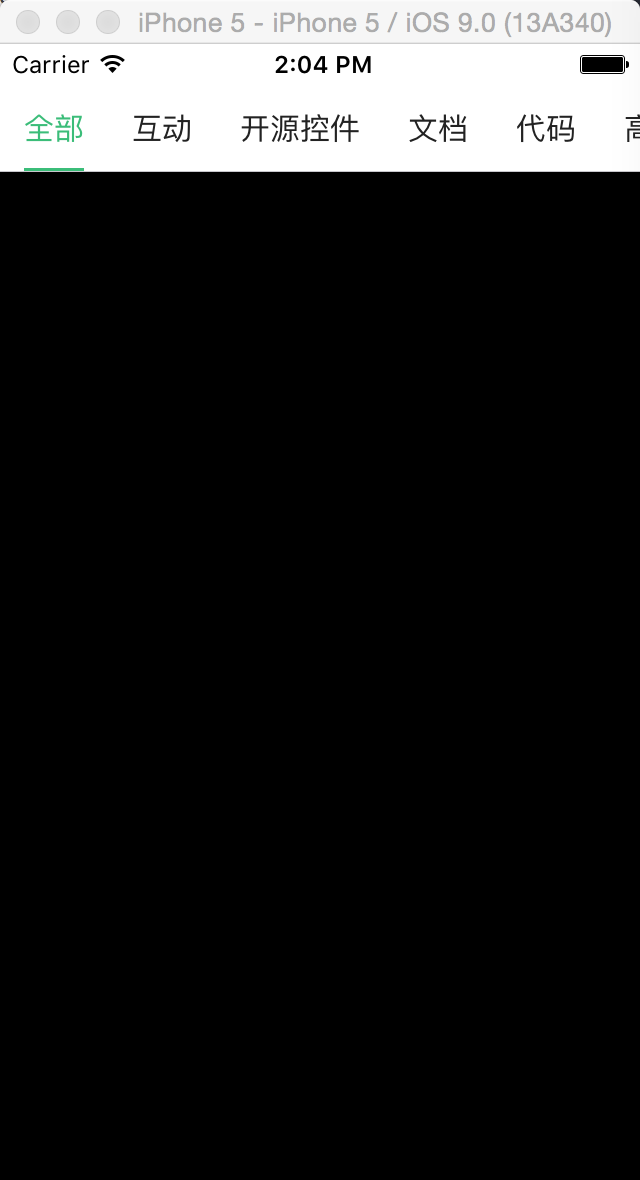
5:扩展XTSegmentControl没有右边更多菜单的效果
    self.mySegmentControl = [[XTSegmentControl alloc] initWithFrame:CGRectMake(, , kScreen_Width, ) Items:self.titlesArray showRightButton:NO selectedBlock:^(NSInteger index) {

        weakSelf.curSelectIndex=index;

        weakCarousel.currentItemIndex=index;

        [weakSelf.myCollectionView reloadData];

    }];
效果图:
 |
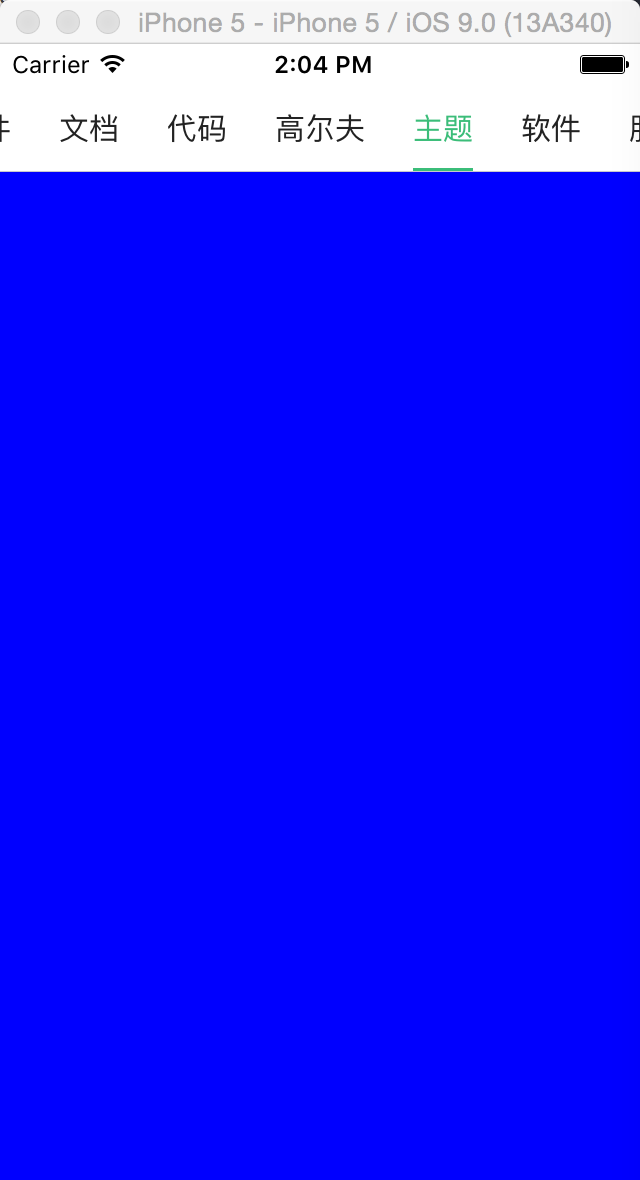 |
6:补充关于popover这个插件的如果有模态时,它会出现整个屏幕,如果不想要这种效果,可以自个设置一个背景视图效果,把popover模态效果关掉(self.popover.maskType=DXPopoverMaskTypeNone; //设置默认是否有模态);下面是写的一个实例:
- (void)updateTableViewFrame {

    CGRect tableViewFrame = self.tableView.frame;

    tableViewFrame.size.width = _popoverWidth;

    self.tableView.frame = tableViewFrame;

    self.popover.contentInset = UIEdgeInsetsZero;

    self.popover.maskType=DXPopoverMaskTypeNone; //设置默认是否有模态

    self.popover.backgroundColor = [UIColor whiteColor];

}

- (void)showPopover {

    [self updateTableViewFrame];

    [self changeShowing];

    CGPoint startPoint =

        CGPointMake(CGRectGetMidX(self.btn.frame), CGRectGetMaxY(self.btn.frame) + );

    [self.popover showAtPoint:startPoint

               popoverPostion:DXPopoverPositionDown

              withContentView:self.tableView

                       inView:self.tabBarController.view];

    __weak typeof(self) weakSelf = self;

    self.popover.didDismissHandler = ^{

        [weakSelf bounceTargetView:weakSelf.btn];

    };

}

//自行增加一个背影层

- (UIView *)myTapBackgroundView{

    if (!_myTapBackgroundView) {

        _myTapBackgroundView = ({

            UIView *view = [[UIView alloc] initWithFrame:CGRectMake(, , [[UIScreen mainScreen] bounds].size.width, [[UIScreen mainScreen] bounds].size.height-)];

            view.backgroundColor = [UIColor clearColor];

            UITapGestureRecognizer *tap = [[UITapGestureRecognizer alloc] initWithTarget:self action:@selector(changeShowing)];

            [view addGestureRecognizer:tap];

            view;

        });

    }

    return _myTapBackgroundView;

}

- (void)changeShowing{

    if (self.isShowing) {//隐藏

        [UIView animateWithDuration:0.3 animations:^{

            self.myTapBackgroundView.backgroundColor = [UIColor colorWithWhite: alpha:];

        } completion:^(BOOL finished) {

            [self.popover dismiss];

            [self.myTapBackgroundView removeFromSuperview];

            self.isShowing = NO;

        }];

    }else{//显示

        [self.view addSubview:self.myTapBackgroundView];

        [UIView animateWithDuration:0.3 animations:^{

            self.myTapBackgroundView.backgroundColor = [UIColor colorWithWhite: alpha:0.2];

        } completion:^(BOOL finished) {

            self.isShowing = YES;

        }];

    }

}
iOS菜单滚动联动内容区域功能实现的更多相关文章
- ionic js 侧栏菜单 把主要内容区域从一边拖动到另一边,来让左侧或右侧的侧栏菜单进行切换
ionic 侧栏菜单 一个容器元素包含侧边菜单和主要内容.通过把主要内容区域从一边拖动到另一边,来让左侧或右侧的侧栏菜单进行切换. 效果图如下所示: 用法 要使用侧栏菜单,添加一个父元素<ion ...
- iOS关于菜单滚动视图实现
菜单滚动视图也是在项目开发过程中比较常用到的功能,先直接看效果图 实现的效果如下: 当菜单个数的总长度超过一个屏宽度就计算每一个的文字宽度,若没有则只进行一个屏平分,点击菜单项时,滚动的视图位置会随着 ...
- JavaScript目录菜单滚动反显组件的实现
JavaScript目录菜单滚动反显组件,有以下两个特点 每个导航菜单项(nav)对应页面一个内容区域(content) 滚动页面到特定内容区域(content)时,对应的菜单会自动切换,一般会添加一 ...
- [Tool] 插入折叠区域功能
之前写了一个 仿博客园网页端推荐的插入代码插件, 后来在总结一些技术文档时,总是想把一些属性或者方法,参数等,都用表格的形式清晰的列举出来,但是插入的表格太大的话,上下跨度就显得特别大,来回上下滚动的 ...
- input聚焦时,滚动至可视区域
这里的代码来自vux,觉得vux处理得很好,在此记录一下. 当我们在手机上填表单的时候,我们会希望正在填的input或者textarea会自动滚动至可视区域,方便我们边填写边查看内容.以前我的做法是, ...
- vue input聚焦时,滚动至可视区域
这里的代码来自vux,觉得vux处理得很好,在此记录一下.当我们在手机上填表单的时候,我们会希望正在填的input或者textarea会自动滚动至可视区域,方便我们边填写边查看内容.以前我的做法是,获 ...
- Excel技巧—开始菜单之格式刷六大功能
转: Excel技巧-开始菜单之格式刷六大功能 点赞再看,养成习惯:千里之行,始于足下. 微信搜索[亦心Excel]关注这个不一样的自媒体人. 本文 GitHub https://github.com ...
- 移动端,input、textarea滚动至可视区域
1.一般情况下 在移动端,点击input框之后,会弹出输入键盘.而内容input的内容也会自动滚动到可视区域内. 2.当父元素设置了overflow属性之后 在设置了overflow属性之后,点击in ...
- JS实现菜单滚动到一定高度后固定
在有些网页中我们会发现会有这样的现象:某个div会随着屏幕的滚动达到一定高度的时候位置就固定下来了.例如一下导航条: 那么这里就需要用到JS的逻辑方法来实现了. html <div id=&qu ...
随机推荐
- smartjs - DataManager 场景示例分析 - 数据懒加载
发一张policy的参数图设置图: 场景1 - 数据的懒加载/延迟加载 在很多时候,为了提高网页的加载速度,减少不必要的开销,会将页面的数据拆分成几个部分,首先加载呈现可视区域内的数据,然后剩下来的会 ...
- cocos2d-x开发: 整合apache http,用于自己检索多项目svn文件
本来我的项目都是放在自己的虚拟机svn仓库中,随着仓库越来越多,有的时候需要去查看项目文件.check out到本地之后,挨个查看也是可以的,可是check out也是需要时间的,就想起了apache ...
- 关于异步Promises
英文原文:What's The Point Of Promises? 迄今为止,可能每个JavaScript开发者和他们的祖母都听说过Promises.如果你没有,那么你即将会.promises的概念 ...
- 红黑树(五)之 Java的实现
概要 前面分别介绍红黑树的理论知识.红黑树的C语言和C++的实现.本章介绍红黑树的Java实现,若读者对红黑树的理论知识不熟悉,建立先学习红黑树的理论知识,再来学习本章.还是那句老话,红黑树的C/C+ ...
- 【转载】Ubuntu下SVN安装和配置
一.SVN安装 1.安装包 1.$ sudo apt-get install subversion 2.创建项目目录 $ sudo mkdir /home/xiaozhe/svn $ cd /home ...
- 【转载】关于shell中的basename
转载自:http://blog.chinaunix.net/uid-20499529-id-1940182.html basename 是去除目录后剩下的名字example:shell>temp ...
- SAPI训练文件存储位置
查看注册表HKEY_CURRENT_USER\Software\Microsoft\Speech\RecoProfiles 说明查看http://msdn.microsoft.com/en-us/li ...
- javascript之IE版本检测
近年来随着操作系统的升级以及各种新技术的开发普及,抛弃低版本IE已经是大势所趋,这对于前端人员来时是个好消息,可以不用花费太多的时间来做低版本的兼容,很多站点采用给予低版本IE以提示的方式(恩,很友好 ...
- [ShortCut] IE10快捷键
适用范围: Windows 8 操作步骤: 1.快速输入网址: “Ctrl+L”.“F4”:在IE10下按下“Ctrl+L”快捷键,可以直接将光标转到浏览器地址栏(注:地址栏中的网址会被选中),可以直 ...
- {"集合已修改;可能无法执行枚举操作。"}
无论是向集合中添加元素还是从集合中删除元素,都会导致集合内部的变化,特别是集合遍历器的变化.例如 List<,,,,}; foreach(int x in list) { list.Remove ...