
TabLayout的高级使用
前言
前面介绍了TabLayout的基本属性和基本的使用方法。我是传送门。
真实的业务场景中,很多的效果,原生的TabLayout,并不支持。例如下滑线短于文字的效果,底部导航栏效果,标签文字选中是需要加粗效果等等。
所以我们需要使用TabLayout的自定义tab标签。
先上图。
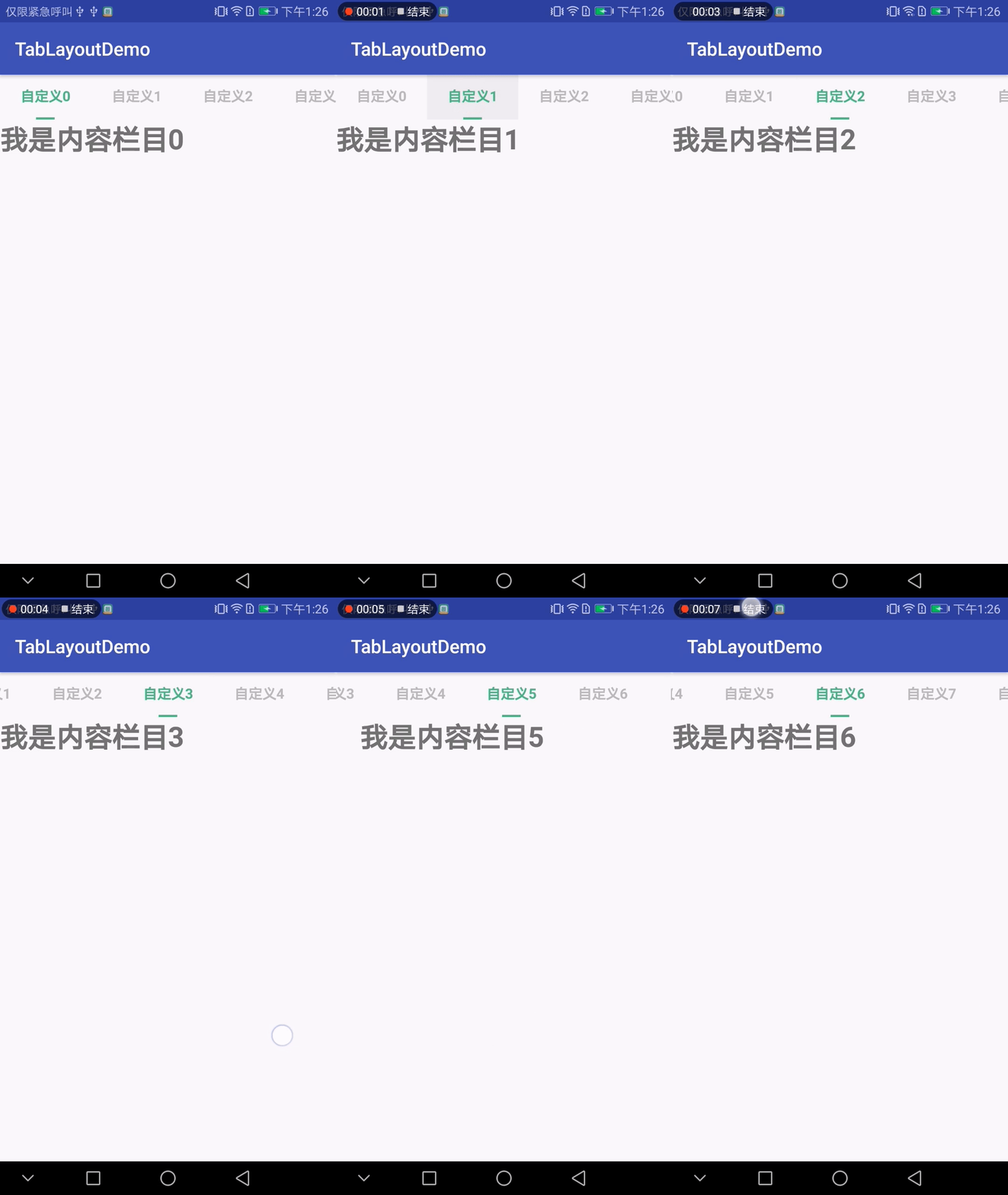
先为急用的朋友上代码,后面做讲解
java类
import android.content.Context;

import android.os.Bundle;

import android.support.design.widget.TabLayout;

import android.support.v4.app.Fragment;

import android.support.v4.app.FragmentManager;

import android.support.v4.app.FragmentPagerAdapter;

import android.support.v4.view.ViewPager;

import android.support.v7.app.AppCompatActivity;

import android.view.LayoutInflater;

import android.view.View;

import android.widget.CheckBox;

import java.util.ArrayList;

import java.util.List;

import butterknife.BindView;

import butterknife.ButterKnife;

public class MainActivity extends AppCompatActivity {

    @BindView(R.id.vp_all)

    ViewPager vpAll;

    @BindView(R.id.tab_custom)

    TabLayout tabCustom;

    //存放自定义tab标签的列表

    List<View> customTabList = new ArrayList<>();

    //存放对应tab标签的fragment页面

    List<PageFragment> fgList = new ArrayList<>();

    //选中的自定义标签,标记器。默认选中第一个。标记位是0;

    int indicator = 0;

    ViewPagerAdapter pagerAdapter;

    @Override

    protected void onCreate(Bundle savedInstanceState) {

        super.onCreate(savedInstanceState);

        setContentView(R.layout.activity_main);

        ButterKnife.bind(this);//此处是用的是butterKnife框架,等同于findviewbyid获取各个控件。

        initTabCustomAndViewPager();

        initListener();

    }

    /**

     * 初始化tab标签和viewpager内容。

     */

    private void initTabCustomAndViewPager() {

        //初始化10个自定义tab标签

        for (int i = 0; i < 10; i++) {

            final View tabView = getCustomTabView(this, "自定义" + i);

            customTabList.add(tabView);

            if (i==0){

                //设置默认第一个选中效果

                ((CheckBox) tabView.findViewById(R.id.cb_name)).setChecked(true);

                tabView.findViewById(R.id.cb_slide).setVisibility(View.VISIBLE);

            }

            tabCustom.addTab(tabCustom.newTab().setCustomView(tabView));

        }

        //初始化10个fragment页面

        for (int i = 0; i < 10; i++) {

            fgList.add(PageFragment.newInstance("我是内容栏目" + i));

        }

        pagerAdapter = new ViewPagerAdapter(getSupportFragmentManager(), fgList);

        vpAll.setAdapter(pagerAdapter);

    }

    /**

     * 将viewpager和tabLayout之间的滑动事件和点击事件关联起来。

     * 此处不能使用tabLayout的setupWithViewPager()方法,否则会造成自定义view失效

     */

    private void initListener() {

        //添加关联接口,此处不能用自带的绑定方法,否则自定义view会失效

        vpAll.addOnPageChangeListener(new ViewPager.OnPageChangeListener() {

            @Override

            public void onPageScrolled(int i, float v, int i1) {

            }

            @Override

            public void onPageSelected(int i) {

                tabCustom.getTabAt(i).select();

            }

            @Override

            public void onPageScrollStateChanged(int i) {

            }

        });

        tabCustom.addOnTabSelectedListener(new TabLayout.OnTabSelectedListener() {

            @Override

            public void onTabSelected(TabLayout.Tab tab) {

                //viewpager联动

                vpAll.setCurrentItem(tab.getPosition());

                //将之前选中的tab标签,设置为未选中状态

                View oldView = customTabList.get(indicator);

                CheckBox oldCbName = (CheckBox) oldView.findViewById(R.id.cb_name);

                View oldCbSlide = oldView.findViewById(R.id.cb_slide);

                oldCbName.setChecked(false);

                oldCbSlide.setVisibility(View.INVISIBLE);

                //当前选中的tab标签,设置为选中状态。

                indicator = tab.getPosition();

                View newView = customTabList.get(indicator);

                CheckBox newCbName = (CheckBox) newView.findViewById(R.id.cb_name);

                View newCbSlide = newView.findViewById(R.id.cb_slide);

                newCbName.setChecked(true);

                newCbSlide.setVisibility(View.VISIBLE);

            }

            @Override

            public void onTabUnselected(TabLayout.Tab tab) {

            }

            @Override

            public void onTabReselected(TabLayout.Tab tab) {

            }

        });

    }

    /**

     * ViewPager的适配器。

     */

    class ViewPagerAdapter extends FragmentPagerAdapter {

        List<PageFragment> fragmentList;

        public ViewPagerAdapter(FragmentManager fm, List<PageFragment> fragmentList) {

            super(fm);

            this.fragmentList = fragmentList;

        }

        @Override

        public Fragment getItem(int position) {

            return fragmentList.get(position);

        }

        @Override

        public int getCount() {

            return fragmentList.size();

        }

    }

    /**

     * 获取自定义Tab标签的显示的内容

     *

     * @param context

     * @param

     * @return

     */

    public static View getCustomTabView(Context context, String text) {

        View view = LayoutInflater.from(context).inflate(R.layout.item_custom_tab, null);

        CheckBox tabText = (CheckBox) view.findViewById(R.id.cb_name);

        tabText.setText(text);

        return view;

    }

}
pageFragment的代码和布局就不贴了。不想写的朋友可以看上一篇:我是传送门
布局文件
activity_main的布局文件
<?xml version="1.0" encoding="utf-8"?>

<LinearLayout xmlns:android="http://schemas.android.com/apk/res/android"

    xmlns:app="http://schemas.android.com/apk/res-auto"

    xmlns:tools="http://schemas.android.com/tools"

    android:layout_width="match_parent"

    android:layout_height="match_parent"

    android:orientation="vertical"

    tools:context="com.example.administrator.tablayoutdemo.MainActivity">

    <android.support.design.widget.TabLayout

        android:id="@+id/tab_custom"

        android:layout_width="match_parent"

        android:layout_height="wrap_content"

        app:tabIndicatorHeight="0dp"

        app:tabMode="scrollable"

        />

    <android.support.v4.view.ViewPager

        android:id="@+id/vp_all"

        android:layout_width="match_parent"

        android:layout_height="match_parent" />

</LinearLayout>
自定义tab标签的布局文件:
<?xml version="1.0" encoding="utf-8"?>

<LinearLayout xmlns:android="http://schemas.android.com/apk/res/android"

    android:layout_width="wrap_content"

    android:layout_height="wrap_content"

    android:paddingLeft="10dp"

    android:paddingRight="10dp"

    android:orientation="vertical"

    android:gravity="center"

    android:descendantFocusability="blocksDescendants">

    <CheckBox

        android:id="@+id/cb_name"

        android:layout_width="wrap_content"

        android:layout_height="wrap_content"

        android:button="@null"

        android:text=""

        android:textColor="@drawable/select_text_color"

        android:textSize="15sp"

        android:paddingTop="13dp"

        android:ellipsize="end"

        android:singleLine="true"

        android:maxEms="5"

        android:textStyle="bold"

        android:paddingBottom="13dp"

        android:clickable="false"

        />

    <View

        android:id="@+id/cb_slide"

        android:layout_width="20dp"

        android:layout_height="3dp"

        android:visibility="invisible"

        android:background="#ff4fbf86"/>

</LinearLayout>
色值文件select_text_color,放在drawable目录下
<?xml version="1.0" encoding="utf-8"?>

<selector xmlns:android="http://schemas.android.com/apk/res/android">

    <item android:color="#ff4fbf86" android:state_checked="true"/>

    <item android:color="#BBBBBB" android:state_checked="false" />

</selector>
讲解:
OK上完代码,针对关键点在做一次说明
1、标签在初始化的过程中,需要对第一个tab标签提前进行选中状态的初始化,否则可能会造成第一次启动的时候,第一个标签没有出现选中状态。
2、viewpager和TabLayout标签进行联动的时候,不可以使用TabLayout的setupWithViewPager()方法,而是要通过ViewPager的addOnPageChangeListener()和Tablayout的addOnTabSelectedListener()方法进行两个控件之间的联动效果。否则会造成自定义的CustomeTab被TabLayout默认生成的标签覆盖掉。
3、在布局文件中,需要将TabLayout的tabIndicatorHeight设为0。用来屏蔽掉控件自动生成的下滑线。
通过自定义的Tab标签可以完全实现自己控制tab标签的内容,这里就不展示tab标签做为底部导航栏的效果了。原理都是一样的。
TabLayout的高级使用的更多相关文章
- TabLayout基本使用
前言 Tablayout继承自HorizontalScrollView,可以用作顶部标签效果.底部导航栏效果.一般多与ViewPager一起使用. 想直接了解如何实现短下滑效果的请看:TabLayou ...
- 重磅推出TabLayout高级窗口组件
TabLayout是在APICloud现有窗口系统基础上升级而来的高级窗口组件,符合Material Design规范,可通过简单的配置为窗口实现原生的导航栏和TabBar,它将帮助您节省30%以上的 ...
- 高级UI晋升之常用View(三)中篇
更多Android高级架构进阶视频学习请点击:https://space.bilibili.com/474380680本篇文章将从ViewPager来介绍常用View:文章目录 一.简介 二.基本使用 ...
- doT的高级用法及loadData的使用
本文出自APICloud官方论坛, 感谢论坛版主 gp3098的分享. 之前直接把模板写在页面底部的script标签内的,但是现在不同. 使用了doT.js配合api的loadData方法,整个页面就 ...
- MySQL高级知识- MySQL的架构介绍
[TOC] 1.MySQL 简介 概述 MySQL是一个关系型数据库管理系统,由瑞典MySQL AB公司开发,目前属于Oracle公司. MySQL是一种关联数据库管理系统,将数据保存在不同的表中,而 ...
- PayPal高级工程总监:读完这100篇论文 就能成大数据高手(附论文下载)
100 open source Big Data architecture papers for data professionals. 读完这100篇论文 就能成大数据高手 作者 白宁超 2016年 ...
- TabLayout + ViewPager
一.实现思路 1.在build.gradle中添加依赖,例如: compile 'com.android.support:support-v4:23.4.0'compile 'com.android. ...
- 马哥linux运维初级+中级+高级 视频教程 教学视频 全套下载(近50G)
马哥linux运维初级+中级+高级 视频教程 教学视频 全套下载(近50G)目录详情:18_02_ssl协议.openssl及创建私有CA18_03_OpenSSH服务及其相关应用09_01_磁盘及文 ...
- JS高级前端开发群加群说明及如何晋级
JS高级前端开发群加群说明 一.文章背景: 二. 高级群: 三. 加入方式: 四. 说明: 一.文章背景: 去年年初建了几个群,在不经意间火了,一直排在“前端开发”关键字搜索结果第一名.当然取得这 ...
随机推荐
- Spring AOP功能和目标
1.AOP的作用 在OOP中,正是这种分散在各处且与对象核心功能无关的代码(横切代码)的存在,使得模块复用难度增加.AOP则将封装好的对象剖开,找出其中对多个对象产生影响的公共行为,并将其封装为一个可 ...
- linux netcat 命令详解
功能说明:强大的网络工具语 法:nc [-hlnruz][-g<网关...>][-G<指向器数目>][-i<延迟秒数>][-o<输出文件>][-p< ...
- VScode 中 vue文件template中不能使用tab补齐标签
选择 文件-->首选项-->设置-->搜索 emmet,选择 编辑 setting.json, 添加下列代码: "emmet.includeLanguages" ...
- Maven项目无法找到mybatis的xml映射文件
通常我们的xml映射文件会放在源码中,普通的java项目在编译时可以将src下的xml放到classes文件中. 但maven项目编译时是不会将xml放到classes文件中,从而导致我们的mybat ...
- 学号20175313 《实现Linux下od -tx -tc XXX的功能》第九周
目录 MyOD 一.题目要求 二.题目理解 三.需求分析 四.设计思路 五.代码链接 六.代码实现过程中遇到的问题 七.运行结果截图 八.参考资料 MyOD 一.题目要求 编写MyOD.java 用j ...
- vi光标移动
1.上下左右移动 k :上移一行 j :下移一行 h :左移一行 l :右移一行 2.移到当前屏幕的首.中.尾部 H :移到当前屏幕的首部 M :移到当前屏幕的中部 L :移到当前屏幕的尾部 ...
- nfs 共享目录
依赖的包 yum -y install nfs-utils vim /etc/exports /data/test_nfs 10.125.37.12/16(rw,sync,no_root_squash ...
- Java数组之二维数组
Java中除了一维数组外,还有二维数组,三维数组等多维数组.本文以介绍二维数组来了解多维数组. 1.二维数组的基础 二维数组的定义:二维数组就是数组的数组,数组里的元素也是数组. 二维数组表示行列二维 ...
- 常用SQL语法
1.替換A表中B字段中第二个字符 ,), 2.根据 Score 字段 排序 并分页 * from (select row_number() over(order by Score DESC) as r ...
- [macOS] git忽略所有的.DS_Store文件
最彻底的方法如下: vi ~/.gitignore_global 输入以下内容 # OS generated files # ###################### .DS_Store .DS_ ...