
用Vue2仿京东省市区三级联动效果
三级联动,随着越来越多的审美,出现了很多种,好多公司都仿着淘宝的三级联动 ,好看时尚,so我们公司也一样……为了贴代码方便,我把写在data里面省市区的json独立了出来,下载贴进去即可用,链接如下
首先页面显示如下:
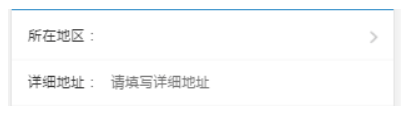
然后我们县级所在地区会出现三级联动,如下:(以下是片段,背景色未截取)
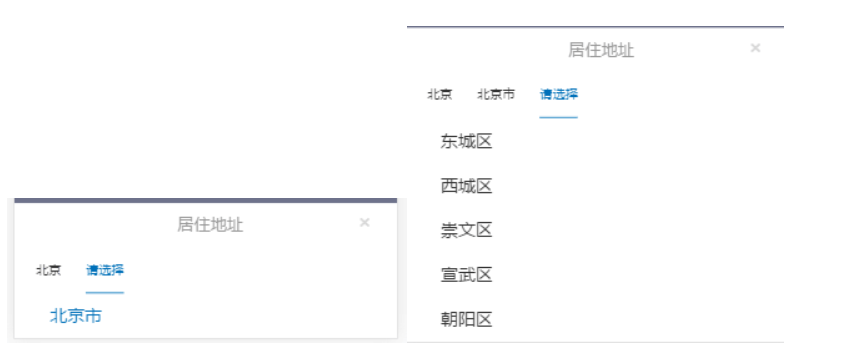
这个张什么样,以什么形式出现,取决于贵公司的UI需求,我们公司是做成弹出层了。。然后背景色透明,这里为了节省流量,我只截取了一段,最后显示如下:
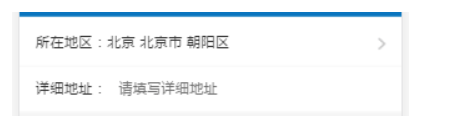
如果贵公司也跟我们需求一样,希望这个可以帮到你们。下面是在vue2项目中写的三级联动代码以及css样式:
<template>

    <section class="myAddress">

        <section>

           <section class="cont" @click="choseAdd()">

              <section>

                 <span>所在地区:{{Province?Province:''}} {{City?City:''}} {{District?District:''}}</span>

              </section>

              <img src="../../assets/main/right.png" alt="">

              <div style="clear: both"></div>

           </section>

        </section>

        <!-- 居住地址三级联动选项 -->

        <section class="showChose" v-show="showChose">

          <section class="address">

            <section class="title">

              <h4>居住地址</h4>

              <span @click="closeAdd()">×</span>

            </section>

            <section class="title">

              <div class="area" @click="provinceSelected()">

                 {{Province?Province:info[province-1].name}}

              </div>

              <div class="area" @click="citySelected()" :class="City?'':'active'">

                 {{City?City:'请选择'}}

              </div>

              <div class="area" @click="districtSelected()" :class="District?'':'active'" v-show="City">

                 {{District?District:'请选择'}}

              </div>

            </section>

            <ul>

               <li class="addList" v-for="(v,k) in info"

                   @click="getProvinceId(v.id, v.name, k)"

                   v-show="showProvince"

                   :class="v.selected ? 'active' : ''">{{v.name}}</li>

               <li class="addList" v-for="(v,k) in showCityList"

                   @click="getCityId(v.id, v.name, k)"

                   v-show="showCity"

                   :class="v.selected ? 'active' : ''">{{v.name}}</li>

               <li class="addList" v-for="(v,k) in showDistrictList"

                   @click="getDistrictId(v.id, v.name, k)"

                   v-show="showDistrict"

                   :class="v.selected ? 'active' : ''">{{v.name}}</li>

             </ul>

          </section>

        </section>

        <!-- 页面内容 -->

        <section class="cont">

            <span>详细地址:</span>

            <input type="text" v-model="address" placeholder="  请填写详细地址">

        </section>

    </section>

</template>

<script>

    import {

            mapActions,

            mapGetters

    } from 'vuex';

    import api from './../../fetch/api.js'

    export default {

        name: 'address',

        data(){},此处的data直接下载json复制进去即可。http://www.cnblogs.com/lguow/p/9272563.html

        components: {

            MineHeader

        },

        computed: {

                ...mapGetters([

                    'BCcontextPathSrc',

                    'sessionId',

                    'token',

                ]),

    },

    methods: {

        choseAdd: function() {

            this.showChose = true;

        },

        closeAdd: function() {

            this.showChose = false;

        },

        _filter(add, name, code) {

            let result = [];

            for (let i = 0; i < add.length; i++) {

                if (code == add[i].id) {

                    result = add[i][name];

                }

            }

            return result;

        },

        getProvinceId: function(code, input, index) {

            this.province = code;

            this.Province = input;

            this.showProvince = false;

            this.showCity = true;

            this.showDistrict = false;

            this.showCityList = this._filter(this.info, 'city', this.province);

            // 点击选择当前

            this.info.map(a => a.selected = false);

            this.info[index].selected = true;

            this.areaProvince = input;

        },

        provinceSelected: function() {

            // 清除市级和区级列表

            this.showCityList = false;

            this.showDistrictList = false;

            // 清除市级和区级选项

            this.City = false;

            this.District = false;

            // 选项页面的切换

            this.showProvince = true;

            this.showCity = false;

            this.showDistrict = false;

        },

        getCityId: function(code, input, index) {

            this.city = code;

            this.City = input;

            this.showProvince = false;

            this.showCity = false;

            this.showDistrict = true;

            this.showDistrictList = this._filter(this.showCityList, 'district', this.city);

            // 选择当前添加active

            this.showCityList.map(a => a.selected = false);

            this.showCityList[index].selected = true;

            this.areaCity = input;

        },

        citySelected: function() {

            this.showProvince = false;

            this.showCity = true;

            this.showDistrict = false;

        },

        getDistrictId: function(code, input, index) {

            this.district = code;

            this.District = input;

            // 选择当前添加active

            this.showDistrictList.map(a => a.selected = false);

            this.showDistrictList[index].selected = true;

            // 选取市区选项之后关闭弹层

            this.showChose = false;

            this.areaDistrict = input;

        },

        districtSelected: function() {

            this.showProvince = false;

            this.showCity = false;

            this.showDistrict = true;

        },

        saveProfile: function() {

            api.commonApi('后台接口', 这里是贵公司后台接口,按照你们公司的改了就好

                    'param_key={"head":{"TYPE":"ADD_UPD_INFO",' +

                    '"SESSION_ID":"' + this.sessionId + '",' +

                    '"TOKEN":"' + this.token + '","DEVICE_ID":""},' +

                    '"param":{"PROVINCE":"' + this.areaProvince + '", ' +

                    '"CITY":"' + this.areaCity + '", "COUNTY":"' + this.areaDistrict + '",' +

                    '"ADDRESS": "' + this.address + '"}}')

                    .then(res => {

                console.log(res.data);

        });

        }

    }

    }

</script>

<style scoped>

    .myAddress {

        width: 100%;

        background-color: white;

        border-top: 4px solid rgba(245, 245, 245, 1);

        color: #333;

    }

    .myAddress .cont {

        border-bottom: 1px solid rgba(245, 245, 245, 0.8);

    }

    .myAddress .cont span {

        display: inline-block;

        font-size: 0.28rem;

        color: #333;

        line-height: 0.88rem;

        margin-left: 0.32rem;

    }

    .myAddress .cont section {

        float: left;

    }

    .myAddress .cont img {

        float: right;

        width: 0.14rem;

        height: 0.24rem;

        margin: 0.32rem 0.32rem 0.32rem 0;

    }

    .showChose {

        width: 100%;

        height: 100%;

        position: fixed;

        top: 0;

        left: 0;

        z-index: 120;

        background: rgba(77, 82, 113, 0.8);

    }

    .address {

        position: absolute;

        bottom: 0;

        left: 0;

        z-index: 121;

        background: #fff;

        width: 100%;

    }

    .title h4 {

        display: inline-block;

        margin-left: 3.2rem;

        font-size: 0.32rem;

        line-height: 0.88rem;

        font-weight: normal;

        color: #999;

    }

    .title span {

        margin: 0.42rem 0 0 2.2rem;

        font-size: 0.45rem;

        line-height: 0.34rem;

        color: #D8D8D8;

    }

    .area {

        display: inline-block;

        font-size: 0.24rem;

        line-height: 0.88rem;

        margin-left: 0.42rem;

        color: #333;

    }

    .addList {

        padding-left: 0.32rem;

        font-size: 0.34rem;

        line-height: 0.88rem;

        color: #333;

    }

    /* 修改的格式 */

    .address ul {

        height: 100%;

        margin-left: 5%;

        max-height: 4.4rem;

        overflow: auto;

    }

    .address .title .active {

        color: #0071B8;

        border-bottom: 0.02rem solid #0071B8;

    }

    .address ul .active {

        color: #0071B8;

    }

</style>
这样就完成了一个省市区的三级联动……悲催啊……整个项目里到处都是坑爹的UI坑爹的需求……
用Vue2仿京东省市区三级联动效果的更多相关文章
- vue仿京东省市区三级联动选择组件
工作中需要一个盒京东购物车地址选择相似的一个省市区三级联动选择组件,google查了下都是下拉框形式的,于是自己写了一个,希望对使用vue开发项目的朋友有帮助,显示效果如下:使用vue2.0开发 ht ...
- Ajax来实现下拉框省市区三级联动效果(服务端基于express)
//服务端JS代码: //提供服务端的处理 const express = require('express'); const fs = require('fs'); const app = expr ...
- WheelView实现省市区三级联动(数据库实现版本号附带完整SQL及数据)
近期在实现收货地址功能,用到了省市区三级联动效果,网上找到一般都是xml或json.数据源陈旧改动麻烦.改动了一下使用数据库方式实现了一下 数据源解决.因为数据量比較大通过初始化批量运行SQL的方式不 ...
- js之省市区(县)三级联动效果
省市区(县)三级联动效果,是我们软件开发比较常用的,特别是对一些crm,erp之类,当然也包括其他的后台管理系统,基本都涉及到,今天贴出这个常用的,方便个人复用和大家使用 <!DOCTYPE h ...
- jQuery省市区三级联动插件
体验效果:http://hovertree.com/texiao/bootstrap/4/支持PC和手机移动端. 手机扫描二维码体验效果: 代码如下: <!DOCTYPE html> &l ...
- 省市区三级联动 pickerView
效果图 概述 关于 省市区 三级联动的 pickerView,我想大多数的 iOS 开发者应该都遇到过这样的需求.在遇到这样的需求的时候,大多数人都会觉的这个很复杂,一时无从下手.其实真的没那么复杂. ...
- QQ JS省市区三级联动
如下图: 首先写一个静态的页面: <!DOCTYPE html> <html> <head> <title>QQ JS省市区三级联动</title ...
- Android中使用开源框架citypickerview实现省市区三级联动选择
1.概述 记得之前做商城项目,需要在地址选择中实现省市区三级联动,方便用户快速的填写地址,当时使用的是一个叫做android-wheel 的开源控件,当时感觉非常好用,唯一麻烦的是需要自己整理并解析省 ...
- PHPOffice/PHPExcel生成省市区三级联动的excel表格
最近公司需要用到一个省市区三级联动的excel表格,但是数据都在数据库,又太多,人工不好制作,就让我这个phper来帮忙啦. 主要用到的是excel的定义名称,数据验证.其中数据验证的列表只能是一列或 ...
随机推荐
- C语言中return 0和return 1和return -1
转载声明:本文系转载文章 原文作者:十一月zz 原文地址:https://blog.csdn.net/baidu_35679960/article/details/77542787 1.返回值int ...
- lr 中cookie的解释与用法
Loadrunner 中 cookie 解释与用法loadrunner 中与 cookie 处理相关的常用函数如下: web_add_cookie(): 添加新的 cookie 或者修改已经存在的 c ...
- 01-Linux操作系统+指令
一.Linux操作系统 操作系统定义:操作系统直接运行在计算机上的系统软件, 它是与硬件打交道和控制软件运行的计算机程序. 虚拟机:就是模拟一个真实的计算机,好比一个虚拟的电 ...
- Android OS 源码 引入和编译 jar / so库
Android -- 源码平台下JAR包的引入与编译https://blog.csdn.net/csdn_of_coder/article/details/64538227 BUILD_JAVA_LI ...
- resource links
http://cenalulu.github.io/linux/all-about-cpu-cache/
- C# 调用继电器api usb_relay_device.dll
C# 调用继电器api usb_relay_device.dll 代码封装 usb_relay_device.dll 为C++编写 using System; using System.Collect ...
- HangFire快速入门 分布式后端作业调度框架服务
安装 NuGet 上有几个可用的Hangfire 的软件包.如果在ASP.NET应用程序中安装HangFire,并使用Sql Server作为存储器,那么请在Package Manager Conso ...
- Macbook pro从购买服务器到搭建服务器环境(2)
这里是在Mac本地上安装软件遇到的坑,先总结一下 在装完mysql的时候,安装wget,这个时候遇到的问题是openssl软件包找不到,我已经不记得是什么时候安装的openssl了,所以用命令查一下 ...
- JavaWeb-SQL-Servlet-JSP学做购物系统——日志一
一.JDBCUtil 本人自半路出家学码代码以来,bug不断,一直不顺利.路漫漫.话不多说,上bug:T_T; 代码是这样的: 自定义的方法,插入一个sql语句:execUpdate(String s ...
- python基础day3
一.文件管理 文件管理是很多应用程序的基本功能和重要组成部分.Python可以使文件管理极其简单,特别是和其它语言相对比. 1. 读操作 1.1r模式 1.1.1读取其他路径下文件 首先在D盘创 ...