
caffe2--ubuntu16.04--14.04--install
Install
Welcome to Caffe2! Get started with deep learning today by following the step by step guide on how to download and install Caffe2.
Select your preferred platform and install type.
| Platform: | MacOS X Ubuntu CentOS Windows iOS Android RaspbianTegra |
| Install Type: | Build From Source Pre-Built Binaries Docker Images Cloud |

This build is confirmed for:
- Ubuntu 14.04
- Ubuntu 16.04
Required Dependencies#
1 |
sudo apt-get update |
Optional GPU Support#
If you plan to use GPU instead of CPU only, then you should install NVIDIA CUDA 8 and cuDNN v5.1 or v6.0, a GPU-accelerated library of primitives for deep neural networks. NVIDIA’s detailed instructions or if you’re feeling lucky try the quick install set of commands below.
Update your graphics card drivers first! Otherwise you may suffer from a wide range of difficult to diagnose errors.
For Ubuntu 14.04
1 |
sudo apt-get update && sudo apt-get install wget -y --no-install-recommends |
For Ubuntu 16.04
1 |
sudo apt-get update && sudo apt-get install wget -y --no-install-recommends |
Install cuDNN (all Ubuntu versions)#
Version 5.1
1 |
CUDNN_URL="http://developer.download.nvidia.com/compute/redist/cudnn/v5.1/cudnn-8.0-linux-x64-v5.1.tgz" |
Version 6.0 Visit NVIDIA’s cuDNN download to register and download the archive. Follow the same instructions above switching out for the updated library.
Optional Dependencies#
Note
libgflags2is for Ubuntu 14.04.libgflags-devis for Ubuntu 16.04.
1 |
# for Ubuntu 14.04 |
1 |
# for Ubuntu 16.04 |
1 |
# for both Ubuntu 14.04 and 16.04 |
Clone & Build#
1 |
git clone --recursive https://github.com/caffe2/caffe2.git && cd caffe2 |
Run this command below to test if your GPU build was a success. You will get a test output either way, but it will warn you at the top of the output if CPU was used instead along with other errors like missing libraries.
1 |
python -m caffe2.python.operator_test.relu_op_test |
Environment Variables#
These environment variables may assist you depending on your current configuration. When using the install instructions above on the AWS Deep Learning AMI you don’t need to set these variables. However, our Docker scripts built on Ubuntu-14.04 or NVIDIA’s CUDA images seem to benefit from having these set. If you ran into problems with the build tests above then these are good things to check. Echo them first and see what you have and possibly append or replace with these directories. Also visit the Troubleshooting section.
1 |
echo $PYTHONPATH |
Setting Up Tutorials & Jupyter Server#
If you’re running this all on a cloud computer, you probably won’t have a UI or way to view the IPython notebooks by default. Typically, you would launch them locally with ipython notebook and you would see a localhost:8888 webpage pop up with the directory of notebooks running. The following example will show you how to launch the Jupyter server and connect to remotely via an SSH tunnel.
First configure your cloud server to accept port 8889, or whatever you want, but change the port in the following commands. On AWS you accomplish this by adding a rule to your server’s security group allowing a TCP inbound on port 8889. Otherwise you would adjust iptables for this.
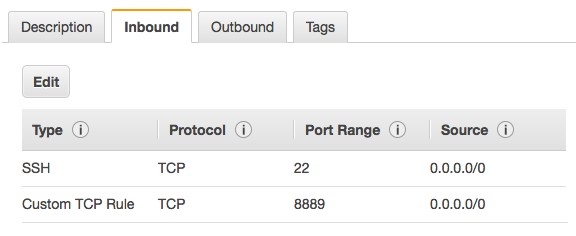
Next you launch the Juypter server.
1 |
jupyter notebook --no-browser --port=8889 |
Then create the SSH tunnel. This will pass the cloud server’s Jupyter instance to your localhost 8888 port for you to use locally. The example below is templated after how you would connect AWS, where your-public-cert.pem is your own public certificate and ubuntu@super-rad-GPU-instance.compute-1.amazonaws.com is your login to your cloud server. You can easily grab this on AWS by going to Instances > Connect and copy the part after ssh and swap that out in the command below.
1 |
ssh -N -f -L localhost:8888:localhost:8889 -i "your-public-cert.pem" ubuntu@super-rad-GPU-instance.compute-1.amazonaws.com |
Troubleshooting#
| PYTHON ERRORS | |
|---|---|
| Python version | Python is core to run Caffe2. We currently require Python2.7. Ubuntu 14.04 and greater have Python built in by default, and that can be used to run Caffe2. To check your version: python --version |
| Solution | If you want the developer version of python, you could install the dev package for Python: sudo apt-get install python-dev |
| Python environment | You may have another version of Python installed or need to support Python version 3 for other projects. |
| Solution | Try virtualenv or Anaconda. The Anaconda platform provides a single script to install many of the necessary packages for Caffe2, including Python. Using Anaconda is outside the scope of these instructions, but if you are interested, it may work well for you. |
| pip version | If you plan to use Python with Caffe2 then you need pip. |
| Solution | sudo apt-get install python-pip and also try using pip2 instead of pip. |
| BUILDING FROM SOURCE | |
|---|---|
| OS version | Caffe2 requires Ubuntu 14.04 or greater. |
| git | While you can download the Caffe2 source code and submodules directly from GitHub as a zip, using git makes it much easier. |
| Solution | sudo apt-get install git |
| protobuf | You may experience an error related to protobuf during the make step. |
| Solution | Make sure you’ve installed protobuf in both of these two ways: sudo apt-get install libprotobuf-dev protobuf-compiler && sudo pip install protobuf |
| libgflags2 error | This optional dependency is for Ubuntu 14.04. |
| Solution | Use apt-get install libgflags-dev for Ubuntu 16.04. |
| GPU SUPPORT | |
|---|---|
| GPU errors | Unsupported GPU or wrong version |
| Solution | You need to know the specific deb for your version of Linux. sudo dpkg -i cuda-repo-<distro>_<version>_<architecture>.debRefer to NVIDIA’s installation guide. |
| Build issues | Be warned that installing CUDA and cuDNN will increase the size of your build by about 4GB, so plan to have at least 12GB for your Ubuntu disk size. |
| CAFFE2 PYTHON | |
|---|---|
| Module not found | Verify that Caffe2 was installed correctly |
| Solution | Run the following: python -c 'from caffe2.python import core' 2>/dev/null && echo "Success" || echo "Failure"An output of Success means you are ready to with Caffe2 - congratulations! An output of Failure usually means you have not installed one of the dependencies correctly. |
| Dependencies missing | It’s possible you’re trying to run something that was using an optional dependency. |
| Solution | sudo pip install setuptools flask jupyter matplotlib scipy pydot tornado python-nvd3 scikit-image pyyaml |
| matplotlib error | Sometimes you need setuptools first: sudo pip install -U pip setuptools && sudo pip install matplotlib |
| model downloader error | If you need to run it as sudo (because it’s trying to install the model in /usr/local/caffe2…), then PYTHONPATH might not be visible in that context. |
| Solution | sudo visudo then add this line: Defaults env_keep += "PYTHONPATH" |
| “AttributeError: ‘module’ object has no attribute ‘MakeArgument’” | Occurs when calling core.CreateOperator |
| Solution | Check your install directory (/usr/local/), and remove the folder /caffe2/python/utils |
| OTHER ERRORS | |
|---|---|
| libdc1394 error | for some reason once opencv is installed you may get errors with libdc1394 |
| Solution | ln /dev/null /dev/raw1394 but that’s not persistent so try sh -c 'ln -s /dev/null /dev/raw1394' or when instantiating the container use: --device /dev/null:/dev/raw1394 |
| caffe2_pybind11_state_gpu | WARNING:root:Debug message: No module named caffe2_pybind11_state_gpu |
| Solution | ignore if you’re using CPU-only |
| Python kernel crashing | This happens when you try to call Jupyter server directly (like in a Docker container). |
| Solution | Use sh -c "jupyter notebook ..." to get around this problem. |
| Exception: “dot” not found in path | This happens in some of the tutorials when graphing. |
| Solution | Make sure you have graphviz and pydot. sudo apt-get install python-pydot and sudo pip install graphvizor brew install these to fix the problem. |
Dependencies#
Try to keep the system and python dependencies at the same version. We’ve encountered issues when the python version is more updated than the system version or vice versa.
| SYSTEM DEPENDENCIES | |
|---|---|
| cmake | |
| git | |
| gflags | |
| glog: Google Logging Module | |
| NumPy | |
| protobuf: Google Protocol Buffers | version 3.2.0 |
| Build tools for C++ 11 | Xcode CLTs & automake (mac/iOS), build-essential (linux), Visual Studio (win), Android Studio (droid) |
| PYTHON DEPENDENCIES | |
|---|---|
| gflags | |
| glog: Google Logging Module | |
| NumPy | |
| protobuf: Google Protocol Buffers | version 3.2.0 |
Strictly speaking, the core dependencies above are all you need to run the core Caffe2 successfully. However, for real-world deep learning (e.g., image processing, mathematical operations, etc), there are other dependencies that you will want to install in order to experience the full features of Caffe2.
| OPTIONAL SYSTEM DEPENDENCIES | |
|---|---|
| cuDNN | if using GPU, this is needed for Caffe2’s cuDNN operators |
| Eigen 3 | |
| LevelDB | |
| Nvidia CUDA | v6.5 or greater |
| OpenCV | for image-related operations; requires leveldb <= v1.19 |
| OpenMPI | for MPI-related Caffe2 operators |
| RocksdB | for Caffe2’s RocksDB IO backend |
| ZeroMQ | needed for Caffe2’s ZmqDB IO backend (serving data through a socket) |
| PYTHON OPTIONAL DEPENDENCIES | |
|---|---|
| There are also various Python libraries that will be valuable in your experience with Caffe2. Many of these are required to run the tutorials. | |
| Flask | |
| Graphviz | |
| Hypothesis | |
| Jupyter | for the Jupyter Notebook |
| LevelDB | |
| lmdb | |
| Matplotlib | |
| Pydot | |
| Python-nvd3 | |
| pyyaml | |
| requests | |
| Scikit-Image | |
| SciPy | |
| setuptools | |
| Tornado | |
| ZeroMQ |
| WHAT’S IN THIRD PARTY? | |
|---|---|
| Whether building from source or installing from the Python wheel, you also get complimentary tools installed as well. | |
| Android cmake | |
| benchmark | |
| cnmem | |
| cub | |
| eigen | |
| googletest | |
| ios-cmake | |
| nccl | |
| nervanagpu | |
| NNPACK | requires ninja and confu to build |
| Google Protocol Buffers (protobuf) | |
| pybind11 |
caffe2--ubuntu16.04--14.04--install的更多相关文章
- Ubuntu LTS 系统学习使用体会和实用工具软件汇总 6.04 8.04 10.04 12.04 14.04 16.04
Ubuntu LTS 系统学习体会和工具软件汇总 6.04 8.04 10.04 12.04 14.04 16.04 ubuntu入门必备pdf:http://download.csdn.net/de ...
- CVE-2015-1328 Ubuntu 12.04, 14.04, 14.10, 15.04 overlayfs Local Root
catalog . 引言 . Description . Effected Scope . Exploit Analysis . Principle Of Vulnerability . Patch ...
- 安装ubuntu出现BUG soft lockup的解决方法(16.04 14.04)
对于16.04而言,当时用的是UtrISO 安装的,导致安装过程用会出现 “not a com32r image” 的错误,解决方法见上文的: boot: live 华硕Z9主板安装16.04以上系统 ...
- Ubuntu16.04 --> 14.04
从16到14 自认为14是比较稳定的.从安装依赖上说. 14安装应用 更多参见[请直接拉到"华丽丽的分割线"下面] Java9 注意,添加源的时候先把lantern打开!!! 添加 ...
- Laptop Ubuntu16.04/14.04 安装Nvidia显卡驱动
笔记本型号 机械革命(MECHREVO)深海泰坦X6Ti-S(黑曜金)15.6英寸 CPU型号 i5-7300HQ 内存 8G 硬盘容量 128SSD+1T机械硬盘 显卡 GeForce GTX 10 ...
- Ubuntu16.04 14.04安装配置Caffe(GPU版)
caffe配置过程很长啊,坑非常多,没有linux基础的估计会香菇的.我参考了网上很多的帖子,基本上每个帖子都有或多或少的问题,研究很久最终配置成功.参考过的帖子太多,都记不太清来源了.为了对前人的感 ...
- Ubuntu16.04 14.04 配置caffe(CPU only)
1.安装依赖 sudo apt-get install libprotobuf-dev libleveldb-dev libsnappy-dev libopencv-dev libhdf5-seria ...
- Ubuntu Server 12.04(14.04) 静态IP简洁配置
1.配置静态IP地址: # vim /etc/network/interfaces 原内容有如下4行:auto loiface lo inet loopback auto eth0iface eth0 ...
- Install Google Pinyin on Ubuntu 14.04
Install Google Pinyin on Ubuntu 14.04 I've been spending more and more time on Ubuntu and I'm not us ...
- How To Install Tinc and Set Up a Basic VPN on Ubuntu 14.04
Introduction In this tutorial, we will go over how to use Tinc, an open source Virtual Private Netwo ...
随机推荐
- 说说IO(一)- IO的分层
IO性能对于一个系统的影响是至关重要的.一个系统经过多项优化以后,瓶颈往往落在数据库:而数据库经过多种优化以后,瓶颈最终会落到IO.而IO性能的发展,明显落后于CPU的发展.Memchached也好, ...
- vim的复制粘贴(包括系统剪贴板)
1.vim常用复制粘贴命令 Vim的复制粘贴命令无疑是y (yank),p(paster),加上yy,P PS: vim有个很有意思的约定(我觉得是一种约定),就是某个命令的大小写都是实现某种功能,只 ...
- 2016 Multi-University Training Contest 10 solutions BY BUPT
1001. 一个数组上的两个区间求中位数,可以通过分类讨论直接找到中位数,复杂度O(1).不过本题数据较小,优美的log(n)也可过. 1002. 直接求得阴影面积表达式即可. 1003. 二分完成时 ...
- POJ3928 Ping pong
Time Limit: 1000MS Memory Limit: 65536KB 64bit IO Format: %lld & %llu Description N(3<= ...
- jsp文件放在WebRoot下还是WebInfo下
观点一:(较为赞同) 安全性不是真正的原因,因为jsp是要解析后才显示到浏览器的,即使用户知道你jsp的路径,也不可能通过浏览器看到jsp源码的,而如果是通过其它手段入侵服务器的话,放在WEB-INF ...
- html-屏蔽按键盘空格键是滚动条向下滚动
document.onkeydown = function(ev){ var e = ev || event; if(e.keyCode == 32){ return false; } }
- jquery 焦点轮播图控制每张图片停留不同时间
轮播代码是代签博客园一位前辈写的代码,这里作了点小修改,实现了每张图片停留不同时间 *{ padding:0px; border:0px; margin:0px; } ul { list-style: ...
- python 之 实现su 到root账号
简单记录一下如何通过python代码在linux系统下实现自动su - 切换到root账号, 使用到的模块:paramiko 使用到的方法:invoke_shell 功能:在SSH server端创 ...
- BZOJ 1008: [HNOI2008]越狱 组合数学
原题链接:http://www.lydsy.com/JudgeOnline/problem.php?id=1008 题解: 就很傻逼的组合数学啊... $$ans=M^N-M*(M-1)^{(N-1) ...
- 【原】手写spring async异步组件
最近在工作中使用到了spring自带的Async,主要是为了把其中耗时多.响应慢.计算复杂的业务抽取几个模块出来,并行查询.不得不说spring自带的比传统线程池提交在代码层次上看起来优雅简洁了不少 ...