
Show All Running Processes in Linux
ps由于历史的原因,所以很奇特,有些命令必须加"-",比如:
ps A
上面的写法是错误的
********* simple selection *********  ********* selection by list *********

-A all processes                      -C by command name

-N negate selection                   -G by real group ID (supports names)

-a all w/ tty except session leaders  -U by real user ID (supports names)

-d all except session leaders         -g by session OR by effective group name

-e all processes                      -p by process ID

T  all processes on this terminal     -s processes in the sessions given

a  all w/ tty, including other users  -t by tty

g  OBSOLETE -- DO NOT USE             -u by effective user ID (supports names)

r  only running processes             U  processes for specified users

x  processes w/o controlling ttys     t  by tty

*********** output format **********  *********** long options ***********

-o,o user-defined  -f full            --Group --User --pid --cols --ppid

-j,j job control   s  signal          --group --user --sid --rows --info

-O,O preloaded -o  v  virtual memory  --cumulative --format --deselect

-l,l long          u  user-oriented   --sort --tty --forest --version

-F   extra full    X  registers       --heading --no-heading --context

                    ********* misc options *********

-V,V  show version      L  list format codes  f  ASCII art forest

-m,m,-L,-T,H  threads   S  children in sum    -y change -l format

-M,Z  security data     c  true command name  -c scheduling class

-w,w  wide output       n  numeric WCHAN,UID  -H process hierarchy

[test@localhost smplayer]$ ps A

ERROR: Unsupported option (BSD syntax)

********* simple selection *********  ********* selection by list *********

-A all processes                      -C by command name

-N negate selection                   -G by real group ID (supports names)

-a all w/ tty except session leaders  -U by real user ID (supports names)

-d all except session leaders         -g by session OR by effective group name

-e all processes                      -p by process ID

T  all processes on this terminal     -s processes in the sessions given

a  all w/ tty, including other users  -t by tty

g  OBSOLETE -- DO NOT USE             -u by effective user ID (supports names)

r  only running processes             U  processes for specified users

x  processes w/o controlling ttys     t  by tty

*********** output format **********  *********** long options ***********

-o,o user-defined  -f full            --Group --User --pid --cols --ppid

-j,j job control   s  signal          --group --user --sid --rows --info

-O,O preloaded -o  v  virtual memory  --cumulative --format --deselect

-l,l long          u  user-oriented   --sort --tty --forest --version

-F   extra full    X  registers       --heading --no-heading --context

                    ********* misc options *********

-V,V  show version      L  list format codes  f  ASCII art forest

-m,m,-L,-T,H  threads   S  children in sum    -y change -l format

-M,Z  security data     c  true command name  -c scheduling class

-w,w  wide output       n  numeric WCHAN,UID  -H process hierarchy
How do I see all running process in Linux operating systems using command line or GUI options?
You need to use the ps
command. It provide information about the currently running processes,
including their process identification numbers (PIDs). Both Linux and
UNIX support the ps command to display information about all
running process. The ps command gives a snapshot of the current
processes. If you want a repetitive update of this status, use top,
atop, and/or htop command as described below.
| Tutorial details | |
|---|---|
| Difficulty | Easy (rss) |
| Root privileges | Yes |
| Requirements | ps/top/htop |
| Estimated completion time | 5 minutes |
Apart from ps command, you can also use the following commands to display info about processes on Linux:
- top command : Display and update sorted information about processes.
- atop : Advanced System & Process Monitor.
- htop : Interactive process viewer.
The ps command
Type the following ps command to display all running process:
# ps aux | less
Where,
- -A: select all processes
- a: select all processes on a terminal, including those of other users
- x: select processes without controlling ttys
Task: see every process on the system
# ps -A

# ps -e
上面两条命令是一样的
Task: See every process except those running as root
# ps -U root -u root -N
[test@localhost Documents]$ ps -U test|grep su

  pts/    :: su

 pts/    :: su

[test@localhost Documents]$ ps -u test|grep su
Task: See process run by user vivek
# ps -u vivek
Task: top command
The top program provides a dynamic real-time view of a running system. Type the top at command prompt:
# top
Output:
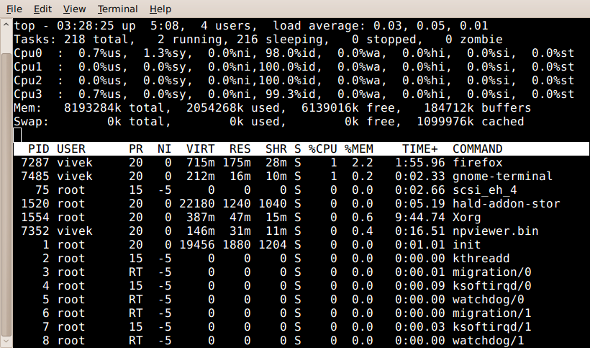
Fig.01: top command: Display Linux Tasks
To quit press q, for help press h.
Task: display a tree of processes
pstree shows running processes as a tree. The tree is rooted at either pid or init if pid is omitted. If a user name is specified, all process trees rooted at processes owned by that user are shown.
$ pstree
Sample outputs:
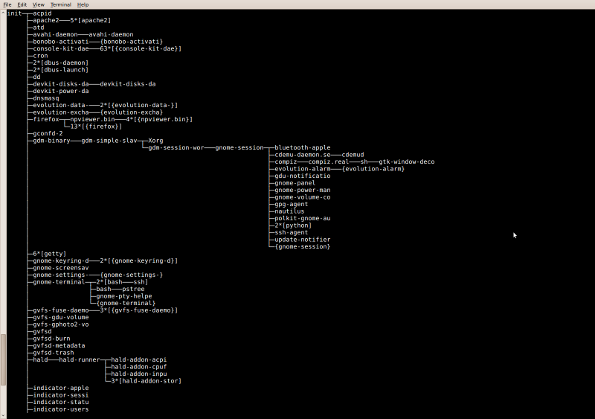
Fig.02: pstree - Display a tree of processes
Task: Print a process tree using ps
# ps -ejH

# ps axjf
Task: Get info about threads
Type the following command:
# ps -ejH

# ps axjf
Task: Get info about threads
Type the following command:
Show All Running Processes in Linux的更多相关文章
- Show tree of processes in linux
pstree(1): tree of processes - Linux man pagehttps://linux.die.net/man/1/pstree How to view process ...
- What are long running processes?
转自:https://blog.bernd-ruecker.com/what-are-long-running-processes-b3ee769f0a27 Some communities have ...
- 路由器逆向分析------Running Debian MIPS Linux in QEMU
本文博客地址:http://blog.csdn.net/qq1084283172/article/details/70176583 下面的文章内容主要参考英文博客<Running Debian ...
- [原]Threads vs Processes in Linux 分析
Linux中thread (light-weighted process) 跟process在實作上幾乎一樣. 最大的差異來自於,thread 會分享 virtual memory address s ...
- check running processes in Ubuntu
Check processes If you want to see what processes are running use the command ps -ef If you want to ...
- Kill Processes in Linux
Step 1: find processes to kill ps -ef | grep java Step 2: Kill the process based on process id kill ...
- How do I Find Out Linux CPU Utilization?
From:http://www.cyberciti.biz/tips/how-do-i-find-out-linux-cpu-utilization.html Whenever a Linux sys ...
- linux processes
So that Linux can manage the processes in the system, each process is represented by a task_struct ...
- Beginning Linux Programming 学习--chapter 11 Processes and Signals
What's process--什么是进程? The UNIX standards, specifically IEEE Std 1003.1, 2004 Edition, defines a pr ...
随机推荐
- 动效解析工厂:Mask 动画
转载自:http://www.cocoachina.com/ios/20160214/15250.html 前言:很多动效都是多种动画的组合,有时候你可能只是需要其中某个动画,但面对庞杂的代码库或是教 ...
- 24种设计模式--装饰模式【Decorator Pattern】
装饰模式在中国使用的那实在是多,中国的文化是中庸文化,说话或做事情都不能太直接,需要有技巧的,比如说话吧,你要批评一个人,你不能一上来就说你这个做的不对,那个做的不对,你要先肯定他的成绩,表扬一下优点 ...
- AS3.0函数定义的方法
在AS3.0中函数的定义有两种方法: 函数语句定义法: function 函数名(参数1:参数类型,参数2:参数类型):返回值类型{ 函数折行的语句 } function testAdd(a:int, ...
- Java 不定长度参数
在调用某个方法时,若是方法的参数个数事先无法确定该如何处理?例如System.out.printf()方法中并没有办法事先决定要给的参数个数,像是: ? 1 2 3 System.out.printf ...
- 不错的轮播插件flexslider
http://flexslider.woothemes.com/ $('.flexslider').flexslider({ animation:'slide', //滑动效果:翻页效果,默认为fad ...
- Hybrid App开发者一定不要错过的框架和工具
最近开始给网站的移动版本做技术选型,发现了很多好玩的东西,写出来给大家分享下. ionicFramework 我是hybrid app的忠实粉丝和大力倡导者,从 新浪移动云开始就不断的寻找能帮助Web ...
- Python 基础-python环境变量、模块初识及字符类型
(1).模块内置模块.第三方模块.自定义模块初识模块:sys \ os一般标准库存放路径 C:\Users\Administrator\AppData\Local\Programs\Python\Py ...
- about python
函数式编程 λ演算 LISP,Erlang 尾递归 栈的使用 避免防御式编程 ER实体Entity关系relationship OOP [OOA/D] 属性.行为 继承.聚合.关联 抽象.封装 笛卡尔 ...
- python基础 [Alex视频]
vi hello.py#!/usr/bin/env pythonprint "hello world!"while True: print("hello world!&q ...
- strstr_while模型
#define _CRT_SECURE_NO_WARNINGS #include<stdio.h> #include<stdlib.h> #include<string. ...