
How to Read, Write XLSX File in Java - Apach POI Example---reference
No matter how Microsoft is doing in comparison with Google, Microsoft Office is still the most used application in software world. Other alternatives like OpenOffice and LiberOffice have failed to take off to challenge MS Office. What this mean to a Java application developer? Because of huge popularity of MS office products you often need to support Microsoft office format such as word, Excel, PowerPoint and additionally Adobe PDF. If you are using JSP Servlet,display tag library automatically provides Excel, Word and PDFsupport. Since JDK doesn't provide direct API to read and write Microsoft Excel and Word document, you have to rely on third party library to do your job. Fortunately there are couple of open source library exists to read and write Microsoft Office XLS and XLSX file format, Apache POI is the best one. It is widely used, has strong community support and it is feature rich. You can find lot of examples of how to do with Excel using Apache POI online, which means you will never feel alone and has instant Google support if you stuck there. In this article, we will learn how to read and write excel files in Java. As I said, Excel files has two popular format .XLS (produced by Microsoft Officer version prior to 2007 e.g. MS Office 2000 and 2003) and .XLSX (created by Microsoft Office 2007 onwards e.g. MS Office 2010 and 2013). Fortunately Apache POI supports both format, and you can easily create, read, write and update Excel files using this library. It uses terms like workbook, worksheet, cell, row to keep itself aligned with Microsoft Excel and that's why it is very easy to use. Apache POI also provides different implementation classes to handle both XLS and XLSX file format.
One interesting thing with POI is that (I don't know whether it's intentional, accidentally or real) it has got some really funny names for its workbook implementations e.g.
- XSSF (XML SpreadSheet Format) – Used to reading and writting Open Office XML (XLSX) format files.
- HSSF (Horrible SpreadSheet Format) – Use to read and write Microsoft Excel (XLS) format files.
- HWPF (Horrible Word Processor Format) – to read and write Microsoft Word 97 (DOC) format files.
- HSMF (Horrible Stupid Mail Format) – pure Java implementation for Microsoft Outlook MSG files
- HDGF (Horrible DiaGram Format) – One of the first pure Java implementation for Microsoft Visio binary files.
- HPSF (Horrible Property Set Format) – For reading “Document Summary” information from Microsoft Office files.
- HSLF (Horrible Slide Layout Format) – a pure Java implementation for Microsoft PowerPoint files.
- HPBF (Horrible PuBlisher Format) – Apache's pure Java implementation for Microsoft Publisher files.
- DDF (Dreadful Drawing Format) – Apache POI package for decoding the Microsoft Office Drawing format.
It's very important that you know full form of these acronyms, otherwise it would be difficult to keep track of which implementation is for which format. If you are only concerned about reading Excel files then at-least remember XSSF andHSSF classes e.g. XSSFWorkBook and HSSFWorkBook.
How to Read Excel File (XLSX) in Java
In our fist example we will learned about reading current popular Excel file format i.e. file with extension .XLSX. This is aXML spread sheet format and other spreadsheet software like OpenOffice and LiberOffice also use this format. In order to read Excel file, you need to first download Apache POI Jar files, without these your code will neither compiler nor execute. If you hate to maintain JARs by yourself, use Maven. In Eclipse IDE, you can download M2Eclipse plug-in to setup Maven project. Once you done that, add following dependencies in your pom.xml (project object model) file.
    <dependency>

        <groupId>org.apache.poi</groupId>

        <artifactId>poi</artifactId>

        <version>3.11-beta2</version>

    </dependency>
By the way as Norbert pointed out, The classes for OOXML format (such as XSSF for reading .xlsx format) are in a different Jar file. You need to include the poi-ooxml jar in your project, along with the dependencies for it. When you add poi-ooxmlJAR as dependency via Maven, it will also add other required dependencies by itself. For example adding below XML snippet in pom.xml will download four JAR files
<dependency>

        <groupId>org.apache.poi</groupId>

        <artifactId>poi-ooxml</artifactId>

        <version>3.11-beta2</version>

</dependency>
poi-ooxml-3.11-beta2.jar
poi-ooxml-schemas-3.11-beta2.jar
xmlbeans-2.6.0.jar
stax-api-1.0.1.jar
If you are not using Maven then add following JAR files in your Java program's classpath
poi-3.11-beta2.jar
commons-codec-1.9.jar
poi-ooxml-3.11-beta2.jar
poi-ooxml-schemas-3.11-beta2.jar
xmlbeans-2.6.0.jar
stax-api-1.0.1.jar
Here is how our sample Excel 2013 File look like, remember this has saved in .xlsx format.
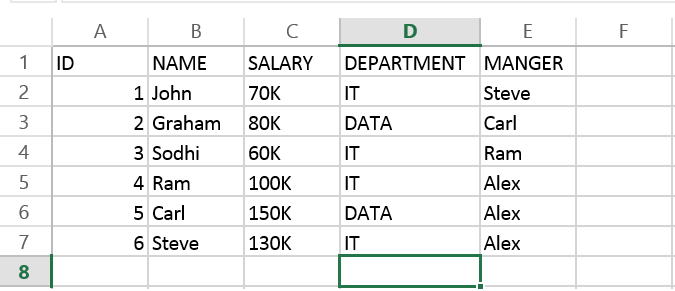
add here is code to read that Excel file. First two lines are very common, they are to read file from file system in Java, real code starts from 3rd line. Here we are passing a binary InputStream to create instance of XSSFWorkBook class, which represent a Excel workbook. Next line gives us a worksheet from book, and from there we are just going through each row and then each column. Cell represent a block in Excel, also known as cell. This is where we read or write data. Cell can be any type e.g. String, numeric or boolean. Before reading value you must ascertain correct type of cell. After that just call corresponding value method e.g. getStringValue() or getNumericValue() to read data from cell. This how exactly you read rows and columns from Excel file in Java. You can see we have used two for loop, one to iterate over all rows and inner loop is to go through each column.
 File myFile = new File("C://temp/Employee.xlsx");

            FileInputStream fis = new FileInputStream(myFile);

            // Finds the workbook instance for XLSX file

            XSSFWorkbook myWorkBook = new XSSFWorkbook (fis);

            // Return first sheet from the XLSX workbook

            XSSFSheet mySheet = myWorkBook.getSheetAt(0);

            // Get iterator to all the rows in current sheet

            Iterator<Row> rowIterator = mySheet.iterator();

            // Traversing over each row of XLSX file

            while (rowIterator.hasNext()) {

                Row row = rowIterator.next();

                // For each row, iterate through each columns

                Iterator<Cell> cellIterator = row.cellIterator();

                while (cellIterator.hasNext()) {

                    Cell cell = cellIterator.next();

                    switch (cell.getCellType()) {

                    case Cell.CELL_TYPE_STRING:

                        System.out.print(cell.getStringCellValue() + "\t");

                        break;

                    case Cell.CELL_TYPE_NUMERIC:

                        System.out.print(cell.getNumericCellValue() + "\t");

                        break;

                    case Cell.CELL_TYPE_BOOLEAN:

                        System.out.print(cell.getBooleanCellValue() + "\t");

                        break;

                    default :

                    }

                }

                System.out.println("");

            }
Let me know if you have trouble to understand any of line. They are very simple and self-explanatory but if you need additional detail, just drop us a comment.
How to write XLSX File in Java
Writing into Excel file is also similar to reading, The workbook and worksheet classes will remain same, all you will do is to create new rows, columns and cells. Once you are done creating new rows in your Excel file in memory, you need to open an output stream to write that data into your Excel File. This will save all update you made in existing file or in a new file which is created by Java's File class. Here is step by step code of updating an existing Excel file in Java. In first couple of lines we are creating rows in form of object array and storing them as value in HashMap with key as row number. After that we loop through HashMap and insert each row at the end of last row, in other word we are appending rows in our Excel file. Just like before reading we need to determine type of cell, we also need to do the same thing before writing data into cell. This is done by using instanceof keyword of Java. Once you are done with appending all rows form Map to Excel file, save the file by opening a FileOutputStream and saving data into file system.
// Now, let's write some data into our XLSX file
            Map<String, Object[]> data = new HashMap<String, Object[]>();

            data.put("7", new Object[] {7d, "Sonya", "75K", "SALES", "Rupert"});

            data.put("8", new Object[] {8d, "Kris", "85K", "SALES", "Rupert"});

            data.put("9", new Object[] {9d, "Dave", "90K", "SALES", "Rupert"});

            // Set to Iterate and add rows into XLS file

            Set<String> newRows = data.keySet();

            // get the last row number to append new data

            int rownum = mySheet.getLastRowNum();

            for (String key : newRows) {

                // Creating a new Row in existing XLSX sheet

                Row row = mySheet.createRow(rownum++);

                Object [] objArr = data.get(key);

                int cellnum = 0;

                for (Object obj : objArr) {

                    Cell cell = row.createCell(cellnum++);

                    if (obj instanceof String) {

                        cell.setCellValue((String) obj);

                    } else if (obj instanceof Boolean) {

                        cell.setCellValue((Boolean) obj);

                    } else if (obj instanceof Date) {

                        cell.setCellValue((Date) obj);

                    } else if (obj instanceof Double) {

                        cell.setCellValue((Double) obj);

                    }

                }

            }

            // open an OutputStream to save written data into XLSX file

            FileOutputStream os = new FileOutputStream(myFile);

            myWorkBook.write(os);

            System.out.println("Writing on XLSX file Finished ...");

Output

Writing on XLSX file Finished ...
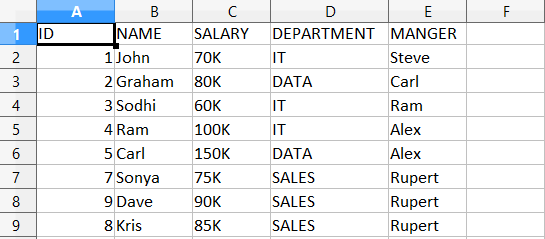
Here is how our updated Excel file looks after adding three more rows
How to read Excel (XLS) file in Java
Reading XLS file is no different than reading an XLSX format file, all you need to do is to use correct workbook implementation for XLS format e.g. instead of usingXSSFWorkbook and XSSFSheet , you need to use HSSFWorkbook andHSSFSheet classes from Apache POI library. As I said before, POI has got some really funny names for different XLS formats e.g. Horrible SpreadSheet Format to represent old Microsoft Excel file format (.xls). Remembering them can be hard but you can always refer to their online Javadoc. You can reuse rest of code given in this example, for example you can use same code snippet to iterate over rows, columnsand from reading/writing into a particular cell. Given they are two different format, some features will not be available on XLS file processors but all basic stuff remain same.
Error and Exception
If you happen to use incorrect classes e.g. instead of using XSSFWorkbook to read XLSX file, if you use HSSFWorkbook then you will see following error :
Exception in thread "main" org.apache.poi.poifs.filesystem.OfficeXmlFileException: The supplied data appears to be in the Office 2007+ XML. You are calling the part of POI that deals with OLE2 Office Documents. You need to call a different part of POI to process this data (eg XSSF instead of HSSF)

 at org.apache.poi.poifs.storage.HeaderBlock.<init>(HeaderBlock.java:131)

 at org.apache.poi.poifs.storage.HeaderBlock.<init>(HeaderBlock.java:104)

 at org.apache.poi.poifs.filesystem.POIFSFileSystem.<init>(POIFSFileSystem.java:128)

 at org.apache.poi.hssf.usermodel.HSSFWorkbook.<init>(HSSFWorkbook.java:361)

 at org.apache.poi.hssf.usermodel.HSSFWorkbook.<init>(HSSFWorkbook.java:342)

 at App.main(App.java:25)
Java Program to Read/Write Excel Files using Apache POI
Here is our full Java program to read/write from existing Excel file in Java. If you are using Eclipse IDE, just create a Java Project, copy the code and paste it there. No need to create proper package structure and Java source file with same name, Eclipse will take care of that. If you have Maven and Eclipse plugin installed, instead create a Maven Java project, this will also help you to download Apache POI Jar files.
import java.io.File;

import java.io.FileInputStream;

import java.io.FileNotFoundException;

import java.io.FileOutputStream;

import java.io.IOException;

import java.sql.Date;

import java.util.HashMap;

import java.util.Iterator;

import java.util.Map;

import java.util.Set;

import org.apache.poi.ss.usermodel.Cell;

import org.apache.poi.ss.usermodel.Row;

import org.apache.poi.xssf.usermodel.XSSFSheet;

import org.apache.poi.xssf.usermodel.XSSFWorkbook;

/**

 * Sample Java program to read and write Excel file in Java using Apache POI

 *

 */

public class XLSXReaderWriter {

    public static void main(String[] args) {

        try {

            File excel = new File("C://temp/Employee.xlsx");

            FileInputStream fis = new FileInputStream(excel);

            XSSFWorkbook book = new XSSFWorkbook(fis);

            XSSFSheet sheet = book.getSheetAt(0);

            Iterator<Row> itr = sheet.iterator();

            // Iterating over Excel file in Java

            while (itr.hasNext()) {

                Row row = itr.next();

                // Iterating over each column of Excel file

                Iterator<Cell> cellIterator = row.cellIterator();

                while (cellIterator.hasNext()) {

                    Cell cell = cellIterator.next();

                    switch (cell.getCellType()) {

                    case Cell.CELL_TYPE_STRING:

                        System.out.print(cell.getStringCellValue() + "\t");

                        break;

                    case Cell.CELL_TYPE_NUMERIC:

                        System.out.print(cell.getNumericCellValue() + "\t");

                        break;

                    case Cell.CELL_TYPE_BOOLEAN:

                        System.out.print(cell.getBooleanCellValue() + "\t");

                        break;

                    default:

                    }

                }

                System.out.println("");

            }

            // writing data into XLSX file

            Map<String, Object[]> newData = new HashMap<String, Object[]>();

            newData.put("7", new Object[] { 7d, "Sonya", "75K", "SALES",

                    "Rupert" });

            newData.put("8", new Object[] { 8d, "Kris", "85K", "SALES",

                    "Rupert" });

            newData.put("9", new Object[] { 9d, "Dave", "90K", "SALES",

                    "Rupert" });

            Set<String> newRows = newData.keySet();

            int rownum = sheet.getLastRowNum();

            for (String key : newRows) {

                Row row = sheet.createRow(rownum++);

                Object[] objArr = newData.get(key);

                int cellnum = 0;

                for (Object obj : objArr) {

                    Cell cell = row.createCell(cellnum++);

                    if (obj instanceof String) {

                        cell.setCellValue((String) obj);

                    } else if (obj instanceof Boolean) {

                        cell.setCellValue((Boolean) obj);

                    } else if (obj instanceof Date) {

                        cell.setCellValue((Date) obj);

                    } else if (obj instanceof Double) {

                        cell.setCellValue((Double) obj);

                    }

                }

            }

            // open an OutputStream to save written data into Excel file

            FileOutputStream os = new FileOutputStream(excel);

            book.write(os);

            System.out.println("Writing on Excel file Finished ...");

            // Close workbook, OutputStream and Excel file to prevent leak

            os.close();

            book.close();

            fis.close();

        } catch (FileNotFoundException fe) {

            fe.printStackTrace();

        } catch (IOException ie) {

            ie.printStackTrace();

        }

    }

}

Output

ID NAME SALARY DEPARTMENT MANGER

1.0 John 70K IT Steve

2.0 Graham 80K DATA Carl

3.0 Sodhi 60K IT Ram

4.0 Ram 100K IT Alex

5.0 Carl 150K DATA Alex

7.0 Sonya 75K SALES Rupert

9.0 Dave 90K SALES Rupert

8.0 Kris 85K SALES Rupert

Writing on Excel file Finished ...
How to Read, Write XLSX File in Java - Apach POI Example---reference的更多相关文章
- Read / Write Excel file in Java using Apache POI
Read / Write Excel file in Java using Apache POI 2014-04-18 BY DINESH LEAVE A COMMENT About a year o ...
- java使用POI实现excel文件的读取,兼容后缀名xls和xlsx
需要用的jar包如下: 如果是maven管理的项目,添加依赖如下: <!-- https://mvnrepository.com/artifact/org.apache.poi/poi --&g ...
- Apache POI – Reading and Writing Excel file in Java
来源于:https://www.mkyong.com/java/apache-poi-reading-and-writing-excel-file-in-java/ In this article, ...
- [Training Video - 6] [File Reading] [Java] Read Excel File Using Apache POI API
读取以下两种格式的Excel : *.xls and *.xlsx 用Apache POI API来实现,需要用到 HSSF 和 XSSF 的类库 HSSF is the POI Project's ...
- 出现错误:Unable to load configuration. - action - file:/E:/Java/Tomcat7.0/apache-tomcat-7.0.68-windows-x64/apache-tomcat-7.0.68/webapps/SSH2Integrate/WEB-INF/classes/struts.xml:8:43
严重: Exception starting filter struts2 Unable to load configuration. - action - file:/E:/Java/Tomcat7 ...
- How to decompile class file in Java and Eclipse - Javap command example(转)
Ability to decompile a Java class file is quite helpful for any Java developer who wants to look int ...
- [Java] Create File with java.io.File class
Create a file with some content in some specific location. The reference is here. /** * Write fileCo ...
- android studio# jdk8# class file for java.lang.invoke.MethodType not found
https://github.com/evant/gradle-retrolambda/issues/23 class file for java.lang.invoke.MethodType not ...
- Import Data from *.xlsx file to DB Table through OAF page(转)
Use Poi.jar Import Data from *.xlsx file to DB Table through OAF page Use Jxl.jar Import Data from ...
随机推荐
- 【USACO 1.2.3】命名那个数字
[问题描述] 在威斯康辛州牛大农场经营者之中,都习惯于请会计部门用连续数字给母牛打上烙印.但是,母牛用手机时并没感到这个系统的便利,它们更喜欢用它们喜欢的名字来呼叫它们的同伴,而不是用像这个的语句&q ...
- 按钮制作技巧(css精灵效果)-高级版
[转自己以前的文章] 无论用什么语言,大家敲程序的时候多多少少都会遇到做按钮的时候.今天分享一个之前学做按钮的技巧,有人叫做css精灵效果. 通常做按钮的思路都用附图中的第一种:两张图片交互的形式,让 ...
- underscorejs-where学习
2.7 where 2.7.1 语法: _.where(list, predicate) 2.7.2 说明: 对list集合的每个对象依次与predicate对象进行匹配,返回一个数组(数组为匹配成功 ...
- 34 Search for a Range(目标数的范围Medium)
题目意思:递增数组,找到目标数的范围,找不到则返回[-1,-1] 思路:折半查找 class Solution { public: vector<int> searchRange(vect ...
- Destoon QQ互联一键登录审核不通过的解决方案
在QQ互联上申请帐号之后提交了审核, 后台填写APPID和KEY之后自己申请的QQ号可以正常登录,但QQ互联审核的时候一直审核不通过说是“您的网站审核未通过,原因是“点击QQ登录按钮提示登录失败或出现 ...
- 百度地图api窗口信息自定义
百度地图加载完后,完全可以用dom方法操作,比较常用的就是点击mark的弹窗,利用jQuery可以很快的创建弹窗,需要注意的就是地图都是异步加载,所以绑定时间要用 jQuery 事件 - delega ...
- Lua:简单入门
首先,感谢 runoob.com:http://www.runoob.com/lua/lua-tutorial.html 直接用 SciTE 进行文本编辑,F5调试,非常方便. 注意点: 1. 变量的 ...
- 终端编写c程序
著作权归作者所有.商业转载请联系作者获得授权,非商业转载请注明出处.作者:JackAlan链接:http://www.zhihu.com/question/21483375/answer/322672 ...
- angular2 学习笔记 ( DI 依赖注入 )
refer : http://blog.thoughtram.io/angular/2016/09/15/angular-2-final-is-out.html ( search Dependency ...
- ARP劫持攻击
今天下午,莫名其妙的产生. 部分客户的网站产生乱码,但本机访问或是好好的. 外网访问,乱码的原文件是一个<IFRAME>网页. 听说,有时ARP攻击是导致网络中断或时断时续. 安全狗和36 ...