
Read / Write Excel file in Java using Apache POI
2014-04-18 BY DINESH LEAVE A COMMENT
About a year or two ago I was working with finance team where they wanted to pull the credit card transactions for all the customer using various combinations. Ex –
– Get the credit card txns for today or certain date.
– Get the txns for customer who used Mastercard or Visa.
However they wanted this application to generate a Excel file and save it on their local machine so that they could prepare reports for our CEO. I used a Apache POI project to create jar files. This tutorial will walk you through the process of reading and writing excel sheet. So let’s see – How to read and write excel files in Java?
Brief History on Apache POI
Apache POI is a powerful Java library to work with different Microsoft Office file formats such as Excel, Power point, Visio, MS Word etc. The name POI was originally an acronym for Poor Obfuscation Implementation, referring humorously to the file formats that seemed deliberately obfuscated, but poorly, since they were successfully reverse-engineered. In short, you can read / write MS Excel files using Java. In addition, you can read/write MS Word and MS PowerPoint files using Java. Apache POI is your Java Excel solution .
Apache POI can be used to create both old ( 2003-2008) and new( 2010 – newer) format. I think the newer jar file to create XLSX document is out of BETA phase now. Back when I used this POI it was still in Beta format.
So let’s see what does it entails to read /write Excel files in Java.
I am will be using Maven and IntelliJ to create my project, however you are welcome to useEclipseor Netbeans.
Apache POI dependencies
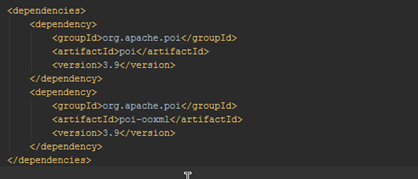
There are two different maven dependencies one for creating an older version of excel – XLS format and other for creating new version of Excel – XLSX format. I am listing both the dependencies here.
<dependencies>
<!– For Excel 2007 –>
<dependency>
<groupId>org.apache.poi</groupId>
<artifactId>poi</artifactId>
<version>3.9</version>
</dependency>
<dependency>
<groupId>org.apache.poi</groupId>
<artifactId>poi-ooxml</artifactId>
<version>3.9</version>
</dependency>
</dependencies>
Create a new module in IntelliJ.
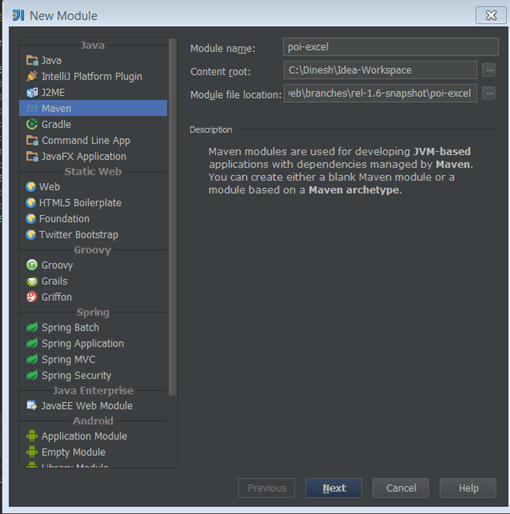
Add the dependency in your pom.xml
PAUSE & THINK: KEY POI CLASSES
Before we go ahead here’s quick primer on 3 key classes in POI.
- HSSF – Java implementation of the Excel ’97(-2007) file format. e.g. HSSFWorkbook, HSSFSheet.
- XSSF – Java implementation of the Excel 2007 OOXML (.xlsx) file format. e.g. XSSFWorkbook, XSSFSheet.
- SXSSF – Used when very large spreadsheets have to be produced, and heap space is limited. e.g. SXSSFWorkbook, SXSSFSheet.
There are other wide range of classes as well which can be used to manipulate the Excel sheet. Ex – BuiltinFormats, ConditionalFormattingRule,ComparisonOperator,CellStyle, FontFormatting, IndexedColors, PatternFormatting, SheetConditionalFormatting. These used for formatting the sheet and formula evaluation.
HOW TO CREATE A NEW EXCEL SHEET
This involves the following steps.
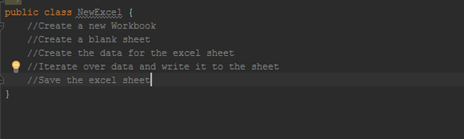
So go ahead and create a new file called NewExcel.java
package com.dinesh;

import org.apache.poi.ss.usermodel.Cell;

import org.apache.poi.ss.usermodel.Row;

import org.apache.poi.xssf.usermodel.XSSFSheet;

import org.apache.poi.xssf.usermodel.XSSFWorkbook;

import java.io.File;

import java.io.FileNotFoundException;

import java.io.FileOutputStream;

import java.io.IOException;

import java.util.HashMap;

import java.util.Map;

import java.util.Set;

import java.util.TreeMap;

/**

 * Created by darora on 4/18/14.

 */

public class NewExcel {

    public static void main(String[] args) {

        //Create a new Workbook

        XSSFWorkbook workbook = new XSSFWorkbook();

        //Create a blank sheet

        XSSFSheet sheet = workbook.createSheet("Student data");

        //Create the data for the excel sheet

        Map<string, object[]=""> data = new TreeMap<string, object[]="">();

        data.put("1", new Object[] {"ID", "FIRSTNAME", "LASTNAME"});

        data.put("2", new Object[] {1, "Randy", "Maven"});

        data.put("3", new Object[] {2, "Raymond", "Smith"});

        data.put("4", new Object[] {3, "Dinesh", "Arora"});

        data.put("5", new Object[] {4, "Barbra", "Klien"});

        //Iterate over data and write it to the sheet

        Set keyset = data.keySet();

        int rownum = 0;

        for (String key : keyset)

        {

            Row row = sheet.createRow(rownum++);

            Object [] objArr = data.get(key);

            int cellnum = 0;

            for (Object obj : objArr)

            {

                Cell cell = row.createCell(cellnum++);

                if(obj instanceof String)

                    cell.setCellValue((String)obj);

                else if(obj instanceof Integer)

                    cell.setCellValue((Integer)obj);

            }

        }

        //Save the excel sheet

        try{

            FileOutputStream out = new FileOutputStream(new File("c:\Dinesh\javahabitExcelDemo.xlsx"));

            workbook.write(out);

            out.close();

            System.out.println("javahabitExcelDemo.xlsx Successfully created");

        } catch (FileNotFoundException e) {

            e.printStackTrace();

        } catch (IOException e) {

            e.printStackTrace();

        }

    }

}
OUTPUT
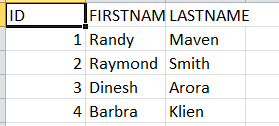
HOW TO READ A NEW EXCEL SHEET
So now that we have written an excel sheet. let’s try to read it back.
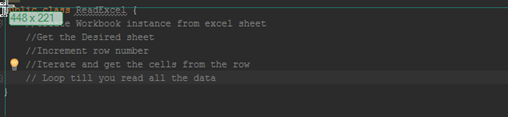
The steps involved are
package com.dinesh;

import org.apache.poi.ss.usermodel.Cell;

import org.apache.poi.ss.usermodel.Row;

import org.apache.poi.xssf.usermodel.XSSFSheet;

import org.apache.poi.xssf.usermodel.XSSFWorkbook;

import java.io.File;

import java.io.FileInputStream;

import java.io.FileNotFoundException;

import java.io.IOException;

import java.util.Iterator;

/**

 * Created by darora on 4/18/14.

 */

public class ReadExcel {

    //Create Workbook instance from excel sheet

    public static void main(String[] args) {

        try {

            //Get the Excel File

            FileInputStream file = new FileInputStream(new File("c:\Dinesh\javahabitExcelDemo.xlsx"));

            XSSFWorkbook workbook = new XSSFWorkbook(file);

            //Get the Desired sheet

            XSSFSheet sheet = workbook.getSheetAt(0);

            //Increment over rows

            for (Row row : sheet) {

                //Iterate and get the cells from the row

                Iterator cellIterator = row.cellIterator();

                // Loop till you read all the data

                while (cellIterator.hasNext()) {

                    Cell cell = cellIterator.next();

                    switch (cell.getCellType()) {

                        case Cell.CELL_TYPE_NUMERIC:

                            System.out.print(cell.getNumericCellValue() + "t");

                            break;

                        case Cell.CELL_TYPE_STRING:

                            System.out.print(cell.getStringCellValue() + "t");

                            break;

                    }

                }

                System.out.println("");

            }

            file.close();

        } catch (FileNotFoundException e) {

            e.printStackTrace();

        } catch (IOException e) {

            e.printStackTrace();

        }

    }

}
OUTPUT

Using formulas in excel sheet
When working on excel sheets, we sometimes have to create cells which use formulas to calculate their values. Apache POI has supports methods for adding formula to cells and evaluating the already present formula in the cells. Neat!!
So Let’s see an example on setting a formula cells in the excel sheet.
In this code we will try to calculate the Simple interest. Formula – Principal * Interest * Time.
package com.dinesh;

import org.apache.poi.ss.usermodel.Row;

import org.apache.poi.xssf.usermodel.XSSFSheet;

import org.apache.poi.xssf.usermodel.XSSFWorkbook;

import java.io.File;

import java.io.FileNotFoundException;

import java.io.FileOutputStream;

import java.io.IOException;

/**

 * Created by darora on 4/18/14.

 */

public class CalculateFormula {

    public static void main(String[] args)

    {

        //Create the workbook

        XSSFWorkbook workbook = new XSSFWorkbook();

        //Create the sheet

        XSSFSheet sheet = workbook.createSheet("Calculate Simple Interest");

        //Create Wor Headers

        Row header = sheet.createRow(0);

        header.createCell(0).setCellValue("Principal");

        header.createCell(1).setCellValue("Interest");

        header.createCell(2).setCellValue("Time");

        header.createCell(3).setCellValue("OUTPUT (P * r * t)");

        //Create the Rows

        Row dataRow = sheet.createRow(1);

        dataRow.createCell(0).setCellValue(1000d);

        dataRow.createCell(1).setCellValue(12.00);

        dataRow.createCell(2).setCellValue(6d);

        dataRow.createCell(3).setCellFormula("A2*B2*C2");

        //Save the File

        try {

            FileOutputStream out =  new FileOutputStream(new File("c:\Dinesh\javahabitformulaDemo.xlsx"));

            workbook.write(out);

            out.close();

            System.out.println("Excel File with formla is created!");

        } catch (FileNotFoundException e) {

            e.printStackTrace();

        } catch (IOException e) {

            e.printStackTrace();

        }

    }

}
OUTPUT

So experiment your way with this jar file and do post your comments and suggestions on topics you had like to see in my future posts.
AUTHOR
I am Dinesh Arora, Java Developer, Go getter, Father and passionate about DIY and Blogging. Connect with me through twitter
Read / Write Excel file in Java using Apache POI的更多相关文章
- Apache POI – Reading and Writing Excel file in Java
来源于:https://www.mkyong.com/java/apache-poi-reading-and-writing-excel-file-in-java/ In this article, ...
- java使用Apache POI操作excel文件
官方介绍 HSSF is the POI Project's pure Java implementation of the Excel '97(-2007) file format. XSSF is ...
- Java中用Apache POI生成excel和word文档
概述: 近期在做项目的过程中遇到了excel的数据导出和word的图文表报告的导出功能.最后决定用Apache POI来完毕该项功能.本文就项目实现过程中的一些思路与代码与大家共享.同一时候.也作为自 ...
- Java 使用Apache POI读取和写入Excel表格
1,引入所用的包 <dependency> <groupId>org.apache.poi</groupId> <artifactId>poi-ooxm ...
- java 通过Apache poi导出excel代码demo实例
package com.zuidaima.excel.util; import java.io.ByteArrayInputStream; import java.io.ByteArrayOutput ...
- Java使用Apache POI进行Excel导入和导出
Manve依赖 <!-- https://mvnrepository.com/artifact/org.apache.poi/poi-ooxml --> <dependency> ...
- Java利用Apache poi导出图表
jar compile('org.apache.poi:poi:4.0.1') compile('org.apache.poi:poi-scratchpad:4.0.1') compile('org. ...
- Java利用Apache POI将数据库数据导出为excel
将数据库中的数据导出为excel文件,供其他人查看 public class POITest { public static void main(String[] args) { POITest te ...
- How to Read, Write XLSX File in Java - Apach POI Example---reference
No matter how Microsoft is doing in comparison with Google, Microsoft Office is still the most used ...
随机推荐
- 陕西中际现代:基于自适应算法的PLC滴灌控制系统
基于自适应算法的PLC滴灌控制系统 陕西中际现代包装科技有限公司滴灌部 1.介绍 水资源正在成为一种珍贵的资源.城镇的市民使用成千上万立方的水来浇灌花园和绿地.他们依赖于使用固定灌溉计划的控制器.而这 ...
- POJ1948Triangular Pastures(DP)
POJ1948http://poj.org/problem?id=1948 题目大意就是说给你n个木棍让你用它们摆成一个三角形 使得这个三角形的面积最大. 这个题我之前想的时候一直纠结怎么通过之前的 ...
- WEB数据挖掘(十三)——关联规则与序列模式(1)
一.Apriori算法简介: Apriori算法是一种挖掘关联规则的频繁项集算法,其核心思想是通过候选集生成和情节的向下封闭检测两个阶段来挖掘频繁项集. Apriori(先验的,推测的)算法应用广泛 ...
- Objective-C 学习记录6--dictionary
1.NSDictionary 和NSMutableDictionary NSDictionary dictionaryWithObjectsAndKeys:~,nil 使用键值对创建字典,用nil标志 ...
- 3DTouch-ShortcutItem - iOS9 - xcode7
据说苹果某个神秘的团队闭门潜心研发多年的3DTouch终于,应用在iOS9上,且公开了API. 在系统主界面用力按压 APP 图标,如上会出现自定义菜单 有两种方法可以实现一.代码(这种方法也是可以动 ...
- window.location.href的使用方法
http://hljqfl.blog.163.com/blog/static/40931580201122210573364/ 在写ASP.Net程序的时候,我们常常遇到跳转页面的问题,我们常常使用R ...
- C++ 名称空间
在程序中,只使用 using namespace std; 而不使用其他的名称空间,如using namespace boost; 这样的好处有: 1.可以避免不同名称空间中的名称冲突: 2.可以很清 ...
- jqery和js如何判断checkbox是否选中
jquery: <div id="divId" class="divTable"> <div class="tableBody&qu ...
- Educational Codeforces Round 4 B. HDD is Outdated Technology 暴力
B. HDD is Outdated Technology 题目连接: http://www.codeforces.com/contest/612/problem/B Description HDD ...
- cdoj 1150 排名表 拓扑排序
排名表 Time Limit: 20 Sec Memory Limit: 256 MB 题目连接 http://acm.uestc.edu.cn/#/problem/show/1150 Descrip ...