
Objective-C ,ios,iphone开发基础:UIAlertView使用详解
UIAlertView使用详解
Ios中为我们提供了一个用来弹出提示框的类 UIAlertView,他类似于javascript中的alert 和c#中的MessageBox();
UIAlertView 继承自 UIView (@interface UIAlertView : UIView )
一、简单的初始化一个UIAlertView 对象。
UIAlertView* alert = [[UIAlertView alloc] init];
激活 alert ,让它显示。
[alert show];
结果将如下:
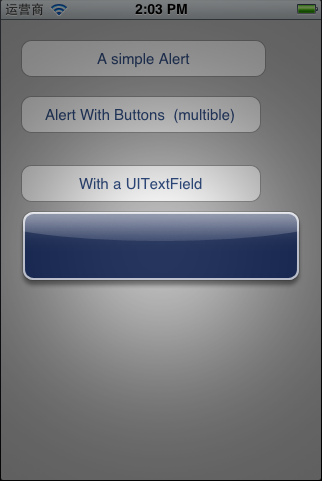
这样虽然出现了一个提示框,但是太不过友好,让人根本无法使用。
二,带有button的提示框。
UIAlertView 里面包含了另外一种用来初始化的方法。
- (id)initWithTitle:(NSString *)title message:(NSString *)message delegate:(id /*<UIAlertViewDelegate>*/)delegate cancelButtonTitle:(NSString *)cancelButtonTitle otherButtonTitles:(NSString *)otherButtonTitles, ... NS_REQUIRES_NIL_TERMINATION;
带有一个button。
UIAlertView* alert = [[UIAlertView alloc] initWithTitle:@"简单的提示框" message:@"simple alert" delegate:self cancelButtonTitle:@"ok" otherButtonTitles: nil];
[alert show];
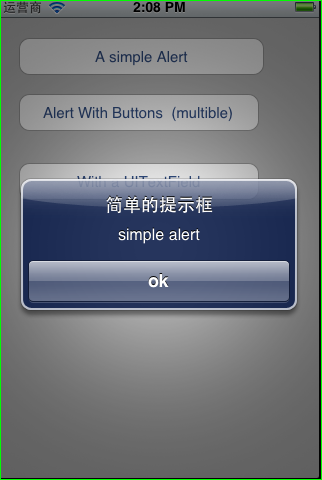
带有多个button
UIAlertView* alert = [[UIAlertView alloc] initWithTitle:@"简单的提示框" message:@"simple alert" delegate:self cancelButtonTitle:@"ok" otherButtonTitles:@"Button1",@"Button2",@"Button3" ,nil];
[alert show];
要想处理多个button点击之后做出不同响应,那么必须让当前控制器类遵循 UIAlertViewDelegate 协议。
UIAlertViewDelegate 里面包含了一个方法(- (void)alertView:(UIAlertView *)alertView clickedButtonAtIndex:(NSInteger)buttonIndex;),用来触发在点击button之后的操作,判断是哪一个button 有两种方式,一种是更具button 的索引,
另外一种是button的title。
- (void)alertView:(UIAlertView *)alertView clickedButtonAtIndex:(NSInteger)buttonIndex{
NSString* buttonTitle = [alertView buttonTitleAtIndex:buttonIndex];
if([buttonTitle isEqualToString:@"Button1"]){
userOutput.text = buttonTitle;
}if([buttonTitle isEqualToString:@"Button2"]){
userOutput.text = buttonTitle;
}if([buttonTitle isEqualToString:@"Button3"]){
userOutput.text = buttonTitle;
}if([buttonTitle isEqualToString:@"ok"]){
userOutput.text = buttonTitle;
}
}
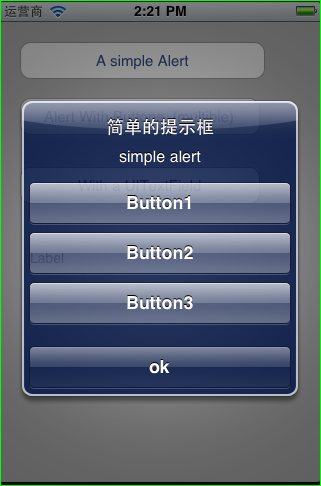
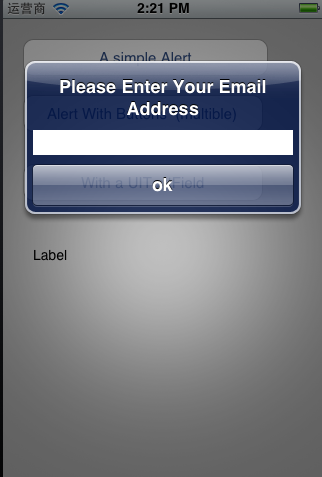
三 、给提示框添加输入框,最经典的案例,appstore 下载的时候输入密码、
首先,初始化UITextField
userInput = [[UITextField alloc] initWithFrame:CGRectMake(12.0, 70.0, 260.0, 25.0)];
[userInput setBackgroundColor:[UIColor whiteColor ]];
将userInput 添加在 alert上,
[alert addSubview:userInput];
- (IBAction)btnWithTextField:(id)sender {
UIAlertView* alert = [[UIAlertView alloc] initWithTitle:@"Please Enter Your Email Address" message:@"simple alert" delegate:self cancelButtonTitle:@"ok" otherButtonTitles: nil];
userInput = [[UITextField alloc] initWithFrame:CGRectMake(12.0, 70.0, 260.0, 25.0)];
[userInput setBackgroundColor:[UIColor whiteColor ]];
[alert addSubview:userInput];
[alert show];
[alert release];
[userInput release];
}
- (void)alertView:(UIAlertView *)alertView clickedButtonAtIndex:(NSInteger)buttonIndex{
NSMutableString* buttonTitle = [NSMutableString stringWithString:[alertView buttonTitleAtIndex:buttonIndex]];
if([buttonTitle isEqualToString:@"Button1"]){
userOutput.text = buttonTitle;
}if([buttonTitle isEqualToString:@"Button2"]){
userOutput.text = buttonTitle;
}if([buttonTitle isEqualToString:@"Button3"]){
userOutput.text = buttonTitle;
}if([buttonTitle isEqualToString:@"ok"]){
[buttonTitle appendString:userInput.text];
userOutput.text = buttonTitle;
}
}
Objective-C ,ios,iphone开发基础:UIAlertView使用详解的更多相关文章
- [置顶] Objective-C ,ios,iphone开发基础:UIAlertView使用详解
UIAlertView使用详解 Ios中为我们提供了一个用来弹出提示框的类 UIAlertView,他类似于javascript中的alert 和c#中的MessageBox(); UIAlertVi ...
- Objective-C ,ios,iphone开发基础:使用GDataXML解析XML文档,(libxml/tree.h not found 错误解决方案)
使用GDataXML解析XML文档 在IOS平台上进行XML文档的解析有很多种方法,在SDK里面有自带的解析方法,但是大多情况下都倾向于用第三方的库,原因是解析效率更高.使用上更方便 这里主要介绍一下 ...
- Objective-C ,ios,iphone开发基础:使用第三方库FMDB连接sqlite3 数据库,实现简单的登录
第一步:下载第三方库,点击 连接 下载, 第二部:准备数据库:按照连接&中博客的步骤实现数据库, 数据库的设计大致如下表: id username pas ...
- Objective-C ,ios,iphone开发基础:几个常用类-NSNumber
2013-08-21 在Objective-C,包括int double float 等等再内的基础数据类型都不是一个类,所以就不能给它们发送消息,也就是说不能调用方法,那怎么办呢 ?Objectiv ...
- Objective-C ,ios,iphone开发基础:快速实现一个简单的图片查看器
新建一个single view 工程: 关闭ARC , 在.xib视图文件上拖放一个UIImageView 两个UIButton ,一个UISlider ,布局如图. 并为他们连线, UIImage ...
- Objective-C ,ios,iphone开发基础:JSON解析(使用苹果官方提供的JSON库:NSJSONSerialization)
json和xml的普及个人觉得是为了简化阅读难度,以及减轻网络负荷,json和xml 数据格式在格式化以后都是一种树状结构,可以树藤摸瓜的得到你想要的任何果子. 而不格式化的时候json和xml 又是 ...
- Objective-C ,ios,iphone开发基础:http网络编程
- (IBAction)loadData:(id)sender { NSURL* url = [NSURL URLWithString:@"http://162.105.65.251:808 ...
- Objective-C ,ios,iphone开发基础:3分钟教你做一个iphone手机浏览器
第一步:新建一个Single View工程: 第二步:新建好工程,关闭arc. 第三步:拖放一个Text Field 一个UIButton 和一个 UIWebView . Text Field 的ti ...
- Objective-C ,ios,iphone开发基础:ios数据库(The SQLite Database),使用终端进行简单的数据库操作
SQLite 是一个轻量级的免费关系数据库.SQLite最初的设计目标是用于嵌入式系统,它占用资源非常少,在嵌入式设备中,只需要几百K的内存就够了,可以在(http://www.sqlite.org ...
随机推荐
- 学习参考《Python基础教程(第3版)》中文PDF+英文PDF+源代码
python基础教程ed3: 基础知识 列表和元组 字符串 字典 流程控制 抽象(参数 作用域 递归) 异常 魔术方法/特性/迭代器 模块/标准库 文件 GUI DB 网络编程 测试 扩展python ...
- caioj 1112 树形动态规划(TreeDP)7:战略游戏
这道题和上一道题非常相似 这道题是看边,上一道是看点. 但是状态定义不同 看边的话没有不放不安全这种状态 因为当前结点的父亲无法让这颗子树没有看到的边看到 所以这种状态不存在 而上一道题存在不放不安全 ...
- 【Codeforces Round #239 (Div. 1) A】Triangle
[链接] 我是链接,点我呀:) [题意] 在这里输入题意 [题解] 最后的直角三角形可以通过平移,将直角顶点移动到坐标原点. 然后我们只要枚举另外两个点其中一个点的坐标就好了. x坐标的范围是[1.. ...
- <Machine Learning in Action >之二 朴素贝叶斯 C#实现文章分类
def trainNB0(trainMatrix,trainCategory): numTrainDocs = len(trainMatrix) numWords = len(trainMatrix[ ...
- vue2.0-transition动画
<!DOCTYPE html> <html lang="en"> <head> <meta charset="UTF-8&quo ...
- JVM-ClassLoader装载class的流程
在JVM中,有三种默认的类加载器,分别为Bootstrap ClassLoader,Extension CLassLoader以及App ClassLoader.其中,Bootstrap Classl ...
- dropify,不错的图片上传预览插件
引言 传统的图片上传,很丑.点击选择之后,还无法预览. 有一种方案是传到服务器,然后返回地址,然后显示,比较麻烦. 用这个dropify,就可以解决之歌问题. 看效果 用法 1.引入文件,需要jque ...
- OpenGL编程逐步深入(三)在窗口中显示一个三角形
这一节教程的内容会比较少,我们仅仅是对上一节教程中的代码进行扩展,在窗口中渲染一个三角形出来. 本节我们以下图所示正方形来讲解OpenGl中的坐标系统.当沿着Z轴负方向看时,可见顶点的坐标必须在这个正 ...
- javaScript 立即执行函数学习笔记
立即执行函数: 即执行函数(Immediate Functions),立即执行函数模式是一种语法,可以让你的函数在定义后立即被执行 立即执行函数(immediate function)术语不是在ECM ...
- 紫书 例题 9-11 UVa 1331 (最优三角形剖分)
设置f(i, j)为点i, i + 1 --j所组成的多边形. 那么可以枚举中间点k, 得f(i, j) = min{s(i, j, k), f(i, k), f(k, j) | i < k & ...