
Objective-C ,ios,iphone开发基础:使用第三方库FMDB连接sqlite3 数据库,实现简单的登录
第一步:下载第三方库,点击 连接 下载,
第二部:准备数据库:按照连接&中博客的步骤实现数据库,
数据库的设计大致如下表:
|
id username password registertime realname groupid |
|
新建一个单视图工程,

关闭arc (Automatic reference count)自动引用计数,

添加 sqlite3.dylib 类库的包含,

将准备好的第三方库FMDB 以及准备好的数据库包含在项目中,包含时要注意选中copy 选项,不然只是单纯的引用到项目中,
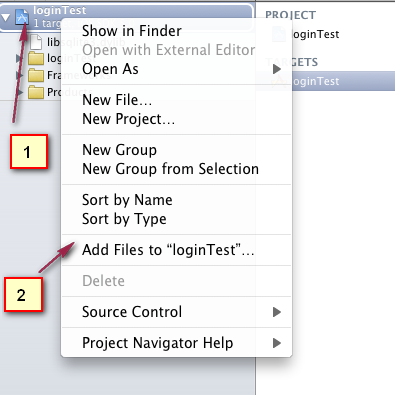
包含后项目结构如下,

单击打开 wsqViewController.xib 拖放两个UILable ,并分别设置title属性为 "用户名" 和 " 密码" ,然后拖放两个Text Field ,再拖放一个UIButton title属性设置为登录,布局随意,

为两个TextField 设置Placeholder属性,这个就是水印属性,用来添加水印提示,当点击输入任何一个字符的时候就会消失。。

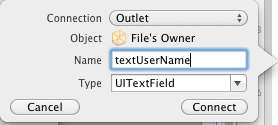
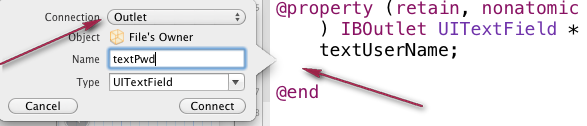
为控件连线,分别为两个TextField 连接连个插座变量 分别命名为textUserName 和 textPwd ,为UIButton 连接一个action 事件,命名为btnClick。(注意红色箭头标注的关键点)

为连个TextField 添加键盘消失的方法,首先让 wsqViewController 遵循 UITextFieldDelegate 协议 ,
@interface wsqViewController : UIViewController<UITextFieldDelegate>
并且在 wsqViewController.m 中重写- (BOOL)textFieldShouldReturn:(UITextField *)textField;方法,
[textField resignFirstResponder];
return YES;
}
其实主要是让两个TextField 在结束的时候调用 resignFirstResponder 方法,通过将代理 delegate 指向File's Owner,在单击小键盘return 键和敲键盘回车键的时候让小键盘消失。

因为我们是在单击UIbutton的时候来判断是否登录成功,所以,所有的赋值和取值的操作都可以放在btnClick 事件里面来操作,
但是这样会在单击button的时候增加响应时间,所以我们把一些基本的操作还是放在- (void)viewDidLoad 里面,这里面主要就是
把数据库拷贝直应用程序的沙盒中,因为在mainBundle 目录下,所有系统的文件都是不可以通过程序来操作的,任何操作都会返回nil。
操作其他应用程序也不行,这样每一个应用程序都在自己的沙盒中运行,从而不会影响其他的应用程序。
在 wsqViewController.h 添加一个实例变量,为NSString 类型,用来存放数据库在沙盒中的路径。不要忘记在 dealloc 中release,并且在.m文件中实现它:@synthesize tempPath;

在viewDidLoad 中添加代码:主要是获取user.db在目录中的路径然后通过 NSFileManager 类中的方法,将数据库拷贝至沙盒目录下。
- (void)viewDidLoad

{

    [super viewDidLoad];

    //获取 user.db在目录中的路径

    NSString* strBundlePath = [[NSBundle mainBundle] pathForResource:@"user.db" ofType:nil];

    //获取应用程序沙盒下所有文件夹 的路径

    NSArray* arrayDocunmentPath = NSSearchPathForDirectoriesInDomains(NSDocumentDirectory, NSUserDomainMask, YES);

    //获取应用程序沙盒下 doucumnet文件夹 的路径

    NSString* strDocunmentPath = [arrayDocunmentPath objectAtIndex:];

    //为文件夹路径附加文件路径,

    NSString* destinationPath = [strDocunmentPath stringByAppendingString:@"user.db"];

    NSFileManager* fManager = [NSFileManager defaultManager];

    //实例化一个NSFileManager 将文件拷贝至沙盒目录下。

    if(![fManager fileExistsAtPath:destinationPath]){

        NSError* error= nil;

        [fManager copyItemAtPath:strBundlePath toPath:destinationPath error:&error];

        if(error){

            NSLog(@"%@",error);

        }

    }
  //retain 一次,不然会在出了括号之后就会释放,
   tempPath = [destinationPath retain];

}
在wsqViewController.h 文件中包含第三方库的头文件:
#import "FMDatabase.h"
在btnClick 方法中添加代码:
- (IBAction)btnClick:(id)sender {

    [textUserName resignFirstResponder];

    [textPwd resignFirstResponder];

    //创建一个第三方库的对象 ,用数据库路径来初始化,

    FMDatabase* fmDatebase = [[FMDatabase alloc] initWithPath:tempPath];

    //连接数据库,并做判断

    if(![fmDatebase open]){

        UIAlertView* alert = [[UIAlertView alloc] initWithTitle:@"数据库连接" message:@"连接失败" delegate:self cancelButtonTitle:@"cancel" otherButtonTitles:@"ok", nil];

        //显示消息框,

        [alert show];

        // alloc 出来的空间必须释放

        [alert release];

    }

    //sql语句

    NSString* executeStr = [NSString stringWithFormat:@"select * from \"member\" where username =\"%@\" and password = \"%@\"",textUserName.text,textPwd.text];

    //sql语句执行之后返回一个FMResultSet容器。

    FMResultSet * fmSet = [fmDatebase executeQuery:executeStr];

    //扑捉sql异常错误,

    if([fmDatebase hadError]){

        NSLog(@"%i ,%@",[fmDatebase lastErrorCode],[fmDatebase lastErrorMessage]);

        return ;

    }

   //循环容器

    while ([fmSet next]) {

        UIAlertView* alert = [[UIAlertView alloc] initWithTitle:@"Login" message:@"success" delegate:self cancelButtonTitle:@"cancel" otherButtonTitles:@"ok", nil];

        [alert show];

        [alert release];

    }

    if([fmDatebase hadError]){

        NSLog(@"%i ,%@",[fmDatebase lastErrorCode],[fmDatebase lastErrorMessage]);

        return ;

    }

    //关闭连接,以及容器

    [fmDatebase close];

    [fmSet close];

    //alloc 出来的空间必须释放。

    [fmDatebase release];

}
然后点击run 运行结果如下:

最后为应用程序添加事先准备的图标和应用程序启动动画:
lanch.jpg 和icon.jpg


打开 .plist文件 ,修改icon 。并且添加 一项lanch

修改后结果如下图:

#import <UIKit/UIKit.h>

#import "FMDatabase.h"

@interface wsqViewController : UIViewController<UITextFieldDelegate> {

    UITextField *textUserName;

    UITextField *textPwd;

    NSString* tempPath;

}

@property (retain, nonatomic) IBOutlet UITextField *textUserName;

@property (retain, nonatomic) IBOutlet UITextField *textPwd;

@property (retain,nonatomic) NSString* tempPath;

- (IBAction)btnClick:(id)sender;

@end
//

//  wsqViewController.m

//  loginTest

//

//  Created by administrator on 13-9-4.

//  Copyright (c) 2013年 __MyCompanyName__. All rights reserved.

//

#import "wsqViewController.h"

@implementation wsqViewController

@synthesize textUserName;

@synthesize textPwd;

@synthesize tempPath;

- (void)didReceiveMemoryWarning

{

    [super didReceiveMemoryWarning];

    // Release any cached data, images, etc that aren't in use.

}

#pragma mark - View lifecycle

- (void)viewDidLoad

{

    [super viewDidLoad];

    //获取 user.db在目录中的路径

    NSString* strBundlePath = [[NSBundle mainBundle] pathForResource:@"user.db" ofType:nil];

    //获取应用程序沙盒下所有文件夹 的路径

    NSArray* arrayDocunmentPath = NSSearchPathForDirectoriesInDomains(NSDocumentDirectory, NSUserDomainMask, YES);

    //获取应用程序沙盒下 doucumnet文件夹 的路径

    NSString* strDocunmentPath = [arrayDocunmentPath objectAtIndex:];

    //为文件夹路径附加文件路径,

    NSString* destinationPath = [strDocunmentPath stringByAppendingString:@"user.db"];

    NSFileManager* fManager = [NSFileManager defaultManager];

    //实例化一个NSFileManager 将文件拷贝至沙盒目录下。

    if(![fManager fileExistsAtPath:destinationPath]){

        NSError* error= nil;

        [fManager copyItemAtPath:strBundlePath toPath:destinationPath error:&error];

        if(error){

            NSLog(@"%@",error);

        }

    }

    tempPath = [destinationPath retain];

}

- (void)viewDidUnload

{

    [self setTextUserName:nil];

    [self setTextPwd:nil];

    [super viewDidUnload];

}

- (void)viewWillAppear:(BOOL)animated

{

    [super viewWillAppear:animated];

}

- (void)viewDidAppear:(BOOL)animated

{

    [super viewDidAppear:animated];

}

- (void)viewWillDisappear:(BOOL)animated

{

    [super viewWillDisappear:animated];

}

- (void)viewDidDisappear:(BOOL)animated

{

    [super viewDidDisappear:animated];

}

- (BOOL)shouldAutorotateToInterfaceOrientation:(UIInterfaceOrientation)interfaceOrientation

{

    // Return YES for supported orientations

    return (interfaceOrientation != UIInterfaceOrientationPortraitUpsideDown);

}

- (BOOL)textFieldShouldEndEditing:(UITextField *)textField{

    [textUserName resignFirstResponder];

    [textPwd resignFirstResponder];

    return YES;

}

- (BOOL)textFieldShouldReturn:(UITextField *)textField{

    [textField resignFirstResponder];

    return YES;

}

- (void)dealloc {

    [textUserName release];

    [textPwd release];

    [tempPath release];

    [super dealloc];

}

- (IBAction)btnClick:(id)sender {

    [textUserName resignFirstResponder];

    [textPwd resignFirstResponder];

    //创建一个第三方库的对象 ,用数据库路径来初始化,

    FMDatabase* fmDatebase = [[FMDatabase alloc] initWithPath:tempPath];

    //连接数据库,并做判断

    if(![fmDatebase open]){

        UIAlertView* alert = [[UIAlertView alloc] initWithTitle:@"数据库连接" message:@"连接失败" delegate:self cancelButtonTitle:@"cancel" otherButtonTitles:@"ok", nil];

        //显示消息框,

        [alert show];

        // alloc 出来的空间必须释放

        [alert release];

    }

    //sql语句

    NSString* executeStr = [NSString stringWithFormat:@"select * from \"member\" where username =\"%@\" and password = \"%@\"",textUserName.text,textPwd.text];

    //sql语句执行之后返回一个FMResultSet容器。

    FMResultSet * fmSet = [fmDatebase executeQuery:executeStr];

    //扑捉sql异常错误,

    if([fmDatebase hadError]){

        NSLog(@"%i ,%@",[fmDatebase lastErrorCode],[fmDatebase lastErrorMessage]);

        return ;

    }

   //循环容器

    while ([fmSet next]) {

        UIAlertView* alert = [[UIAlertView alloc] initWithTitle:@"Login" message:@"success" delegate:self cancelButtonTitle:@"cancel" otherButtonTitles:@"ok", nil];

        [alert show];

        [alert release];

    }

    if([fmDatebase hadError]){

        NSLog(@"%i ,%@",[fmDatebase lastErrorCode],[fmDatebase lastErrorMessage]);

        return ;

    }

    //关闭连接,以及容器

    [fmDatebase close];

    [fmSet close];

    //alloc 出来的空间必须释放。

    [fmDatebase release];

}

@end
Objective-C ,ios,iphone开发基础:使用第三方库FMDB连接sqlite3 数据库,实现简单的登录的更多相关文章
- iOS程序开发引用的第三方库之间出现duplicate symbol时的处理方法
iOS程序集成的第三方库过多时,很容易出现某几个库同时用到了一样的函数库,也就是在你的程序link时会提示duplicate symbol,而重复的符号又不是由你自己程序的代码造成的,也就说没法通过直 ...
- Objective-C ,ios,iphone开发基础:使用GDataXML解析XML文档,(libxml/tree.h not found 错误解决方案)
使用GDataXML解析XML文档 在IOS平台上进行XML文档的解析有很多种方法,在SDK里面有自带的解析方法,但是大多情况下都倾向于用第三方的库,原因是解析效率更高.使用上更方便 这里主要介绍一下 ...
- Objective-C ,ios,iphone开发基础:几个常用类-NSNumber
2013-08-21 在Objective-C,包括int double float 等等再内的基础数据类型都不是一个类,所以就不能给它们发送消息,也就是说不能调用方法,那怎么办呢 ?Objectiv ...
- [置顶] Objective-C ,ios,iphone开发基础:UIAlertView使用详解
UIAlertView使用详解 Ios中为我们提供了一个用来弹出提示框的类 UIAlertView,他类似于javascript中的alert 和c#中的MessageBox(); UIAlertVi ...
- Objective-C ,ios,iphone开发基础:UIAlertView使用详解
UIAlertView使用详解 Ios中为我们提供了一个用来弹出提示框的类 UIAlertView,他类似于javascript中的alert 和c#中的MessageBox(); UIAlertVi ...
- Objective-C ,ios,iphone开发基础:快速实现一个简单的图片查看器
新建一个single view 工程: 关闭ARC , 在.xib视图文件上拖放一个UIImageView 两个UIButton ,一个UISlider ,布局如图. 并为他们连线, UIImage ...
- Objective-C ,ios,iphone开发基础:JSON解析(使用苹果官方提供的JSON库:NSJSONSerialization)
json和xml的普及个人觉得是为了简化阅读难度,以及减轻网络负荷,json和xml 数据格式在格式化以后都是一种树状结构,可以树藤摸瓜的得到你想要的任何果子. 而不格式化的时候json和xml 又是 ...
- Objective-C ,ios,iphone开发基础:http网络编程
- (IBAction)loadData:(id)sender { NSURL* url = [NSURL URLWithString:@"http://162.105.65.251:808 ...
- Objective-C ,ios,iphone开发基础:3分钟教你做一个iphone手机浏览器
第一步:新建一个Single View工程: 第二步:新建好工程,关闭arc. 第三步:拖放一个Text Field 一个UIButton 和一个 UIWebView . Text Field 的ti ...
随机推荐
- RabbitMQ (四) 路由选择 (Routing) -摘自网络
本篇博客我们准备给日志系统添加新的特性,让日志接收者能够订阅部分消息.例如,我们可以仅仅将致命的错误写入日志文件,然而仍然在控制面板上打印出所有的其他类型的日志消息. 1.绑定(Bindings) 在 ...
- [cocos2d-x]File文件的IO读写处理
转载:http://blog.csdn.net/chiuan/article/details/8618411 为了保存自定义数据文件,需要保存文件和读取文件,也就是File的IO处理: 针对cocos ...
- Laravel Configuration
Introduction All of the configuration files for the Laravel framework are stored in the app/config d ...
- hdu 1429 胜利大逃亡(续)(bfs+位压缩)
胜利大逃亡(续) Time Limit: 4000/2000 MS (Java/Others) Memory Limit: 65536/32768 K (Java/Others)Total Su ...
- 微软企业库5.0学习-Security.Cryptography模块
一.微软企业库加密应用模块提供了两种加密: 1.Hash providers :离散加密,即数据加密后无法解密 2.Symmetric Cryptography Providers:密钥(对称)加密法 ...
- JMS开发(二):深入PTP,Pub-Sub两种模式
1.PTP模型 PTP(Point-to-Point)模型是基于队列(Queue)的,对于PTP消息模型而言,它的消息目的是一个消息队列(Queue),消息生产者每次发送消息总是把消息送入消息队列中, ...
- js 限定上传文件大小 类型
方案1 :限定大小 <html> <head> <script type="text/javascript"> var isIE = /ms ...
- Cocos2d-x——pthread的使用注意事项
1:多线程所调用的成员方法定义为static. 2:互斥锁(pthread_mutex_t)定义在cpp文件的开头,并且也定义为static. 3:pthread_mutex_init方法尽量在最早的 ...
- 【转】Dijkstra算法(单源最短路径)
原文:http://www.cnblogs.com/dolphin0520/archive/2011/08/26/2155202.html 单源最短路径问题,即在图中求出给定顶点到其它任一顶点的最短路 ...
- Codeforces Beta Round #85 (Div. 1 Only) A. Petya and Inequiations 贪心
A. Petya and Inequiations Time Limit: 20 Sec Memory Limit: 256 MB 题目连接 http://codeforces.com/contest ...