
后端框架学习1-----Spring
Spring学习笔记
spring全家桶:https://www.springcloud.cc/spring-reference.html
spring中文文档:http://c.biancheng.net/spring/
spring是一个轻量级的控制反转(IOC)和面向切面编程(AOP)的容器框架。
IOC本质:实质上是一种设计思想,DI(依赖注入)是实现ioc的一种方法。。没有ioc的程序中,使用面向对象编程,对象的创建于对象间的依赖关系完全硬编码在程序中,对象的创建由程序自己控制,控制反转后将对象的创建转移给第三方
注意:使用xml配置的Bean,Bean的定义信息是和实现分离的,采用注解的方式可以把二者合为一体。
定义:控制反转是一种通过描述(XML或注解)并通过第三方生产获取特定对象的方式,在spring中实现控制反转的是ioc容器,实现方法是依赖注入
1、由 Spring IoC 容器管理的对象称为 Bean,Bean 根据 Spring 配置文件中的信息创建。
Properties 配置文件主要以 key-value 键值对的形式存在,只能赋值,不能进行其他操作,适用于简单的属性配置。
2、ClassPathXmlApplicationContext 该类从类路径 ClassPath 中寻找指定的 XML 配置文件,并完成 ApplicationContext 的实例化工作
3、
通过set注入
导入pom依赖
    <dependencies>

        <!-- https://mvnrepository.com/artifact/org.springframework/spring-webmvc -->

        <dependency>

            <groupId>org.springframework</groupId>

            <artifactId>spring-webmvc</artifactId>

            <version>5.3.8</version>

        </dependency>

    </dependencies>
2、学生信息
package com.zheng.pojo;

public class Student {

    private String name;

    private int age;

    public void setName(String name) {

        this.name = name;

    }

    public void setAge(int age) {

        this.age = age;

    }

    public String getName() {

        return name;

    }

    public int getAge() {

        return age;

    }

    @Override

    public String toString() {

        return "Student{" +

                "name='" + name + '\'' +

                ", age=" + age +

                '}';

    }

}
3、xml配置文件
<?xml version="1.0" encoding="UTF-8"?>

<beans xmlns="http://www.springframework.org/schema/beans"

       xmlns:xsi="http://www.w3.org/2001/XMLSchema-instance"

       xsi:schemaLocation="http://www.springframework.org/schema/beans

   http://www.springframework.org/schema/beans/spring-beans-3.0.xsd">

    <bean id="student" class="com.zheng.pojo.Student">

        <property name="name" value="小红"></property>

        <property name="age" value="12"></property>

    </bean>

</beans>
4、测试
package com.zheng.pojo;

import org.springframework.context.ApplicationContext;

import org.springframework.context.support.ClassPathXmlApplicationContext;

public class StudentTest {

    public static void main(String[] args) {

        //获取容器

        ApplicationContext context = new ClassPathXmlApplicationContext("Beans.xml");

        Student st1 = (Student) context.getBean("student");

        System.out.println("姓名:" + st1.getName());

        System.out.println("年龄:" + st1.getAge());

        System.out.println(st1.toString());

    }

}
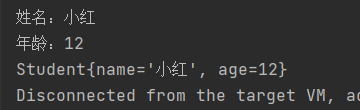
通过构造函数注入
    public Student(String name, int age) {

        this.name = name;

        this.age = age;

    }
xml文件
    <bean id="student1" class="com.zheng.pojo.Student">

        <constructor-arg name="name" value="小黑"></constructor-arg>

        <constructor-arg name="age" value="18"></constructor-arg>

    </bean>
测试
System.out.println("通过构造函数");

        Student st2 = (Student) context.getBean("student1");

        System.out.println(st2.toString());
结果

注意:
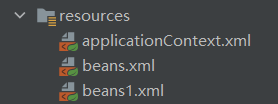
在application中导入其他配置
<?xml version="1.0" encoding="UTF-8"?>

<beans xmlns="http://www.springframework.org/schema/beans"

       xmlns:xsi="http://www.w3.org/2001/XMLSchema-instance"

       xsi:schemaLocation="http://www.springframework.org/schema/beans http://www.springframework.org/schema/beans/spring-beans.xsd">

    <import resource="beans.xml"/>

    <import resource="beans1.xml"/>

</beans>
获得容器方法
ApplicationContext context=new ClassPathXmlApplicationContext("applicationContext.xml");
依赖注入
构造函数注入
setter注入
复杂类型依赖注入
student
package com.zheng.dao;

import java.util.*;

public class Student {

    private String name;

    private Address address;

    private String[] books;

    private List<String> hobbys;

    private Map<String, String> card;

    private Set<String> games;

    private String wife;

    private Properties info;

    public String getName() {

        return name;

    }

    public void setName(String name) {

        this.name = name;

    }

    public Address getAddress() {

        return address;

    }

    public void setAddress(Address address) {

        this.address = address;

    }

    public String[] getBooks() {

        return books;

    }

    public void setBooks(String[] books) {

        this.books = books;

    }

    public List<String> getHobbys() {

        return hobbys;

    }

    public void setHobbys(List<String> hobbys) {

        this.hobbys = hobbys;

    }

    public Map<String, String> getCard() {

        return card;

    }

    public void setCard(Map<String, String> card) {

        this.card = card;

    }

    public Set<String> getGames() {

        return games;

    }

    public void setGames(Set<String> games) {

        this.games = games;

    }

    public String getWife() {

        return wife;

    }

    public void setWife(String wife) {

        this.wife = wife;

    }

    public Properties getInfo() {

        return info;

    }

    public void setInfo(Properties info) {

        this.info = info;

    }

    @Override

    public String toString() {

        return "Student{" +

                "name='" + name + '\'' +

                ", address=" + address +

                ", books=" + Arrays.toString(books) +

                ", hobbys=" + hobbys +

                ", card=" + card +

                ", games=" + games +

                ", wife='" + wife + '\'' +

                ", info=" + info +

                '}';

    }

}
address
package com.zheng.dao;

public class Address {

    private String address;

    public String getAddress() {

        return address;

    }

    public void setAddress(String address) {

        this.address = address;

    }

    @Override

    public String toString() {

        return "Address{" +

                "address='" + address + '\'' +

                '}';

    }

}
配置文件
<?xml version="1.0" encoding="UTF-8"?>

<beans xmlns="http://www.springframework.org/schema/beans"

       xmlns:xsi="http://www.w3.org/2001/XMLSchema-instance"

       xsi:schemaLocation="http://www.springframework.org/schema/beans http://www.springframework.org/schema/beans/spring-beans.xsd">

    <bean id="address" class="com.zheng.dao.Address">

        <property name="address" value="上海"></property>

    </bean>

    <bean id="student" class="com.zheng.dao.Student">

        <property name="name" value="小红"></property>

        <property name="address" ref="address"></property>

        <!--为数组注入值-->

        <property name="books">

            <array>

                <value>JAVA</value>

                <value>PHP</value>

                <value>C++</value>

            </array>

        </property>

        <!--为list集合注入值-->

        <property name="hobbys">

            <list>

                <value>足球</value>

                <value>篮球</value>

                <value>乒乓球</value>

            </list>

        </property>

        <!--map集合注入值-->

        <property name="card">

            <map>

                <entry key="身份证" value="234567655678987678"></entry>

                <entry key="信用卡" value="234567789087654678"></entry>

            </map>

        </property>

        <!--set注入-->

        <property name="games">

            <set>

                <value>和平精英</value>

                <value>明日之后</value>

                <value>王者荣耀</value>

            </set>

        </property>

        <!--注入空值-->

        <property name="wife">

            <null/>

        </property>

        <!--注入properties-->

        <property name="info">

            <props>

                <prop key="学号">B20180702224</prop>

                <prop key="姓名">张三</prop>

                <prop key="性别">男</prop>

                <prop key="年龄">18</prop>

            </props>

        </property>

    </bean>

</beans>
测试
import com.zheng.dao.Student;

import org.springframework.context.ApplicationContext;

import org.springframework.context.support.ClassPathXmlApplicationContext;

public class Mytest {

    public static void main(String[] args) {

       ApplicationContext context = new ClassPathXmlApplicationContext("beans.xml");

        Student student = (Student) context.getBean("student");

        System.out.println(student.toString());

    }

}


Bean的作用域
1)singleton
默认值,单例模式,表示在 Spring 容器中只有一个 Bean 实例,Bean 以单例的方式存在。
2)prototype
原型模式,表示每次通过 Spring 容器获取 Bean 时,容器都会创建一个 Bean 实例。
Bean的自动装配
- byName自动装配
    <bean id="cat" class="com.zheng.pojo.Cat"></bean>

    <bean id="dog" class="com.zheng.pojo.Dog"></bean>

    <!--

    byName:会自动在容器上下文中查找,和自己对象set方法后面的值对应的beanid

    -->

    <bean id="user" class="com.zheng.pojo.User" autowire="byName">

        <property name="name" value="小红"></property>

    </bean>
- byType自动装配
    <bean class="com.zheng.pojo.Cat"></bean>

    <bean  class="com.zheng.pojo.Dog"></bean>

    <!--

    byName:会自动在容器上下文中查找,和自己对象属性类型相同的bean

    -->

    <bean id="user" class="com.zheng.pojo.User" autowire="byType">

        <property name="name" value="小红"></property>

    </bean>
注解自动装配
1、导入约束context约束
2、配置注解支持 <context:annotation-config/>
<?xml version="1.0" encoding="UTF-8"?>

<beans xmlns="http://www.springframework.org/schema/beans"

       xmlns:xsi="http://www.w3.org/2001/XMLSchema-instance"

       xmlns:context="http://www.springframework.org/schema/context"

       xsi:schemaLocation="http://www.springframework.org/schema/beans

    http://www.springframework.org/schema/beans/spring-beans-3.0.xsd

    http://www.springframework.org/schema/context

            http://www.springframework.org/schema/context/spring-context.xsd">

    <!--开启注解的支持-->

    <context:annotation-config/>

</beans>
举例
- @Autowired
可以应用到 Bean 的属性变量、属性的 setter 方法、非 setter 方法及构造函数等,配合对应的注解处理器完成 Bean 的自动配置工作。默认按照 Bean 的类型进行装配。
@Qualifier
与 @Autowired 注解配合使用,会将默认的按 Bean 类型装配修改为按 Bean 的实例名称装配,Bean 的实例名称由 @Qualifier 注解的参数指定。
package com.zheng.pojo;

import org.springframework.beans.factory.annotation.Autowired;

public class User {

    @Autowired

    private  Dog dog;

    @Autowired

    private Cat cat;

    private String name;

    public Dog getDog() {

        return dog;

    }

    public void setDog(Dog dog) {

        this.dog = dog;

    }

    public Cat getCat() {

        return cat;

    }

    public void setCat(Cat cat) {

        this.cat = cat;

    }

    public String getName() {

        return name;

    }

    public void setName(String name) {

        this.name = name;

    }

}
xml配置
<?xml version="1.0" encoding="UTF-8"?>

<beans xmlns="http://www.springframework.org/schema/beans"

       xmlns:xsi="http://www.w3.org/2001/XMLSchema-instance"

       xmlns:context="http://www.springframework.org/schema/context"

       xsi:schemaLocation="http://www.springframework.org/schema/beans

    http://www.springframework.org/schema/beans/spring-beans-3.0.xsd

    http://www.springframework.org/schema/context

            http://www.springframework.org/schema/context/spring-context.xsd">

    <!--开启注解的支持-->

    <context:annotation-config/>

    <bean id="cat" class="com.zheng.pojo.Cat"></bean>

    <bean id="dog" class="com.zheng.pojo.Dog"></bean>

    <bean id="user" class="com.zheng.pojo.User"/>

</beans>
两者配合使用
    @Autowired

    @Qualifier("dog")

    private  Dog dog;
    <bean  class="com.zheng.pojo.Cat"></bean>

    <bean id="dog"  class="com.zheng.pojo.Dog"></bean>
二、spring注解开发
xml文件
<?xml version="1.0" encoding="UTF-8"?>

<beans xmlns="http://www.springframework.org/schema/beans"

       xmlns:context="http://www.springframework.org/schema/context"

       xmlns:xsi="http://www.w3.org/2001/XMLSchema-instance"

       xsi:schemaLocation="http://www.springframework.org/schema/beans http://www.springframework.org/schema/beans/spring-beans.xsd

                        http://www.springframework.org/schema/context http://www.springframework.org/schema/context/spring-context.xsd">

    <!--指定扫描下的包,这个包下的注解就会自动生效-->

    <context:component-scan base-package="com.zheng.pojo"/>

    <context:annotation-config/>

</beans>
实体类
package com.zheng.pojo;

import org.springframework.beans.factory.annotation.Value;

import org.springframework.stereotype.Component;

import org.springframework.stereotype.Controller;

@Component   //相当于== <bean id="student" class="com.zheng.pojo.Student"/>

public class Student {

    @Value("小红")  //相当于== <property name="name" value="小红"/>

    private String name;

    private int age;

    public String getName() {

        return name;

    }

    public void setName(String name) {

        this.name = name;

    }

    public int getAge() {

        return age;

    }

    public void setAge(int age) {

        this.age = age;

    }

    @Override

    public String toString() {

        return "Student{" +

                "name='" + name + '\'' +

                ", age=" + age +

                '}';

    }

}
测试
import com.zheng.pojo.Student;

import org.springframework.context.ApplicationContext;

import org.springframework.context.support.ClassPathXmlApplicationContext;

public class MyTest {

    public static void main(String[] args) {

        ApplicationContext context = new ClassPathXmlApplicationContext("ApplicationContext.xml");

        Student st1 = context.getBean("student", Student.class);//默认的实例名是类的小写

        System.out.println(st1.getName());

    }

}

衍生的注解(重点理解)
@Component有几个衍生注解,在web开发中,按照mvc三层架构
- dao【@Repository】
- service【@Service】
- controller【@Controller】
四个注解的功能一样,都是代表将某个类注册到spring中,装配Bean
后端框架学习1-----Spring的更多相关文章
- 第65节:Java后端的学习之Spring基础
Java后端的学习之Spring基础 如果要学习spring,那么什么是框架,spring又是什么呢?学习spring中的ioc和bean,以及aop,IOC,Bean,AOP,(配置,注解,api) ...
- Spring框架学习03——Spring Bean 的详解
1.Bean 的配置 Spring可以看做一个大型工厂,用于生产和管理Spring容器中的Bean,Spring框架支持XML和Properties两种格式的配置文件,在实际开发中常用XML格式的配置 ...
- Spring 框架学习(1)--Spring、Spring MVC扫盲
纸上得来终觉浅,绝知此事要躬行 文章大纲 什么是spring 传统Java web应用架构 更强的Java Web应用架构--MVC框架 Spring--粘合式框架 spring的内涵 spring核 ...
- 后端框架学习3------SpringMVC
springMVC学习笔记 官方文档地址:https://docs.spring.io/spring/docs/current/spring-framework-reference/web.html# ...
- 框架学习之Spring(一IOC)----HelloWrod
一.概述 Spring是一个开源框架,它的核心是控制反转(IOC)和面向切面(AOP).简单来说,Spring是一个分层的JavaSE/EEfull-stack(一站式)轻量级开源框架. EE 开发分 ...
- Spring框架学习02——Spring IOC 详解
1.Spring IOC的基本概念 IOC(Inverse of Control)反转控制的概念,就是将原本在程序中手动创建对象的控制权,交由Spring框架管理.当某个Java对象(调用者)需要调用 ...
- 后端框架学习-----mybatis(使用mybatis框架遇到的问题)
1.配置文件没有注册(解决:在核心配置文件中注册mapper,注册有三种形式.资源路径用斜杆,包和类用点) <mappers> <!--每一个mapper.xml文件都需要在myba ...
- 后端框架学习-----mybatis(4)
文章目录 4.解决属性名和字段名不一致的问题 4.解决属性名和字段名不一致的问题 1.问题.数据库字段名和属性名不一致,导致查出的数据部分为空 2.resultMap(用于解决数据库表中的字段和属性) ...
- Springboot 框架学习
Springboot 框架学习 前言 Spring Boot是Spring 官方的顶级项目之一,她的其他小伙伴还有Spring Cloud.Spring Framework.Spring Data等等 ...
随机推荐
- [LNOI2022]盒
\(LNOI2022\)盒 由于是加的形式,那么可以套路的拆贡献,枚举每条边的贡献就好了 \(40pts\) //比较显然的事情 //首先确定了一个B数组之后 //最小的移动应该是 //设左右两侧比原 ...
- Prometheus+Grafana+钉钉部署一个单机的MySQL监控告警系统
GreatSQL社区原创内容未经授权不得随意使用,转载请联系小编并注明来源. GreatSQL是MySQL的国产分支版本,使用上与MySQL一致. 目录 一.Prometheus 二.exporter ...
- SVN:取消对代码的修改
取消对代码的修改分为两种情况: 第一种情况:改动没有被提交(commit). 这种情况下,使用svnrevert就能取消之前的修改. svn revert用法如下: #svn revert[-R] s ...
- 《DevOps围炉夜话》- Pilot - CNCF开源DevOps项目DevStream简介 - feat. PMC成员胡涛
本文作者:aFlyBird0 个人主页:https://blog.aflybird.cn/ 开门见山 这是<DevOps围炉夜话>系列节目的第一期.在这期首秀中,我们邀请到了 DevStr ...
- kubernetes之Endpoint引入外部资源实践;
1. 什么是Endpoint? 我们创建Service的时候会自动给我们创建一个同名的Endpoint资源,每一个同名的 Servie都有一个Endpoints资源,因为Service自己并不直接匹配 ...
- Excel 运算符(一):算术运算符
算术运算符用于最基本的加.减.乘.除运算. 运算符 含义 实例 结果 + 加法运算 =2+3 5 - 减法运算 =5-2 3 * 乘法运算 =5*2 10 / 除法运算 =4/2 2 % 百分数 =5 ...
- 【NOI P模拟赛】混凝土粉末(整体二分)
题面 样例输入 5 8 1 1 4 2 2 3 1 2 3 3 1 2 5 1 2 3 3 2 5 2 2 1 2 2 1 3 样例输出 1 0 4 0 1 0 样例解释 题解 比这道题简单了不知多少 ...
- 因势而变,因时而动,Go lang1.18入门精炼教程,由白丁入鸿儒,Go lang泛型(generic)的使用EP15
事实上,泛型才是Go lang1.18最具特色的所在,但为什么我们一定要拖到后面才去探讨泛型?类比的话,我们可以想象一下给小学一年级的学生讲王勃的千古名篇<滕王阁序>,小学生有多大的概率可 ...
- KingbaseES sys_prewarm 扩展
Oracle 在查询数据 可以通过cache hint 所访问的数据cache 到数据库buffer,对于KingbaseES,如何将数据加载到cache 了?sys_prewarm 扩展插件可以实现 ...
- 【Android 逆向】switch 的smail特征
JAVA 源码 ... String str1 = packedSwitch(1); ... private String packedSwitch(int i) { String str = nul ...