
【Vue学习笔记】—— vue的基础语法 { }
学习笔记
作者:oMing
vue
v-on: 简称 @
<div id='app'>

	<button v-on:click='Show1'>   </button>

	<button @click='Show2'>   </button>

</div>
new Vue({

	methods: {

		show1(){

			console.log("show1")

		},

		show2(){

			console.log("show2")

		}

	}

}).$mount('#app')
v-model(数据双向绑定)
<div>

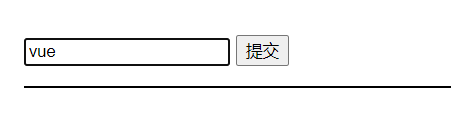
	<input type="text" v-model='name'>

</div>
var vm = new Vue({

	el: '#app',

	data: {

		name: ''

	}

}
- 只要 input 内容发生变化,vue app 实例的 data 中的数据也会发生变化,反之亦然

v-bind: (给元素的 ++属性++ 绑定数据)
<div id='app'>

	<h1 v-bind:class="{ white: canWhite }"</h1>

</div>
.white {

    color: #fff;

}
new Vue({

	data: {

		canWhite: false,

	}

}).$mount('#app')
{{ }}、v-text=" " 、v-html=" " (给 ++元素++ 绑定数据)
[v-cloak] {

	display: none;

}
<!-- v-cloak 解决插值表达式闪烁的问题 -->

<p v-cloak>{{ data }}</p>

<p v-text='data'></p>

<p v-html='data'></p>
v-for
<div id="app">

	<input type="text" v-model='name'>

	<input type="submit" @click.prevent='add'>

	<ul>

		<li v-for='(person,index) in persons' :key='person.id'><input type="checkbox">{{ person.name }}</li>

	</ul>

</div>
new Vue({

	el: '#app',

	data: {

		name: '',

		id: 0,

		persons: [

			{name: 'javascript',id: 1},

			{name: 'Vue',id: 2},

			{name: 'jQuery',id: 3}

		]

	},

	methods: {

		add(){

			let lastId = ++this.id

			let newObj = {name: this.name,id: lastId}

			this.persons.unshift(newObj)

			this.name = ''

		}

	},

	created(){

		this.id = this.persons[this.persons.length-1].id

	}

});
组件(component)
- 创建组件
- 方式1
<div id='app'>

	<!-- 使用标签的形式使用已创建好的组件 -->

	<my-com1></my-com1>

	<my_com2></my_com2>

	<my_com3></my_com3>

</div>

<!-- 在被控制的 app 外面,使用 template 元素创建组件的 HTML 模板结构 -->

<template id="tmp_1">

	<div>

		<h1>这是通过 template 创建的组件(myCom3),有代码提示 --- {{ msg }}</h1>

		<span>非常好用!</span>

	</div>

</template>
var com1 = Vue.extend({

	template: '<h1>这是使用 Vue.extend 创建的组件(myCom1)</h1>'

})

// 在注册 组件 的时候使用 “驼峰命名法”

// 在使用组件的时候就要使用 “短横线分割命名法”(my-com1)

Vue.component("myCom1",com1)
- 方式2
Vue.component("my_com2",{

	template: "<div><h1>这是直接使用 Vue.component 创建的组件(myCom2)</h1><span>有且只有一个'根元素'div</span></div>"

})
- 方式3
Vue.component("my_com3",{

	template: "#tmp_1",

	// 组件中的 data

	data: function(){

		return {

			msg: "这是组件中 data 定义的数据"

		}

	},

})
- 渲染组件的另一种方式
new Vue({

	// 注意,这种方式和使用标签渲染的方式只能选择其中一种

	render: function(createElement){

		let myCom1 = createElement("myCom1")

		return myCom1

	},

})
插槽 slot
<!-- 匿名插槽 -->

<div class="app">

	<father></father>

</div>

<template id="father">

	<div>

		<!-- 在使用子组件的时候 动态 给子组件添加内容 -->

		<son>

			<div>我是son中的追加数据1</div>

			<div>我是son中的追加数据2</div>

			<div>我是son中的追加数据3</div>

		</son>

	</div>

</template>

<template id="son">

	<div>

		<div>我是头部</div>

		<slot>我是默认数据</slot>

		<div>我是尾部</div>

	</div>

</template>
<!-- 具名插槽 -->

<div class="app">

	<father></father>

</div>

<template id="father">

	<div>

		<!-- 在使用子组件的时候 动态 给子组件添加内容 -->

		<son>

			<div slot="one">我是son中one的追加数据</div>

			<div slot="two">我是son中two的追加数据</div>

		</son>

	</div>

</template>

<template id="son">

	<div>

		<div>我是头部</div>

		<slot name="one">我是one默认数据</slot>

		<slot name="two">我是two默认数据</slot>

		<div>我是尾部</div>

	</div>

</template>
<!-- v-slot插槽 -->

<div class="app">

	<father></father>

</div>

<template id="father">

	<div>

		<!-- 在使用子组件的时候 动态 给子组件添加内容 -->

		<son>

			<template v-slot:one>

				<div>我是son中one的追加数据</div>

			</template>

			<template v-slot:two>

				<div>我是son中two的追加数据</div>

			</template>

			<!-- #default == v-slot:default="scope" default用于匿名插槽-->

            <!-- <template #default="scope">

                <div>names --- {{ scope.names }}</div>

                <li v-for="(name,i) in scope.names" :key="i">{{ name }}</li>

            </template> -->

            <!-- 具名的v-slot 插槽名字为names -->

            <template #names="scope">

                <div>names --- {{ scope.names }}</div>

                <li v-for="(name,i) in scope.names" :key="i">{{ name }}</li>

            </template>

		</son>

	</div>

</template>

<template id="son">

	<div>

		<div>我是头部</div>

		<slot name="one">我是one默认数据</slot>

		<slot name="two">我是two默认数据</slot>

		<slot name="names" v-bind:names="names">我是names默认数据</slot>

		<div>我是尾部</div>

	</div>

</template>
<!-- 作用域插槽 -->

<div class="app">

	<father></father>

</div>

<template id="father">

	<div>

		<!-- 在使用子组件的时候 动态 给子组件添加内容 -->

		<son>

			<!-- slot-scope="scope"的作用:接收子组件暴露的数据 -->

			<template slot-scope="scope">

				<div>names: {{ scope.names }}</div>

				<li v-for="(name,i) in scope.names" :key="i">{{ name }}</li>

			</template>

		</son>

	</div>

</template>

<template id="son">

	<div>

		<div>我是头部</div>

		<!-- v-bind:names="names"的作用:将当前子组件的names数据暴露给父组件 -->

		<slot v-bind:names="names">我是one默认数据</slot>

		<!-- <slot :names="names">我是one默认数据</slot> -->

		<div>我是尾部</div>

	</div>

</template>
Vue.component("father",{

	template: "#father",

	components: {

		"son": {

			template: "#son",

			data: function(){

                return {

                    names: ['oMing','Unity','Vue','JS'],

                }

            },

		}

	},

})

new Vue({

	el: ".app",

})
vue-router 路由
<div id="app">

	<!-- 第一种赋值方式 -->

	<router-link to="/login?name=oMing&age=21" tag="button">登录</router-link>

	<!-- 第二种赋值方式 -->

	<router-link to="/register/vue/5" tag="button">注册</router-link>

	<transition mode="out-in">

		<router-view></router-view>

	</transition>

</div>
// 1、定义组件

const login = {

	template: "<h1>登录界面</h1>",

	// 生命周期方法

	created(){

		console.log(this.$route)

		// 第一种获取方式

		console.log(this.$route.query.name + " " + this.$route.query.age)

	}

}

const register = {

	template: "<h1>注册界面</h1>",

	// 生命周期方法

	created(){

		console.log(this.$route)

		// 第二种获取方式

		console.log(this.$route.params.name + " " + this.$route.params.age)

	}

}

// 2、根据自定义的路由规则创建 路由对象

const vue_router = new VueRouter({

	// 3、定义路由(切换规则)

	routes: [

		// 数组中的每一个对象就是一条规则

		{ path: '/login', component: login },

		// 第二种赋值方式

		{ path: '/register/:name/:age', component: register },

		// 路由重定向

		{ path: '/', redirect: '/login' }

	],

	// 修改 router-link 的类名

	linkActiveClass: "lr-active",

})

new Vue({

	// 4、将创建好的 路由对象 绑定 到 app实例

	router: vue_router,

}).$mount("#app")
过滤器(格式化文本内容)
- 把 # 替换为 vue
<div id='app'>

	//                        不需要传message

	<p>{{ message | messageFormat('vue') }}</p>

</div>
Vue.filter('messageFormat',function(message,arg){

    return message.replace(/#/g,arg)

})

new Vue({

    el: '#app',

    data: {

        message: 'Fireming love #,# is great'

    }

})
自定义指令(使用 Vue.directive() 定义全局的 指令)
- 全局
<div id='app'>

	<input type="text" v-focus v-color="'blue'" v-fontweight="1000">

</div>
Vue.directive("focus", {

	// el 是一个原生的 js 对象,DOM对象

	// 当指令绑定到元素上的时候触发

    bind: function (el) {

    },

    // 当绑定元素 input 插入到 DOM 中的时候触发

    inserted: function (el) {

    	// 聚焦元素

        el.focus()

    },

    // 当 VNode 更新的时候触发

    updated: function () {

    }

})

Vue.directive("color", {

    bind: function (el, binding) {

        el.style.color = binding.value

    }

})
- 局部
new Vue({

	el: '#app',

	// 自定义私有 指令

    directives: {

        "fontweight": function (el, binding) {

            el.style.fontWeight = binding.value

        }

    }

})
自定义按键修饰符
<input v-on:keyup.113="submit">
// 自定义全局按键修饰符

Vue.config.keyCodes.f2 = 113
watch (用于监听数据变化)
<div id='app'>

	<input type="text" v-model:value='num'>

</div>
new Vue({

	el: '#app',

	data: {

		num: 1,

	}

	watch: {

		num: function(newValue,oldValue){

			console.log(newValue,oldValue)

		}

	}

})
【Vue学习笔记】—— vue的基础语法 { }的更多相关文章
- Vue学习笔记-Vue.js-2.X 学习(二)===>组件化开发
===重点重点开始 ========================== (三) 组件化开发 1.创建组件构造器: Vue.extends() 2.注册组件: Vue.component() 3.使用 ...
- Vue学习笔记-Vue.js-2.X 学习(一)===>基本知识学习
一 使用环境: windows 7 64位操作系统 二 IDE:VSCode/PyCharm 三 Vue.js官网: https://cn.vuejs.org/ 四 下载安装引用 方式1:直接 ...
- Vue学习笔记-Vue.js-2.X 学习(六)===>脚手架Vue-CLI(项目说明-Babel)
五 Vue学习-vue-cli脚手架学习(创建只选一个选项:Babel) 1. 项目目录说明 node_modules : 包管理文件夹 public : 静态资源 src : 源代码 gitign ...
- Vue学习笔记-Vue.js-2.X 学习(四)===>脚手架Vue-CLI(基本工作和创建)
(五) 脚手架Vue-CLI 一 Vue-CLI前提(nodejs和webpack) 二 Vue学习-nodejs按装配置,Node.js 就是运行在服务端的 JavaScript. 1. 去nod ...
- Vue学习笔记-Vue.js-2.X 学习(五)===>脚手架Vue-CLI(PyCharm)
Vue项目在pycharm中配置 退出运行: ctrl+c Vue学习笔记-Vue.js-2.X 学习(六)===>脚手架Vue-CLI(项目说明)
- Vue学习笔记-Vue.js-2.X 学习(三)===>组件化高级
(四) 组件化高级 1.插槽(slot)的基本使用 A:基本使用: <slot></slot> B:默认置:<slot><h1>中间可以放默认值< ...
- Vue学习笔记-Vue基础入门
此篇文章是本人在学习Vue是做的部分笔记的一个整理,内容不是很全面,希望能对阅读文章的同学有点帮助. 什么是Vue? Vue.js (读音 /vjuː/,类似于 view) 是一套构建用户界面的渐进式 ...
- 【Vue学习笔记】—— vuex的语法 { }
学习笔记 作者:o_Ming vuex Vuex ++ state ++ (用于存储全局数据) 组件访问 state 中的全局数据的方式1: this.$store.state.全局数据 组件访问 s ...
- <学习笔记 之 JQuery 基础语法>
jQuery 库 - 特性 jQuery 是一个 JavaScript 函数库. jQuery 库包含以下特性: HTML 元素选取 HTML 元素操作 CSS 操作 HTML 事件函数 JavaSc ...
- Vue学习笔记-Vue.js-2.X 学习(七)===>脚手架Vue-CLI(路由Router)
脚手架Vue-CLI(路由Router) 一 按装(通过新创建脚手架按装),如果在原来的脚手架上按装直接进图型化界面vue ui的插件按装. 二 使用(上面按装下面步骤自动会生成) 第一步:导入路由对 ...
随机推荐
- Spring Data JPA系列4——Spring声明式数事务处理与多数据源支持
大家好,又见面了. 到这里呢,已经是本SpringData JPA系列文档的第四篇了,先来回顾下前面三篇: 在第1篇<Spring Data JPA系列1:JDBC.ORM.JPA.Spring ...
- linux系统漏洞lynis扫描
1.下载lynis https://cisofy.com/downloads/lynis/ 或者 yum --enablerepo=epel -y install lynis 2. rz上传压缩包解压 ...
- Halcon · 曲线宽度检测算法总结
视觉检测中,直线的宽度很好检测,即两条平行线的垂直距离,而曲线的宽度检测则需要另辟蹊径. 检测图像中曲线边缘的宽度,用以判断边缘是否崩缺,总结如下五种方法: 1.图像匹配判断 概述:建立标准图像参考, ...
- P2599 [ZJOI2009]取石子游戏 做题感想
题目链接 前言 发现自己三岁时的题目都不会做. 我发现我真的是菜得真实. 正文 神仙构造,分讨题. 不敢说有构造,但是分讨我只服这道题. 看上去像是一个类似 \(Nim\) 游戏的变种,经过不断猜测结 ...
- 写出个灵活的系统竟然可以如此简单!小白也能写出高级的Java业务!
一 最近正好公司里有个需求,一个短信业务接了多个第三方供应商,某些业务需要查询第三方供应商剩余的短信包数量去选择剩余量最多的渠道去批量发送.有些业务是指定了某个短信供应商,有些场景需要根据业务的值去动 ...
- Unity-2D像素晶格化消融
效果展示: ShaderLab Shader功能:图像变白+根据顶点的y值作透明裁剪: 才是可操作属性: IsDead: 控制像素变白,片元着色阶段IsDead小于0将颜色改为白色: Percent: ...
- 一款性价比很高的PLC网关如何采集西门子PLC到Thingsboard
PLC转MQTT网关金鸽BL100 西门子S7-200smart对接thingsboardBL102是一款采集西门子.三菱.欧姆龙.台达.AB.施耐德等各种PLC数据转换为Modbus TCP.OPC ...
- 霜皮剥落紫龙鳞,下里巴人再谈数据库SQL优化,索引(一级/二级/聚簇/非聚簇)原理
原文转载自「刘悦的技术博客」https://v3u.cn/a_id_206 举凡后端面试,面试官不言数据库则已,言则必称SQL优化,说起SQL优化,网络上各种"指南"和" ...
- 附加进程 到远程服务器中Docker容器内 调试
很多时候,我们在本地开发过程中程序运行很正常,但是发布到线上之后由于环境的原因,可能会有一些异常.通常我们会通过日志来分析问题,除了日志还有一种常用的调试手段就是:附加进程. VS中的附加进程非常强大 ...
- 解决zlibrary注册后,再次登录提示密码错误的问题
很多小伙伴注册后,再登录提示电子邮件或密码错误,但是可以确认账号密码都是正确的,这种应该怎么处理呢? 其实这种问题有两种处理方式, 首先使用 https://find.looks.wang/ 检测可以 ...