
3. Image Structure and Generation
名词
Extensible Linking Format(ELF)
3.1 The structure of an ARM ELF image
ARM ELF映像包含sections, regions, and segments,每个链接阶段都有不同的映像视图。
- Number of its constituent regions and output sections.
- Positions in memory of these regions and sections when the image is loaded.
- Positions in memory of these regions and sections when the image executes.
- ELF object file view (linker input)
-
The ELF object file view comprises包含 input sections. The ELF object file can be:
- A relocatable( 浮动的) file that holds code and data suitable for linking with other object files to create an executable or a shared object file.
- A shared object file that holds code and data.
- Linker view
-
The linker has two views for the address space of a program that become distinct in the presence of overlaid(覆盖层的存在), position-independent, and relocatable program fragments (code or data):
- The load address of a program fragment is the target address that the linker expects an external agent such as a program loader, dynamic linker, or debugger to copy the fragment from the ELF file. This might not be the address at which the fragment executes.
- The execution address of a program fragment is the target address where the linker expects the fragment to reside(属于,归于) whenever it participates(参加) in the execution of the program.
If a fragment is position-independent or relocatable, its execution address can vary during execution. - ELF image file view (linker output)
-
The ELF image file view comprises program segments and output sections:
- A load region corresponds to a program segment.
- An execution region contains one or more of the following output sections:
- RO section.
- RW section.
- XO section.
- ZI section.
One or more execution regions make up a load region.
Note
- The term root region means a region that has the same load and execution addresses.
- Load regions are equivalent to ELF segments.
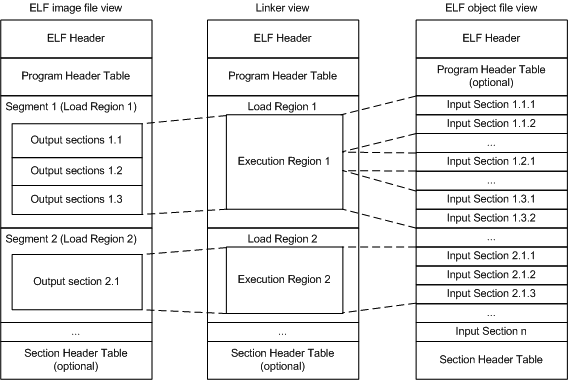
3.2 Input sections, output sections, regions, and program segments
An object or image file is constructed from a hierarchy of input sections, output sections, regions, and program segments.
- Input section
-
An input section is an individual section from an input object file. It contains code, initialized data, or describes a fragment of memory that is not initialized or that must be set to zero before the image can execute. These properties are represented by attributes such as RO, RW, XO, and ZI. These attributes are used by armlink to group input sections into bigger building blocks called output sections and regions.
- Output section
-
An output section is a group of input sections that have the same RO, RW, XO, or ZI attribute, and that are placed contiguously in memory by the linker. An output section has the same attributes as its constituent input sections. Within an output section, the input sections are sorted according to the section placement rules.
- Region
-
A region contains up to four output sections depending on the contents and the number of sections with different attributes. By default, the output sections in a region are sorted according to their attributes. Any XO output section is first, followed by the RO output section, then the RW output section, and finally the ZI output section. A region typically maps onto a physical memory device, such as ROM, RAM, or peripheral. You can change the order of output sections using scatter-loading.
- Program segment
-
A program segment corresponds to a load region and contains execution regions. Program segments hold information such as text and data.
3.3 Load view and execution view of an image
Image regions are placed in the system memory map at load time. The location of the regions in memory might change during execution.
- Load view
-
Describes each image region and section in terms of the address where it is located when the image is loaded into memory, that is, the location before image execution starts.
- Execution view
-
Describes each image region and section in terms of the address where it is located during image execution.

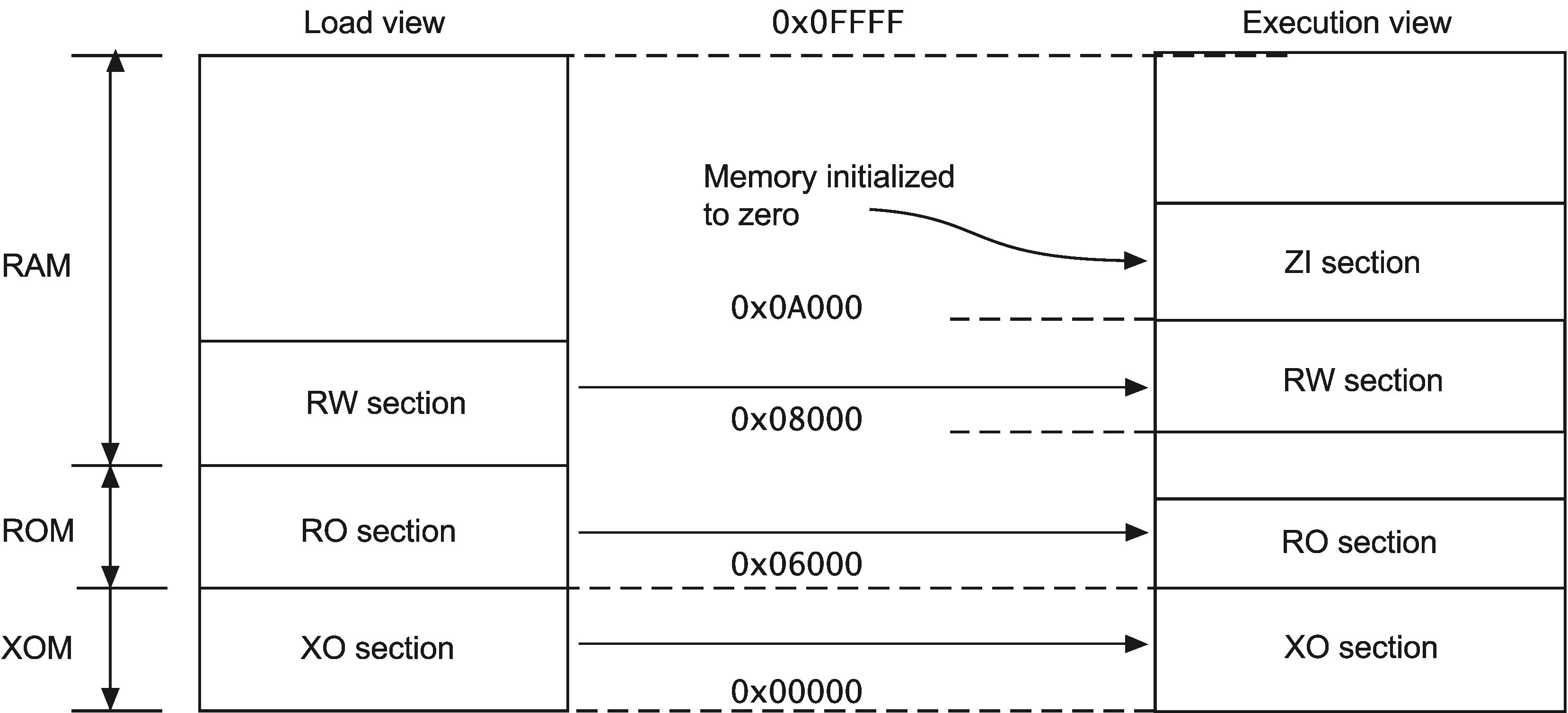
Table 3-1 Comparing load and execution views
| Load | Description | Execution | Description |
|---|---|---|---|
| Load address | The address where a section or region is loaded into memory before the image containing it starts executing. The load address of a section or a non-root region can differ from its execution address | Execution address | The address where a section or region is located while the image containing it is being executed |
| Load region | A load region describes the layout of a contiguous chunk of memory in load address space. | Execution region | An execution region describes the layout of a contiguous chunk of memory in execution address space. |
3.6 Type 1 image structure, one load region and contiguous execution regions
A Type 1 image consists of a single load region in the load view and three execution regions placed contiguously in the memory map.

armlink --ro_base 0x8000
Note
0x8000 is the default address, so you do not have to specify --ro_base for the example.Load view
Execution view
--ro_base address to specify the load and execution address of the region containing the RO output. The default address is 0x8000.--zi_base command-line option to specify the base address of a ZI execution region.Load view for images containing execute-only regions
--ro_base. The RO and RW output sections are placed consecutively and immediately after the XO section.Execution view for images containing execute-only regions
--ro_base. The RO, RW, and ZI execution regions are placed contiguously and immediately after the XO execution region.3.7 Type 2 image structure, one load region and non-contiguous execution regions
A Type 2 image consists of a single load region, and three execution regions in execution view. The RW execution region is not contiguous with the RO execution region.
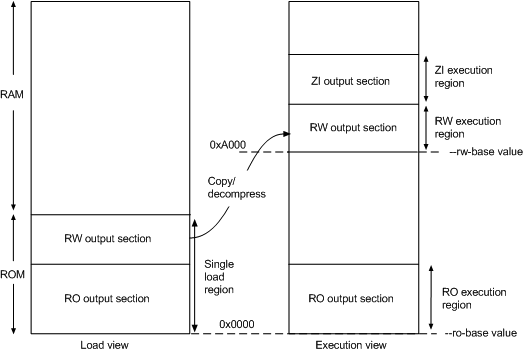
armlink --ro_base 0x0 --rw_base 0xA000
Load view
Execution view
--ro_base address to specify the load and execution address for the RO output section, and --rw_base address to specify the execution address of the RW output section. If you do not use the --ro_base option to specify the address, the default value of 0x8000 is used by armlink. For an embedded system, 0x0 is typical for the --ro_base value. If you do not use the --rw_base option to specify the address, the default is to place RW directly above RO (as in a Type 1 image).--zi_base command-line option to specify the base address of a ZI execution region.Note
Load view for images containing execute-only regions
--ro_base. The RO and RW output sections are placed consecutively and immediately after the XO section.Execution view for images containing execute-only regions
--ro_base. The RO execution region is placed contiguously and immediately after the XO execution region.--xo_base address, then the XO execution region is placed in a separate load region at the specified address.3.8 Type 3 image structure, multiple load regions and non-contiguous execution regions
A Type 3 image is similar to a Type 2 image except that the single load region is split into multiple root load regions.

armlink --split --ro_base 0x8000 --rw_base 0xE000
Load view
Execution view
--ro_baseaddress-
Instructs armlink to set the load and execution address of the region containing the RO section at a four-byte aligned
address, for example, the address of the first location in ROM. If you do not use the--ro_baseoption to specify the address, the default value of0x8000is used byarmlink. --rw_baseaddress-
Instructs armlink to set the execution address of the region containing the RW output section at a four-byte aligned
address. If this option is used with--split, this specifies both the load and execution addresses of the RW region, for example, a root region. --split-
Splits the default single load region, that contains both the RO and RW output sections, into two root load regions:
- One containing the RO output section.
- One containing the RW output section.
You can then place them separately using--ro_baseand--rw_base.
Load view for images containing XO sections
--ro_base. The RO and RW output sections are placed consecutively and immediately after the XO section.--split, then the one load region contains the XO and RO output sections, and the other contains the RW output section.Execution view for images containing XO sections
--ro_base. The RO execution region is placed contiguously and immediately after the XO execution region.--split, then the XO and RO execution regions are placed in the first load region, and the RW and ZI execution regions are placed in the second load region.--xo_base address, then the XO execution region is placed at the specified address in a separate load region from the RO execution region.3.11 Section placement with the linker
The linker places input sections in a specific order by default.
- By attribute as follows:
- Read-only code.
- Read-only data.
- Read-write code.
- Read-write data.
- Zero-initialized data.
- By input section name if they have the same attributes. Names are considered to be case-sensitive and are compared in alphabetical order using the ASCII collation sequence for characters.
- By a tie-breaker if they have the same attributes and section names. By default, it is the order that armlink processes the section. You can override this with the
FIRSTorLASTexecution region attribute.
Note
--tiebreaker=cmdline option uses a more predictable order based on the order the section appears on the command line.- One execute-only (XO) section if the execution region contains only XO sections.
- One RO section if the execution region contains read-only code or data.
- One RW section if the execution region contains read-write code or data.
- One ZI section if the execution region contains Zero-initialized data.
Note
--sort=algorithm command-line option. The linker might change the algorithm to minimize the amount of veneers generated if no algorithm is chosen.Handling unassigned sections
- If the sections must be placed at specific locations, then modify your scatter file to include specific module selectors and input section selectors as required.
- If the placement of the unassigned sections is not important, you can use one or more
.ANYmodule selectors with optional input section selectors.
Examples
LoadRegion 0x8000

{

    ExecRegion1 0x0000 0x4000

    {

        *(sections)

        *(moresections)

    }

    ExecRegion2 0x4000 0x2000

    {

        *(evenmoresections)

    }

}
3.12 Section placement with the FIRST and LAST attributes
You can make sure that a section is placed either first or last in its execution region. For example, you might want to make sure the section containing the vector table is placed first in the image.
- If you are not using scatter-loading, use the
--firstand--lastlinker command-line options to place input sections. - If you are using scatter-loading, use the attributes
FIRSTandLASTin the scatter file to mark the first and last input sections in an execution region if the placement order is important.However,FIRSTandLASTmust not violate the basic attribute sorting order. For example,FIRST RWis placed after any read-only code or read-only data.
3. Image Structure and Generation的更多相关文章
- GC那些事儿--Android内存优化第一弹
引言 接App优化之内存优化(序), 作为App优化系列中内存优化的一个小部分. 由于内存相关知识比较生涩, 内存优化中使用到的相关工具, 也有很多专有名词. 对Java内存管理, GC, Andro ...
- Android内存优化5 了解java GC 垃圾回收机制3
引言 接App优化之内存优化(序), 作为App优化系列中内存优化的一个小部分. 由于内存相关知识比较生涩, 内存优化中使用到的相关工具, 也有很多专有名词. 对Java内存管理, GC, Andro ...
- Apache Kafka: Next Generation Distributed Messaging System---reference
Introduction Apache Kafka is a distributed publish-subscribe messaging system. It was originally dev ...
- JVM Specification 9th Edition (3) Chapter 2. The Structure of the Java Virtual Machine
Chapter 2. The Structure of the Java Virtual Machine 内容列表 2.1. The class File Format (class文件的格式) 2. ...
- 1.2 the structure of a compiler
Compiler 1.2 the structure of a compiler Compiler : analysis and synthesis syntactically 语法上的 sema ...
- 《The challenge of realistic music generation: modelling raw audio at scale》论文阅读笔记
The challenge of realistic music generation: modelling raw audio at scale 作者:Deep mind三位大神 出处:NIPS ...
- 《SONG FROM PI: A MUSICALLY PLAUSIBLE NETWORK FOR POP MUSIC GENERATION》论文笔记
出处:ICLR 2017 Motivation 提出一个通用的基于RNN的pop music生成模型,在层次结构中封装了先验乐理知识(prior knowledge about how pop mus ...
- 《MIDINET: A CONVOLUTIONAL GENERATIVE ADVERSARIAL NETWORK FOR SYMBOLIC-DOMAIN MUSIC GENERATION》论文阅读笔记
出处 arXiv.org (引用量暂时只有3,too new)2017.7 SourceCode:https://github.com/RichardYang40148/MidiNet Abstrac ...
- 《MuseGAN: Multi-track Sequential Generative Adversarial Networks for Symbolic Music Generation and Accompaniment》论文阅读笔记
出处:2018 AAAI SourceCode:https://github.com/salu133445/musegan abstract: (写得不错 值得借鉴)重点阐述了生成音乐和生成图片,视频 ...
随机推荐
- js处理浮点数一点思考
作为一名web开发人员,如果我们做到了涉及到费用加加减减的需求 难免会遇到浮点数的计算,就会遇到浮点数精度误差的问题 假设场景: 1.接口给你的金额单位是分,页面需要展示的金额单位为元. 最后落档金额 ...
- NOIp2018集训test-10-19 (bike day5)
Bike老爷问了好几天到底要怎样简单的题目你们才能AK啊终于在他每天降难度直到要走了才出了一套我们能AK的题.虽然前几天的题换成llj肯定随便AK. 其实最近有点方虽然通常最后都写完了把该拿的分拿了该 ...
- WebBug靶场基础篇 — 03
基础篇 6 - 16 关... 在记录之前,先说一件事 = =! 小学生真多 = =!好心提供一个靶场,玩玩就算了,他挂黑页 ?现在好了,以后这个靶场不对外啊!你高兴了?爽了吧? 都是新手过来的,好心 ...
- thinkphp5选择redis库,让数据存入不同的redis库
thinkphp5选择redis库,让数据存入不同的redis库 在登录的时候把个人信息存入redis,选择redis库1号库, db1 读取redis里面的个人信息
- Mina(一)
配置log4j注意事项: Log4J 1.2 users: slf4j-api.jar, slf4j-log4j12.jar, and Log4J 1.2.x slf4j-log4j*.jar要对应 ...
- CSS实现背景图片固定
body { background-image:url('bg.jpg'); background-repeat: no-repeat; background-attachment: fixed; / ...
- 洛谷 P4173 残缺的字符串 (FFT)
题目链接:P4173 残缺的字符串 题意 给定长度为 \(m\) 的模式串和长度为 \(n\) 的目标串,两个串都带有通配符,求所有匹配的位置. 思路 FFT 带有通配符的字符串匹配问题. 设模式串为 ...
- 常用命令--sed
sed -n '/2019-07-24/,/2019-07-25/p' my.log sed -n '/2019-07-25 16:51:23,699/,/2019-07-25 16:51:38,79 ...
- JDK在Win10与Ubuntu下的安装与配置
本文首发于cartoon的博客 转载请注明出处:https://cartoonyu.github.io/cartoon-blog 近段时间把自己电脑(win).虚拟机(Ubun ...
- Redis数据结构之压缩列表-ziplist
为了节约内存,在zset和hash容器对象元素个数较少时,Redis会采用压缩列表(ziplist)进行存储. 压缩列表是一块连续的内存空间,元素之间紧挨着存储,不存在冗余 一个压缩列表可以包含任意多 ...