
PopupWindow 使用
昨天马失前蹄,为了做一个小键盘,耽误了两个小时,记录一下心路历程
1.关于需求与选择
需求:
点击一个按钮,弹出一个小键盘(类似于输入法键盘)
选择:
(1)方案一:KeyboardView
这是百度之后选的第一个方案,试用之后发现,点击每个按键都会闪现一个小空白框(可能是提示按键字符之类的,具体没有验证),后来试着把KeyboardView放在一个PopupWindow里面后,点击KeyboardView,应用崩溃,错误提示(addWindow Error)。大意是说,PopupWindow是subWindow,不能在subWindow里面再继续addWindow。
(2)方案二:Button + PopupWindow
放弃KeyboardView之后,乖乖在xml里面放了N个Button,问题点就在PopupWindow的弹出,下面记录一下使用的Tips。
2.PopupWindow的创建
(1)页面设计
 <?xml version="1.0" encoding="utf-8"?>

 <LinearLayout xmlns:android="http://schemas.android.com/apk/res/android"

     android:id="@+id/keypad_dialog"

     android:layout_width="match_parent"

     android:orientation="vertical"

     android:layout_height="wrap_content">

     <LinearLayout

         android:layout_width="match_parent"

         android:layout_height="wrap_content"

         android:weightSum="3">

         <Button

             android:layout_width="match_parent"

             android:layout_height="wrap_content"

             android:text="1"

             android:id="@+id/btn1"

             android:layout_weight="1"

             android:soundEffectsEnabled="true"/>

         <Button

             android:layout_width="match_parent"

             android:layout_height="wrap_content"

             android:text="2"

             android:id="@+id/btn2"

             android:layout_weight="1"

             android:soundEffectsEnabled="true"/>

         <Button

             android:layout_width="match_parent"

             android:layout_height="wrap_content"

             android:text="3"

             android:id="@+id/btn3"

             android:layout_weight="1"

             android:soundEffectsEnabled="true"/>

     </LinearLayout>

     <LinearLayout

         android:layout_width="match_parent"

         android:layout_height="wrap_content"

         android:weightSum="3">

         <Button

             android:layout_width="match_parent"

             android:layout_height="wrap_content"

             android:text="4"

             android:id="@+id/btn4"

             android:layout_weight="1"

             android:soundEffectsEnabled="true"/>

         <Button

             android:layout_width="match_parent"

             android:layout_height="wrap_content"

             android:text="5"

             android:id="@+id/btn5"

             android:layout_weight="1"

             android:soundEffectsEnabled="true"/>

         <Button

             android:layout_width="match_parent"

             android:layout_height="wrap_content"

             android:text="6"

             android:id="@+id/btn6"

             android:layout_weight="1"

             android:soundEffectsEnabled="true"/>

     </LinearLayout>

     <LinearLayout

         android:layout_width="match_parent"

         android:layout_height="wrap_content"

         android:weightSum="3">

         <Button

             android:layout_width="match_parent"

             android:layout_height="wrap_content"

             android:text="7"

             android:id="@+id/btn7"

             android:layout_weight="1"

             android:soundEffectsEnabled="true"/>

         <Button

             android:layout_width="match_parent"

             android:layout_height="wrap_content"

             android:text="8"

             android:id="@+id/btn8"

             android:layout_weight="1"

             android:soundEffectsEnabled="true"/>

         <Button

             android:layout_width="match_parent"

             android:layout_height="wrap_content"

             android:text="9"

             android:id="@+id/btn9"

             android:layout_weight="1"

             android:soundEffectsEnabled="true"/>

     </LinearLayout>

     <LinearLayout

         android:layout_width="match_parent"

         android:layout_height="wrap_content"

         android:orientation="horizontal"

         android:weightSum="3">

         <Button

             android:layout_width="match_parent"

             android:layout_height="match_parent"

             android:layout_margin="3dp"

             android:text="Cancel"

             android:textAllCaps="false"

             android:background="#FF0000"

             android:id="@+id/btnCancel"

             android:layout_weight="1"

             android:soundEffectsEnabled="true"/>

         <LinearLayout

             android:layout_width="match_parent"

             android:layout_height="wrap_content"

             android:orientation="vertical"

             android:layout_weight="1"

             android:weightSum="2">

             <Button

                 android:layout_width="match_parent"

                 android:layout_height="wrap_content"

                 android:text="0"

                 android:id="@+id/btn0"

                 android:layout_weight="1"

                 android:soundEffectsEnabled="true"/>

             <Button

                 android:layout_width="match_parent"

                 android:layout_height="wrap_content"

                 android:text="Clear"

                 android:layout_margin="3dp"

                 android:textAllCaps="false"

                 android:background="#FFFF00"

                 android:id="@+id/btnClear"

                 android:layout_weight="1"

                 android:soundEffectsEnabled="true"/>

         </LinearLayout>

         <Button

             android:layout_width="match_parent"

             android:layout_height="match_parent"

             android:text="Enter"

             android:layout_margin="3dp"

             android:textAllCaps="false"

             android:id="@+id/btnEnter"

             android:layout_weight="1"

             android:background="#00FF00"

             android:soundEffectsEnabled="true"/>

     </LinearLayout>

 </LinearLayout>
(2)逻辑设置
 package com.pax.dialogtest;

 import android.content.Context;

 import android.graphics.drawable.BitmapDrawable;

 import android.util.Log;

 import android.view.Gravity;

 import android.view.LayoutInflater;

 import android.view.MotionEvent;

 import android.view.View;

 import android.view.ViewGroup;

 import android.widget.Button;

 import android.widget.PopupWindow;

 /**

  * Created by yanina on 12/12/2016.

  */

 public class KeyPadDialog extends PopupWindow implements View.OnClickListener{

     private View parent;

     public KeyPadDialog(Context context, View parent){

         super(context);

         this.parent = parent;

         //set content view

         LayoutInflater layoutInflater = (LayoutInflater) context.getSystemService(Context.LAYOUT_INFLATER_SERVICE);

         View contentView = layoutInflater.inflate(R.layout.keypad_dialog, null);

         setContentView(contentView);

         //set width and height

         setWidth(ViewGroup.LayoutParams.MATCH_PARENT);

         setHeight(ViewGroup.LayoutParams.WRAP_CONTENT);

         //

         setOutsideTouchable(false); //

         setFocusable(false); // Not allow to dismiss PopupWindow by touching outside

         setTouchable(true);

         setTouchInterceptor(new View.OnTouchListener() {

             @Override

             public boolean onTouch(View v, MotionEvent event) {

                 return false;

             }

         });

 //        this.setBackgroundDrawable(new BitmapDrawable());

         contentView.findViewById(R.id.btn0).setOnClickListener(this);

         contentView.findViewById(R.id.btn1).setOnClickListener(this);

         contentView.findViewById(R.id.btn2).setOnClickListener(this);

         contentView.findViewById(R.id.btn3).setOnClickListener(this);

         contentView.findViewById(R.id.btn4).setOnClickListener(this);

         contentView.findViewById(R.id.btn5).setOnClickListener(this);

         contentView.findViewById(R.id.btn6).setOnClickListener(this);

         contentView.findViewById(R.id.btn7).setOnClickListener(this);

         contentView.findViewById(R.id.btn8).setOnClickListener(this);

         contentView.findViewById(R.id.btn9).setOnClickListener(this);

         contentView.findViewById(R.id.btnCancel).setOnClickListener(this);

         contentView.findViewById(R.id.btnClear).setOnClickListener(this);

         contentView.findViewById(R.id.btnEnter).setOnClickListener(this);

     }

     public void show(){

         // Show at bottom of parent

         this.showAtLocation(parent, Gravity.BOTTOM,0,0);

         Log.d("DialogTest","ShowDialog");

     }

     @Override

     public void onClick(View view) {

         Log.d("DialogTest","key: "+((Button)view).getText());

         switch (view.getId()){

             case R.id.btn0:

             case R.id.btn1:

             case R.id.btn2:

             case R.id.btn3:

             case R.id.btn4:

             case R.id.btn5:

             case R.id.btn6:

             case R.id.btn7:

             case R.id.btn8:

             case R.id.btn9:

                 break;

             case R.id.btnCancel:

                 break;

             case R.id.btnClear:

                 break;

             case R.id.btnEnter:

                 break;

             default:

                 break;

         }

     }

 }
注意点:
PopupWindow通过设置一些属性,可以控制是否通过点击外部区域来使窗口消失。
 // Not allow to dismiss PopupWindow by touching outside

 setFocusable(false);

 setTouchable(true);

 setOutsideTouchable(false);
三个属性这样设置就可以达到一定的效果。
这样PopupWindow在触摸到外部区域后也不会消失。当然外部区域还是可以接收touch事件的,比如外部区域中的Button还是可以被点击。
3.MainActivity
package com.pax.dialogtest;

import android.content.Context;

import android.support.v7.app.AppCompatActivity;

import android.os.Bundle;

import android.view.LayoutInflater;

import android.view.View;

import android.widget.Button;

public class MainActivity extends AppCompatActivity {

    private View mView;

    KeyPadDialog dialog;

    @Override

    protected void onCreate(Bundle savedInstanceState) {

        super.onCreate(savedInstanceState);

        LayoutInflater layoutInflater = (LayoutInflater) getSystemService(Context.LAYOUT_INFLATER_SERVICE);

        mView = layoutInflater.inflate(

                R.layout.activity_main, null);

        setContentView(mView);

        Button button = (Button)findViewById(R.id.buttonPanel);

        button.setOnClickListener(new View.OnClickListener() {

            @Override

            public void onClick(View view) {

                dialog = new KeyPadDialog(MainActivity.this,mView);

                dialog.show();

            }

        });

    }

    @Override

    protected void onResume() {

        super.onResume();

    }

}
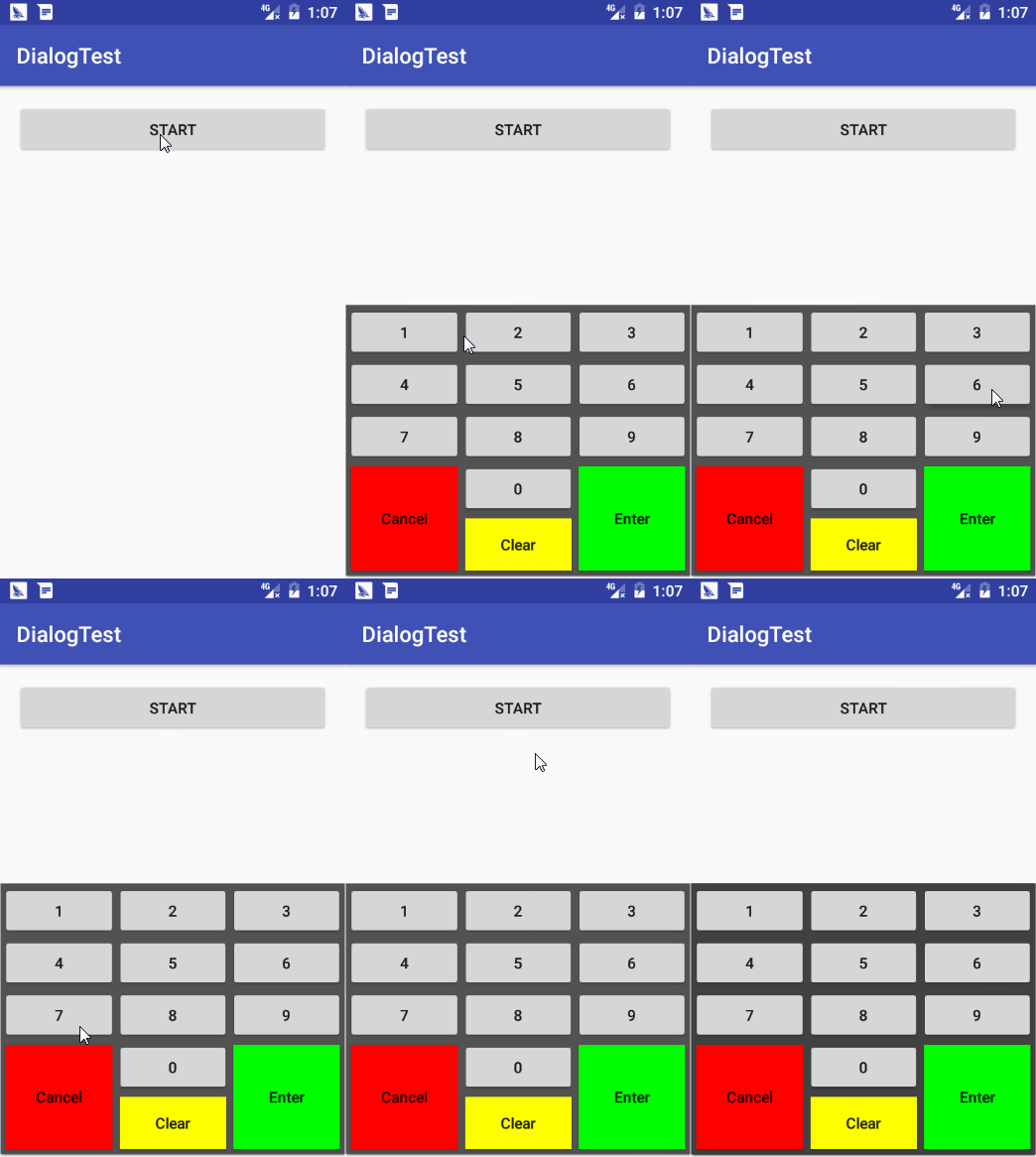
4.效果图
PopupWindow 使用的更多相关文章
- Android PopupWindow Dialog 关于 is your activity running 崩溃详解
Android PopupWindow Dialog 关于 is your activity running 崩溃详解 [TOC] 起因 对于 PopupWindow Dialog 需要 Activi ...
- Android popupwindow使用心得(一)
最近项目中好多地方用到popupwindow,感觉这个控件还是非常重要的.所以把使用心得总结下,废话不多说,直接上代码. public class MainActivity extends Activ ...
- 不得不吐槽的Android PopupWindow的几个痛点(实现带箭头的上下文菜单遇到的坑)
说到PopupWindow,我个人感觉是又爱又恨,没有深入使用之前总觉得这个东西应该很简单,很好用,但是真正使用PopupWindow实现一些效果的时候总会遇到一些问题,但是即便是人家的api有问题, ...
- 仿QQ空间根据位置弹出PopupWindow显示更多操作效果
我们打开QQ空间的时候有个箭头按钮点击之后弹出PopupWindow会根据位置的变化显示在箭头的上方还是下方,比普通的PopupWindow弹在屏幕中间显示好看的多. 先看QQ空间效果图: ...
- 自定义PopupWindow
PopupWindow,一个弹出窗口控件,可以用来显示任意View,而且会浮动在当前activity的顶部 自定义PopupWindow. 1.extends PopupWindow 2.构造方法中可 ...
- popupwindow的基本使用以及基本动画效果
1.创建一个popupwindow view的布局文件自己写一个就好了,这里就不说了 View view= LayoutInflater.from(context).inflate(R.layout. ...
- Android -- PopupWindow(其中嵌套ListView 可以被点击)
1. 效果图
- Android开发学习之路-PopupWindow和仿QQ左滑删除
这周作业,要做一个类似QQ的左滑删除效果的ListView,因为不想给每个item都放一个按钮,所以决定用PopupWindow,这里记录一下 先放一下效果图: 先说明一下这里面的问题: ①没有做到像 ...
- android标题栏上面弹出提示框(二) PopupWindow实现,带动画效果
需求:上次用TextView写了一个从标题栏下面弹出的提示框.android标题栏下面弹出提示框(一) TextView实现,带动画效果, 总在找事情做的产品经理又提出了奇葩的需求.之前在通知栏显示 ...
随机推荐
- 怎么实现ZBrush 4R7中界面视窗的快速转换
本篇教程介绍ZBrush® 4R7界面的基本操作之转换界面视窗, 教程属于入门教程可以帮助新手快速入门.因为ZBrush工 作界面不同于其他我们所熟知的3D软件,初次接触ZBrush的时候难免会有所困 ...
- ubuntu14.04 yuv文件的播放及视频信息的查看
1.安装ffmpeg sudo add-apt-repository ppa:mc3man/trusty-media sudo apt-get update sudo apt-get install ...
- [LeetCode] Design Tic-Tac-Toe 设计井字棋游戏
Design a Tic-tac-toe game that is played between two players on a n x n grid. You may assume the fol ...
- ceph hadoop spark 大数据处理
http://docs.ceph.com/docs/giant/cephfs/hadoop/ https://indico.cern.ch/event/524549/contributions/218 ...
- java的反射
JAVA反射机制是在运行状态中,对于任意一个类,都能够知道这个类的所有属性和方法:对于任意一个对象,都能够调用它的任意方法和属性:这种动态获取信息以及动态调用对象方法的功能称为java语言的反射机制. ...
- 【BZOJ 1061】【Vijos 1825】【NOI 2008】志愿者招募
http://www.lydsy.com/JudgeOnline/problem.php?id=1061 https://vijos.org/p/1825 直接上姜爷论文... #include< ...
- 在javascript中使用Json
jSON是JavaScript面向对象语法的一个子集.由于JSON是JavaScript的一个子集,因此它可清晰的运用于此语言中. 文本生成json对象,必须在外面加一对括号. js 代码 var m ...
- Android基础测试题(四)
看了前两道题大家有没有发现,测试题少了(一),大家猜猜测试题(一)是什么? Android基础测试题(四): 需求: 建一个方法,格式化输出2016-11-14 10:15:26格式的当前时间,然后截 ...
- Django models .all .values .values_list 几种数据查询结果的对比
Django models .all .values .values_list 几种数据查询结果的对比
- javascript随机打乱数组
var arr=[]; ;i<;i++){ arr[i]=i; } arr.sort(function(){ return 0.5 - Math.random() }) var str=arr. ...