
win7 powershell配色方案
首先我是参考微软的word的, look~
要配置powershell很简单, 就几步
1.显示 Windows PowerShell 配置文件的路径
$profile
2.确定是否已经在系统上创建了 Windows PowerShell 配置文件,请键入:
test-path $profile
如果存在配置文件,则响应为 True:否则响应为 False。(我的显示是False)
3.创建 Windows PowerShell 配置文件,请键入:
new-item -path $profile -itemtype file -force
4.在记事本中打开配置文件,请键入:
notepad $profile
然后把下面的配置方案扔进去
set-alias ll         Get-ChildItemColor

function prompt

{

    $my_path = $(get-location).toString()

    $my_pos = ($my_path).LastIndexOf("\") + 1

    if( $my_pos -eq ($my_path).Length ) { $my_path_tail = $my_path }

    else { $my_path_tail = ($my_path).SubString( $my_pos, ($my_path).Length - $my_pos ) }

    Write-Host ("[") -nonewline -foregroundcolor 'Green'

    Write-Host ("Chenglee") -nonewline -foregroundcolor 'Red'

    Write-Host ("@") -nonewline -foregroundcolor 'Yellow'

    Write-Host ("WIN7 ") -nonewline -foregroundcolor 'Magenta'

    Write-Host ($my_path_tail) -nonewline -foregroundcolor 'Blue'

    Write-Host ("]#") -nonewline -foregroundcolor 'Green'

    return " "

}

function Get-ChildItemColor {

<#

.Synopsis

  Returns childitems with colors by type.

.Description

  This function wraps Get-ChildItem and tries to output the results

  color-coded by type:

  Directories - Cyan

  Compressed - Red

  Executables - Green

  Text Files - Gray

  Image Files - Magenta

  Others - Gray

.ReturnValue

  All objects returned by Get-ChildItem are passed down the pipeline

  unmodified.

.Notes

  NAME:      Get-ChildItemColor

  AUTHOR:    Tojo2000 <tojo2000@tojo2000.com>

#>

  $regex_opts = ([System.Text.RegularExpressions.RegexOptions]::IgnoreCase -bor [System.Text.RegularExpressions.RegexOptions]::Compiled)

  $fore = $Host.UI.RawUI.ForegroundColor

  $compressed = New-Object System.Text.RegularExpressions.Regex(

      '\.(zip|tar|gz|rar|7z|tgz|bz2)', $regex_opts)

  $executable = New-Object System.Text.RegularExpressions.Regex(

      '\.(exe|bat|cmd|py|pl|ps1|psm1|vbs|rb|reg|sh)', $regex_opts)

  $text_files = New-Object System.Text.RegularExpressions.Regex(

      '\.(txt|cfg|conf|ini|csv|log)', $regex_opts)

  $image_files = New-Object System.Text.RegularExpressions.Regex(

      '\.(bmp|jpg|png|gif|jpeg)', $regex_opts)

  Invoke-Expression ("Get-ChildItem $args") |

    %{

      if ($_.GetType().Name -eq 'DirectoryInfo') { $Host.UI.RawUI.ForegroundColor = 'Cyan' }

      elseif ($compressed.IsMatch($_.Name)) { $Host.UI.RawUI.ForegroundColor = 'Red' }

      elseif ($executable.IsMatch($_.Name)) { $Host.UI.RawUI.ForegroundColor = 'Green' }

      elseif ($text_files.IsMatch($_.Name)) { $Host.UI.RawUI.ForegroundColor = 'Gray' }

      elseif ($image_files.IsMatch($_.Name)) { $Host.UI.RawUI.ForegroundColor = 'Magenta' }

      else { $Host.UI.RawUI.ForegroundColor = 'Gray' }

      echo $_

      $Host.UI.RawUI.ForegroundColor = $fore

    }

}

function Show-Color( [System.ConsoleColor] $color )

{

    $fore = $Host.UI.RawUI.ForegroundColor

    $Host.UI.RawUI.ForegroundColor = $color

    echo ($color).toString()

    $Host.UI.RawUI.ForegroundColor = $fore

}

function Show-AllColor

{

    Show-Color('Black')

    Show-Color('DarkBlue')

    Show-Color('DarkGreen')

    Show-Color('DarkCyan')

    Show-Color('DarkRed')

    Show-Color('DarkMagenta')

    Show-Color('DarkYellow')

    Show-Color('Gray')

    Show-Color('DarkGray')

    Show-Color('Blue')

    Show-Color('Green')

    Show-Color('Cyan')

    Show-Color('Red')

    Show-Color('Magenta')

    Show-Color('Yellow')

    Show-Color('White')

}
启动powershell(可能会报错, 不管它)执行下面命令:
Set-ExecutionPolicy RemoteSigned
选择Y
OK!
重新启动powershell!
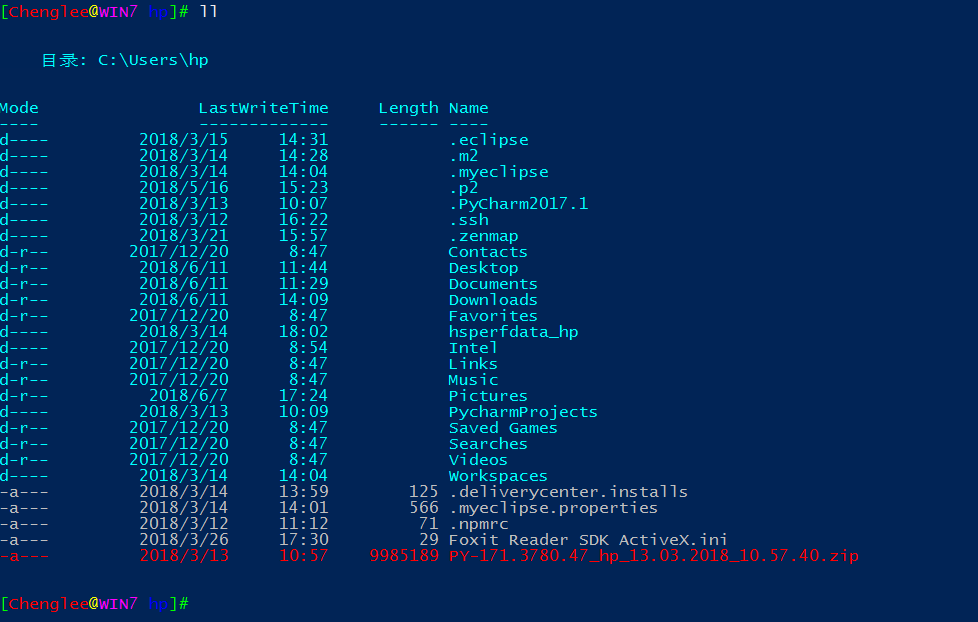
。
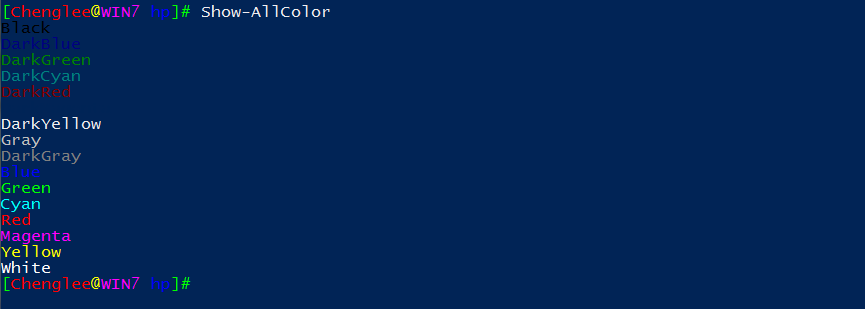
以后要修改配置方案的话直接换C:\Users\hp\Documents\WindowsPowerShell目录下的Microsoft.PowerShell_profile.ps1文件即可。
win7 powershell配色方案的更多相关文章
- 解决提示“配色方案已更改为Windows7 Basic”
WIN7是很多用户都用过的系统,是由微软推出的.下面就说一个小技巧. 如何解决Win7系统提示:“配色方案已更改为Windows 7 Basic”解决方案. 更改Win7配色方案 首先,右击桌面空 ...
- QT Creater 配色方案及下载
打开QT Creater的工具--选项--文本编辑器--字体和颜色,复制一份配色方案:Vim (dark) ->Vim (dark) (copy) 更改想更改的任何内容的配色.其中,修改后的文件 ...
- 分享3个Putty配色方案【转】
本文转载自:https://www.coder4.com/archives/1506 分享3个Putty配色方案 4 Replies 虽然服务器都是Linux的,平时也基本用Linux,但是难免还是要 ...
- CodeBlocks 配色方案设置
最终效果(官方sublime修改版) 官方配色 codeblocks是一个功能很强大编程软件,我们在安装codeblocks后软件默认的是白底黑字界面,这种界面在长时间写代码时会对眼睛造成很大伤害,增 ...
- 改变linux默认配色方案(dircolors和dircolors-solarized使用)
前言 前几天刚买了阿里云的云服务器,今天使用putty进入服务器,发现linux默认的bash配色实在太丑. 特别是文件夹显示为深蓝色,到了白天,和黑色背景一搭配,根本看不清文字. 好在在github ...
- VisualStudio配色方案
最近发现一个很神奇的网站,可以方便的为VisualStudio配色:Studio Styles - Visual Studio color schemes 可以下载一份自己喜欢的配色方案 如果还不满意 ...
- 好看的IDE配色方案让代码看起来不再那么凶猛了
写这篇小文的初衷是,笔者是原教旨主义者,一直坚持用IDE默认的配色方案.另外也觉得网上黑色系的配色方案太过bling bling了.但今天尝试用新的配色方案后,兴奋地发现对代码的好感度大幅提升. 嗯, ...
- Sourceinsight最佳配色方案及颜色字体调整方法
在Ubuntu下面用Gedit有一款比较好看的配色,应该是Darkblue.按照那个样子在SI里面做了一个差不多的,按个人喜好,背景色换成黑色,如下所示: 配色的方案文件可以从此处链接免费下载: 配色 ...
- Visual Studio配色方案
Eclipse开源工具和VS在诸多方面真的是差距非常大,无奈Java编程,使用VS非常麻烦.所以只能选择Eclipse 但是Eclipse的系统配色,又实在是不舒服,于是抽时间,从VS上抠了一份默认的 ...
随机推荐
- C++ 类定义
C++ 类定义 定义一个类,本质上是定义一个数据类型的蓝图.这实际上并没有定义任何数据,但它定义了类的名称意味着什么,也就是说,它定义了类的对象包括了什么,以及可以在这个对象上执行哪些操作. 类定义是 ...
- C# sapnco支持.net 4.5了,真是个意外的发现
意外篇: 需要用C#写一个RFC直连的类库,需要引用sapnco.dll sapnco_utils.dll两个文件 之前都是从网上下载的sapnco3.0,引用开发,在win10机器上使用没有问题 ...
- sql注入学习笔记,什么是sql注入,如何预防sql注入,如何寻找sql注入漏洞,如何注入sql攻击 (原)
(整篇文章废话很多,但其实是为了新手能更好的了解这个sql注入是什么,需要学习的是文章最后关于如何预防sql注入) (整篇文章废话很多,但其实是为了新手能更好的了解这个sql注入是什么,需要学习的是文 ...
- react native中使用ScrollableTabView
第一步,下载依赖 npm install react-native-scrollable-tab-view --save 第二步,引入 import ScrollableTabView, { Scro ...
- .NET 黑魔法 - asp.net core 日志系统
asp.net core 里如何记录日志呢? 这要从asp.net core的依赖注入说起,在asp.net core里的依赖注入真是无所不在,各种面向切面的接口与事件. 好吧,来点干货. 首先,我们 ...
- gitlab覆盖率
https://danny50610.blogspot.com/2017/09/gitlab-ci-phpunit-coverage.html
- IntelliJ IDEA总是提示Cannot resolve symbol的解决方案
- tcl脚本
tcl,全名tool command language,是一种通用的工具语言. 1)每个命令之间,通过换行符或者分号隔开: 2)tcl的每个命令包含一个或者多个单词,默认第一个单词表示命令,第二个单词 ...
- Lua 可变参数之arg与select
function TestFunc(...) local arg = { ... } --Lua .2以后不再支持默认arg参数,{}与...之间要有空格 print("输入的参数个数:&q ...
- html5-css的引入
<!DOCTYPE html><html lang="en"><head> <meta charset="UTF-8&qu ...