
Java NIO 读取文件、写入文件、读取写入混合
前言
Java NIO(new/inputstream outputstream)使用通道、缓冲来操作流,所以要深刻理解这些概念,尤其是,缓冲中的数据结构(当前位置(position)、限制(limit)、容量(capacity)),这些知识点要通过写程序慢慢体会。
NIO vs 传统IO
NIO是面向缓冲、通道的;传统IO面向流
通道是双向的既可以写、也可以读;传统IO只能是单向的
NIO可以设置为异步;传统IO只能是阻塞,同步的
缓冲区结构图
NIO是面向缓冲区的,缓冲区可以理解为一块内存,有大小。缓冲区有位置、界限、容量几个概念。
capacity:容量,缓冲区的大小
limit:限制,表示最大的可读写的数量
position:当前位置,每当读写,当前位置都会加一
flip和clear方法,内部就操作这三个变量。
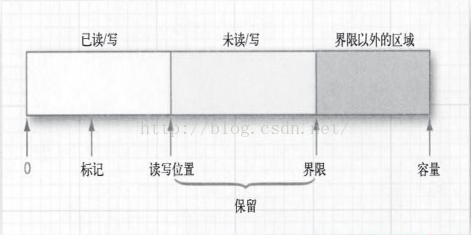
缓冲区常用方法
clear:将当前位置设置为0,限制设置为容量,目的是尽最大可能让字节,由通道读取到缓冲中
flip:当前位置置为限制,然后将当前位置置为0,目的是将有数据部分的字节,由缓冲写入到通道中。通常用在读与写之间。
读写文件代码
 package com.nio;

 import java.io.*;

 import java.nio.ByteBuffer;

 import java.nio.channels.FileChannel;

 import java.nio.charset.Charset;

 public class TestJavaNio {

     public static String pathname = "d://read.txt";

     public static String filename = "d://write.txt";

     @SuppressWarnings("resource")

     public static void main(String[] args) {

         readNIO();

         writeNIO();

         //testReadAndWriteNIO();

     }

     public static void readNIO() {

         FileInputStream fin = null;

         try {

             fin = new FileInputStream(new File(pathname));

             FileChannel channel = fin.getChannel();

             int capacity = 1000;// 字节

             ByteBuffer bf = ByteBuffer.allocate(capacity);

             System.out.println("限制是:" + bf.limit() + ",容量是:" + bf.capacity() + " ,位置是:" + bf.position());

             int length = -1;

             while ((length = channel.read(bf)) != -1) {

                 /*

                  * 注意,读取后,将位置置为0,将limit置为容量, 以备下次读入到字节缓冲中,从0开始存储

                  */

                 bf.clear();

                 byte[] bytes = bf.array();

                 System.out.println("start..............");

                 String str = new String(bytes, 0, length);

                 System.out.println(str);

                 //System.out.write(bytes, 0, length);

                 System.out.println("end................");

                 System.out.println("限制是:" + bf.limit() + "容量是:" + bf.capacity() + "位置是:" + bf.position());

             }

             channel.close();

         } catch (FileNotFoundException e) {

             e.printStackTrace();

         } catch (IOException e) {

             e.printStackTrace();

         } finally {

             if (fin != null) {

                 try {

                     fin.close();

                 } catch (IOException e) {

                     e.printStackTrace();

                 }

             }

         }

     }

     public static void writeNIO() {

         FileOutputStream fos = null;

         try {

             fos = new FileOutputStream(new File(filename));

             FileChannel channel = fos.getChannel();

             ByteBuffer src = Charset.forName("utf8").encode("你好你好你好你好你好");

             // 字节缓冲的容量和limit会随着数据长度变化,不是固定不变的

             System.out.println("初始化容量和limit:" + src.capacity() + ","

                     + src.limit());

             int length = 0;

             while ((length = channel.write(src)) != 0) {

                 /*

                  * 注意,这里不需要clear,将缓冲中的数据写入到通道中后 第二次接着上一次的顺序往下读

                  */

                 System.out.println("写入长度:" + length);

             }

         } catch (FileNotFoundException e) {

             e.printStackTrace();

         } catch (IOException e) {

             e.printStackTrace();

         } finally {

             if (fos != null) {

                 try {

                     fos.close();

                 } catch (IOException e) {

                     e.printStackTrace();

                 }

             }

         }

     }

     public static void testReadAndWriteNIO() {

         FileInputStream fin = null;

         FileOutputStream fos = null;

         try {

             fin = new FileInputStream(new File(pathname));

             FileChannel channel = fin.getChannel();

             int capacity = 100;// 字节

             ByteBuffer bf = ByteBuffer.allocate(capacity);

             System.out.println("限制是:" + bf.limit() + "容量是:" + bf.capacity() + "位置是:" + bf.position());

             int length = -1;

             fos = new FileOutputStream(new File(filename));

             FileChannel outchannel = fos.getChannel();

             while ((length = channel.read(bf)) != -1) {

                 //将当前位置置为limit,然后设置当前位置为0,也就是从0到limit这块,都写入到同道中

                 bf.flip();

                 int outlength = 0;

                 while ((outlength = outchannel.write(bf)) != 0) {

                     System.out.println("读," + length + "写," + outlength);

                 }

                 //将当前位置置为0,然后设置limit为容量,也就是从0到limit(容量)这块,

                 //都可以利用,通道读取的数据存储到

                 //0到limit这块

                 bf.clear();

             }

         } catch (FileNotFoundException e) {

             e.printStackTrace();

         } catch (IOException e) {

             e.printStackTrace();

         } finally {

             if (fin != null) {

                 try {

                     fin.close();

                 } catch (IOException e) {

                     e.printStackTrace();

                 }

             }

             if (fos != null) {

                 try {

                     fos.close();

                 } catch (IOException e) {

                     e.printStackTrace();

                 }

             }

         }

     }

 }
Java NIO 读取文件、写入文件、读取写入混合的更多相关文章
- JAVA NIO FileChannel 内存映射文件
文件通道总是阻塞式的. 文件通道不能创建,只能通过(RandomAccessFile.FileInputStream.FileOutputStream)getChannel()获得,具有与File ...
- Java NIO之内存映射文件——MappedByteBuffer
大多数操作系统都可以利用虚拟内存实现将一个文件或者文件的一部分"映射"到内存中.然后,这个文件就可以当作是内存数组来访问,这比传统的文件要快得多. 内存映射文件的一个关键优势是操作 ...
- Java IO和Java NIO 和通道 在文件拷贝上的性能差异分析
1. 在JAVA传统的IO系统中,读取磁盘文件数据的过程如下: 以FileInputStream类为例,该类有一个read(byte b[])方法,byte b[]是我们要存储读取到用户空间的缓冲区 ...
- java nio通过ByteBuffer输出文件信息
1.通过ByteBuffer的get()方法每次读取一个字节转换成char类型输出. fc = new FileInputStream("src/demo20/data.txt") ...
- Java NIO FileVisitor 高效删除文件
在公司项目中,由于做个二维码扫码平台项目,预计每天产生的二维码图片达到十几G,所以要做个定时清理任务来定时清理图片,根据不同场景保留图片,规则是:1.二维码统一登录图片几个小时有效 2.电子名片二 ...
- Java NIO(四)文件通道
文件通道 通道是访问I/O服务的导管,I/O可以分为广义的两大类:File I/O和Stream I/O.那么相应的,通道也有两种类型,它们是文件(File)通道和套接字(Socket)通道.文件通道 ...
- java nio 快速read大文件
If you want to make your first example faster FileChannel inChannel = new FileInputStream(fileName). ...
- Java NIO学习笔记五 FileChannel(文件通道)
Java NIO FileChannel Java NIO FileChannel是连接文件的通道.使用FileChannel,您可以从文件中读取数据和将数据写入文件.Java NIO FileCha ...
- Java NIO 完全学习笔记(转)
本篇博客依照 Java NIO Tutorial翻译,算是学习 Java NIO 的一个读书笔记.建议大家可以去阅读原文,相信你肯定会受益良多. 1. Java NIO Tutorial Java N ...
- Java NIO 进程间通信
转自:http://blog.csdn.net/lingzhm/article/details/45026119 传统的进程间通信的方式有大致如下几种: (1) 管道(PIPE) (2) 命名 ...
随机推荐
- easyui-switchbutton js判断是否启动
<input class="easyui-switchbutton" id="statusId" name="status" onTe ...
- js 学习
{% load static %} <!DOCTYPE html> <html lang="en"> <head> <meta chars ...
- 如何用javac 和java 编译运行整个Java工程
转自:http://blog.csdn.net/huagong_adu/article/details/6929817 前言:本文教你怎么用javac和Java命令,以及如何利用脚本(she ...
- Socket网络编程--简单Web服务器(2)
上一小节通过阅读开源的Web服务器--tinyhttpd.大概知道了一次交互的请求信息和应答信息的具体过程.接下来我就自己简单的实现一个Web服务器. 下面这个程序只是实现一个简单的框架出来.这次先实 ...
- SoapUI5.0创建WebService接口模拟服务端(转)
转载自:https://blog.csdn.net/a19881029/article/details/26348627 使用SoapUI创建WebService接口模拟服务端需要接口描述文件 Mat ...
- MT7601 WG209模块驱动移植,并连接路由器
驱动位置: https://github.com/Aplexchenfl/WG209_MT7601 下载之后,查看 Makefile 在这里,我修改了 kernel的位置以及编译器的版本 执行 mak ...
- 最详尽的 JS 原型与原型链终极详解,没有「可能是」。(一)
最详尽的 JS 原型与原型链终极详解,没有「可能是」.(一) 第二篇已更新,点击进入第三篇已更新,点击进入
- iTunes空间不足无法备份iphone的问题
因为换手机,需要把旧iphone备份出来,在新iphone上恢复.使用mac进行备份时总是提示iTunes无法备份,所用电脑空间不够,即使有个用空间的移动硬盘也无法备份.网上的方法都是说修改iTune ...
- Java知多少(75)Object类
Object 类位于 java.lang 包中,是所有 Java 类的祖先,Java 中的每个类都由它扩展而来. 定义Java类时如果没有显示的指明父类,那么就默认继承了 Object 类.例如: p ...
- 嵌入式开发之hi3519---GPIO 驱动
在一个嵌入式系统中使用最多的莫过于 通用输入输出 GPIO口.看到论坛中经常有朋友问海思为什么没有提供GPIO驱动.其实不然. 在海思SDK xxx/osdrv/tools/board_tools/ ...