
Android 自动生成表格
Layout.xml
<?xml version="1.0" encoding="utf-8"?>

<LinearLayout xmlns:android="http://schemas.android.com/apk/res/android"

    android:layout_width="match_parent"

    android:layout_height="match_parent"

    android:orientation="vertical" >

    <LinearLayout

        android:layout_width="match_parent"

        android:layout_height="match_parent"

        android:layout_weight="6">

        <TableLayout

            android:layout_width="match_parent"

            android:layout_height="match_parent"

            android:layout_gravity="center_vertical">

            <TextView

                android:layout_width="wrap_content"

                android:layout_height="wrap_content"

                android:text="请输入要生成表格的行号列"

                android:textSize="15sp"/>

            <TableRow

                android:gravity="center"

                android:layout_marginTop="5dp"

                >

                 <TextView

                    android:id="@+id/tv1"

                    android:layout_width="wrap_content"

                    android:layout_height="wrap_content"

                    android:text="行"

                    android:textSize="15sp"/>

            <EditText

                android:id="@+id/et1"

                android:layout_width="100dp"

                android:layout_height="wrap_content"/>

            </TableRow>

            <TableRow

                android:gravity="center"

                android:layout_marginTop="5dp"

                >

                <TextView

                    android:id="@+id/tv2"

                    android:layout_width="wrap_content"

                    android:layout_height="wrap_content"

                    android:text="列"

                    android:textSize="15sp" />

            <EditText

                android:id="@+id/et2"

                android:layout_width="100dp"

                android:layout_height="wrap_content"

                android:numeric="decimal"/>

            <!-- decimal 只能输入数字,大于0的数字-->

            </TableRow>

            <TableRow

                android:gravity="center"

                >

                <Button

                    android:id="@+id/btnadd"

                    android:layout_width="wrap_content"

                    android:layout_height="wrap_content"

                    android:layout_span="2"

                    android:text="确定"

                    />

            </TableRow>

        </TableLayout>

     </LinearLayout>

    <TableLayout

        android:id="@+id/table"

        android:layout_width="match_parent"

        android:layout_height="match_parent"

        android:layout_weight="3"

        android:stretchColumns="*"

        android:shrinkColumns="*">

    </TableLayout>

</LinearLayout>
Activity.java
import android.app.Activity;

import android.os.Bundle;

import android.view.View;

import android.view.View.OnClickListener;

import android.widget.Button;

import android.widget.EditText;

import android.widget.TableLayout;

import android.widget.TableRow;

public class MainActivity extends Activity implements OnClickListener {

    private Button submit;

    private EditText row;

    private EditText cloumn;

    private TableLayout table;

    @Override

    protected void onCreate(Bundle savedInstanceState) {

        super.onCreate(savedInstanceState);

        setContentView(R.layout.canchange);

        submit = (Button) findViewById(R.id.btnadd);

        row = (EditText) findViewById(R.id.et1);

        cloumn = (EditText) findViewById(R.id.et2);

        table = (TableLayout) findViewById(R.id.table);

        submit.setOnClickListener(this);

    }

    @Override

    public void onClick(View v) {

        int c = Integer.parseInt(row.getText() + "");

        int r = Integer.parseInt(cloumn.getText() + "");

        table.removeAllViews();

        for (int i = 0; i < c; i++) {

            TableRow tr = new TableRow(this);

            for (int j = 0; j < r; j++) {

                Button b = new Button(this);

                tr.addView(b);

            }

            table.addView(tr);

        }

    }

}
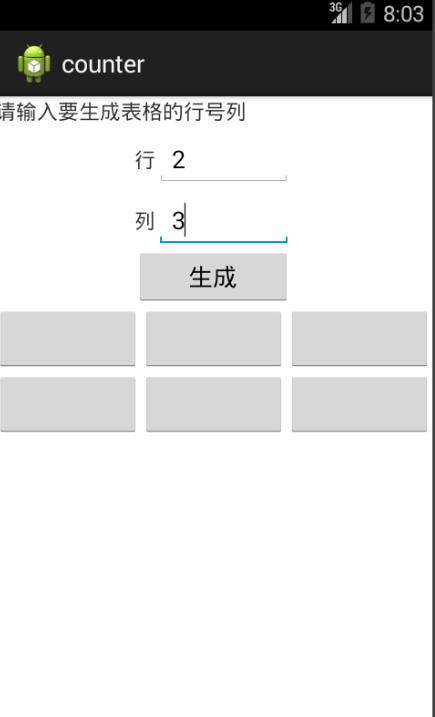
效果:
时人不识凌云木,直待凌云始道高
Android 自动生成表格的更多相关文章
- ANDROID 自动生成动态表格for
简单的栗子去了解这个自动生成的动态的控件(自动生成表格) /cs-Layout/res/layout/activity_main.xml <LinearLayout xmlns:android= ...
- Android 自动生成的R类
资源文件的使用分为在代码中使用和在其他资源文件中引用该资源文件.在我们编译一个Android应用时,Android会自动生成一个R类,在该类中根据不同的资源类型又生成了相应的内部类,该类包含了系统中使 ...
- 结队编程第二次作业:Android自动生成算式应用
一.题目要求 本次作业要求两个人合作完成,驾驶员和导航员角色自定,鼓励大家在工作期间角色随时互换,这里会布置两个题目,请各组成员根据自己的爱好任选一题. 这次我和我的小伙伴选择了题目一. 题目1: 实 ...
- android 自动生成jni C语言头文件
1. 在类里面申明 public native xxx(); 函数接口2. 在安卓工程src目录下 使用命令 javah 包名.类名 生成该类所申明的c语言接口
- hibnet 自动生成表格
在pom文件中添加相关的依赖 在application.yml文件中添加配置信息 新建实体类Boy 项目运行,mysql就产生了一个boy表. 需要注意的是:当配置文件ddl-auto: create ...
- android_demo之自动生成动态表格
今天我们学习了如何更好的利用Android 的 layout 布局. 接下来是个简单的栗子去了解这个自动生成的动态的控件(自动生成表格) 这是我们的layout 页面 <?xml version ...
- eclipse下Android无法自动生成apk文件怎么办?
eclipse下Android无法自动生成apk文件怎么办? 现象:创建android工程后,通过手动build/clean或自动build均无法在bin文件夹下生成.apk文件 解决方法:进入win ...
- eclipse android 不会自动生成R.java文件和包的解决办法
eclipse下编写android程序突然不会自动生成R.java文件和包的解决办法 我的eclipse原来是好好的,什么问题都没有的,结果今天一打开新建一个android程序,发现工程里不会自动 ...
- 不自动生成Android Dependencies的解决方式
今天遇到的奇怪问题是网上下载的demo导入第三方包运行后Android: NoClassDefFoundError的错误,原因是第三方的jar包并没有打包进apk里,运行是肯定要出错的. 网上百度了N ...
随机推荐
- Make Blog Beautiful
想做一个文艺而专业的编程技术博客 :) 博客定位 编程大观园,正如其名,探索和汇萃各种编程思想.技术.技能.技巧,并融入自己对编程开发.产品研发的思考和探索. 分类与标签 好的博客分类能让访 ...
- UnicodeDecodeError: 'ascii' codec can't decode byte 0xe5 in position 0: ordinal not in range(128)
问题分析:错误提示中的“ordinal not in range(128)”,意思是,字符不在128范围内,即说明不是普通的ASCII字符,超出处理能力了. import sys print u'系统 ...
- 给NIOS II CPU增加看门狗定时器并使用
给NIOS II CPU增加看门狗定时器并使用 配置看门狗定时器: 设置计时溢出时间为1秒 计数器位宽为32位 勾选No Start/Stop control bits 勾选Fixed perio ...
- 用andtoid studio获取天气数据并解析适配
1.申请拿到数据 可以用“聚合数据” 2.在android studio中导入需要的jar包 复制—>app—>libs—>粘贴—>右击—>Add As Library… ...
- linux初始化配置---主机名、关闭防火墙、关闭selinux
一.修改主机名 1.零时修改 [root@localhost network-scripts]# hostname jw07 然后就可以看到我们的主机名被修改了
- hdu 5749 Colmerauer
题意:对于给定的$n \times m$矩阵$M$,定义$S(a,b)$为$M$的所有$a \times b$子矩阵的权重之和.一个矩阵的权重是指矩阵中所有马鞍点权值之和,在一个矩阵中某点是马鞍点当且 ...
- easyui datagrid tooltip
$('#dg').datagrid('getPanel').find('.easyui-tooltip').each(function(){ var index = parseInt($(this). ...
- 在Tomat7上使用Redis保存Session
源博客http://my.oschina.net/gccr/blog/321083 当用户量大.应用服务器使用集群来布署时,使用Tomcat默认自带的Session就不能满足需求了.当然解决方法有很多 ...
- python_way ,day26 django_admin 自定义
1.想在admin中增加新的字段如图: 默认django只显示 def __str__(self)里面的return的值 from django.contrib import admin # Regi ...
- Criterion & DetachedCriteria
今天笔记主要是记录笔记,以及代码: criteria: 创建查询接口:createCriteria(class) 查询条件接口:add(各种条件); Restrictions 提供了设置参数的各种接口 ...