
Android 自动生成表格
Layout.xml
<?xml version="1.0" encoding="utf-8"?>

<LinearLayout xmlns:android="http://schemas.android.com/apk/res/android"

    android:layout_width="match_parent"

    android:layout_height="match_parent"

    android:orientation="vertical" >

    <LinearLayout

        android:layout_width="match_parent"

        android:layout_height="match_parent"

        android:layout_weight="6">

        <TableLayout

            android:layout_width="match_parent"

            android:layout_height="match_parent"

            android:layout_gravity="center_vertical">

            <TextView

                android:layout_width="wrap_content"

                android:layout_height="wrap_content"

                android:text="请输入要生成表格的行号列"

                android:textSize="15sp"/>

            <TableRow

                android:gravity="center"

                android:layout_marginTop="5dp"

                >

                 <TextView

                    android:id="@+id/tv1"

                    android:layout_width="wrap_content"

                    android:layout_height="wrap_content"

                    android:text="行"

                    android:textSize="15sp"/>

            <EditText

                android:id="@+id/et1"

                android:layout_width="100dp"

                android:layout_height="wrap_content"/>

            </TableRow>

            <TableRow

                android:gravity="center"

                android:layout_marginTop="5dp"

                >

                <TextView

                    android:id="@+id/tv2"

                    android:layout_width="wrap_content"

                    android:layout_height="wrap_content"

                    android:text="列"

                    android:textSize="15sp" />

            <EditText

                android:id="@+id/et2"

                android:layout_width="100dp"

                android:layout_height="wrap_content"

                android:numeric="decimal"/>

            <!-- decimal 只能输入数字,大于0的数字-->

            </TableRow>

            <TableRow

                android:gravity="center"

                >

                <Button

                    android:id="@+id/btnadd"

                    android:layout_width="wrap_content"

                    android:layout_height="wrap_content"

                    android:layout_span="2"

                    android:text="确定"

                    />

            </TableRow>

        </TableLayout>

     </LinearLayout>

    <TableLayout

        android:id="@+id/table"

        android:layout_width="match_parent"

        android:layout_height="match_parent"

        android:layout_weight="3"

        android:stretchColumns="*"

        android:shrinkColumns="*">

    </TableLayout>

</LinearLayout>
Activity.java
import android.app.Activity;

import android.os.Bundle;

import android.view.View;

import android.view.View.OnClickListener;

import android.widget.Button;

import android.widget.EditText;

import android.widget.TableLayout;

import android.widget.TableRow;

public class MainActivity extends Activity implements OnClickListener {

    private Button submit;

    private EditText row;

    private EditText cloumn;

    private TableLayout table;

    @Override

    protected void onCreate(Bundle savedInstanceState) {

        super.onCreate(savedInstanceState);

        setContentView(R.layout.canchange);

        submit = (Button) findViewById(R.id.btnadd);

        row = (EditText) findViewById(R.id.et1);

        cloumn = (EditText) findViewById(R.id.et2);

        table = (TableLayout) findViewById(R.id.table);

        submit.setOnClickListener(this);

    }

    @Override

    public void onClick(View v) {

        int c = Integer.parseInt(row.getText() + "");

        int r = Integer.parseInt(cloumn.getText() + "");

        table.removeAllViews();

        for (int i = 0; i < c; i++) {

            TableRow tr = new TableRow(this);

            for (int j = 0; j < r; j++) {

                Button b = new Button(this);

                tr.addView(b);

            }

            table.addView(tr);

        }

    }

}
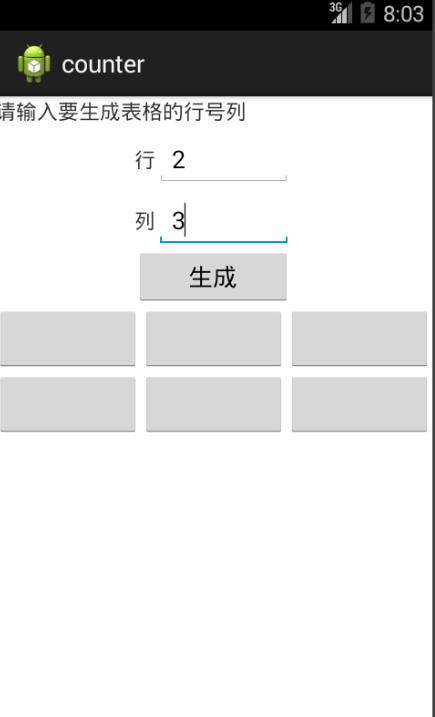
效果:
时人不识凌云木,直待凌云始道高
Android 自动生成表格的更多相关文章
- ANDROID 自动生成动态表格for
简单的栗子去了解这个自动生成的动态的控件(自动生成表格) /cs-Layout/res/layout/activity_main.xml <LinearLayout xmlns:android= ...
- Android 自动生成的R类
资源文件的使用分为在代码中使用和在其他资源文件中引用该资源文件.在我们编译一个Android应用时,Android会自动生成一个R类,在该类中根据不同的资源类型又生成了相应的内部类,该类包含了系统中使 ...
- 结队编程第二次作业:Android自动生成算式应用
一.题目要求 本次作业要求两个人合作完成,驾驶员和导航员角色自定,鼓励大家在工作期间角色随时互换,这里会布置两个题目,请各组成员根据自己的爱好任选一题. 这次我和我的小伙伴选择了题目一. 题目1: 实 ...
- android 自动生成jni C语言头文件
1. 在类里面申明 public native xxx(); 函数接口2. 在安卓工程src目录下 使用命令 javah 包名.类名 生成该类所申明的c语言接口
- hibnet 自动生成表格
在pom文件中添加相关的依赖 在application.yml文件中添加配置信息 新建实体类Boy 项目运行,mysql就产生了一个boy表. 需要注意的是:当配置文件ddl-auto: create ...
- android_demo之自动生成动态表格
今天我们学习了如何更好的利用Android 的 layout 布局. 接下来是个简单的栗子去了解这个自动生成的动态的控件(自动生成表格) 这是我们的layout 页面 <?xml version ...
- eclipse下Android无法自动生成apk文件怎么办?
eclipse下Android无法自动生成apk文件怎么办? 现象:创建android工程后,通过手动build/clean或自动build均无法在bin文件夹下生成.apk文件 解决方法:进入win ...
- eclipse android 不会自动生成R.java文件和包的解决办法
eclipse下编写android程序突然不会自动生成R.java文件和包的解决办法 我的eclipse原来是好好的,什么问题都没有的,结果今天一打开新建一个android程序,发现工程里不会自动 ...
- 不自动生成Android Dependencies的解决方式
今天遇到的奇怪问题是网上下载的demo导入第三方包运行后Android: NoClassDefFoundError的错误,原因是第三方的jar包并没有打包进apk里,运行是肯定要出错的. 网上百度了N ...
随机推荐
- php中rsa加密解密验证
RSA非对称加密,对敏感的数据传输进行数据加密.验证等.测试环境:wamp.aliyun虚拟主机(lamp)一.加密解密的第一步是生成公钥.私钥对,私钥加密的内容能通过公钥解密(反过来亦可以).下载生 ...
- CentOS 7 防火墙和端口配置
centos 7 防火墙和端口配置--解决 RHEL 7/ CentOS 7/Fedora 出现Unit iptables.service failed to load # 第一步,关闭firewal ...
- JQ的live(),on(),deletage(),bind()几个的区别
今天在网上看到一篇文章,关于JQ里面事件绑定的区别,说说我自己看后的理解,本人菜鸟一枚,很多东西不懂 ,有理解错误的还望大神们多多指教 bind()方法是绑定事件最直接的方法,这个方法是绑定到docu ...
- Thinkphp单字母快捷键
在ThinkPHP中有许多使用简便的单字母函数(即快捷方法),可以很方便开发者快速的调用,但是字母函数却不方便记忆,本文将所有的字母函数总结一下,以方便以后查找. 1.U() URL组装 支持不同UR ...
- php 全角半角转换
<?phpheader("Content-type: text/html; charset=utf-8");// 第一个参数:传入要转换的字符串// 第二个参数:取0,半角转 ...
- selenium—JS点击方法
package com.allin.pc;import java.util.NoSuchElementException;import org.openqa.selenium.By;import or ...
- Json概述以及python对json的相关操作(转)
什么是json: JSON(JavaScript Object Notation) 是一种轻量级的数据交换格式.易于人阅读和编写.同时也易于机器解析和生成.它基于JavaScript Programm ...
- 制作登录界面,登录成功后把用户名放在session里,在第3个页面读取session显示用户名
<%@ page language="java" contentType="text/html; charset=UTF-8" pageEncoding= ...
- C++库汇总
C++库汇总 C++类库介绍再次体现了C++保持核心语言的效率同时大力发展应用库的发展趋势!!在C++中,库的地位是非常高的.C++之父 Bjarne Stroustrup先生多次表示了设计库来扩充功 ...
- Writing Text Files On The Client in Oracle Forms 10g
Below is the example to write file on client in Oracle Forms 10g with webutil library package.Note: ...