
Reducing and Profiling GPU Memory Usage in Keras with TensorFlow Backend
keras 自适应分配显存 & 清理不用的变量释放 GPU 显存
Intro
Are you running out of GPU memory when using keras or tensorflow deep learning models, but only some of the time?
Are you curious about exactly how much GPU memory your tensorflow model uses during training?
Are you wondering if you can run two or more keras models on your GPU at the same time?
Background
By default, tensorflow pre-allocates nearly all of the available GPU memory, which is bad for a variety of use cases, especially production and memory profiling.
When keras uses tensorflow for its back-end, it inherits this behavior.
Setting tensorflow GPU memory options
For new models
Thankfully, tensorflow allows you to change how it allocates GPU memory, and to set a limit on how much GPU memory it is allowed to allocate.
Let’s set GPU options on keras‘s example Sequence classification with LSTM network
## keras example imports

from keras.models import Sequential

from keras.layers import Dense, Dropout

from keras.layers import Embedding

from keras.layers import LSTM

## extra imports to set GPU options

import tensorflow as tf

from keras import backend as k

###################################

# TensorFlow wizardry

config = tf.ConfigProto()

# Don't pre-allocate memory; allocate as-needed

config.gpu_options.allow_growth = True

# Only allow a total of half the GPU memory to be allocated

#config.gpu_options.per_process_gpu_memory_fraction = 0.5

# Create a session with the above options specified.

k.tensorflow_backend.set_session(tf.Session(config=config))

###################################

model = Sequential()

model.add(Embedding(max_features, output_dim=256))

model.add(LSTM(128))

model.add(Dropout(0.5))

model.add(Dense(1, activation='sigmoid'))

model.compile(loss='binary_crossentropy',

              optimizer='rmsprop',

              metrics=['accuracy'])

model.fit(x_train, y_train, batch_size=16, epochs=10)

score = model.evaluate(x_test, y_test, batch_size=16)
After the above, when we create the sequence classification model, it won’t use half the GPU memory automatically, but rather will allocate GPU memory as-needed during the calls to model.fit() and model.evaluate().
Additionally, with the per_process_gpu_memory_fraction = 0.5, tensorflow will only allocate a total of half the available GPU memory.
If it tries to allocate more than half of the total GPU memory, tensorflow will throw a ResourceExhaustedError, and you’ll get a lengthy stack trace.
If you have a Linux machine and an nvidia card, you can watch nvidia-smi to see how much GPU memory is in use, or can configure a monitoring tool like monitorix to generate graphs for you.
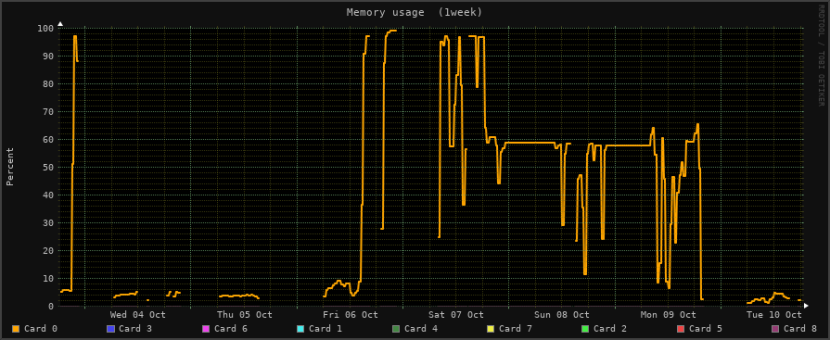
GPU memory usage, as shown in Monitorix for Linux
For a model that you’re loading
We can even set GPU memory management options for a model that’s already created and trained, and that we’re loading from disk for deployment or for further training.
For that, let’s tweak keras‘s load_model example:
# keras example imports

from keras.models import load_model

## extra imports to set GPU options

import tensorflow as tf

from keras import backend as k

###################################

# TensorFlow wizardry

config = tf.ConfigProto()

# Don't pre-allocate memory; allocate as-needed

config.gpu_options.allow_growth = True

# Only allow a total of half the GPU memory to be allocated

config.gpu_options.per_process_gpu_memory_fraction = 0.5

# Create a session with the above options specified.

k.tensorflow_backend.set_session(tf.Session(config=config))

###################################

# returns a compiled model

# identical to the previous one

model = load_model('my_model.h5')

# TODO: classify all the things
Now, with your loaded model, you can open your favorite GPU monitoring tool and watch how the GPU memory usage changes under different loads.
Conclusion
Good news everyone! That sweet deep learning model you just made doesn’t actually need all that memory it usually claims!
And, now that you can tell tensorflow not to pre-allocate memory, you can get a much better idea of what kind of rig(s) you need in order to deploy your model into production.
Is this how you’re handling GPU memory management issues with tensorflow or keras?
Did I miss a better, cleaner way of handling GPU memory allocation with tensorflow and keras?
Let me know in the comments!
How to remove stale models from GPU memory
import gc

m = Model(.....)

m.save(tmp_model_name)

del m

K.clear_session()

gc.collect()

m = load_model(tmp_model_name)
Reducing and Profiling GPU Memory Usage in Keras with TensorFlow Backend的更多相关文章
- GPU Memory Usage占满而GPU-Util却为0的调试
最近使用github上的一个开源项目训练基于CNN的翻译模型,使用THEANO_FLAGS='floatX=float32,device=gpu2,lib.cnmem=1' python run_nn ...
- Allowing GPU memory growth
By default, TensorFlow maps nearly all of the GPU memory of all GPUs (subject to CUDA_VISIBLE_DEVICE ...
- Redis: Reducing Memory Usage
High Level Tips for Redis Most of Stream-Framework's users start out with Redis and eventually move ...
- Android 性能优化(21)*性能工具之「GPU呈现模式分析」Profiling GPU Rendering Walkthrough:分析View显示是否超标
Profiling GPU Rendering Walkthrough 1.In this document Prerequisites Profile GPU Rendering $adb shel ...
- Memory usage of a Java process java Xms Xmx Xmn
http://www.oracle.com/technetwork/java/javase/memleaks-137499.html 3.1 Meaning of OutOfMemoryError O ...
- Shell script for logging cpu and memory usage of a Linux process
Shell script for logging cpu and memory usage of a Linux process http://www.unix.com/shell-programmi ...
- 5 commands to check memory usage on Linux
Memory Usage On linux, there are commands for almost everything, because the gui might not be always ...
- SHELL:Find Memory Usage In Linux (统计每个程序内存使用情况)
转载一个shell统计linux系统中每个程序的内存使用情况,因为内存结构非常复杂,不一定100%精确,此shell可以在Ghub上下载. [root@db231 ~]# ./memstat.sh P ...
- Why does the memory usage increase when I redeploy a web application?
That is because your web application has a memory leak. A common issue are "PermGen" memor ...
随机推荐
- openerp学习笔记 视图样式(表格行颜色、按钮,字段只读、隐藏,按钮状态、类型、图标、权限,group边距,聚合[合计、平均],样式)
表格行颜色: <tree string="请假单列表" colors="red:state == 'refuse';blue:state = ...
- tensorflow初次接触记录,我用python写的tensorflow第一个模型
tensorflow初次接触记录,我用python写的tensorflow第一个模型 刚用python写的tensorflow机器学习代码,训练60000张手写文字图片,多层神经网络学习拟合17000 ...
- Java之集合(二)ArrayDeque
转载请注明源出处:http://www.cnblogs.com/lighten/p/7283928.html 1.前言 上章讲解了Java中的集合接口和相关实现抽象类,本章开始介绍一些具体的实现类,第 ...
- seek()方法的使用
seek()方法用于移动文件读取指针到指定位置. file.seek()方法标准格式是:file.seek(offset,whence) offset:开始的偏移量,也就是代表需要移动偏移的字节数 w ...
- CentOS7 配置 Redis Sentinel主从集群配置
Redis Sentinel主从集群 环境.准备 slave配置 sentinel配置 测试 C#连接Redis Sentinel 1.环境.准备 单实例3台CentOS7服务器,IP地址.: 192 ...
- JDK1.10+scala环境的搭建之linux环境(centos6.9)
---恢复内容开始--- 第一步:安装jdk1.10版本 进入网页 http://oracle.com/technetwork/java/javase/downloads/index.html 下载 ...
- phpstorm之自定义代码碎片(tab键自动填充代码)
打开phpstorm 的设置界面(快捷键ctrl+alt+s) 比如上面的form表单,需要在生成以后自动跳转到“名称”的位置,然后更改,可以如下修改
- 【树】Count Complete Tree Nodes
题目: 求完全二叉树节点数. 思路: 满二叉树的节点数是2^k-1,k是树的深度. 所以我们可以先判断该树是否为满二叉树,然后是的话直接返回结果,如果不是递归地求解子树. 这样不用遍历所有的节点.复杂 ...
- jquery.lazyload插件实现图片延迟加载
jquery.lazyload是一个实现图片延迟加载的jQuery 插件,它可以延迟加载长页面中的图片.在浏览器可视区域外的图片在初始状态下不会被载入,直到用户将页面滚动到它们所在的位置. 1.引入j ...
- c# static用法
有时候写程序时常常遇到这样的情况: 1.定义了变量和方法不知道什么时候该加上static修饰符. 2.static变量和方法与非static变量和方法有什么区别? 3.在一个类的静态方法里为什么不 ...