
(转)AssetBundle系列——游戏资源打包(一)
转自:http://www.cnblogs.com/sifenkesi/p/3557231.html
将本地资源打包,然后放到资源服务器上供游戏客户端下载或更新。服务器上包含以下资源列表:
(1)游戏内容资源assetbundle
(2)资源维护列表,包含每个资源的名字(完整路径名)和对应的版本号[资源名,版本号],如下表所示(VersionNum.xml):
<VersionNum>

  <File FileName="Assets.Resources.BigLevelTexture.TestLevel.assetbundle" Num="" />

  <File FileName="Assets.Resources.EquipmentTexture.Test001.assetbundle" Num="" />

  <File FileName="Assets.Resources.EquipmentTexture.Test002.assetbundle" Num="" />

  <File FileName="Assets.Resources.EquipmentTexture.Test003.assetbundle" Num="" />

  <File FileName="Assets.Resources.EquipmentTexture.Test004.assetbundle" Num="" />

  <File FileName="Assets.Resources.PetTexture.Empty.assetbundle" Num="" />

</VersionNum>
那么本地客户端的资源打包编辑器就需要完成以下工作:将资源打包、生成版本号。
我们采用通过MD5码对比的方式来对版本号进行管理,如果某资源的MD5码变更了,则将其版本号+1,否则不变。那么,可以将编辑器的具体任务划分如下:
(1)将资源打包成assetbundle,并放到指定目录下
(2)为每个assetbund生成最新MD5码,用于检查资源是否有修改
(3)比较新旧MD5码列表,产生资源变更列表,对于每个变更的资源,将其版本号+1
(4)将变更列表文件也打包成assetbundle
各个平台使用的资源包时各自独立的,打包资源代码时的选项不一样,编辑器界面如下,图2中的4个按钮每个对应上述的一步操作:
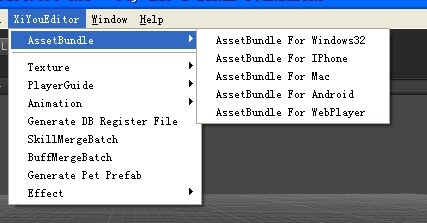
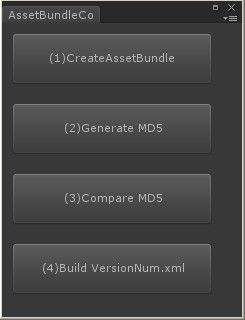
最终生成的资源目录结构如下所示:
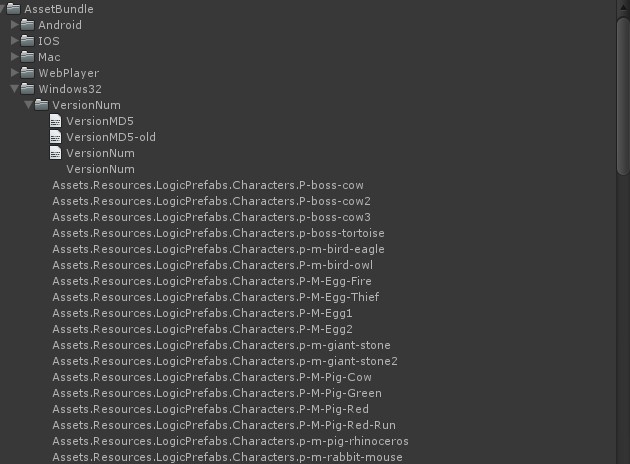
编辑器代码如下所示(包括菜单项和窗口):
using UnityEditor;

using UnityEngine;

using System.IO;

using System.Collections;

using System.Collections.Generic;

public class AssetBundleController : EditorWindow

{

    public static AssetBundleController window;

    public static UnityEditor.BuildTarget buildTarget = BuildTarget.StandaloneWindows;

    [MenuItem("XiYouEditor/AssetBundle/AssetBundle For Windows32", false, )]

    public static void ExecuteWindows32()

    {

        if (window == null)

        {

            window = (AssetBundleController)GetWindow(typeof(AssetBundleController));

        }

        buildTarget = UnityEditor.BuildTarget.StandaloneWindows;

        window.Show();

    }

    [MenuItem("XiYouEditor/AssetBundle/AssetBundle For IPhone", false, )]

    public static void ExecuteIPhone()

    {

        if (window == null)

        {

            window = (AssetBundleController)GetWindow(typeof(AssetBundleController));

        }

        buildTarget = UnityEditor.BuildTarget.iPhone;

        window.Show();

    }

    [MenuItem("XiYouEditor/AssetBundle/AssetBundle For Mac", false, )]

    public static void ExecuteMac()

    {

        if (window == null)

        {

            window = (AssetBundleController)GetWindow(typeof(AssetBundleController));

        }

        buildTarget = UnityEditor.BuildTarget.StandaloneOSXUniversal;

        window.Show();

    }

    [MenuItem("XiYouEditor/AssetBundle/AssetBundle For Android", false, )]

    public static void ExecuteAndroid()

    {

        if (window == null)

        {

            window = (AssetBundleController)GetWindow(typeof(AssetBundleController));

        }

        buildTarget = UnityEditor.BuildTarget.Android;

        window.Show();

    }

    [MenuItem("XiYouEditor/AssetBundle/AssetBundle For WebPlayer", false, )]

    public static void ExecuteWebPlayer()

    {

        if (window == null)

        {

            window = (AssetBundleController)GetWindow(typeof(AssetBundleController));

        }

        buildTarget = UnityEditor.BuildTarget.WebPlayer;

        window.Show();

    }

    void OnGUI()

    {

        if (GUI.Button(new Rect(10f, 10f, 200f, 50f), "(1)CreateAssetBundle"))

        {

            CreateAssetBundle.Execute(buildTarget);

            EditorUtility.DisplayDialog("", "Step (1) Completed", "OK");

        }

        if (GUI.Button(new Rect(10f, 80f, 200f, 50f), "(2)Generate MD5"))

        {

            CreateMD5List.Execute(buildTarget);

            EditorUtility.DisplayDialog("", "Step (2) Completed", "OK");

        }

        if (GUI.Button(new Rect(10f, 150f, 200f, 50f), "(3)Compare MD5"))

        {

            CampareMD5ToGenerateVersionNum.Execute(buildTarget);

            EditorUtility.DisplayDialog("", "Step (3) Completed", "OK");

        }

        if (GUI.Button(new Rect(10f, 220f, 200f, 50f), "(4)Build VersionNum.xml"))

        {

            CreateAssetBundleForXmlVersion.Execute(buildTarget);

            EditorUtility.DisplayDialog("", "Step (4) Completed", "OK");

        }

    }

    public static string GetPlatformPath(UnityEditor.BuildTarget target)

    {

        string SavePath = "";

        switch (target)

        {

            case BuildTarget.StandaloneWindows:

                SavePath = "Assets/AssetBundle/Windows32/";

                break;

            case BuildTarget.StandaloneWindows64:

                SavePath = "Assets/AssetBundle/Windows64/";

                break;

            case BuildTarget.iPhone:

                SavePath = "Assets/AssetBundle/IOS/";

                break;

            case BuildTarget.StandaloneOSXUniversal:

                SavePath = "Assets/AssetBundle/Mac/";

                break;

            case BuildTarget.Android:

                SavePath = "Assets/AssetBundle/Android/";

                break;

            case BuildTarget.WebPlayer:

                SavePath = "Assets/AssetBundle/WebPlayer/";

                break;

            default:

                SavePath = "Assets/AssetBundle/";

                break;

        }

        if (Directory.Exists(SavePath) == false)

            Directory.CreateDirectory(SavePath);

        return SavePath;

    }

    public static string GetPlatformName(UnityEditor.BuildTarget target)

    {

        string platform = "Windows32";

        switch (target)

        {

            case BuildTarget.StandaloneWindows:

                platform = "Windows32";

                break;

            case BuildTarget.StandaloneWindows64:

                platform = "Windows64";

                break;

            case BuildTarget.iPhone:

                platform = "IOS";

                break;

            case BuildTarget.StandaloneOSXUniversal:

                platform = "Mac";

                break;

            case BuildTarget.Android:

                platform = "Android";

                break;

            case BuildTarget.WebPlayer:

                platform = "WebPlayer";

                break;

            default:

                break;

        }

        return platform;

    }

}
PS:每个操作的具体实现,见下一篇讲解...
(转)AssetBundle系列——游戏资源打包(一)的更多相关文章
- AssetBundle系列——游戏资源打包(一)
将本地资源打包,然后放到资源服务器上供游戏客户端下载或更新.服务器上包含以下资源列表:(1)游戏内容资源assetbundle(2)资源维护列表,包含每个资源的名字(完整路径名)和对应的版本号[资源名 ...
- [Unity Asset]AssetBundle系列——游戏资源打包
转载:http://www.cnblogs.com/sifenkesi/p/3557231.html 将本地资源打包,然后放到资源服务器上供游戏客户端下载或更新.服务器上包含以下资源列表:(1)游戏内 ...
- AssetBundle系列——游戏资源打包(二)
本篇接着上一篇.上篇中说到的4步的代码分别如下所示: (1)将资源打包成assetbundle,并放到自定目录下 using UnityEditor; using UnityEngine; using ...
- (转)AssetBundle系列——游戏资源打包(二)
转自:http://www.cnblogs.com/sifenkesi/p/3557290.html 本篇接着上一篇.上篇中说到的4步的代码分别如下所示: (1)将资源打包成assetbundle,并 ...
- AssetBundle系列——共享资源打包/依赖资源打包
有人在之前的博客中问我有关共享资源打包的代码,其实这一块很简单,就两个函数: BuildPipeline.PushAssetDependencies():依赖资源压栈: BuildPipeline.P ...
- (转)AssetBundle系列——共享资源打包/依赖资源打包
有人在之前的博客中问我有关共享资源打包的代码,其实这一块很简单,就两个函数: BuildPipeline.PushAssetDependencies():依赖资源压栈: BuildPipeline.P ...
- AssetBundle系列——场景资源之打包(一)
本篇讲解的是3D游戏的场景资源打包方式,首先简单的分析一下场景中所包含的资源的类型. 场景资源一般包含:地表模型(或者是Unity Terrain),非实例化物体(摄像机.空气墙.光源.各种逻辑物体之 ...
- AssetBundle系列——场景资源之解包(二)
本篇接着上一篇继续和大家分享场景资源这一主题,主要包括两个方面: (1)加载场景 场景异步加载的代码比较简单,如下所示: private IEnumerator LoadLevelCoroutine( ...
- 【Cocos2d-Js基础教学(5)资源打包工具的使用及资源的异步加载处理】
TexturePacker是纹理资源打包工具,支持Cocos2dx的游戏资源打包. 如果用过的同学可以直接看下面的资源的异步加载处理 首先为什么用TexturePacker? 1,节省图片资源实际大小 ...
随机推荐
- [ 转载 ] Mysql 数据库常用命令
完整的创建数据库例子: >create database db_test default character set utf8 collate utf8_general_ci; >use ...
- 【贪心】【字典树】Gym - 101466A - Gaby And Addition
题意:定义一种无进位加法运算,给你n个正整数,问你取出两个数,使得他们加起来和最大/最小是多少. 无进位加法运算,其实是一种位运算,跟最大xor那个套路类似,很容易写出对于每个数字,其对应的最优数字是 ...
- Educational Codeforces Round 13 A. Johny Likes Numbers 水题
A. Johny Likes Numbers 题目连接: http://www.codeforces.com/contest/678/problem/A Description Johny likes ...
- Codeforces Round #352 (Div. 1) B. Robin Hood 二分
B. Robin Hood 题目连接: http://www.codeforces.com/contest/671/problem/B Description We all know the impr ...
- cookie、sessionStorage、localStorage 详解
转自--http://www.cnblogs.com/fly_dragon/p/3946012.html cookie Cookie的大小.格式.存储数据格式等限制,网站应用如果想在浏览器端存储用户的 ...
- 字符串转码【String.getBytes()和new String()】
在Java中,String.getBytes(String decode)方法会根据指定的decode编码返回某字符串在该编码下的byte数组表示,如 byte[] b_gbk = "中&q ...
- Hyper-V创建固定大小虚拟机
1.新建硬盘 点击确定,就创建好了一个固定大小的vhd文件,下面我们开始创建虚拟机. 2.创建虚拟机 输入虚拟机名称 选择第一代虚拟机 我这里给虚拟机分配512MB内存 网络配置 在这之前我们已经创建 ...
- svn如何提取文件更新列表
eclipse svn插件site-1.10.1 Slik-Subversion-1.8.0-x64.msi ---可以使用svn命令,如svn status 显示修改过的本地文件,如下示例: I: ...
- Swift教程之枚举语法
import Foundation //MARK:-------枚举语法----------- //不像 C 和 Objective-C 一样.Swift 的枚举成员在被创建时不会被赋予一个默认的整数 ...
- wireshark提取gzip格式的html
原文地址:http://blog.csdn.net/vah101/article/details/44102501 首先使用wireshark启动抓包,然后以百度为例,访问百度的首页,之后停止抓包,w ...