
获取gps信息
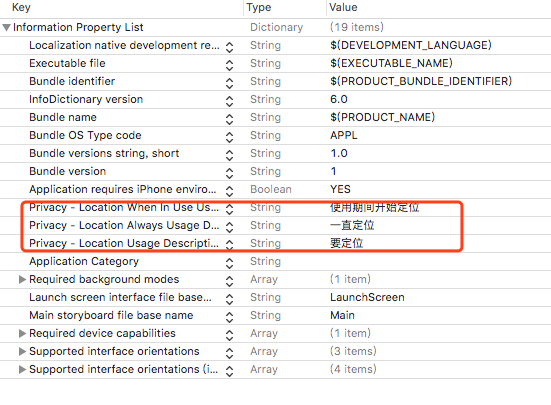
(一)plist修改
添加如下变量
(二)新建视图用来启动Gps
此视图控制器继承CLLocationManagerDelegate
#import <UIKit/UIKit.h>

#import <CoreLocation/CoreLocation.h>

@interface GpsViewController : UIViewController <CLLocationManagerDelegate>

@end
(三)定义标签用来显示位置,并开启定位
UILabel *latitudeValue;

UILabel *longitudeValue;

CLLocationManager *locationManager;

- (void)viewDidLoad {

    [super viewDidLoad];

    self.view.backgroundColor=[UIColor redColor];

    self.view.alpha=0.5;

    UILabel *latitude=[[UILabel alloc] init];

    latitude.text=@"Latitude:";

    latitude.frame=CGRectMake(, , , );

    [self.view addSubview:latitude];

    latitudeValue=[[UILabel alloc] init];

    latitudeValue.text=@"";

    latitudeValue.frame=CGRectMake(, , , );

    [self.view addSubview:latitudeValue];

    UILabel *longitude=[[UILabel alloc] init];

    longitude.text=@"Longitude:";

    longitude.frame=CGRectMake(, , , );

    [self.view addSubview:longitude];

    longitudeValue=[[UILabel alloc] init];

    longitudeValue.text=@"";

    longitudeValue.frame=CGRectMake(, , , );

    [self.view addSubview:longitudeValue];

    //开启定位

    locationManager=[[CLLocationManager alloc] init];

    locationManager.delegate=self;

    locationManager.desiredAccuracy=kCLLocationAccuracyBest;

    locationManager.distanceFilter=kCLDistanceFilterNone;

    locationManager.allowsBackgroundLocationUpdates=YES;

    //使用期间定位

    [locationManager requestWhenInUseAuthorization];

    [locationManager requestAlwaysAuthorization];

    [locationManager startUpdatingLocation];

// Do any additional setup after loading the view.

}
(四)通过委托说去实时位置
- (void)locationManager:(CLLocationManager *)manager didUpdateLocations:(NSArray<CLLocation *> *)locations

{

    NSLog(@"Update location");

    CLLocation *newLoaction=locations[];

    latitudeValue.text=[[NSString alloc] initWithFormat:@"%f",newLoaction.coordinate.latitude];

    longitudeValue.text=[[NSString alloc] initWithFormat:@"%f",newLoaction.coordinate.longitude];

}
(五)用户权限检测
    if ([CLLocationManager locationServicesEnabled]) {

        switch ([CLLocationManager authorizationStatus]) {

            case kCLAuthorizationStatusNotDetermined:

                NSLog(@"用户尚未进行选择");

                break;

            case kCLAuthorizationStatusRestricted:

                NSLog(@"定位权限被限制");

                break;

            case kCLAuthorizationStatusAuthorizedAlways:

            case kCLAuthorizationStatusAuthorizedWhenInUse:

                NSLog(@"用户允许定位");

                break;

            case kCLAuthorizationStatusDenied:

                NSLog(@"用户不允许定位");

                break;

            default:

                break;

        }

    }
(六)定位失败委托
- (void)locationManager:(CLLocationManager *)manager didFailWithError:(NSError *)error

{

    NSLog(@"Update error");

    if(error.code == kCLErrorLocationUnknown) {

        NSLog(@"无法检索位置");

    }

    else if(error.code == kCLErrorNetwork) {

        NSLog(@"网络问题");

    }

    else if(error.code == kCLErrorDenied) {

        NSLog(@"定位权限的问题");

        [locationManager stopUpdatingLocation];

    }

}
//--------------------------------方法封装-----------------------------------//
通过自定义委托来实现获取地址后的数据传递
LLLocation.h
#import <Foundation/Foundation.h>

#import <CoreLocation/CoreLocation.h>

@protocol LocationHandlerDelegate <NSObject>

@required

-(void) didUpdateToLocation:(CLLocation*)newLocation;

@end

@interface LLLocation :  NSObject<CLLocationManagerDelegate>

{

    CLLocationManager *locationManager;

}

@property(nonatomic,strong) id<LocationHandlerDelegate> delegate;

+(id)getSharedInstance;

-(void)startUpdatingLocation;

-(void) stopUpdatingLocation;

@end
LLLocation.m
#import "LLLocation.h"

@interface LLLocation()

-(void)initLocationManager;

@end

@implementation LLLocation

+ (LLLocation *)getSharedInstance

{

    static LLLocation *location = nil;

    static dispatch_once_t onceToken;

    dispatch_once(&onceToken, ^{

        location = [[LLLocation alloc] init];

        [location initLocationManager];

    });

    return location;

}

-(void)initLocationManager

{

    NSLog(@"init");

    locationManager = [[CLLocationManager alloc] init];

    locationManager.delegate = self;

}

-(void)startUpdatingLocation

{

    [locationManager startUpdatingLocation];

}

-(void) stopUpdatingLocation

{

    [locationManager stopUpdatingLocation];

}

- (void)locationManager:(CLLocationManager *)manager didUpdateLocations:(NSArray<CLLocation *> *)locations

{

    [locationManager stopUpdatingLocation];

    NSLog(@"Update gps");

    if ([self.delegate respondsToSelector:@selector

         (didUpdateToLocation:)])

    {

        [self.delegate didUpdateToLocation:locations[]];

    }

}

@end
调用
    LLLocation *location=[LLLocation getSharedInstance];

    [location startUpdatingLocation];

    [location setDelegate:self];
上述调用文件中要实现自定义的委托,如下
@interface GpsViewController ()<LocationHandlerDelegate>

@property(nonatomic,strong) CLLocationManager *locationManager;

@end
-(void) didUpdateToLocation:(CLLocation*)newLocation

{

     latitudeValue.text=[[NSString alloc] initWithFormat:@"%f",newLocation.coordinate.latitude];

     longitudeValue.text=[[NSString alloc] initWithFormat:@"%f",newLocation.coordinate.longitude];

}
PS:在应用过程中会出现委托并未调用情况,如果按上述步骤进行,委托还未调用,则建议查看CLLocationManagerDelegate的定义,确定委托方法是否在此ios版本中适用;或者把CLLocationManager *locationManager定义为强引用的属性试试
获取gps信息的更多相关文章
- Android开发程序获取GPS信息步骤
1.获取LOCATION_SERVICE系统服务.2.创建Criteria对象,调用该对象的set方法设置查询条件.3.调用LocationManager.getBestProvider(Criter ...
- 文件读写以及NMEA码中GPS信息的提取
首先先了解下什么是NMEA码,这里有很好的解释,就不直接搬运了 http://www.gpsbaby.com/wz/nmea.html 首先要找到包含GPS信息的文本行,即字符串GPGGA所在行 $G ...
- 使用SerialPort 读取外置GPS信息和使用GeoCoordinateWatcher获取内置gps的信息
简介最近工作中需要读取gps设备的信息,平板本身有内置的gps设备,但是精度不够,就又添加了一个外置的gps.对于外置的gps,我们主要通过SerialPort类来获得串口的信息,然后对接收到的内容进 ...
- Android GPS应用:动态获取位置信息
在上文中,介绍了GPS概念及Android开发GPS应用涉及到的常用类和方法.在本文中,开发一个小应用,实时获取定位信息,包括用户所在的纬度.经度.高度.方向.移动速度等.代码如下: Activity ...
- Android 使用GPS获取到经纬度后 无法在Android8.0上使用Geocoder类获取位置信息
由于我的应用在获取到经纬度后在Android8.0不能使用如下代码获取位置信息.只好使用百度地图 WEB服务API 通过调接口的方式获取位置信息. Geocoder geocoder = new Ge ...
- Android获取位置信息的方法总结
1.位置服务的简介:位置服务,英文翻译为Location-Based Services,缩写为LBS,又称为定位服务或基于位置的服务,融合了GPS定位.移动通信.导航等多种技术,提供与空间位置相关的综 ...
- Html5 Geolocation获取地理位置信息
Html5中提供了地理位置信息的API,通过浏览器来获取用户当前位置.基于此特性可以开发基于位置的服务应用.在获取地理位置信息前,首先浏览器都会向用户询问是否愿意共享其位置信息,待用户同意后才能使用. ...
- 使用高德地图SDK获取定位信息
使用高德地图SDK获取定位信息 第一步: 在高德官网下载SDK,如我这里需要获取定位信息,故仅下载"定位功能" 第二步: 注册成为开发者,并创建应用获取相应的key.其中,在使用A ...
- GPS(2)关于位置的3个示例,实时获取GPS定位数据,求两个经纬点距离,邻近某个区域圆时警告
实时获取GPS定位数据 import android.app.Activity; import android.content.Context; import android.location.Loc ...
随机推荐
- Maven 梳理-安装配置
项目构建过程包括[清理项目]→[编译项目]→[测试项目]→[生成测试报告]→[打包项目]→[部署项目]这几个步骤,这六个步骤就是一个项目的完整构建过程. 下载后解压 配置环境变量 F:\jtDev ...
- Java 基础篇之集合
List 集合 List 集合中元素有序.可重复,集合中每个元素都有其对应的索引顺序. List 判断两个对象相等,只要通过 equals 方法比较返回 true 即可. 看个例子: public c ...
- 阿里云服务器CentOS6.9安装Ant
下载地址:http://mirrors.hust.edu.cn/apache/ant/binaries/ 1.下载 2.上传到服务器(非root用户下) 3.解压移动目录(root用户下) tar - ...
- nginx 配置语法
一.语法规则: location [=|~|~*|^~] /uri/ { … } = 开头表示精确匹配 ^~ 开头表示uri以某个常规字符串开头,理解为匹配 url路径即可.nginx不对url做编码 ...
- 【ADO.NET-中级】百万级数据的批量插入的两种方法测试
在SQL Server 中插入一条数据使用Insert语句,但是如果想要批量插入一堆数据的话,循环使用Insert不仅效率低,而且会导致SQL一系统性能问题.下面介绍SQL Server支持的两种批量 ...
- Java面向对象程序设计第6章1-12
1.this和super各有几种用法? this this 用法有三种,主要应用场合: 表示当前对象引用,常用于形参或局部变量与类的成员变 量同名的情形,使用this.成员名表示当前对象的成员 表示当 ...
- Grafana 6.4 正式发布!
原文链接:Grafana 6.4 正式发布! 2019 年 10 月 2 日,也就是国内小伙伴们的放假期间,Grafana 实验室正式发布了 Grafana 6.4 版本.这个版本主要围绕数据模型和指 ...
- robotframework框架 - seleniumLibrary 关键字解读-全攻略
在robotframework当中,要实现web自动化,则需要使用SeleniumLibrary这个库. 目前版本中,有180+关键字.随着版本的更新,关键字的个数和名字也会有所变动. 在网上没有找到 ...
- mpvue 图片上传预览组件封装
<template> <div class="j-pic-upload"> <div class="j-upload-btn" @ ...
- Linux上安装jdk1.8和配置环境变量
前言 Linux 上安装jdk1.8 和配置环境变量,参考相关文档,本人在此总结,操作归纳如下. 第一步:创建jdk安装目录(该/usr/local/src 目录是空的,最好把我们自己下载的放到这,容 ...