
mpvue 图片上传预览组件封装
<template>

  <div class="j-pic-upload">

    <div class="j-upload-btn" @click="uploadImg()" :style="{'width':width || '120rpx','height':height || '120rpx'}">

      <span class="j-upload-add">+</span>

    </div>

    <img @click="previewImg(index)" v-for="(src,index) in urls" :key="src" :src="src" :style="{'width':width || '120rpx','height':height || '120rpx'}" class="img" >

  </div>

</template>

<script>

    export default {

      props:["width","height","max","srcs"],

      data(){

        return {

          urls:[]

        }

      },

      mounted(){

        this.urls = this.srcs || [];

      },

      methods:{

        uploadImg(){

          let that = this;

          wx.chooseImage({

            count: that.max || 3,

            sizeType: ['original', 'compressed'],

            sourceType: ['album', 'camera'],

            success: function (res) {

              res.tempFilePaths.forEach(v=>{

                that.urls.push(v);

              });

              that.$emit("choosed",{all:that.urls,currentUpload:res.tempFilePaths});

            }

          })

        },

        previewImg(index){

          let that = this;

          wx.showActionSheet({

            itemList:["预览","删除"],

            success: function(res) {

              if(res.tapIndex === 0){

                wx.previewImage({

                  current:that.urls[index],

                  urls:that.urls

                });

              } else {

                that.urls.splice(index,1);

                that.$emit("delete",that.urls);

              }

            },

          });

        },

      }

    }

</script>

<style scoped>

  .j-pic-upload{

    padding: 10rpx;

    display: flex;

    flex-direction: row;

    align-items: center;

    flex-wrap: wrap;

  }

.j-upload-btn{

  border: 1px dashed #ddd;

  display: flex;

  flex-direction: row;

  justify-content: center;

  align-items: center;

  margin-right: 20rpx;

}

  .j-upload-add{

    font-size: 80rpx;

    font-weight: 500;

    color:#C9C9C9;

  }

  .img{

    margin:10rpx 20rpx 10rpx 0;

  }

</style>

<!--

  使用

    import Upload from "@/components/upload"

    <upload width="120rpx" height="120rpx" max="6" @choosed="choosed" @delete="" :srcs="['/static/img/no-man.png']"></upload>

  Read me

  属性名                 说明                                  举例                    是否必传                     默认                     返回值说明

  width               定义上传按钮和图片展示的宽度              120rpx                    否                        120rpx

  height              定义上传按钮和图片展示的高度              120rpx                    否                        120rpx

  max                 每次最多上传几张图片                      5                         否                         3

  srcs                可以传入一个图片url的数组      :srcs="['/static/img/no-man.png']"   否                         null

  choosed             每次选完图片触发此事件                 @choosed="choosed"           否                         null                返回一个对象,all代表选取的所有图片,currentUpload代表目前选取的图片

  delete              每次删除已选取的图片触发                @delete="deleteImg"         否                         null                  返回所有选取的图片

-->
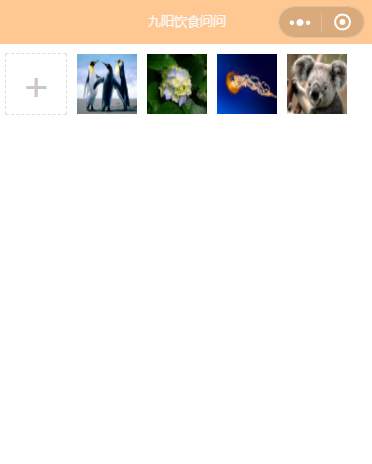
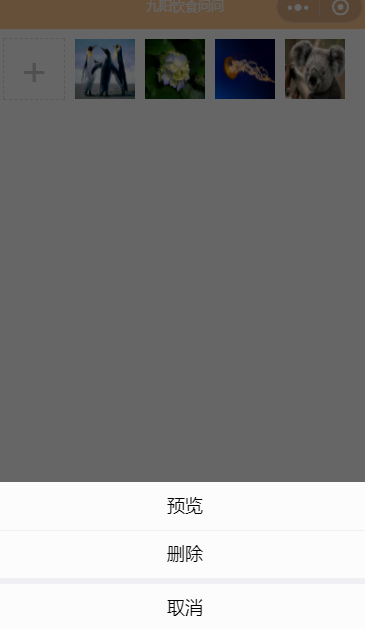
预览图:
mpvue 图片上传预览组件封装的更多相关文章
- 兼容好的JS图片上传预览代码
转 : http://www.codefans.net/articles/1395.shtml 兼容好的JS图片上传预览代码 (谷歌,IE11) <html xmlns="http:/ ...
- Jquery图片上传预览效果
uploadPreview.js jQuery.fn.extend({ uploadPreview: function (opts) { var _self = this, _this = $(thi ...
- [前端 4] 使用Js实现图片上传预览
导读:今天做图片上传预览,刚开始的做法是,先将图片上传到Nginx,然后重新加载页面才能看到这个图片.在这个过程中,用户一直都看不到自己上传的文件是什么样子.Ps:我发现我真的有强迫症了,都告诉我说不 ...
- Javascript之图片上传预览
使用Javascript之图片上传预览,我们无需上传到服务器中,兼容所有浏览器. 关键方法是使用微软库filter:progid:DXImageTransform.Microsoft.AlphaIma ...
- HTML5 图片上传预览
<!DOCTYPE html> <html lang="zh-cn"> <head> <meta charset="utf-8& ...
- ASP.NET工作笔记之一:图片上传预览及无刷新上传
转自:http://www.cnblogs.com/sibiyellow/archive/2012/04/27/jqueryformjs.html 最近项目里面涉及到无刷新上传图片的功能,其实也就是上 ...
- php 图片上传预览(转)
网上找的图片上传预览: <!DOCTYPE html PUBLIC "-//W3C//DTD XHTML 1.0 Transitional//EN" "http:/ ...
- js实现图片上传预览及进度条
原文js实现图片上传预览及进度条 最近在做图片上传的时候,由于产品设计的比较fashion,上网找了比较久还没有现成的,因此自己做了一个,实现的功能如下: 1:去除浏览器<input type= ...
- html 图片上传预览
Html5 upload img 2012年12月27日 20:36 <!DOCTYPE HTML> <html> <head> <meta http-equ ...
随机推荐
- Springboot2.x 自动创建表并且执行初始化数据
1.使用springboot jdbc初始化数据库 项目结构 schema.sql drop table if exists user; create table user (id bigint(20 ...
- 字符串和Date互相转化
话不多说,上程序,如图: public class TestDate { public static void main(String[] args) throws ParseException { ...
- Spring boot出现Cannot determine embedded database driver class for database type NONE
在spring boot项目中,我们在pom.xml文件中添加了mysql和mybatis的依赖,我们常常遇到下面这样的问题: Description: Cannot determine embedd ...
- Linux上安装JDK1.7步骤
1.使用SecurtCRT连接上Linux,把jdk的压缩包传递过去:(传递的方法在我的博客中也有写,参考之前的博客) 2.解压缩jdk:tar -zxvf jdk-7u55-linux-i586.t ...
- C# 表达式树讲解(一)
一.前言 一直想写一篇Dpper的定制化扩展的文章,但是里面会设计到对Lambda表达式的解析,而解析Lambda表达式,就必须要知道表达式树的相关知识点.我希望能通过对各个模块的知识点或者运用能够多 ...
- [币严区块链]数字货币交易所之以太坊(ETH)钱包对接(四) 使用web3j对接以太坊钱包
本文给大家介绍了 Web3j Java 版本的框架的基本使用,大家可根据本文的内容进行扩展性的练习,对其他 API 的使用进行尝试. 使用web3j对接以太坊钱包 一.开发准备事项 启动 Geth 此 ...
- EventBus 消息的线程切换模型与实现原理
一. 序 EventBus 是一个基于观察者模式的事件订阅/发布框架,利用 EventBus 可以在不同模块之间,实现低耦合的消息通信. EventBus 因为其使用简单且稳定,被广泛应用在一些生产项 ...
- 用代码触发testng实现并发测试
有时候希望测试用例能用代码触发,发现testng支持这种操作,于是记录一下: 首先添加testng依赖: <dependency> <groupId>org.testng< ...
- IO流——递归(输出所有文件)
package pers.zbb.File; import java.io.File; public class FileDemo { public static void main(String[] ...
- ExpandableListView之BaseExpandableListAdapter
之前使用的SimpleExpandableListAdapter有较大局限性,样式单一,修改难度大,这里不建议使用,而是利用BaseExpandableListAdapter,其实SimpleExpa ...