
jquery easyui-datagrid手动增加删除重置行
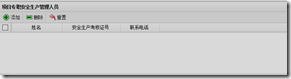
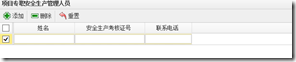
1.实现的效果图如下
2.界面:
<div region="center">
<table id="tt">
</table>
</div>
3.引入的js文件
<link rel="stylesheet" type="text/css" href="http://www.cnblogs.com/script/themes/default/easyui.css" />
<link rel="stylesheet" type="text/css" href="http://www.cnblogs.com/script/themes/icon.css" />
<script type="text/javascript" src="http://www.cnblogs.com/script/jquery-1.4.2.min.js" </script>
<script type="text/javascript" src="http://www.cnblogs.com/script/jquery.easyui.min.js" </script>
<script type="text/javascript" src="http://www.cnblogs.com/script/locale/easyui-lang-zh_CN.js" mce_src="script/locale/easyui-lang-zh_CN.js"></script>
4.实现的js代码:
<script type="text/javascript">

    var id;

    $(document).ready(function () { //初始化所在城区

        var dialogParams = window.dialogArguments;

        var obj  = dialogParams[0];

        var  xmaqryPartJson = obj['xmaqryPartJson'];

        $("[id^=gfzrzt_]").each(function(){

            document.getElementById($(this).attr("id")).value = obj[$(this).attr("id").replace("gfzrzt_","")]

        })

        id = obj['id'];

        initData(xmaqryPartJson)

    });

    function initData(xmaqJson) {

        if (xmaqJson == '' || xmaqJson == undefined || xmaqJson == null) {

            showTable(new Array());

        }  else {

            var data = $.parseJSON(xmaqJson);

            showTable(data);

        }

    }

    var lastIndex = undefined;

    function showTable(xmaqJson) {

        $("#tt").datagrid({

            idField: "id",

            fitColumns: false,

            title: "项目专职安全生产管理人员",

            singleSelect: true,

            frozenColumns: [[

                { field: 'id', checkbox: true }

            ]],

            columns: [

                [

                    {field: 'zrztid',  align: "center", width: 0},

                    {field: 'gcid',hidden: true, align: "center", width: 0},

                    {field: 'gccode', align: "center", width: 0},

                    {field: 'zzid',hidden: true, align: "center", width: 0},

                    {field: 'zzsj',  align: "center", width: 0},

                    {field: 'xm', title: '姓名', width: 130, sortable: true, align: 'center',required:true, editor: {type:'text'}},

                    {field: 'aqsckhzh', title: '安全生产考核证号', width: 150, sortable: true, align: 'center', editor: 'text'},

                    {field: 'lxdh', title: '联系电话', width: 100, sortable: true, align: 'center', editor: 'text'}

                ]

            ],

            toolbar: [{

                text: '添加',

                iconCls: 'icon-add',

                handler: function () {

                    if (endEditing()){

                        $('#tt').datagrid('appendRow',{row: {

                            id:'',zrztid:id,gcid:'',

                            gccode: '',

                            zzid: '',

                            zzsj: '',

                            xm:'',

                            aqsckhzh: '',

                            lxdh:''

                        }});

                        if($('#tt').datagrid('getRows') != undefined){

                            lastIndex = $('#tt').datagrid('getRows').length-1;

                        }

                        $('#tt').datagrid('selectRow', lastIndex)

                                .datagrid('beginEdit', lastIndex)

                    }

                }

            }, '-', {

                text: '删除',

                iconCls: 'icon-remove',

                handler: function () {

                    var row = $('#tt').datagrid('getSelected');

                    if (row) {

                        var index = $('#tt').datagrid('getRowIndex', row);

                        $('#tt').datagrid('cancelEdit', index).datagrid('deleteRow', index);

                        lastIndex = undefined;

                    }

                }

            }

//                ,'-', {

//                text: '保存',

//                iconCls: 'icon-save',

//                handler: function () {

//                    if (endEditing()){

//                        $('#tt').datagrid('acceptChanges');

//                    }

//                }

//            }

                , '-', {

                text: '重置',

                iconCls: 'icon-undo',

                handler: function () {

                    $('#tt').datagrid('rejectChanges');

                    lastIndex = undefined;

                }

            }]  ,

            onClickRow: function (index){

                if (lastIndex != index){

                    if (endEditing()){

                            $('#tt').datagrid('selectRow', index)

                                    .datagrid('beginEdit', index);

                            lastIndex = index;

                        } else {

                            $('#tt').datagrid('selectRow', lastIndex);

                        }

                }

            }

        });

        $("#tt").datagrid("loadData", xmaqJson);

    }

    function endEditing(){

        if (lastIndex == undefined){return true}

        if ($('#tt').datagrid('validateRow', lastIndex)){

            var ed = $('#tt').datagrid('getEditor', {index:lastIndex,field:'xm'});

            var xm = $(ed.target).val();

            var ed1 = $('#tt').datagrid('getEditor', {index:lastIndex,field:'aqsckhzh'});

            var aqsckhzh = $(ed1.target).val();

            if(xm != '' && xm != undefined && aqsckhzh !='' && aqsckhzh != undefined){

                $('#tt').datagrid('endEdit', lastIndex);

                lastIndex = undefined;

                return true;

            }else{

                alert("项目专职安全生产管理人员第"+(lastIndex+1)+"行【姓名】和【安全生产考核】必须填写");

                return false;

            }

        } else {

            return false;

        }

    }

</script>
jquery easyui-datagrid手动增加删除重置行的更多相关文章
- JQuery EasyUI DataGrid根据条件设置表格行样式(背景色)
1.javascript定义函数返回样式 <script type="text/javascript"> //根据条件设置表格行背景颜色 function setRow ...
- 扩充 jQuery EasyUI Datagrid 数据行鼠标悬停/离开事件(onMouseOver/onMouseOut)
客户需求: jQuery EasyUI Datagrid 用户列表鼠标悬停/离开数据行时显示人员头像(onMouseOver/onMouseOut) 如图所示,Datagrid 鼠标悬停/离开数据行时 ...
- 扩展 jQuery EasyUI Datagrid 数据行鼠标悬停/离开事件(onMouseOver/onMouseOut)
客户需求: jQuery EasyUI Datagrid 用户列表鼠标悬停/离开数据行时显示人员头像(onMouseOver/onMouseOut) 如图所示,Datagrid 鼠标悬停/离开数据行时 ...
- jquery easyui datagrid 获取Checked选择行(勾选行)数据
原文:jquery easyui datagrid 获取Checked选择行(勾选行)数据 getSelected:取得第一个选中行数据,如果没有选中行,则返回 null,否则返回记录. getSel ...
- JQuery easyUi datagrid 中 自定义editor作为列表操作按钮列
转自 http://blog.csdn.net/tianlincao/article/details/7494467 前言 JQuery easyUi datagrid 中 使用datagrid生 ...
- jquery easyui datagrid使用参考
jquery easyui datagrid使用参考 创建datagrid 在页面上添加一个div或table标签,然后用jquery获取这个标签,并初始化一个datagrid.代码如下: 页面上 ...
- 扩展jquery easyui datagrid编辑单元格
扩展jquery easyui datagrid编辑单元格 1.随便聊聊 这段时间由于工作上的业务需求,对jquery easyui比较感兴趣,根据比较浅薄的js知识,对jquery easyui中的 ...
- JQuery easyUi datagrid 中 editor 动态设置最大值最小值
前言 近来项目中使用到 easyui 来进行页面设计,感觉挺方便的,但是网上除了api外,其他有价值的资料比较少,故在此分享一点经验,供大家参考. 问题 JQuery easyUi datagri ...
- jQuery EasyUI DataGrid Checkbox 数据设定与取值
纯粹做个记录,以免日后忘记该怎么设定. 这一篇将会说明两种使用 jQuery EasyUI DataGrid 的 Checkbox 设定方式,以及在既有数据下将 checked 为 true 的该笔数 ...
随机推荐
- assert.deepEqual()
assert.deepEqual(actual, expected[, message]) 深度比较 actual 和 expected 参数,使用比较运算符(==)比较原始值. 只考虑可枚举的&qu ...
- <vue>…… v-if 与 v-show ……//
#v-if 用法: 根据表达式的值的真假条件渲染元素.在切换时元素及它的数据绑定 / 组件被销毁并重建.如果元素是 <template> ,将提出它的内容作为条件块. 当条件变化时该指令触 ...
- 3W法则-学习Docker
一.前言 5W1H法则是在一次面试中学习到的,后来在工作也开始使用这种东西,虽然最后没去那家公司,但是也是学习到了,关注开这些东西以后,也发现了一些简化版的3W法则,最近公司也要搞Doce ...
- DD & E-app
DD & E-app 企业内部开发的E应用 前端 demo https://github.com/open-dingtalk docs https://open-doc.dingtalk.co ...
- [luoguP2444] [POI2000]病毒(AC自动机 + dfs)
传送门 先把所有串建一个AC自动机, 如果要找一个不包含任意一个串的串, 说明这个串一直在AC自动机上匹配但匹配不到, 也就是说,匹配时除去val值为1的点,除去fail指针指向val值为1的点,是否 ...
- c/c++ 位域的概念
位域 有些信息在存储时,并不需要占用一个完整的字节, 而只需占几个或一个二进制位.例如在存放一个开关量时,只有0和1 两种状态, 用一位二进位即可.为了节省存储空间,并使处理简便,C语言又提供了一种数 ...
- ZOJ3956 ZJU2017校赛(dp)
题意:给出n对(h,c) 记 sumh为选出的h的总和 sumc为选出的c的总和 你可以从中选出任意多对(可以不选) 使得 sumh^2-sumh*sumc-sumc^2 最大 输出最大值 输入 ...
- 具体解说Android图片下载框架UniversialImageLoader之内存缓存(三)
前面的两篇文章着重介绍的是磁盘缓存,这篇文章主要是解说一下内存缓存.对于内存缓存.也打算分两篇文章来进行解说.在这一篇文章中,我们主要是关注三个类, MemoryCache.BaseMemoryCac ...
- HTTP请求方式之GET和POST比较
什么是HTTP协议 超文本传输协议(HyperText Transfer Protocol -- HTTP)是一个设计来使客户端和服务器顺利进行通讯的协议 HTTP在客户端和服务器之间以request ...
- [Unity3D]Unity3D游戏开发之从Unity3D到Eclipse
---------------------------------------------------------------------------------------------------- ...