
OpenCV特征点检测
特征点检测
目标
在本教程中,我们将涉及:
- 使用 FeatureDetector 接口来发现感兴趣点。特别地:
- 使用 SurfFeatureDetector 以及它的函数 detect 来实现检测过程
- 使用函数 drawKeypoints 来绘制检测到的关键点
理论
代码
这个教程的代码如下所示。你还可以从 这个链接下载到源代码
#include <stdio.h>

#include <iostream>

#include "opencv2/core/core.hpp"

#include "opencv2/features2d/features2d.hpp"

#include "opencv2/highgui/highgui.hpp"

using namespace cv;

void readme();

/** @function main */

int main( int argc, char** argv )

{

  if( argc != 3 )

  { readme(); return -1; }

  Mat img_1 = imread( argv[1], CV_LOAD_IMAGE_GRAYSCALE );

  Mat img_2 = imread( argv[2], CV_LOAD_IMAGE_GRAYSCALE );

  if( !img_1.data || !img_2.data )

  { std::cout<< " --(!) Error reading images " << std::endl; return -1; }

  //-- Step 1: Detect the keypoints using SURF Detector

  int minHessian = 400;

  SurfFeatureDetector detector( minHessian );

  std::vector<KeyPoint> keypoints_1, keypoints_2;

  detector.detect( img_1, keypoints_1 );

  detector.detect( img_2, keypoints_2 );

  //-- Draw keypoints

  Mat img_keypoints_1; Mat img_keypoints_2;

  drawKeypoints( img_1, keypoints_1, img_keypoints_1, Scalar::all(-1), DrawMatchesFlags::DEFAULT );

  drawKeypoints( img_2, keypoints_2, img_keypoints_2, Scalar::all(-1), DrawMatchesFlags::DEFAULT );

  //-- Show detected (drawn) keypoints

  imshow("Keypoints 1", img_keypoints_1 );

  imshow("Keypoints 2", img_keypoints_2 );

  waitKey(0);

  return 0;

  }

  /** @function readme */

  void readme()

  { std::cout << " Usage: ./SURF_detector <img1> <img2>" << std::endl; }
解释
结果
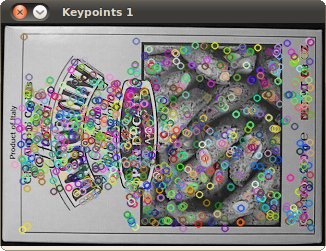
这是第一张图的特征点检测结果:
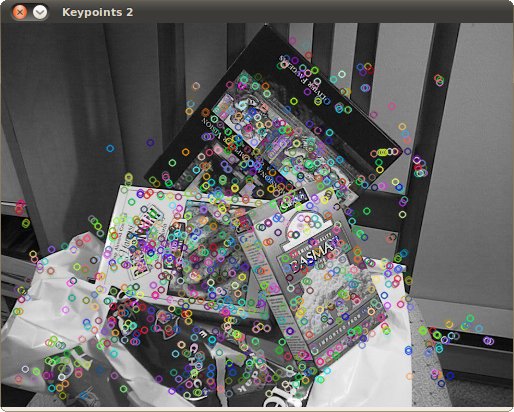
这是第二张图的特征点检测:
翻译者
Shuai Zheng, <kylezheng04@gmail.com>, http://www.cbsr.ia.ac.cn/users/szheng/
from: http://www.opencv.org.cn/opencvdoc/2.3.2/html/doc/tutorials/features2d/feature_detection/feature_detection.html#feature-detection
OpenCV特征点检测的更多相关文章
- OpenCV特征点检测------ORB特征
OpenCV特征点检测------ORB特征 ORB是是ORiented Brief的简称.ORB的描述在下面文章中: Ethan Rublee and Vincent Rabaud and Kurt ...
- python+OpenCV 特征点检测
1.Harris角点检测 Harris角点检测算法是一个极为简单的角点检测算法,该算法在1988年就被发明了,算法的主要思想是如果像素周围显示存在多于一个方向的边,我们认为该点为兴趣点.基本原理是根据 ...
- OpenCV特征点检测匹配图像-----添加包围盒
最终效果: 其实这个小功能非常有用,甚至加上只有给人感觉好像人脸检测,目标检测直接成了demo了,主要代码如下: // localize the object std::vector<Point ...
- OpenCV特征点检测------Surf(特征点篇)
Surf(Speed Up Robust Feature) Surf算法的原理 ...
- OpenCV特征点检测——Surf(特征点篇)&flann
学习OpenCV--Surf(特征点篇)&flann 分类: OpenCV特征篇计算机视觉 2012-04-20 21:55 19887人阅读评论(20)收藏举报 检测特征 Surf(Spee ...
- OpenCV特征点检测——ORB特征
ORB算法 目录(?)[+] 什么是ORB 如何解决旋转不变性 如何解决对噪声敏感的问题 关于尺度不变性 关于计算速度 关于性能 Related posts 什么是ORB 七 4 Ye ...
- OpenCV特征点检测算法对比
识别算法概述: SIFT/SURF基于灰度图, 一.首先建立图像金字塔,形成三维的图像空间,通过Hessian矩阵获取每一层的局部极大值,然后进行在极值点周围26个点进行NMS,从而得到粗略的特征点, ...
- OpenCV 特征点检测
#include <stdio.h> #include <iostream> #include "opencv2/core/core.hpp" #inclu ...
- OPENCV图像特征点检测与FAST检测算法
前面描述角点检测的时候说到,角点其实也是一种图像特征点,对于一张图像来说,特征点分为三种形式包括边缘,焦点和斑点,在OPENCV中,加上角点检测,总共提供了以下的图像特征点检测方法 FAST SURF ...
随机推荐
- 大理石在哪儿(UVa10474)
题目具体描述见:https://uva.onlinejudge.org/index.php?option=com_onlinejudge&Itemid=8&category=835&a ...
- Jenkins配置agent
一. 通信协议 为了master和agent能够正常通信,连接的建立必须是双向的. SSH: master通过标准的SSH协议连接slave. Java Web Start: Java 应用在agen ...
- Recursion in Java
Recursion in Java 递归无出口 public class RecursionExample1 { public static void p() { System.out.println ...
- IntelliJ IDEA 编译程序出现 非法字符 的 解决方法(转)
百度到很多方法,比如(删了文件重新建:先改成GBK再UTF8:粘贴到notpad++上改utf8),但都没有解决问题.下面这种方法确实有效,先记下来,如果有其他好方法将来在补充…… 文章来源: ht ...
- TopTicTacToe 开发文档
团队成员: 1.张旭 2.余浩 3.孙闯 4.吴阳 5.王晓华 6.张国庆 开发文档地址:http://www.kancloud.cn/netcon/t4 代码项目地址:https://coding. ...
- cogs——2098. Asm.Def的病毒
2098. Asm.Def的病毒 ★☆ 输入文件:asm_virus.in 输出文件:asm_virus.out 简单对比时间限制:1 s 内存限制:256 MB [题目描述] “这就 ...
- ESXI 5.5卡在LSI_MR3.V00
方法一 故障现象 此问题无论使用VMware官方镜像还是HP的自定义镜像都会出现一下情况并卡着不动.(此文档普遍存在各种服务器上,包括其它厂商服务器) 故障原因: 故障原因VMware官方和HP官方并 ...
- poj 1659 Frogs' Neighborhood( 青蛙的邻居)
Frogs' Neighborhood Time Limit: 5000MS Memory Limit: 10000K Total Submissions: 9639 Accepted: 40 ...
- redis_NoSql数据库四大分类
前面简单介绍了什么是NoSql,以及NoSql的应用场景,今天简单来学习一下NoSql的分类 一.KV键值对 典型的介绍:新浪(BerkeleyDB+redis).美团(redis+tair).阿里, ...
- HDU 3790最短路径问题 [最短路最小花费]
题目链接:[http://acm.hdu.edu.cn/showproblem.php?pid=3790] 最短路径问题 Time Limit: 2000/1000 MS (Java/Others) ...