
关于c#生成word。
需求: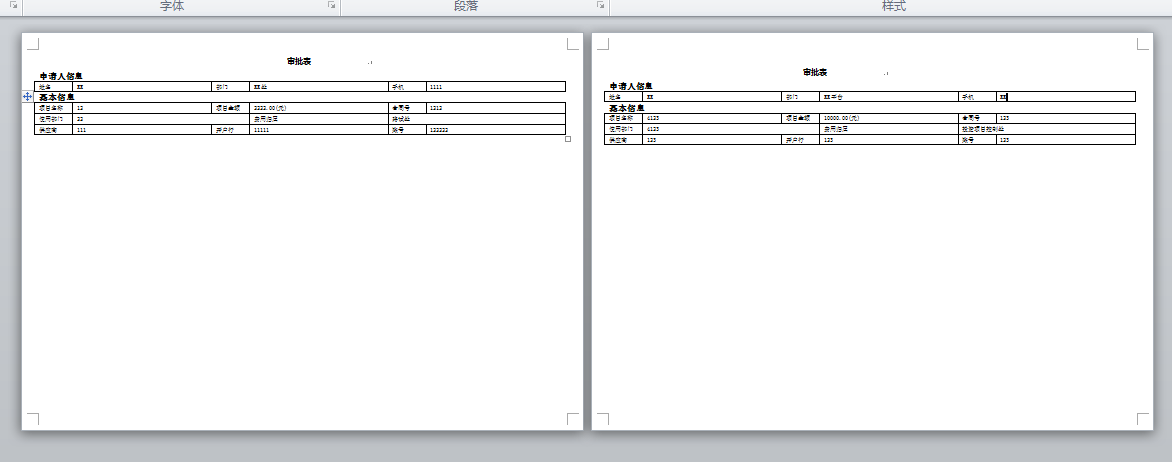 需要把数据做成这样的效果、一个页面展示一个r单子数据。
 object filename = "";

            Object Nothing = System.Reflection.Missing.Value;

            Word.Application WordApp = new Word.ApplicationClass();//实例化word

            HY.Common.Utils.Logger.Log.Info("WordApp:" + WordApp);

            Word._Application oWord = new Word.Application();

            //创建Word文档

            Word._Document WordDoc = WordApp.Documents.Add(ref Nothing, ref Nothing, ref Nothing, ref Nothing);

            try

            {

                SetPage(WordApp, WordDoc, "横板", , 29.7, , , , );

                HY.Common.Utils.Logger.Log.Info("WordDoc:" + WordDoc);

                string name = "审批表" + DateTime.Now.ToString("yyyyMMdd") + DateTime.Now.ToLongTimeString().Replace(":", "") + ".docx";//创建生成文件名字

                HY.Common.Utils.Logger.Log.Info("name" + name);

                string CreateFilePath = ConfigurationManager.AppSettings["CreateFilePath"];

                HY.Common.Utils.Logger.Log.Info("CreateFilePath" + CreateFilePath);

                filename = CreateFilePath + name; //文件保存路径

                HY.Common.Utils.Logger.Log.Info("filename" + filename);

                string[] SerialNumberArr = Context.Request["SerialNumber"].Substring(, Context.Request["SerialNumber"].ToString().Length - ).Split(',');

                string[] ProcInstIDArr = Context.Request["ProcInstID"].Substring(, Context.Request["ProcInstID"].ToString().Length - ).Split(',');//挂账Id

                string[] PaymentProcInstIDArr = Context.Request["PaymentProcInstID"].Substring(, Context.Request["PaymentProcInstID"].ToString().Length - ).Split(',');//付款Id

                for (int i = ; i < ProcInstIDArr.Length; i++)

                {

                    #region 打印

                    InsertText(WordDoc, "                 审批表              ", new System.Drawing.Font("微软雅黑", , System.Drawing.FontStyle.Bold), Word.WdParagraphAlignment.wdAlignParagraphLeft, false);

                    InsertText(WordDoc, "", new System.Drawing.Font("微软雅黑", , System.Drawing.FontStyle.Bold), Word.WdParagraphAlignment.wdAlignParagraphLeft, true);

                    InsertText(WordDoc, "申请人信息", new System.Drawing.Font("宋体", , System.Drawing.FontStyle.Bold), Word.WdParagraphAlignment.wdAlignParagraphLeft, false);

                    if (ProcInstIDArr.Length -  != i)

                    {

                        InsertBreak(WordDoc, Nothing);

                    }

                    #endregion

                }

                WordDoc.SaveAs(ref filename, ref Nothing, ref Nothing, ref Nothing, ref Nothing, ref Nothing, ref Nothing, ref Nothing, ref Nothing, ref Nothing, ref Nothing, ref Nothing, ref Nothing, ref Nothing, ref Nothing, ref Nothing);

                WordApp = null;

                HY.Common.Utils.Logger.Log.Info("SaveAs" + filename);

            }

            catch (Exception ex)

            {

                HY.Common.Utils.Logger.Log.Info("error" + e.ToString());

            }

            finally

            {

                WordDoc.Close(ref Nothing, ref Nothing, ref Nothing);

                oWord.Quit(ref Nothing, ref Nothing, ref Nothing);

                KillWordProcess();

            }
   #region  - 插入文本 -

        public static bool InsertText(Word._Document oDoc, string strText, System.Drawing.Font font, Word.WdParagraphAlignment wdAlign, bool isAftre)

        {

            try

            {

                Word.Range rng = oDoc.Content;

                int lenght = oDoc.Characters.Count - ;

                object start = lenght;

                object end = lenght;

                rng = oDoc.Range(ref start, ref end);

                if (isAftre == true)

                {

                    strText += "\r\n";

                }

                rng.Text = strText;

                rng.Font.Name = font.Name;

                rng.Font.Size = font.Size;

                if (font.Style == System.Drawing.FontStyle.Bold) { rng.Font.Bold = ; } //设置单元格中字体为粗体

                rng.ParagraphFormat.Alignment = wdAlign;//设置文本对齐格式(左对齐,右对齐,居中)

                return true;

            }

            catch (Exception)

            {

                return false;

            }

        }

        #endregion
   #region - 插入分页符 -

        public static void InsertBreak(Word._Document WordDoc, Object Nothing)

        {

            Word.Paragraph para;

            para = WordDoc.Content.Paragraphs.Add(ref Nothing);

            object pBreak = (int)Word.WdBreakType.wdSectionBreakNextPage;

            para.Range.InsertBreak(ref pBreak);

        }

        public static void DeleteBreak(Word.Application wordApp, Object Nothing)

        {

            Word.Range range1, range2;

            // 跳转种类

            object objWhat = Word.WdGoToItem.wdGoToPage;

            // 跳转位置

            object objWhich = Word.WdGoToDirection.wdGoToLast;

            // 转向最后一页

            wordApp.Selection.GoTo(ref objWhat, ref objWhich, ref Nothing, ref Nothing);

            // Range取得

            range1 = wordApp.Selection.Range;

            range2 = wordApp.ActiveDocument.Range(ref Nothing, ref Nothing);

            object start = range1.Start;

            object end = range2.End;

            // 删除最后一页

            wordApp.ActiveDocument.Range(ref start, ref end).Delete(ref Nothing, ref Nothing);

        }

        #endregion
    #region - 页面设置 -

        public static void SetPage(Word.Application oWord, Word._Document oDoc, string orientation, double width, double height, double topMargin, double leftMargin, double rightMargin, double bottomMargin)

        {

            Logger.Log.Info("Word.Name" + oWord.Name);

            Logger.Log.Info("oDoc" + oDoc);

            oDoc.PageSetup.PageWidth = oWord.CentimetersToPoints((float)width);

            oDoc.PageSetup.PageHeight = oWord.CentimetersToPoints((float)height);

            if (orientation == "横板")

            {

                oDoc.PageSetup.Orientation = Microsoft.Office.Interop.Word.WdOrientation.wdOrientLandscape;

            }

            oDoc.PageSetup.TopMargin = (float)(topMargin * );//上边距

            oDoc.PageSetup.LeftMargin = (float)(leftMargin * );//左边距

            oDoc.PageSetup.RightMargin = (float)(rightMargin * );//右边距

            oDoc.PageSetup.BottomMargin = (float)(bottomMargin * );//下边距

        }

        #endregion
    #region - 清除word进程 -

        /**/

        /// <summary>

        /// 清除word进程

        /// </summary>

        public static void KillWordProcess()

        {

            System.Diagnostics.Process[] myPs;

            myPs = System.Diagnostics.Process.GetProcesses();

            foreach (System.Diagnostics.Process p in myPs)

            {

                if (p.Id != )

                {

                    string myS = "WINWORD.EXE" + p.ProcessName + "  ID:" + p.Id.ToString();

                    try

                    {

                        if (p.Modules != null)

                            if (p.Modules.Count > )

                            {

                                System.Diagnostics.ProcessModule pm = p.Modules[];

                                myS += "/n Modules[0].FileName:" + pm.FileName;

                                myS += "/n Modules[0].ModuleName:" + pm.ModuleName;

                                myS += "/n Modules[0].FileVersionInfo:/n" + pm.FileVersionInfo.ToString();

                                if (pm.ModuleName.ToLower() == "winword.exe")

                                    p.Kill();

                            }

                    }

                    catch

                    { }

                    finally

                    {

                    }

                }

            }

        }

        #endregion
遇到的问题:
1.由于需要每一个页面显示一个单子、所以每次根据ProcInstIDArr[] 循环创建完以后、调用InsertBreak()生成下一个空白页面、导致最后会出现一个空白页面、
当时想到的是怎么删除最后一个空白页、通过在网上查询,说通过以下代码可以删除、最后拿下来试验发现无法实现。
 //Word.Range range1, range2;

                //// 跳转种类

                //object objWhat = Word.WdGoToItem.wdGoToPage;

                //// 跳转位置

                //object objWhich = Word.WdGoToDirection.wdGoToLast;

                //// 转向最后一页

                //WordApp.Selection.GoTo(ref objWhat, ref objWhich, ref Nothing, ref Nothing);

                //// Range取得

                //range1 = WordApp.Selection.Range;

                //range2 = WordApp.ActiveDocument.Range(ref Nothing, ref Nothing);

                //object start = range1.Start;

                //object end = range2.End;

                //// 删除最后一页

                //WordApp.ActiveDocument.Range(ref start, ref end).Delete(ref Nothing, ref Nothing);
中午跟同事请教:理理思路。发现完全是我想复杂了、只想着怎么删除,没有想过不去生成。最后通过一个if判断轻松解决问题。
遇到问题不要想的太复杂。
2.还有一个关于winword.exe进程未杀死的问题、 这个是今天早上发现的,早上打开服务器,发现服务器上出现N个word文档。进程里还有不下30个winword.exe进 程、详情点击
关于c#生成word。的更多相关文章
- Aspose.Words简单生成word文档
Aspose.Words简单生成word文档 Aspose.Words.Document doc = new Aspose.Words.Document(); Aspose.Words.Documen ...
- php 生成word的三种方式
原文地址 http://www.jb51.net/article/97253.htm 最近工作遇到关于生成word的问题 现在总结一下生成word的三种方法. btw:好像只要是标题带PHP的貌似点击 ...
- 代码批量生成WORD的遇到的问题及解决
好久没搞工具了,最近因为处理大规模公文处理单文档,自己写了个批量处理WORD的程序:在调试过程中,主要遇到两个问题 第一个是WORD的模板 数据很多,但是WORD模板只需要一个,将数据替换WORD里标 ...
- ASP.NET生成WORD文档,服务器部署注意事项
网上转的,留查备用,我服务器装的office2007所以修改的是Microsoft Office word97 - 2003 文档这一个. ASP.NET生成WORD文档服务器部署注意事项 1.Asp ...
- [转载]Matlab生成Word报告
最近在进行一批来料的检验测试,一个个手动填写报告存图片太慢了,就有了种想要使用Matlab在分析完后数据可以自动生成PDF报告的想法,于是就去网上搜索了相关的资料,发现Matlab中文论坛上有xiez ...
- POI生成WORD文档
h2:first-child, body>h1:first-child, body>h1:first-child+h2, body>h3:first-child, body>h ...
- poi生成word文件
一.简介 对于poi来说,poi可以完成对word.excel.ppt的处理.word目前有两种文件格式,一种是doc后缀.另一种是docx后缀的.2007之前的版本都是doc后缀的,这种格式poi使 ...
- 根据指定Word模板生成Word文件
最近业务需要批量打印准考证信息 1.根据Table数据进行循环替换,每次替换的时候只替换Word中第一个Table的数据, 2.每次替换之后将Word中第一个Table数据进行复制,将复制Table和 ...
- 使用freemarker生成word,步骤详解并奉上源代码
1. 步骤 1. 用word编辑好模板 1. 普通字符串替换为 ${string} 2. 表格循环用标签 <#list userList as user> 姓名:${user.u ...
- PHP生成word的三种方式
摘要: 最近工作遇到关于生成word的问题 现在总结一下生成word的三种方法. btw:好像在博客园发表博客只要是标题带PHP的貌似点击量都不是很高(哥哥我标题还是带上PHP了),不知道为什么,估计 ...
随机推荐
- delphi 调用 webservice (.NET C#版)
uses XMLIntf, XMLDoc; XML to XTR文件转换 .File-->open打开你要分析的XML文件 .在左边选择你要分析的接点,双击加到中间的转换列表中 .Create- ...
- A Tour of Go Map literals continued
If the top-level type is just a type name, you can omit it from the elements of the literal. package ...
- Arrays.asList的源码分析
以前一直很奇怪为什么Arrays.asList的数组不能插入新的数据,后来看了源码发现是因为内部是一个final的数组支持起来的Arraylist,下面贴入源码与分析. 1.先看Arrays的方法 我 ...
- ulua学习笔记(二):官方资料及问题解决方案
uLua&SimpleFramework入门视频教程网盘地址 视频教程地址 http://pan.baidu.com/s/1gd8fG4N游戏框架地址 https://github.com/j ...
- Oracle- 表的自增长创建
Oracle创建自增长要先写序列还要去写触发器,不像MSSQLSERVER那样方便.但也是麻烦,记录如下: Oracle中,可以为每张表的主键创建一个单独的序列,然后从这个序列中获取自动增加的标识符, ...
- 在C#中实现软件自动升级
在C#中实现软件自动升级 winform程序相对web程序而言,功能更强大,编程更方便,但软件更新却相当麻烦,要到客户端一台一台地升级,本文结合实际情况,通过软件实现自动升级,弥补了这一缺陷,有较好的 ...
- Notes(一)
Numerous experimental measurements in spatially complex systems have revealed anomalous diffusion in ...
- 解决 mac ssh空闲 连接断开问题
想必大家都知道,用终端 ssh 连接服务器,如果长时间没有操作,会被断开连接. 要用的话又得重新登录,这非常不方便,也影响开发效率.那针对这种情况,有没有解决方法呢? 答案是肯定的.理论上,有两种方案 ...
- Genymotion - 强大好用高性能的 Android 模拟器 (在电脑流畅运行APK安卓软件游戏的利器)
随着 Android 系统的应用和游戏越来越丰富,甚至有些比起Windows.Mac上的软件更加好用好玩,因此很多人都希望能在电脑上也能玩到安卓的游戏或APP. 我们曾推荐过 BlueStacks,而 ...
- 理解shared_ptr<T>
1.shared_ptr<T>解决什么问题? auto_ptr有个局限,拥有权转移.这往往不符合我们的需求,有时候我们期望,多个资源管理对象可以共享一个资源,当引用计数为0的时候,执行de ...