
微信小程序调用用百度地图天气功能
#小程序之调用百度地图天气功能
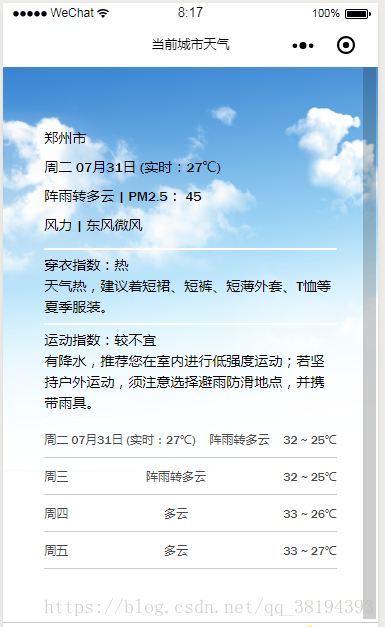
本篇博客主要介绍小程序在百度地图中获取天气信息,如有不全请指出。下面先上效果图
主要内容
- 百度地图API的个人密钥,也就是AK
- 请求百度地图API接口数据
- 获取到的信息结果
- 页面输出获取到的信息
- 完整代码
第一步:获取个人AK
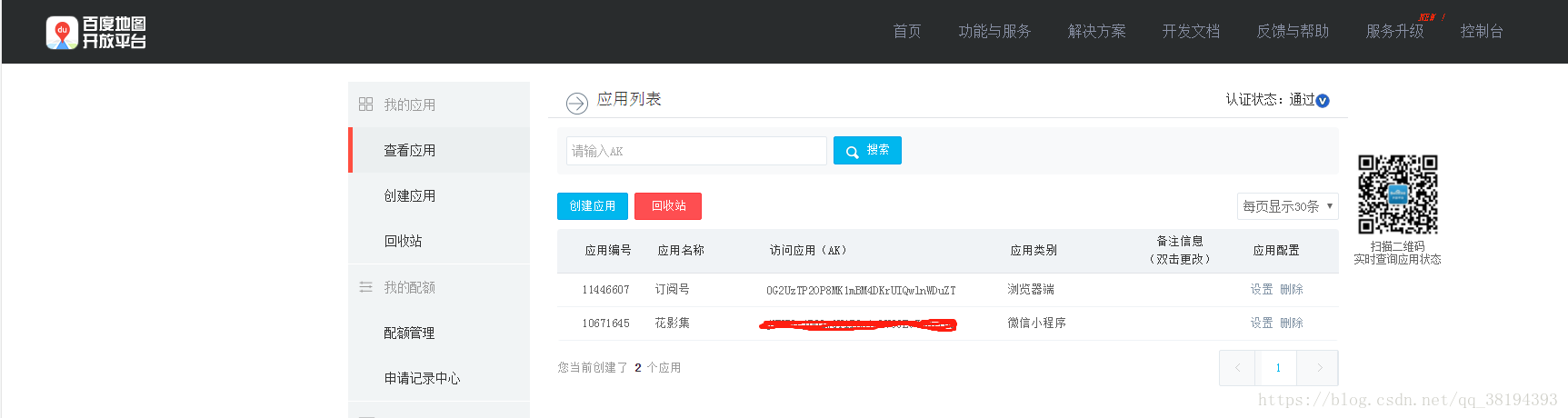
这一步较为简单,也有很多博主写过了,可以直接去百度开放平台注册获取,链接(http://lbsyun.baidu.com/),具体界面获取后如下图:
红色部分就是我们要用到的AK,注意不是AK47哦,也不是安卓或者移动应用哦,一定要是微信小程序的应用AK。
第二步:JS代码中引入接口请求
*在util.js中写入函数方法
function getLocation(callback) { //位置信息

  wx.getLocation({

    type: 'gcj02',

    success: function (res) {

      callback(true, res.latitude, res.longitude);

    },

    fail: function () {

      callback(false);

    }

  })

}

function getWeather(latitude, longitude, callback) {  //天气信息

  var ak = "第一步获取到的AK";//换成自己的ak

  var url = "https://api.map.baidu.com/telematics/v3/weather?location=" + longitude + "," + latitude + "&output=json&ak=" + ak; //接口请求和参数传递

  wx.request({

    url: url,

    success: function (res) {

      console.log("天气请求结果",res.data); //在打开应用即可看到

      callback(res.data);

    }

  });

}

function loadWeatherData(callback) {

  getLocation(function (success, latitude, longitude) {

    getWeather(latitude, longitude, function (weatherData) {

      callback(weatherData);

    });

  });

}
注意以上请求数据以及函数需要在util.js的module中声明出来
module.exports = {

  http: http,

  loadWeatherData: loadWeatherData //诸如此类新写入的函数

}
###第三步: 获取到的天气信息结果
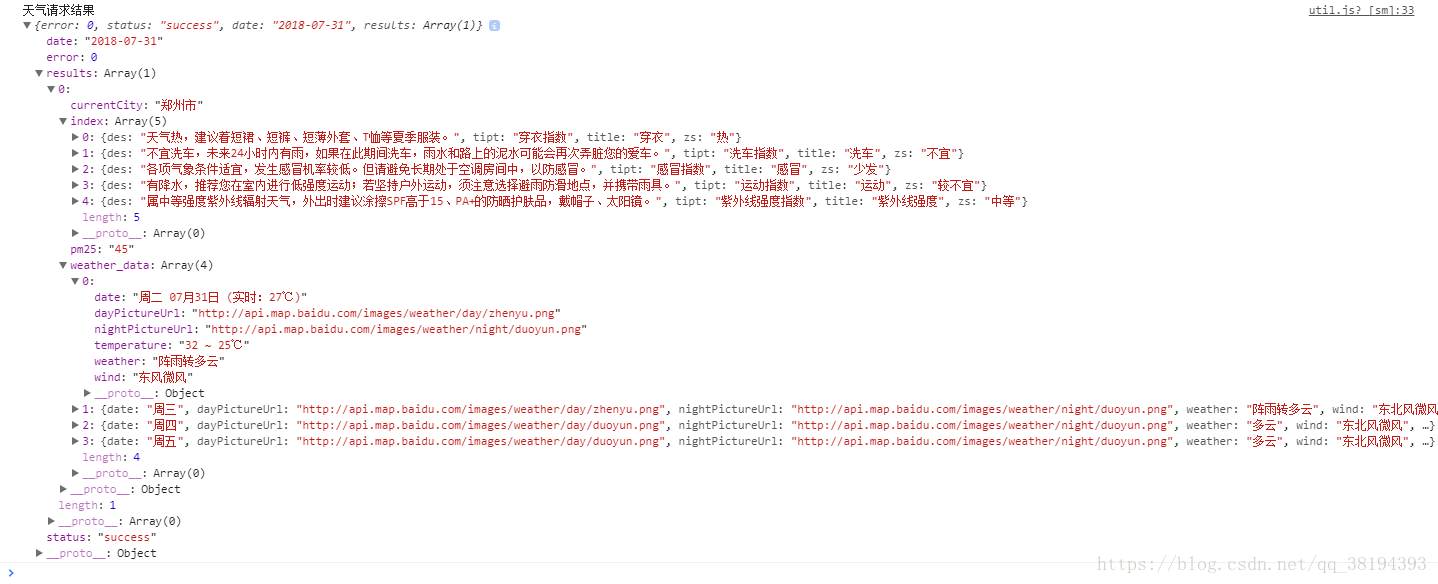
以下图片可能看不太清,可以放大了看。主要输出结果都在results数组中,results[0].index中是各种指数提示信息,想在天气中加入暖心贴片提示,可引用results[0].index(后面会有方法说明的)。天气信息列表在weather_data数组中,当天信息就是第一条数据了。关于百度地图为什么显示4条天气信息我未作深入研究。一般查看当天和未来三天信息已经足够了。如有爱好者有深入研究可评论回我,我也跟你们学点。
下面这是我们在util.js中写入的方法,
function getWeather(latitude, longitude, callback) {

  var ak = "个人AK";//换成自己的ak

  var url = "https://api.map.baidu.com/telematics/v3/weather?location=" + longitude + "," + latitude + "&output=json&ak=" + ak;

  wx.request({

    url: url,

    success: function (res) {

      console.log("天气请求结果",res.data); //天气请求结果输出

      callback(res.data); //一定要回调

    }

  });

}
###第四步:页面输出信息
页面输出当前城市天气信息:
<view class="now-tmp">

  <view class="city">{{weather.currentCity}}</view>

  <view class="tmp">{{weatherData[0].date}}</view>

  <view class="type">{{weatherData[0].weather}} | PM2.5: {{weather.pm25}}</view>

  <view class='wind'>风力  |  {{weatherData[0].wind}}</view>

</view>
以上页面代码对应就是效果图中的第一部分信息包括城市、日期、实时温度、天气信息、PM2.5以及风力。
<view class="exp-item">

  <view class="">{{indexData[0].tipt}}:{{indexData[0].zs}}</view>

  <view class="">{{indexData[0].des}}</view>

</view>
以上页面代码对应的是效果图中的暖心提示信息。
<block wx:for="{{weatherData}}" wx:for-item="item" wx:key="">

  <view class="cast-item">

    <view class="cast-day">{{item.date}}</view>

    <view class="cast-type">

      {{item.weather}}

    </view>

    <view class="cast-tmp">

      {{item.temperature}}

    </view>

  </view>

</block>
以上代码对应的是最近天数天气信息列表
###最后放上完整页面代码
先来.wxml页面的:
<!-- 当前城市天气 -->

<view class="wrapper">

    <view class="now">

      <view class="now-tmp">

        <view class="city">{{weather.currentCity}}</view>

        <view class="tmp">{{weatherData[0].date}}</view>

        <view class="type">{{weatherData[0].weather}} | PM2.5: {{weather.pm25}}</view>

        <view class='wind'>风力  |  {{weatherData[0].wind}}</view>

      </view>

      <!-- 暖心提示 -->

      <view class="now-exp">

        <view class="item-sp"></view>

        <view class="exp-item">

          <view class="">{{indexData[0].tipt}}:{{indexData[0].zs}}</view>

          <view class="">{{indexData[0].des}}</view>

        </view>

        <view class="item-sp"></view>

        <view class="exp-item">

          <view class="">{{indexData[3].tipt}}:{{indexData[3].zs}} </view>

          <view class="">{{indexData[3].des}}</view>

        </view>

        <view class="item-sp"></view>

      </view>

    </view>

    <!-- 最近几天天气列表 -->

    <view class="forecast">

      <block wx:for="{{weatherData}}" wx:for-item="item" wx:key="">

        <view class="cast-item">

          <view class="cast-day">{{item.date}}</view>

          <view class="cast-type">

            {{item.weather}}

          </view>

          <view class="cast-tmp">

            {{item.temperature}}

          </view>

        </view>

      </block>

    </view>

</view>

<!--页面背景图  -->

<view class='bgImg'><image src='../../image/card1.png' ></image></view>
再来.wxss的代码:
.wrapper{

  width:100%;

  height:100%;

  box-sizing: border-box;

  position: absolute;

  top:0;

  left:0;

  padding:50rpx;

  font-family: 'Franklin Gothic Medium', 'Arial Narrow', Arial, sans-serif;

}

.now{

  height:60%;

  color:#000;

  font-size: 28rpx;

  display: flex;

  flex-direction: column;

  width:90%;

  margin:0 auto;

  margin-top:8%;

}

 .city{

   margin-top:10px;

 }

 .type{

   margin-top:10px;

 }

 .wind{

   margin-top:10px;

 }

.tmp{

  margin-top:10px;

}

.now-exp{

  display: block;

  flex-direction: row;

  justify-content: space-around;

  line-height:150%;

}

.now-tmp{

  flex-grow:  1;/*表示剩余的空间都分配给该元素*/

}

.exp-item{

  font-size: 28rpx;

  text-align: left;

  margin-top:5px;

  margin-bottom:5px;

}

.item-sp{

  height:5rpx;

  width:100%;

  background-color: #fff;

}

.forecast{

  margin-top: 30rpx;

  width:90%;

  margin:0 auto;

}

.cast-item{

  display: flex;

  flex-direction: row;

  justify-content: space-between;

  border-bottom: 1rpx solid #ccc;

  padding: 20rpx 0;

}

.bgImg{

  height:100%;

  width:100%;

  margin:0 auto;

  top:0;

}

.bgImg image{

  width:100%;

  height:100%;

  margin:0 auto;

}
最后附上js代码,代码各行用处我就不一一做注释了。有不了解的可以评论区回复我
// 引用百度地图微信小程序JSAPI模块

var App = getApp();

var common = require('../../utils/util.js');

Page({

  data: {

    weather: {},

    weatherData: {},

    indexData:{}

  },

  onLoad: function () {

    var that = this;

    console.log("当加载天气页面的时候", that.data);

    common.loadWeatherData(function (data) {

      that.setData({

        weather: data.results[0],

        weatherData: data.results[0].weather_data,

        indexData: data.results[0].index

      });

    });

  },

  getUserFortune: function() {

    wx.navigateTo({

      url: '../fortune-result/fortune-result',

    })

  },

  onShareAppMessage: function(res) {

    if (res.from === 'button') {

      // 来自页面内转发按钮

      console.log(res.target)

    }

    return {

      title: '快来看看你周围有什么',

      path: 'pages/maps/map',

      success: function(res) {

        // 转发成功

        wx.showShareMenu({

          // 要求小程序返回分享目标信息

          withShareTicket: true

        });

      },

      fail: function(res) {

        // 转发失败

      }

    }

  }

})
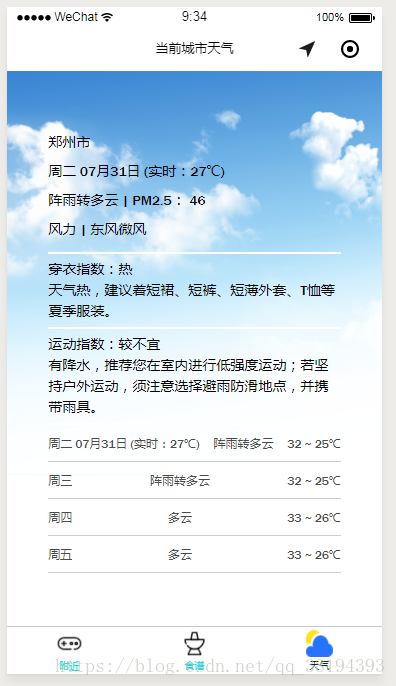
运行后的效果展示:
#最后祝各位学有所成!


微信小程序调用用百度地图天气功能的更多相关文章
- 微信小程序城市定位(百度地图API)
概述 微信小程序提供一些API(地址)用于获取当前用户的地理位置等信息,但无论是wx.getLocation,还是wx.chooseLocation均没有单独的字段表示国家与城市信息,仅有经纬度信息. ...
- 微信小程序 - 调用腾讯地图插件
1. 登录公众号平台 https://mp.weixin.qq.com/ 2. 设置->第三方服务->添加插件->输入插件名称->申请 3. 项目中使用 3.1 app.jso ...
- 微信小程序项目实战之豆瓣天气
概述 微信小程序项目实战之豆瓣天气 详细 代码下载:http://www.demodashi.com/demo/10943.html 一.准备工作 1.注册微信小程序 2.在小程序设置中设置reque ...
- 图解微信小程序---调用API操作步骤
图解微信小程序---调用API操作步骤 什么是API API(Application Programming Interface,应用程序编程接口:是一些预先定义的函数,目的是提供应用程序与开发人员基 ...
- 微信小程序0.11.122100版本新功能解析
微信小程序0.11.122100版本新功能解析 新版本就不再吐槽了,整的自己跟个愤青似的.人老了,喷不动了,把机会留给年轻人吧.下午随着新版本开放,微信居然破天荒的开放了开发者论坛.我很是担心官方 ...
- 微信小程序 使用腾讯地图SDK详解及实现步骤
信小程序 使用腾讯地图SDK详解及实现步骤 微信小程序JavaScript SDK: 官方文档:http://lbs.qq.com/qqmap_wx_jssdk/index.html 步骤: 1 ...
- 微信小程序调用蓝牙功能控制车位锁
第一次学用微信小程序,项目需要,被逼着研究了一下,功能是调用微信小程序的蓝牙功能,连接上智能车位锁,控制升降,大概步骤及调用的小程序接口API如下: 1.打开蓝牙模块 wx.openBluetooth ...
- PHP:微信小程序调用【统一下单】【微信支付】【支付回调】API;XML转Array,Array转XML方法(通用)
1.微信公众号.微信小程序开发过程中,第三方服务器与微信服务器数据交互,需要进行数据转换,必须用到这两个函数: 分别是xml_to_array.array_to_xml ; /** * 输出xml字符 ...
- vue过滤器微信小程序过滤器和百度智能小程序过滤器
因为最近写了微信小程序和百度小程序,用到了过滤器,感觉还挺好用的,所以就来总结一下,希望能帮到你们. 1. 微信小程序过滤器: 1.1:首先建一个单独的wxs后缀的文件,一般放在utils文件夹里面. ...
随机推荐
- 提高unigui开发效率的两个方法(02)
1.编译时自己退出运行的程序. 在做unigui开发时,每次编译运行时,unigui的应用都会在后台运行,每次重新编译时都必须手工在任务栏里将应用退出才行,非常麻烦,可以在项目编译的参数里加上杀进程的 ...
- 你知道Verilog HDL程序是如何构成的吗
本节通过硬件描述语言Verilog HDL对二十进制编码器的描述,介绍Verilog HDL程序的基本结构及特点. 二十进制编码器及Verilog HDL描述 二十进制编码器是数字电路中常用的电路单元 ...
- java set的线程安全
CopyOnWriteArraySet和ConcurrentSkipListSet 与线程不安全的集合类的对应关系 HashSet -> CopyOnWriteArraySet TreeSet ...
- Django的urls(路由)
目录 Django的urls(路由) 正则表达式详解 路由匹配(分组匹配) 无名分组 有名分组 反向解析 无名分组反向解析 有名分组反向解析 路由分发 名称空间 虚拟环境 伪静态 Django的url ...
- 为何以及如何学Linux系统?
在当今的社会中,linux用处实在是太过广泛了.现在用在服务器和嵌入式上的Linux发行版本数不胜数,桌面上linux只占1%的比例,但这不代表linux比windows和mac 做得差,实际上桌面系 ...
- 一、java基础-数据类型_数据类型转化_字符编码_转义字符
1.Java 支持的8种基本数据类型: java的四种整数数据类型:byte 1 short 2 int4 long8 byte 8位带符号整数 -128到127之 ...
- DatePicker和DatePickerDialog的使用
activity_main.xml: <Button android:id="@+id/showDatePickerButton" android:text="@s ...
- 5.8 Nginx 常用功能的配置
- MVC5仓库管理系统
下载
- 干货 | RDS For SQL Server单库上云
数据库作为核心数据的重要存储,很多时候都会面临数据迁移的需求,例如:业务从本地迁移上云.数据中心故障需要切换至灾备中心.混合云或多云部署下的数据同步.流量突增导致数据库性能瓶颈需要拆分-- 本文将会一 ...