
Direct2D教程VIII——几何(Geometry)对象的运算,本系列的终结篇
目前博客园中成系列的Direct2D的教程有
1、万一的 Direct2D 系列,用的是Delphi 2009
2、zdd的 Direct2D 系列,用的是VS中的C++
3、本文所在的 Direct2D教程 系列,用的是VS2010的Visual Basic语言(可以很方便的转为C#),基于Windows API Code Pack 1.1。
还有官方的说明文档 Direct2D ,用的是C++。
本系列的前几篇文章:
Direct2D教程II——绘制基本图形和线型(StrokeStyle)的设置详解
Direct2D教程V——位图(Bitmap)和位图笔刷(BitmapBrush)
Direct2D教程VII——变换几何(TransformedGeometry)对象
研究Direct2D已经有一段时间了。在参阅了一些相关的文章后,发现虽然Windows API Code Pack 1.1对Direct2D封装的比较好,但也有不足的地方(封装不完全)。
1、在WIC组件中,没有封装BitmapFrameEncode对象
在前文中曾介绍,WIC组件中有BitmapFrameDecode对象,负责图像数据的解码。相对应的也应该有BitmapFrameEncode对象,负责图像数据的编码。但是在Windows API Code Pack 1.1中的WIC组件中没有这个对象,仅仅在ImagingBitmap对象中提供了SaveToFile方法。该方法提供了图像数据保存到文件的途径,但是扩展性不够,没有提供不同格式的参数设置(全采用该格式的默认设置)
2、没有提供ID2D1Effect对象的封装
Direct2D提供了一些图像的特效,通过ID2D1Effect对象实现,参看 Built-in Effects 。由于没有封装ID2D1Effect对象,自然也就没法实现图像的特效了。
期待Windows API Code Pack的下个版本能弥补上面的两个不足
言归正传,接下来介绍几何(Geometry)对象的运算。
几何(Geometry)对象的运算
在前文 Direct2D教程III——几何(Geometry)对象 中介绍了几何(Geometry)对象的一些高级功能。其中一个就是两个几何(Geometry)对象的运算功能。
运算方法的原型定义
Public Sub CombineWithGeometry(inputGeometry As Direct2D1.Geometry, combineMode As Direct2D1.CombineMode, geometrySink As Direct2D1.ISimplifiedGeometrySink)
Public Sub CombineWithGeometry(inputGeometry As Direct2D1.Geometry, combineMode As Direct2D1.CombineMode, geometrySink As Direct2D1.ISimplifiedGeometrySink, flatteningTolerance As Single)
Public Sub CombineWithGeometry(inputGeometry As Direct2D1.Geometry, combineMode As Direct2D1.CombineMode, geometrySink As Direct2D1.ISimplifiedGeometrySink, flatteningTolerance As Single, inputGeometryTransform As Direct2D1.Matrix3x2F)
Public Enum CombineMode
Union = 0
Intersect = 1
Xor = 2
Exclude = 3
End Enum
该方法的几个参数的意义如下:
inputGeometry:要和本对象运算的几何对象,类型是Geometry类
combineMode:运算的类型,类型是CombineMode枚举,分别是Union(并集)、Intersect(交集)、Xor(异或,两个对象不属于对方的部分的合集)、Exclude(差集)
geometrySink:运算的结果要添加到的Sink对象,类型是ISimplifiedGeometry接口
flatteningTolerance:运算结果的精度,类型是数值,表示模拟结果的每条边的长度,值越小越精细,在可以接受的精度下,可以适当提高精度的数值
inputGeometryTransform:和本对象运算的几何对象要进行的转换(Transform),类型是Matrix3x2F,是先转换再运算
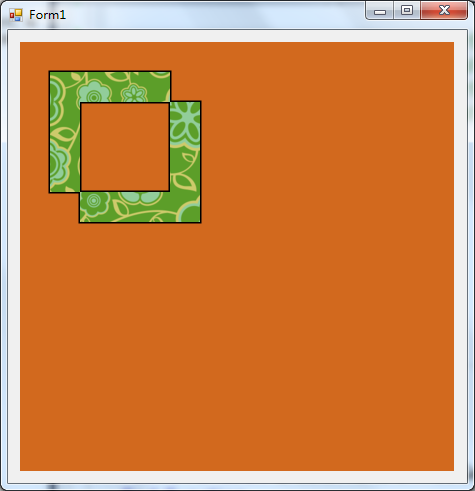
下面是个示例代码,用两个矩形对象来演示运算结果,运算的类型我们用Xor表示,其余的和这个类似
Public Class clsDirect2DSample17
Inherits clsDirect2DSample11
Public Shadows Sub Render()
If Not _renderTarget Is Nothing Then
With _renderTarget
.BeginDraw()
.Clear(New Direct2D1.ColorF(Color.Chocolate.ToArgb))
Dim BorderBrush As Direct2D1.SolidColorBrush = _renderTarget.CreateSolidColorBrush(New Direct2D1.ColorF(0, 0, 0))
Dim Bmp As Direct2D1.D2DBitmap = LoadBitmapFromFile("216.png")
Dim BmpBrush As Direct2D1.BitmapBrush = _renderTarget.CreateBitmapBrush(Bmp)
Dim R1 As Direct2D1.RectangleGeometry, R2 As Direct2D1.RectangleGeometry
R1 = _d2DFactory.CreateRectangleGeometry(New Direct2D1.RectF(30, 30, 150, 150))
R2 = _d2DFactory.CreateRectangleGeometry(New Direct2D1.RectF(60, 60, 180, 180))
Dim P As Direct2D1.PathGeometry
Dim Sink As Direct2D1.GeometrySink
P = _d2DFactory.CreatePathGeometry()
Sink = P.Open
R1.CombineWithGeometry(R2, Direct2D1.CombineMode.Xor, Sink)
Sink.Close()
.DrawGeometry(P, BorderBrush, 3)
.FillGeometry(P, BmpBrush)
.EndDraw()
End With
End If
End Sub
End Class
下面是该示例代码的效果图
故事到此似乎很完美,然而,接下来的调试彻底让我崩溃了,先看看效果图
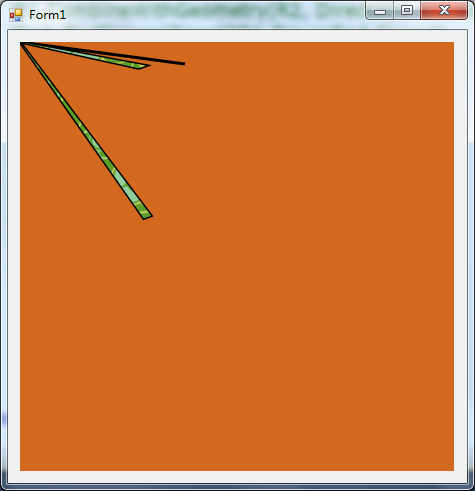
代码和前面的代码几乎一样,仅仅是用EllipseGeometry对象替换了RectangleGeometry对象,结果出现了不可预知的错误,大大出乎我的意料。在反复检查代码后,证实不是代码的写错后,我开始怀疑Windows API Code Pack 1.1来。
RectangleGeometry对象有一个Rectangle属性,其还有Top、Left、Right、Bottom四个属性,在上文的示例代码中,这四个值分别是30、30、150、150。
同样EllipseGeometry对象有一个Ellipse属性,其有Point属性,其还有X、Y两个属性,在调试代码时发现,这两个值是0、0。这太奇怪了,正常值是100、100(我设的中心点是(100,100))。这也许是Windows API Code Pack 1.1封装EllipseGeometry对象的一个失误。导致这两个值异常,导致几何对象运算出现不可预知的错误。
遗憾的是,在几个几何对象中(RectangleGeometry、EllipseGeometry、RoundedRectangleGeometry、PathGeometry)仅仅有RectangleGeometry对象支持CombineWithGeometry方法,其余的都会出现不可预知的错误
我很喜欢Windows API Code Pack 1.1,它是微软推出的,兼容性应该是最好的。
在测试CombineWithGeometry方法后,大失所望。没有详细的测试后,就推出了。期待Windows API Code Pack 的下一个版本,本系列的教程就到此为止了。
听闻SharpDx对Direct2D封装的很好,下图是SharpDx官网的说明图

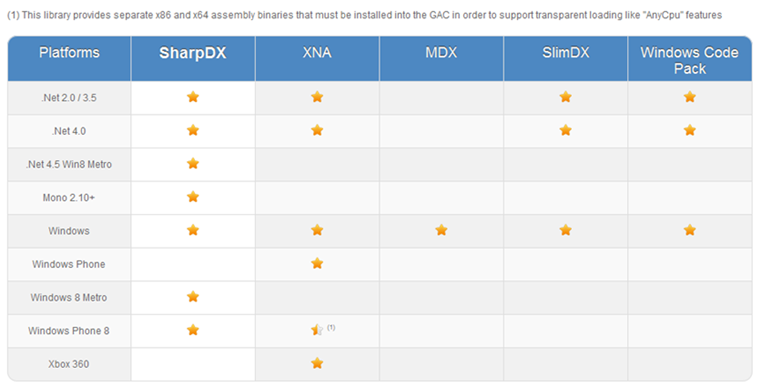

可以看出SharpDx的优势了,打算研究一段时间。再视情况而定是否写新的教程系列。
也欢迎网友提供相关的教程,谢谢!!!!!
Direct2D教程VIII——几何(Geometry)对象的运算,本系列的终结篇的更多相关文章
- Direct2D教程III——几何(Geometry)对象
目前博客园中成系列的Direct2D的教程有 1.万一的 Direct2D 系列,用的是Delphi 2009 2.zdd的 Direct2D 系列,用的是VS中的C++ 3.本文所在的 Direct ...
- SharpDX之Direct2D教程I——简单示例和Color(颜色)
研究Direct2D已经有一段时间了,也写了一个系列的文章 Direct2D ,是基于Windows API Code Pack 1.1.在前文 Direct2D教程VIII——几何(Geometry ...
- Direct2D教程VII——变换几何(TransformedGeometry)对象
目前博客园中成系列的Direct2D的教程有 1.万一的 Direct2D 系列,用的是Delphi 2009 2.zdd的 Direct2D 系列,用的是VS中的C++ 3.本文所在的 Direct ...
- Direct2D教程VI——转换(Transform)
目前博客园中成系列的Direct2D的教程有 1.万一的 Direct2D 系列,用的是Delphi 2009 2.zdd的 Direct2D 系列,用的是VS中的C++ 3.本文所在的 Direct ...
- Direct2D教程V——位图(Bitmap)和位图笔刷(BitmapBrush)
目前博客园中成系列的Direct2D的教程有 1.万一的 Direct2D 系列,用的是Delphi 2009 2.zdd的 Direct2D 系列,用的是VS中的C++ 3.本文所在的 Direct ...
- Direct2D教程IV——笔刷(Brush)对象
目前博客园中成系列的Direct2D的教程有 1.万一的 Direct2D 系列,用的是Delphi 2009 2.zdd的 Direct2D 系列,用的是VS中的C++ 3.本文所在的 Direct ...
- SharpDX之Direct2D教程II——加载位图文件和保存位图文件
本系列文章目录: SharpDX之Direct2D教程I——简单示例和Color(颜色) 绘制位图是绘制操作的不可缺少的一部分.在Direct2D中绘制位图,必须先利用WIC组件将位图加载到内存中,再 ...
- Direct2D教程II——绘制基本图形和线型(StrokeStyle)的设置详解
目前,在博客园上,相对写得比较好的两个关于Direct2D的教程系列,分别是万一的Direct2D系列和zdd的Direct2D系列.有兴趣的网友可以去看看.本系列也是介绍Direct2D的教程,是基 ...
- java程序操作Geometry对象
Geometry 空间地理对象,Oracle中存储Geometry对象的字段类型是 MDSYS.SDO_GEOMETRY,在数据库中构建Geometry对象的方法: v_pointarray MDSY ...
随机推荐
- loading加载和layer.js
layer.js中的loading加载 l本篇主要介绍layerjs中的loading加载在实际项目中的应用 1.使用的技术 前端:HTML5+CSS3+JS+layer.js 后端:.net 2.遇 ...
- Snmp学习总结(七)——SNMP4J介绍
一.SNMP4J介绍 SNMP4J是一个用Java来实现SNMP(简单网络管理协议)协议的开源项目.它支持以命令行的形式进行管理与响应.SNMP4J是纯面向对象设计与SNMP++(用C++实现SNMP ...
- AngularJS的增删改查、state嵌套案例,不涉及服务端
本篇实践一个案例,大致是:左边有导航菜单,右边显示列表,并可对列表项编辑或删除,也可添加新的列表项.借此,可体会到:如何组织可扩展的AngualrJS文件结构,如何点击左侧菜单项右侧显示相应内容,an ...
- Delphi的自动编译软件Want
Delphi自动编译环境的搭建及使用 什么是Want Want是一套Windows下用于编译Delphi源代码的工具.Want的名称是Windows Ant的意思. Ant是Java下最著名的自动编译 ...
- 关于toString方法的重写工具ToStringBuilder
原文:https://blog.csdn.net/zhaowen25/article/details/39521899# apache的commons-lang3的工具包里有一个ToStringBui ...
- 灵书妙探第八季/全集Castle迅雷下载
英文全名Castle,第8季(2015)ABC.本季看点:<灵书妙探>讲述性格和背景迥异的两人在不断的斗嘴与摩擦中竟然渐渐培养出了默契,成了名符其实的最佳搭档.在上季Richard Cas ...
- 用开源项目CropImage实现图片的裁剪(不推荐)
之前介绍过一个截图的办法(http://www.cnblogs.com/tianzhijiexian/p/3900241.html),这里再分享个开源项目.它也是截图,但是效果不是很好,首先还是 ...
- CTO、CIO
对于不从事技术研发的企业,完全不必要设立CTO这一职位,但是CIO是要始终存在为企业提供更好的咨询服务.有时CT0和CIO是同一个人,毕竟是信息时代嘛!CIO的角色从过去IT时代的交付型,转变为DT时 ...
- Asp.Net Core获取当前上下文对象
HttpContext简介 .Net Core中的HttpContext上下文是个抽象类,命名空间为Microsoft.AspNetCore.Http 所在程序集 \netstandard2.0\Mi ...
- RV32A指令集
RV32A指令包括两类:AMO(atomic memory operation)指令,Load-Reserved/Store-Conditional指令 Category Fmt RV32I base ...