
Direct2D教程III——几何(Geometry)对象
目前博客园中成系列的Direct2D的教程有
1、万一的 Direct2D 系列,用的是Delphi 2009
2、zdd的 Direct2D 系列,用的是VS中的C++
3、本文所在的 Direct2D教程 系列,用的是VS2010的Visual Basic语言(可以很方便的转为C#),基于Windows API Code Pack 1.1。
还有官方的说明文档 Direct2D ,用的是C++。
几何(Geometry)对象
历数微软的图形开发技术,几何(Geometry)对象就不停的在发展,不断完善,越来越强大。
在GDI和GDI+中,区域(Region)和路径(Path)就是几何(Geometry)对象的雏形。WPF中已经有专门几何(Geometry)对象的概念,包含有直线几何(LineGeometry)、矩形几何(RectangleGeometry)、椭圆几何(EllipseGeometry)、路径几何(PathGeometry)、流几何(StreamGeometry)(轻量级的PathGeometry)、合并几何(CombinedGeometry)、几何组(GeometryGroup)等
在Direct2D更加完善了几何(Geometry)对象的概念。
在Direct2D中,所有的几何(Geometry)对象都继承自基类Geometry类(是个抽象类)。包括:矩形几何(RectangleGeometry)、圆角矩形几何(RoundedRectangleGeometry)、椭圆几何(EllipseGeometry)、路径几何(PathGeometry)、几何组(GeometryGroup)、变换几何(TransformedGeometry)。
这些几何(Geometry)对象都不能直接创建,必须通过D2DFactory对象的相应的方法创建。
Direct2D强大的是其绘图功能。有人会疑惑,既然有RenderTarget对象的绘图函数(以Draw和Fill开头的函数),那还需要几何(Geometry)对象么?
答案是肯定的,Direct2D提供了几何(Geometry)类,必然提供了许多强大的功能。这些功能自己去实现的话,可能要颇费一番功夫。让我们看看几何(Geometry)对象提供了哪些实用、强大的功能
计算方法:
计算几何(Geometry)对象的面积:ComputerArea
计算几何(Geometry)对象线段展开的长度:ComputerLength
计算几何(Geometry)对象上指定距离处的点和正切矢量:ComputerPointAtLength
获得几何(Geometry)对象的边界:GetBounds
获得几何(Geometry)对象按指定笔画宽度和样式加宽并按指定矩阵转换后的边界:GetWidentdBounds
判定方法:
判定几何(Geometry)对象是否包含指定点:FillContainsPoint
判定几何(Geometry)对象的描边笔画是否包含指定的点:StrokeContainsPoint
判定该几何(Geometry)对象和指定几何(Geometry)对象的交集的类型的结果:CompareWithGeometry
运算方法:
该几何(Geometry)对象和指定几何(Geometry)对象的合并结果:CombineWithGeometry
按照指定笔画加宽几何(Geometry)对象:Widen
优化方法:
获得几何(Geometry)对象的轮廓:Outline
获得几何(Geometry)对象的简化版本(仅包含直线和三次贝塞尔曲线):Simplify
获得几何(Geometry)对象的简化成一组三角形:Tesselate
注:优化方法中的函数能在精度要求不高的情况下,大幅提升几何(Geometry)对象的显示效率(牺牲精度换取效率)。
下面是各个方法的原型定义:
Public Function ComputeArea() As Single
Public Function ComputeArea(flatteningTolerance As Single) As Single
Public Function ComputeArea(flatteningTolerance As Single, worldTransform As Direct2D1.Matrix3x2F) As Single
Public Function ComputeLength() As Single
Public Function ComputeLength(flatteningTolerance As Single) As Single
Public Function ComputeLength(flatteningTolerance As Single, worldTransform As Direct2D1.Matrix3x2F) As Single
Public Function ComputePointAtLength(length As Single) As Direct2D1.PointAndTangent
Public Function ComputePointAtLength(length As Single, flatteningTolerance As Single) As Direct2D1.PointAndTangent
Public Function ComputePointAtLength(length As Single, flatteningTolerance As Single, worldTransform As Direct2D1.Matrix3x2F) As Direct2D1.PointAndTangent
Direct2D1.PointAndTangent(point As Direct2D1.Point2F, tangent As Direct2D1.Point2F)
Public Function GetBounds() As Direct2D1.RectF
Public Function GetBounds(worldTransform As Direct2D1.Matrix3x2F) As Direct2D1.RectF
Public Function GetWidenedBounds(strokeWidth As Single, strokeStyle As Direct2D1.StrokeStyle) As Direct2D1.RectF
Public Function GetWidenedBounds(strokeWidth As Single, strokeStyle As Direct2D1.StrokeStyle, flatteningTolerance As Single) As Direct2D1.RectF
Public Function GetWidenedBounds(strokeWidth As Single, strokeStyle As Direct2D1.StrokeStyle, flatteningTolerance As Single, worldTransform As Direct2D1.Matrix3x2F) As Direct2D1.RectF
Public Function FillContainsPoint(point As Direct2D1.Point2F) As Boolean
Public Function FillContainsPoint(point As Direct2D1.Point2F, flatteningTolerance As Single) As Boolean
Public Function FillContainsPoint(point As Direct2D1.Point2F, flatteningTolerance As Single, worldTransform As Direct2D1.Matrix3x2F) As Boolean
Public Function StrokeContainsPoint(point As Direct2D1.Point2F, strokeWidth As Single, strokeStyle As Direct2D1.StrokeStyle) As Boolean
Public Function StrokeContainsPoint(point As Direct2D1.Point2F, strokeWidth As Single, strokeStyle As Direct2D1.StrokeStyle, flatteningTolerance As Single) As Boolean
Public Function StrokeContainsPoint(point As Direct2D1.Point2F, strokeWidth As Single, strokeStyle As Direct2D1.StrokeStyle, flatteningTolerance As Single, worldTransform As Direct2D1.Matrix3x2F) As Boolean
Public Function CompareWithGeometry(inputGeometry As Direct2D1.Geometry) As Direct2D1.GeometryRelation
Public Function CompareWithGeometry(inputGeometry As Direct2D1.Geometry, flatteningTolerance As Single) As Direct2D1.GeometryRelation
Public Function CompareWithGeometry(inputGeometry As Direct2D1.Geometry, flatteningTolerance As Single, inputGeometryTransform As Direct2D1.Matrix3x2F) As Direct2D1.GeometryRelation
Public Enum GeometryRelation
Unknown = 0
Disjoint = 1
IsContained = 2
Contains = 3
Overlap = 4
End Enum
Public Sub CombineWithGeometry(inputGeometry As Direct2D1.Geometry, combineMode As Direct2D1.CombineMode, geometrySink As Direct2D1.ISimplifiedGeometrySink)
Public Sub CombineWithGeometry(inputGeometry As Direct2D1.Geometry, combineMode As Direct2D1.CombineMode, geometrySink As Direct2D1.ISimplifiedGeometrySink, flatteningTolerance As Single)
Public Sub CombineWithGeometry(inputGeometry As Direct2D1.Geometry, combineMode As Direct2D1.CombineMode, geometrySink As Direct2D1.ISimplifiedGeometrySink, flatteningTolerance As Single, inputGeometryTransform As Direct2D1.Matrix3x2F)
Public Enum CombineMode
Union = 0
Intersect = 1
Xor = 2
Exclude = 3
End Enum
Public Sub Widen(strokeWidth As Single, strokeStyle As Direct2D1.StrokeStyle, geometrySink As Direct2D1.ISimplifiedGeometrySink)
Public Sub Widen(strokeWidth As Single, strokeStyle As Direct2D1.StrokeStyle, geometrySink As Direct2D1.ISimplifiedGeometrySink, flatteningTolerance As Single)
Public Sub Widen(strokeWidth As Single, strokeStyle As Direct2D1.StrokeStyle, geometrySink As Direct2D1.ISimplifiedGeometrySink, flatteningTolerance As Single, worldTransform As Direct2D1.Matrix3x2F)
Public Sub Outline(geometrySink As Direct2D1.ISimplifiedGeometrySink)
Public Sub Outline(geometrySink As Direct2D1.ISimplifiedGeometrySink, flatteningTolerance As Single)
Public Sub Outline(geometrySink As Direct2D1.ISimplifiedGeometrySink, flatteningTolerance As Single, worldTransform As Direct2D1.Matrix3x2F)
Public Sub Simplify(simplificationOption As Direct2D1.GeometrySimplificationOption, geometrySink As Direct2D1.ISimplifiedGeometrySink)
Public Sub Simplify(simplificationOption As Direct2D1.GeometrySimplificationOption, geometrySink As Direct2D1.ISimplifiedGeometrySink, flatteningTolerance As Single)
Public Sub Simplify(simplificationOption As Direct2D1.GeometrySimplificationOption, geometrySink As Direct2D1.ISimplifiedGeometrySink, flatteningTolerance As Single, worldTransform As Direct2D1.Matrix3x2F)
Public Enum GeometrySimplificationOption
CubicsAndLines = 0
Lines = 1
End Enum
Public Sub Tessellate(tessellationSink As Direct2D1.ITessellationSink)
Public Sub Tessellate(tessellationSink As Direct2D1.ITessellationSink, flatteningTolerance As Single)
Public Sub Tessellate(tessellationSink As Direct2D1.ITessellationSink, flatteningTolerance As Single, worldTransform As Direct2D1.Matrix3x2F)
从上面的原型定义可以看出,基本上每个函数都有一个基本的调用方法,然后增加了两个扩展的调用方法(一个增加了参数flatteningTolerance;一个增加了参数flatteningTolerance和参数worldTransform,至于这两个参数的意义,留待后文讲解)
几何(Geometry)对象有一个特性,一旦创建完成就不能修改(要么使用、要么销毁、要么通过运算获得新的几何(Geometry)对象)。这个特性和String对象类似,虽然理解上有点困难,但是这样定义必定有其合理性。
虽然我们有矩形几何(RectangleGeometry)、圆角矩形几何(RoundedRectangleGeometry)、椭圆几何(EllipseGeometry)对象,但这些对象对一些比较复杂的图像就无能为力了。因此,还得引入路径几何(PathGeometry)对象
路径几何(PathGeometry)对象
路径几何(PathGeometry)对象指的是由弧线、曲线(三次贝塞尔曲线、二次贝塞尔曲线)和线条组成的复杂形状。
路径几何(PathGeometry)对象必须包含一个(只能一个)可包含线条、弧线、曲线(三次贝塞尔曲线和二次贝塞尔曲线)的几何路径(GeometrySink)对象
而几何路径(GeometrySink)对象可以包含一组(一条或若干条)的线(直线、曲线)
创建路径几何(PathGeometry)对象的步骤为
1、定义路径几何(PathGeometry)对象,并从D2DFactory对象的CreatePathGeometry方法获得该对象的实例
2、定义几何路径(GeometrySink)对象,并从PathGeometry对象的Open方法获得该对象的实例(该方法只能执行一次)
3、通过GeometrySink对象的BeginFigure方法获得一条线的起点(以及填充模式)
4、通过GeometrySink对象的AddLine(添加直线)、AddArc(添加弧线)、AddBezier(添加三次贝塞尔曲线)、AddQuadraticBezier(添加二次贝塞尔曲线)等方法依次添加线(每条线的起点是上条线的终点,第一条直线的起点是步骤3中定义的起点)
5、通过GeometrySink对象的EndFigure方法完成一条线(设置封闭模式)。
6、如果还要给GeometrySink对象添加其他线,请重复步骤3、4、5
7、通过调用GeometrySink对象的Close方法,完成创建路径几何(PathGeometry)对象的步骤
一旦路径几何(PathGeometry)对象创建完成,则不能对其修改。
下面是几何路径(GeometrySink)对象的添加线的方法的原型定义:
Public Sub AddLine(point As Direct2D1.Point2F)
Public Sub AddBezier(bezier As Direct2D1.BezierSegment)
Direct2D1.BezierSegment(point1 As Direct2D1.Point2F, point2 As Direct2D1.Point2F, point3 As Direct2D1.Point2F)
Public Sub AddQuardraticBezier(bezier As Direct2D1.QuadraticBezierSegment)
Direct2D1.QuadraticBezierSegment(point1 As Direct2D1.Point2F, point2 As Direct2D1.Point2F)
Public Sub AddLines(points As IEnumerable(Of Direct2D1.Point2F))
Public Sub AddBeziers(beziers As IEnumerable(Of Direct2D1.BezierSegment))
Public Sub AddQuardraticBezier(beziers As IEnumerable(Of Direct2D1.QuadraticBezierSegment))
Public Sub AddArc(arc As Direct2D1.ArcSegment)
Direct2D1.ArcSegment(point As Direct2D1.Point2F, size As Direct2D1.SizeF, rotationAngle As Single, sweepDirection As Direct2D1.SweepDirection, arcSize As Direct2D1.ArcSize)
Direct2D1.SizeF(width As Single, height As Single)
Public Enum SweepDirection
Counterclockwise = 0
Clockwise = 1
End Enum
Public Enum ArcSize
Small = 0
Large = 1
End Enum
每个方法都省略了起点(起点是上一条线的终点或者是BeginFigure方法定义的起点)。所以AddLine方法的参数只有一个点(终点),AddBezier方法参数有三个点(两个控制点,一个终点),AddQuardraticBezier方法有两个点(一个控制点,一个终点)
这里讲讲AddArc方法(添加弧线),参数是ArcSegment结构,它有这几个属性,分别代表
point:终点,Point2F结构

size:弧线所在的椭圆的横轴半径和纵轴半径,参数SizeF结构,width表示横轴半径,height表示纵轴半径
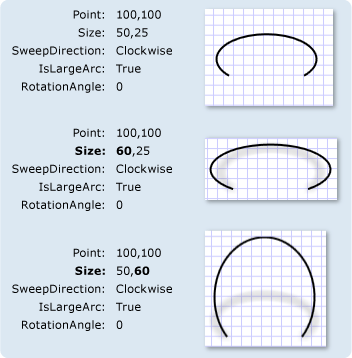
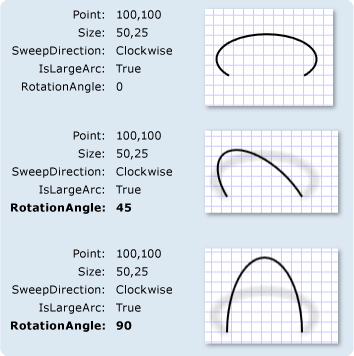
rotationAngle:弧线所在的椭圆旋转角度
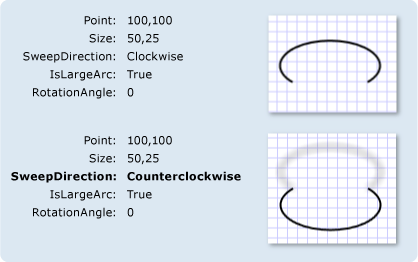
sweepDirection:从起点到终点的弧线的方向(顺时针或逆时针),参数是SweepDirection枚举,Counterclockwise表示逆时针,Clockwise表示顺时针。
arcSize:表示选取椭圆的大弧还是小弧,参数是ArcSize枚举,Small表示小弧,Large表示大弧。(注:配图是WPF的IsLargeArc,True对应Large,False对应Small)
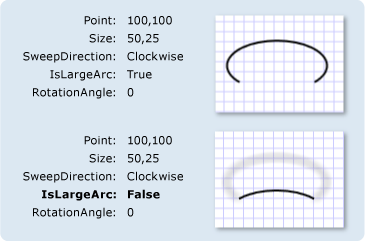
这几个参数的意义和WPF中的ArcSegment对象的对应的参数几乎一样。上面微软官网上的几张图(WPF帮助文档中的图)很好的阐述了这些参数的意义。
接下来看看几何路径(GeometrySink)对象的BeginFigure方法和EndFigure方法的原型定义
Public Sub BeginFigure(point As Direct2D1.Point2F, figureBegin As Direct2D1.FigureBegin)
Public Enum FigureBegin
Filled = 0
Hollow = 1
End Enum
Public Sub EndFigure(figureEnd As Direct2D1.FigureEnd)
Public Enum FigureEnd
Open = 0
Closed = 1
End Enum
几何路径(GeometrySink)对象的BeginFigure方法,第一个参数标明了起点;第二个参数是FigureBegin枚举,表明线围成区域的填充方式,Filled表示填充,Hollow这个参数表示的意义在后文再解释。EndFigure方法中的参数是FigureEnd枚举,表明线是否封闭,Open表示不封闭,线从起点到终点;Closed表示封闭,从终点到起点再连一条直线。
下面的代码是一段示例代码
Public Class clsDirect2DSample5
Inherits clsDirect2DSample
Public Shadows Sub Render()
If Not _renderTarget Is Nothing Then
With _renderTarget
.BeginDraw()
Dim B As Direct2D1.SolidColorBrush = _renderTarget.CreateSolidColorBrush(New Direct2D1.ColorF(1, 0, 0))
Dim SP As New Direct2D1.StrokeStyleProperties()
Dim S As Direct2D1.StrokeStyle
Dim PG As Direct2D1.PathGeometry
Dim sink As Direct2D1.GeometrySink
PG = _d2DFactory.CreatePathGeometry
sink = PG.Open
sink.BeginFigure(New Direct2D1.Point2F(30, 30), Direct2D1.FigureBegin.Filled)
sink.AddLine(New Direct2D1.Point2F(240, 30))
sink.AddArc(New Direct2D1.ArcSegment( _
New Direct2D1.Point2F(240, 240), _
New Direct2D1.SizeF(60, 100), _
45, _
Direct2D1.SweepDirection.Clockwise,
Direct2D1.ArcSize.Large))
sink.AddBezier(New Direct2D1.BezierSegment( _
New Direct2D1.Point2F(170, 120), _
New Direct2D1.Point2F(100, 360), _
New Direct2D1.Point2F(30, 240)))
sink.EndFigure(Direct2D1.FigureEnd.Closed)
sink.Close()
SP.LineJoin = Direct2D1.LineJoin.MiterOrBevel
S = _d2DFactory.CreateStrokeStyle(SP)
.DrawGeometry(PG, B, 6, S)
.EndDraw()
End With
End If
End Sub
End Class
下图是该示例代码的运行结果图
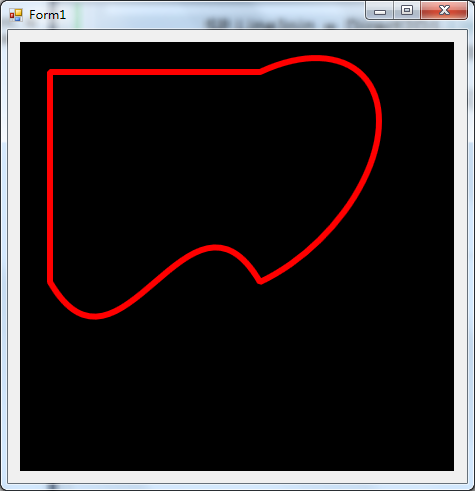
该代码一共添加了三条线,一条水平直线,一条弧线(右倾45度的椭圆弧线),一条三次贝塞尔曲线。最后通过EndFigure方法中的参数Direct2D1.FigureEnd.Closed设置为封闭曲线,在终点和起点之间自动添加了一条直线。
Direct2D教程III——几何(Geometry)对象的更多相关文章
- Direct2D教程VIII——几何(Geometry)对象的运算,本系列的终结篇
目前博客园中成系列的Direct2D的教程有 1.万一的 Direct2D 系列,用的是Delphi 2009 2.zdd的 Direct2D 系列,用的是VS中的C++ 3.本文所在的 Direct ...
- Direct2D教程VII——变换几何(TransformedGeometry)对象
目前博客园中成系列的Direct2D的教程有 1.万一的 Direct2D 系列,用的是Delphi 2009 2.zdd的 Direct2D 系列,用的是VS中的C++ 3.本文所在的 Direct ...
- Direct2D教程VI——转换(Transform)
目前博客园中成系列的Direct2D的教程有 1.万一的 Direct2D 系列,用的是Delphi 2009 2.zdd的 Direct2D 系列,用的是VS中的C++ 3.本文所在的 Direct ...
- Direct2D教程V——位图(Bitmap)和位图笔刷(BitmapBrush)
目前博客园中成系列的Direct2D的教程有 1.万一的 Direct2D 系列,用的是Delphi 2009 2.zdd的 Direct2D 系列,用的是VS中的C++ 3.本文所在的 Direct ...
- SharpDX之Direct2D教程I——简单示例和Color(颜色)
研究Direct2D已经有一段时间了,也写了一个系列的文章 Direct2D ,是基于Windows API Code Pack 1.1.在前文 Direct2D教程VIII——几何(Geometry ...
- Direct2D教程IV——笔刷(Brush)对象
目前博客园中成系列的Direct2D的教程有 1.万一的 Direct2D 系列,用的是Delphi 2009 2.zdd的 Direct2D 系列,用的是VS中的C++ 3.本文所在的 Direct ...
- SharpDX之Direct2D教程II——加载位图文件和保存位图文件
本系列文章目录: SharpDX之Direct2D教程I——简单示例和Color(颜色) 绘制位图是绘制操作的不可缺少的一部分.在Direct2D中绘制位图,必须先利用WIC组件将位图加载到内存中,再 ...
- Direct2D教程II——绘制基本图形和线型(StrokeStyle)的设置详解
目前,在博客园上,相对写得比较好的两个关于Direct2D的教程系列,分别是万一的Direct2D系列和zdd的Direct2D系列.有兴趣的网友可以去看看.本系列也是介绍Direct2D的教程,是基 ...
- java程序操作Geometry对象
Geometry 空间地理对象,Oracle中存储Geometry对象的字段类型是 MDSYS.SDO_GEOMETRY,在数据库中构建Geometry对象的方法: v_pointarray MDSY ...
随机推荐
- CentOS 7.x,不重新编译 PHP,动态安装 imap 扩展
先前的教程:PHP5不重新编译,如何安装自带的未安装过的扩展,如soap扩展? # 安装依赖包 yum install -y libc-client-devel /usr/local/src/cent ...
- AngularJS使用angular-formly进行表单验证
当验证表单中有很多字段时,这时候可能希望把html的生成以及验证逻辑放到controller中,在页面,也许是这样的: <some-form fiedls="vm.someFields ...
- OData查询ASP.NET Web API全攻略
本篇使用ASP.NET Web API来体验OData各种query. 首先是本篇即将用到的Model.使用的OData版本是4.0. public class Customer { public i ...
- ASP.NET MVC异步验证是如何工作的03,jquery.validate.unobtrusive.js是如何工作的
在上一篇"ASP.NET MVC异步验证是如何工作的02,异步验证表单元素的创建"中了解了ASP.NET异步验证是如何创建表单元素的,本篇体验jquery.validate.uno ...
- Delphi XE5 Android 运行黑屏卡死的解决方法
1. 确保正确安装Android SDK: 开始菜单 > 所有程序 > Embarcadero RAD Studio XE5 > > Android Tools > 打开 ...
- android studio# jdk8# class file for java.lang.invoke.MethodType not found
https://github.com/evant/gradle-retrolambda/issues/23 class file for java.lang.invoke.MethodType not ...
- 提高你的代码稳定性与可读性-lint工具
from://http://wiki.eoe.cn/page/Improving_Your_Code_with_lint.html 负责人:lingzideshensha 分任务原文链接:http:/ ...
- 架构:The Onion Architecture : part 1(洋葱架构:第一篇)(转载)
原文地址:http://jeffreypalermo.com/blog/the-onion-architecture-part-1/. I've spoken several times about ...
- ibatis.net:第五天,QueryForObject
xml <statement id="LoadOrder" parameterClass="int" resultClass="Order&qu ...
- .NET:默认是按值传递的
小测试 代码 using System; using System.Collections.Generic; using System.Linq; using System.Text; using S ...