
Unity读取配置文件
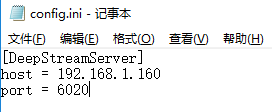
config.ini存放在Assets目录下,项目打包之后存放在Data目录下exe同目录
// 从配置文件读取

        string configFile = Application.dataPath + "/config.ini";//打包好的“xxx_Data”目录貌似没有读取里面的文件权限

        //所以对于打包的程序,需要把配置文件config.ini放在exe同目录下

#if !UNITY_EDITOR

    configFile = System.Environment.CurrentDirectory + "/config.ini";

#endif

        if (File.Exists(configFile))

        {

            ConfigIni ini = new ConfigIni(configFile);

            //host = ini.ReadIniContent("DeepStreamServer", "host");

            //port = ini.ReadIniContent("DeepStreamServer", "port");

            host = ini.keyVal["host"];

            port = ini.keyVal["port"];

            //MessageBox(IntPtr.Zero, configFile+","+host+","+port, "从配置文件读取DeepStream的IP:Port", 0);

        }
using System;

using System.Collections;

using System.Collections.Generic;

using System.IO;

using System.Runtime.InteropServices;

using System.Text;

using UnityEngine;

/// <summary>

/// 读取ini配置文件

/// [Time]

/// time=10

/// [Speed]

/// speed=5

/// ConfigIni ini=new ConfigIni(Application.StreamingAssets+"/Setting.ini");

/// time=ini.ReadIniContent("Time","time");

/// speed=ini.ReadIniContent("Speed","speed");

/// ini.WritePrivateProfileString("Count","count","5");

/// </summary>

public class ConfigIni {

    public string path;

    public Dictionary<string, string> keyVal = new Dictionary<string, string>();

    //ini文件的路径

    public ConfigIni(string path)

    {

        this.path = path;

        StreamReader sr = new StreamReader(path, Encoding.Default);

        string line;

        while ((line = sr.ReadLine()) != null)

        {

            if (line.Contains("="))

            {

                string[] kv = line.Split('=');

                string key = kv[].Trim();

                string v = kv[].Trim();

                keyVal.Add(key, v);

            }

        }

    }

    [DllImport("kernel32")]

    public static extern long WritePrivateProfileString(string section, string key, string value, string path);

    [DllImport("kernel32")]

    public static extern int GetPrivateProfileString(string section, string key, string deval, StringBuilder stringBuilder, int size, string path);

    [DllImport("User32.dll", SetLastError = true, ThrowOnUnmappableChar = true, CharSet = CharSet.Auto)]

    public static extern int MessageBox(IntPtr handle, String message, String title, int type);

    //写入ini文件

    public void WriteIniContent(string section, string key, string value)

    {

        WritePrivateProfileString(section, key, value, this.path);

    }

    //读取Ini文件

    public string ReadIniContent(string section, string key)

    {

        StringBuilder temp = new StringBuilder();

        int i = GetPrivateProfileString(section, key, "", temp, , this.path);

        //MessageBox(IntPtr.Zero, this.path+i + ","+temp+","+section+key, "ReadIniContent", 0);

        return temp.ToString();

    }

    //判断路径是否正确

    public bool IsIniPath()

    {

        return File.Exists(this.path);

    }

}
Unity读取配置文件的更多相关文章
- IT咨询顾问:一次吐血的项目救火 java或判断优化小技巧 asp.net core Session的测试使用心得 【.NET架构】BIM软件架构02:Web管控平台后台架构 NetCore入门篇:(十一)NetCore项目读取配置文件appsettings.json 使用LINQ生成Where的SQL语句 js_jquery_创建cookie有效期问题_时区问题
IT咨询顾问:一次吐血的项目救火 年后的一个合作公司上线了一个子业务系统,对接公司内部的单点系统.我收到该公司的技术咨询:项目启动后没有规律的突然无法登录了,重新启动后,登录一断时间后又无法重新登 ...
- 【无私分享:ASP.NET CORE 项目实战(第八章)】读取配置文件(二) 读取自定义配置文件
目录索引 [无私分享:ASP.NET CORE 项目实战]目录索引 简介 我们在 读取配置文件(一) appsettings.json 中介绍了,如何读取appsettings.json. 但随之产生 ...
- 解决IntelliJ IDEA无法读取配置文件的问题
解决IntelliJ IDEA无法读取配置文件的问题 最近在学Mybatis,按照视频的讲解在项目的某个包里建立配置文件,然后读取配置文件,但是一直提示异常. 读取配置文件的为官方代码: String ...
- java-工具类-读取配置文件
java读取配置文件,当发现文件被修改后则重新加载 package com.zg.config; import java.io.File; import java.io.FileInputStream ...
- java 4种方式读取配置文件 + 修改配置文件
版权声明:本文为博主原创文章,未经博主允许不得转载. 目录(?)[-] 方式一采用ServletContext读取读取配置文件的realpath然后通过文件流读取出来 方式二采用ResourceB ...
- 在IIS Express中调试时无法读取配置文件 错误
在IIS Express中调试代码时,如果出现"无法读取配置文件"的问题(如图),这种情况是IIS Express的"applicationhost.config&quo ...
- ASP.NET Core开发-读取配置文件Configuration
ASP.NET Core 是如何读取配置文件,今天我们来学习. ASP.NET Core的配置系统已经和之前版本的ASP.NET有所不同了,之前是依赖于System.Configuration和XML ...
- Java 利用 ByteArrayOutputStream 和 ByteArrayInputStream 避免重复读取配置文件
最近参与了github上的一个开源项目 Mycat,是一个mysql的分库分表的中间件.发现其中读取配置文件的代码,存在频繁多次重复打开,读取,关闭的问题,代码写的很初级,稍微看过一些框架源码的人,是 ...
- Python+Selenium进行UI自动化测试项目中,常用的小技巧2:读取配置文件(configparser,.ini文件)
在自动化测试项目中,可能会碰到一些经常使用的但 很少变化的配置信息,下面就来介绍使用configparser来读取配置信息config.ini 读取的信息(config.ini)如下: [config ...
随机推荐
- 关于Unity中的3D拾取
3D拾取 3D游戏实际上看到的是2D画面,我们在屏幕上点击,想要找到哪个3D物体,我们实际上是在一个2维平面内做3D拾取. 3D拾取实际上是,当玩家点击屏幕的时候,会从显示屏幕的摄像头发射一条射线,射 ...
- 前段时间,接手一个项目使用的是原始的jdbc作为数据库的访问,发布到服务器上在运行了一段时间之后总是会出现无法访问的情况,登录到服务器,查看tomcat日志发现总是报如下的错误。 Caused by: com.mysql.jdbc.exceptions.jdbc4.MySQLNonTransientConnectionException: Data source rejected est
前段时间,接手一个项目使用的是原始的jdbc作为数据库的访问,发布到服务器上在运行了一段时间之后总是会出现无法访问的情况,登录到服务器,查看tomcat日志发现总是报如下的错误. Caused by: ...
- Numpy 用于数组的文件输入和输出
将数组以二进制格式保存 np.save 和np.load 是读写磁盘数组数据的两个主要函数.默认情况下,数组是以未压缩的原始二进制格式进行保持在扩展名 为.npy的文件中的 如果文件路径末尾没有扩展名 ...
- (笔记)Linux线程编译undefined reference to 'pthread_create'
在使用线程时,使用gcc或arm-linux-gcc编译时,会出现错误:undefined reference to 'pthread_create' 主要是以下两种原因: 1.#include &l ...
- 了解VIM的寄存器
VIM下的删除:delete; 复制:yank; 粘帖:put; 都会用到VIM下的相关寄存器,今天就说说这个寄存器的问题: VIM中有多种寄存器:包括: 有名寄存器,用名字("a-&quo ...
- (转)TCP连接异常断开检测
TCP是一种面向连接的协议,连接的建立和断开需要通过收发相应的分节来实现.某些时候,由于网络的故障或是一方主机的突然崩溃而另一方无法检测到,以致始终保持着不存在的连接.下面介绍一种方法来检测这种异常断 ...
- TargetScan 数据库简介
TargetScan 是一个miRNA 靶基因预测的网站, 包括了 人, 小鼠,果蝇 , 线虫, 斑马鱼 共5个物种的miRNA 靶基因结果, 人 : TargetScanHuman 小鼠 :Targ ...
- js document.activeElement及使用
// 解决键盘弹出后挡表单的问题 // 解决键盘弹出后挡表单的问题 window.addEventListener('resize', function() { if( document.active ...
- js requestAnimationFrame
requestAnimationFrame,Web中写动画的另一种选择 原文:https://www.cnblogs.com/Wayou/p/requestAnimationFrame.html H ...
- 183使用 MediaPlayer Framework 框架播放视频
效果如下: ViewController.h #import <UIKit/UIKit.h> #import <MediaPlayer/MediaPlayer.h> @inte ...